
ASUS Prime AP201
4.7Editor score
Compact 33L footprint
360mm radiator support
Tool-free side panels
Discover the best Compact E ATX Case options by comparing airflow, motherboard support, GPU clearance, radiator capacity, build quality, and portability.
A compact E-ATX case offers a practical middle ground between a small-form-factor desktop and a full-size tower, but choosing one requires checking more than its exterior dimensions. Motherboard support, GPU clearance, power supply fit, cooling options, airflow, and ease of assembly all determine whether a case works for your particular build.
This guide compares ten cases that span E-ATX, standard ATX, and Micro-ATX formats, including compact mid-towers, portable designs, and smaller mATX alternatives. We examined the supplied specifications for chassis compatibility, cooling support, front-panel connectivity, construction, cable management, and practical features, with particular attention to the needs of powerful graphics cards and dense internal layouts.
The ranking shows why the best cases differ: some maximize hardware compatibility, some prioritize component visibility, and others focus on affordability, portability, or minimal footprint. Every recommendation reflects the currently listed product information, while ratings and prices can change, so readers should verify current details and availability before making a purchase.
4.7Editor score

4.4Editor score

4.7Editor score
The comparison below highlights motherboard format, graphics card clearance, cooling capacity, and defining chassis features. Although several affordable entries use the Micro-ATX standard, they provide useful alternatives for builders seeking the smallest practical footprint.



The Cooler Master QUBE 540 receives a 4.4 rating and stands out as the most flexible compact chassis in this guide. It combines support for ITX, ATX, and E-ATX motherboards with an unusually generous graphics card allowance, while its reversible design lets builders orient the system to suit a desk, shelf, or display arrangement.
We may earn a commission when you buy through this link, at no additional cost to you.
Its full front mesh panel and pre-installed SickleFlow 120mm fan provide a useful airflow foundation, particularly for a case that must contain a large motherboard and long graphics card. Graphics cards up to 415mm can fit when the front fan is removed, and the case includes a 24-pin motherboard cable bracket for a tidier interior. Front connectivity includes two USB 3.2 Gen1 ports and a USB 3.2 Gen2 Type-C port.
The main qualification is that the E-ATX allowance extends to an 11-inch-wide motherboard, so buyers should compare their board and accessories against the stated dimensions rather than assuming every E-ATX model will fit. The included fan also leaves more cooling work to the builder. These constraints are reasonable for a chassis whose defining advantage is unusually broad hardware compatibility within a compact ATX-style format.
This is our top overall recommendation for anyone who wants a genuine compact E-ATX option without giving up GPU length, motherboard flexibility, or front USB Type-C. It is especially compelling for a powerful workstation or gaming system that may need to be repositioned. Confirm the exact motherboard and cooler dimensions, then build around the generous but deliberate hardware envelope.
Supporting ITX, ATX, and E-ATX boards gives the QUBE 540 more useful range than many similarly compact towers. The 415mm GPU clearance also creates room for long, high-performance cards, although buyers should account for the required front-fan removal.
The reversible I/O panel, movable handles, and horizontal or vertical orientation make this case more adaptable than a conventional fixed-layout tower. That versatility is useful when a build must move between a desktop, entertainment area, and LAN event.
We may earn a commission when you buy through this link, at no additional cost to you.
The Lian Li O11D Mini V2 carries a 4.7 rating and is the premium choice for builders who consider presentation as important as performance. Its pillar-less tempered glass front and side panels create a broad view of the system, and the compact ATX structure avoids many of the visual bulk associated with large conventional towers.
We may earn a commission when you buy through this link, at no additional cost to you.
Cooling begins with a 10-degree slanted bottom that directs air toward the graphics card and intake area. The design supports ATX, M-ATX, and Mini-ITX motherboards, with particular optimization for ATX back-connect boards. Horizontal and vertical GPU anti-sag brackets help support heavy cards, while dedicated brackets for the 24-pin motherboard cable improve the appearance of the interior.
Because the case is sold without fans, it is best suited to builders who already understand fan placement or intend to select a carefully matched cooling configuration. The emphasis on back-connect motherboards also means a builder using a conventional motherboard should verify cable routing and clearance before committing. Those points add planning requirements, but they are part of the chassis's enthusiast-oriented design.
Choose the O11D Mini V2 when display quality, tidy cable presentation, and a refined compact-tower appearance matter. It is a strong premium recommendation for a showcase build with an ATX back-connect motherboard. For those using standard power and data connections, make room to check the motherboard's connector layout first.
Pillar-less tempered glass removes visual obstructions from the front and side, giving builders a clean view of the motherboard, graphics card, and power-supply area. The slanted-bottom composition also makes the compact footprint feel deliberate rather than simply miniaturized.
Horizontal and vertical anti-sag brackets provide additional support for large graphics cards. Combined with specific motherboard-cable brackets, these details help preserve both component stability and a clean internal presentation.
We may earn a commission when you buy through this link, at no additional cost to you.
The Mechanic Master C34Pro has a 3.9 rating, but its specification sheet reveals one of the most ambitious compatibility envelopes in the group. It supports ATX and E-ATX motherboards, accommodates graphics cards up to 420mm, accepts 360mm radiators, and provides room for ATX power supplies up to 220mm.
We may earn a commission when you buy through this link, at no additional cost to you.
Its 30.6-liter body measures 429mm by 205mm by 349mm and uses a 2mm aluminum shell with a 1mm steel frame. Multi-zone fan mounts are positioned at the top, bottom, and front, while dust filters help manage airflow. The modular layout, adjustable PCIe slots, 18mm cable-management space, magnetic screwdriver kit, and several power-supply mounting positions all support a broad range of build styles.
Its portability story comes with a qualification: the integrated handle makes the completed system easier to carry, but the dimensions and component support are larger than those of a conventional compact tower. The 3.9 rating may also reflect buyer experience not captured by the specifications, so it is worth reading current customer feedback and confirming the exact contents of the package. The 220mm power-supply allowance and wide GPU range can also make a large build heavy and awkward to move.
This case is best for a builder who prioritizes E-ATX hardware compatibility, flexible mounting, and eventual transport to a LAN event or another workstation. It is less appropriate if portability means a genuinely tiny desk footprint. Measure the finished components and plan the power-supply position before ordering.
A 420mm GPU allowance, 360mm radiator support, 165mm tower-cooler clearance, and 220mm ATX power-supply support give the C34Pro unusually broad margins. Buyers can fit high-end components without relying on a full-size tower enclosure.
Adjustable PCIe positions, multiple power-supply mounting choices, and an 18mm routing area make component placement adaptable. The carry handle adds value when moving a completed system, though the 30.6-liter volume remains substantial.
We may earn a commission when you buy through this link, at no additional cost to you.
The Cooler Master Q300L V1 earns a 4.5 rating as a straightforward compact Micro-ATX option. It provides a spacious interior for its motherboard class, with compatibility for Micro-ATX and Mini-ITX boards, graphics cards up to 360mm, CPU coolers up to 159mm, and power supplies up to 160mm.
We may earn a commission when you buy through this link, at no additional cost to you.
Cooling potential includes support for a 240mm liquid cooler and as many as five fans. The perforated design across the sides promotes airflow and heat dissipation, while magnetic dust filters have a distinctive visual pattern. A transparent side panel gives the build a recognizable appearance, and the modular I/O panel can be positioned at the front, top, or bottom on either side.
Its most important limitation is motherboard format: it does not accept E-ATX boards and is therefore not a direct answer for a full E-ATX build. The open thermal design also makes component placement and cable management more consequential than in a fully enclosed chassis. As with any compact case, the 160mm power-supply limit and 159mm CPU-cooler height need to be checked against selected hardware.
The Q300L V1 is a sensible value-oriented choice for a Micro-ATX gaming or productivity system, especially when a long graphics card and liquid cooling are priorities. It is less suited to an E-ATX workstation, but it delivers a useful combination of compatibility, airflow, and flexible front-panel placement.
A 360mm graphics card limit is generous for the Micro-ATX category, and the 159mm CPU-cooler allowance provides room for many popular air coolers. Checking these figures early can prevent a late upgrade from becoming incompatible.
The movable I/O panel can be placed on several edges and either side, which is particularly useful when the case orientation changes. It adds convenience without changing the core Micro-ATX layout.
We may earn a commission when you buy through this link, at no additional cost to you.
The Mechanic Master C34 Ultra has a 4.6 rating and focuses on preserving standard ATX capability in a compact, transportable chassis. It supports standard ATX motherboards, full-size ATX power supplies, and graphics cards up to 335mm, giving builders more freedom than a typical Micro-ATX case.
We may earn a commission when you buy through this link, at no additional cost to you.
The cooling section supports a 240mm liquid-cooling radiator and CPU air coolers up to 162mm. An optimized interior is intended to simplify installation, while a metal front I/O panel includes USB 3.0 and USB Type-C. Most importantly for users who want to move their desktop, the chassis includes an integrated carry handle suitable for LAN events or relocation between workstations.
The product does not support E-ATX motherboards, so its standard ATX label is a meaningful distinction from the C34Pro. The manufacturer also recommends an SFX/L power supply for the cleanest cable management and easiest build experience, even though full-size ATX power supplies are supported. That recommendation signals that the chassis has enough flexibility but may reward more deliberate component selection.
This is an attractive pick for a compact ATX system that will be transported, particularly if a standard motherboard and full-size power supply are priorities. Buyers should compare the 335mm GPU limit with their graphics card, decide whether a 240mm radiator is needed, and consider an SFX/L supply to simplify installation.
The C34 Ultra accepts a standard ATX motherboard while retaining a 335mm GPU allowance and 162mm CPU-cooler clearance. It offers a useful middle ground for builders who need more than Micro-ATX but do not require E-ATX width.
The integrated handle makes a completed system easier to relocate, while USB 3.0 and USB Type-C front connectors provide practical access to compatible peripherals. The metal I/O panel adds a durable touch to an otherwise portable design.
We may earn a commission when you buy through this link, at no additional cost to you.
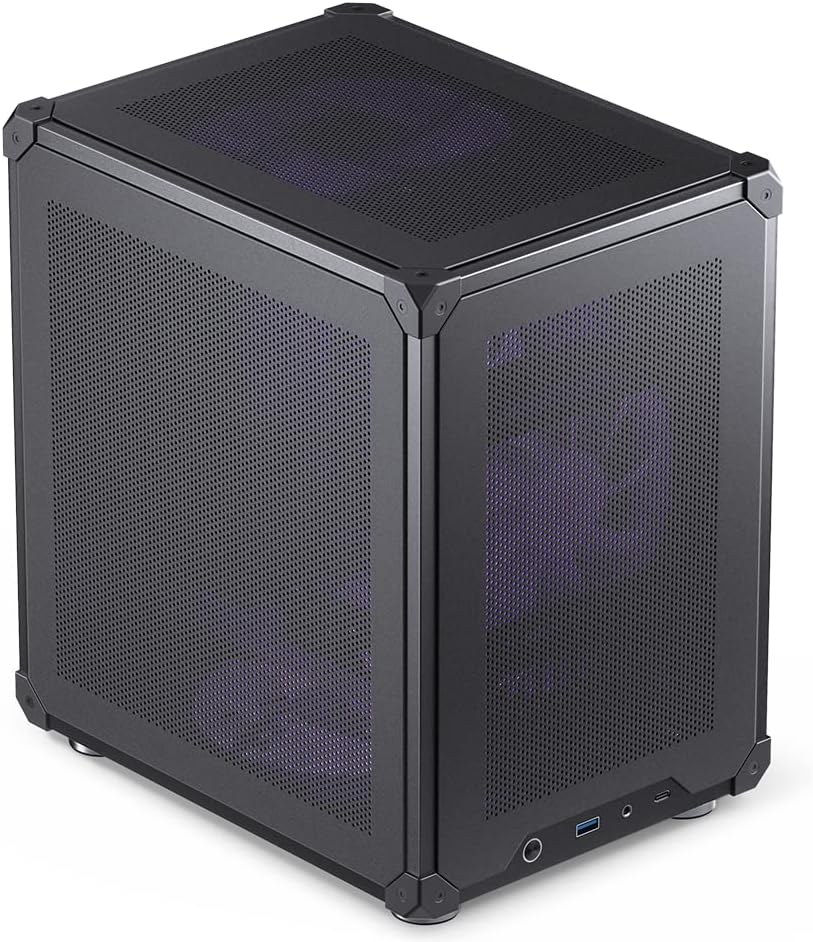
The ASUS Prime AP201 earns a 4.7 rating and stands out as the best budget-oriented selection in this guide. Its defining strength is spatial efficiency: the case provides a 33-liter footprint while still supporting ATX power supplies up to 180mm, graphics cards up to 338mm, custom liquid cooling, and several types of storage devices.
We may earn a commission when you buy through this link, at no additional cost to you.
Its quasi-filter mesh panels contain more than 57,000 precision-machined 1.5mm holes, combining an open cooling path with a detailed visual appearance. The chassis can support 280mm and 360mm radiators and up to six fans, offering strong cooling options in a relatively small body. Tool-free side panels use a secure clip mechanism intended to resist accidental removal.
Cable management is unusually well considered for a compact case. The extended motherboard tray includes strategically placed cutouts and a 32mm gap for tucking cables out of sight, which helps offset the density of the internal layout. The fine mesh does require periodic cleaning, and the case accepts Micro-ATX rather than full-size ATX or E-ATX motherboards, so it is not suitable for every power build.
The AP201 is a strong recommendation for a compact gaming or productivity PC when the builder wants efficient volume, good cooling options, and easier access to internal components. It combines a high rating with features usually associated with larger cases. Choose it when Micro-ATX is acceptable and the priority is getting more capability from every liter.
The 33-liter body fits long ATX power supplies, graphics cards up to 338mm, and custom liquid-cooling hardware. That combination makes the AP201 feel more accommodating than the volume figure alone might suggest.
Tool-free side panels simplify routine access, while the extended tray, dedicated cutouts, and 32mm cable gap help maintain a clean layout. These details are particularly valuable in a compact chassis where every millimeter affects usability.
We may earn a commission when you buy through this link, at no additional cost to you.
The Cooler Master Q300L V3 has a 4.6 rating and offers a balanced update for builders seeking a compact Micro-ATX chassis with room for substantial components. It supports graphics cards up to 366mm, CPU air coolers up to 178mm, and ATX power supplies up to 200mm.
We may earn a commission when you buy through this link, at no additional cost to you.
The cooling specification is generous for the case size. It can accommodate six 120mm or 140mm fans, 240mm AIO radiators, and large tower-style air coolers. A movable I/O panel, magnetic dust filters, tempered glass, and cable-management features support a tidy, accessible build, while the stated high-airflow design focuses on keeping heat away from densely packed components.
Its limitation is motherboard format: only Micro-ATX systems are supported, so E-ATX and standard ATX builders need a different chassis. The 200mm power-supply allowance is also more restrictive than some full ATX compact cases, while the combination of a 366mm GPU and 178mm cooler leaves little spare room. Those are not problems for a well-planned build, but they make component selection important.
The V3 is a compelling option for a compact Micro-ATX gaming system using a long graphics card, a large CPU cooler, or a 240mm liquid cooler. It also works for creative workstation applications that value expandability over motherboard format. Verify all three major clearance limits before ordering.
Support for six fans, 240mm AIO radiators, and 178mm CPU coolers provides several cooling paths. The choice between air and liquid cooling can be made around the graphics card and power supply rather than being forced by a narrow chassis.
The 366mm graphics-card allowance is one of the most generous among the Micro-ATX entries. Buyers can use modern long cards while retaining access to the stated fan and radiator positions, provided the overall layout is planned carefully.
We may earn a commission when you buy through this link, at no additional cost to you.
The Zalman CUBIX M-ATX has a 4.5 rating and is the smallest case in this comparison by listed volume. Its 17.1-liter body uses 0.8mm steel construction and follows a compact desktop form factor, offering a clear footprint advantage over the mid-towers and portable E-ATX designs.
We may earn a commission when you buy through this link, at no additional cost to you.
Despite its small dimensions, it supports Micro-ATX motherboards, standard ATX power supplies, graphics cards up to 260mm, and CPU coolers up to 137mm. A perforated front panel and pre-installed 80mm fan create the basic airflow path, while front connectivity includes USB 3.0, USB 2.0, and a 3.5mm stereo audio jack.
The component limits are the central concern. A 260mm GPU allowance excludes many larger graphics cards, and 137mm of CPU-cooler clearance rules out many popular tower coolers. The 80mm fan can move air through the chassis, but the case does not offer the broad multi-position fan or large-radiator specification seen in the larger alternatives. A compact power supply may also be advisable during planning even though standard ATX units are listed as supported.
The CUBIX M-ATX is best for a small workstation, office PC, or restrained gaming system whose graphics card and cooler fit within the stated limits. Its appeal comes from saving space rather than supporting oversized hardware. Check the longest card, cooler, and power supply before finalizing the build.
At 17.1 liters, the CUBIX occupies substantially less volume than the featured ATX and E-ATX cases. It is the clearest option here for users who need a small desktop system in a constrained workspace.
USB 3.0, USB 2.0, and stereo audio connections cover common accessories, while the perforated front and included 80mm fan provide a simple cooling foundation. A more elaborate cooling setup is constrained by the case's compact dimensions.
We may earn a commission when you buy through this link, at no additional cost to you.
The JONSBO C6 Black has a 4.6 rating and is designed around a very small desktop footprint. It supports ITX and M-ATX motherboards, power supplies up to 185mm, graphics cards from 200mm to 255mm, and CPU coolers up to 75mm, making it best suited to carefully selected compact components.
We may earn a commission when you buy through this link, at no additional cost to you.
All sides use mesh, and the case provides three listed fan positions at the top, bottom, and front. The top accepts one optional 120mm or 140mm fan, the bottom accepts one 120mm or 140mm fan, and the front position supports a 120mm fan or a hard drive. Tool-free opening for the upper cover and side panel makes system access and assembly more convenient.
The 75mm CPU-cooler limit is the most important constraint. It effectively rules out ordinary tower coolers and many popular air coolers, pushing the build toward a low-profile cooler or a compact liquid-cooling solution. The 255mm maximum GPU length is also shorter than most entries in the guide. Front Type-C, USB 3.0, and audio connections add useful access, but the small chassis still requires a disciplined component plan.
The C6 works best for a deliberately compact ITX or Micro-ATX build using short-form hardware. It is a less convenient choice for upgrading into a long graphics card or a tall cooler later. Measure the existing parts before purchase and include storage and fan hardware in the available space.
The 75mm cooler limit and 255mm maximum GPU length define the build more than the motherboard choice. A low-profile CPU cooler and appropriately sized graphics card will make the difference between a straightforward installation and a difficult one.
Mesh panels on all sides support a ventilated layout, while tool-free upper and side panels simplify access. Three possible cooling positions offer useful airflow options despite the small dimensions.
We may earn a commission when you buy through this link, at no additional cost to you.
The NZXT H5 Flow has a 4.6 rating and delivers a polished compact mid-tower package for builders who want a conventional layout with modern airflow. It comes with two 120mm Quiet Airflow fans, one at the front and one at the rear, giving a new system a useful starting point without requiring an immediate fan purchase.
We may earn a commission when you buy through this link, at no additional cost to you.
Ultra-fine mesh covers the top, front, and side panels, while the power-supply shroud has perforations on its side and bottom. Those openings are designed to admit air from two 120mm fans, although those shroud fans are not included. The case supports a 360mm radiator in front and a 240mm radiator at the top, allowing meaningful liquid-cooling configurations in a compact chassis.
The key planning issue is whether the front 360mm position is appropriate for the chosen radiator and whether the required fans are already available. A 240mm top radiator offers a more restrained alternative. Cable management is supported by wide channels, hooks, and straps, which should help keep the compact interior organized. As always, the motherboard, graphics card, power supply, and cooler dimensions should be checked against the manufacturer's fitment guidance.
The H5 Flow is an attractive general-purpose recommendation for a compact ATX gaming build with a conventional tower silhouette. It offers attractive presentation, two installed fans, and strong radiator options. Choose it when you want a ready-to-build compact system without giving up modern cooling flexibility.
Fine mesh on the top, front, and side panels supports airflow throughout the chassis. The perforated shroud adds another route for cooler air to enter, helping protect the power supply and adjacent components.
The front supports a 360mm radiator, while the top accommodates up to 240mm. Two 120mm fans are included for basic operation, and additional fans can be added to match a more substantial cooling plan.
We may earn a commission when you buy through this link, at no additional cost to you.
Choosing a compact chassis requires balancing motherboard format, component dimensions, cooling strategy, and accessibility. The most important step is to assemble the intended hardware list first, then compare every clearance and mounting limitation before focusing on appearance.
Start by confirming whether you actually need E-ATX. The featured cases vary widely: the QUBE 540 and Mechanic Master C34Pro support E-ATX, the Lian Li O11D Mini V2 supports standard ATX, and several alternatives accept only Micro-ATX or Mini-ITX boards. E-ATX is not simply a generic label for a large motherboard, so check the board's width against the case specification. The QUBE 540 supports E-ATX boards up to 11 inches wide, making the exact model comparison essential rather than optional.
Choose a case that explicitly lists your motherboard standard and, when possible, its maximum dimensions. If future expansion is unlikely, Micro-ATX can reduce the required footprint. If the system may need a workstation-class board, prioritize a clearly documented E-ATX allowance over a smaller case that cannot accept it.
Graphics cards vary dramatically in length, and the difference between a 255mm limit and a 420mm limit can determine whether a case works at all. Review the maximum card length, but also check whether reaching that number requires removing a fan, repositioning a radiator, or using a riser arrangement. The QUBE 540's 415mm allowance is attained without the front fan, while the Mechanic Master C34Pro lists 420mm support and the AP201 provides 338mm.
Use the card's actual length rather than the marketing name of its GPU series. Leave enough room for the power connector, cable bend, and any front cooling hardware. Short graphics cards make the most compact cases practical, while long cards generally call for a wider mid-tower envelope.
Power supply support involves more than confirming that the drive cage exists. The AP201 accepts ATX units up to 180mm, the Q300L V3 reaches 200mm, and the Mechanic Master C34Pro reaches 220mm. The Mechanic Master C34 Ultra supports full-size ATX power supplies but recommends an SFX/L unit for cleaner routing, while the JONSBO C6 lists a 185mm maximum.
Choose a supply whose length and connectors match the chassis rather than assuming every full-size unit will slide into the same position. Modular or short-form power supplies can create additional room for cable routing, although they are not universally required. For any case, verify the wattage, connector set, and bend clearance needed by the selected graphics card.
CPU cooler height is one of the most frequently overlooked case limitations. The Q300L V3 permits 178mm, the C34 Ultra permits 162mm, and the Q300L V1 permits 159mm. At the far end of this guide, the JONSBO C6 supports only 75mm, effectively requiring a low-profile air cooler or another suitably compact solution. The CUBIX provides more room at 137mm but remains far below the height of common tower coolers.
Measure the full height of the selected cooler, including its heat sink and fan, rather than comparing just the heat-sink body. If a future CPU or cooler upgrade is likely, choose a case with additional headroom. If the processor runs quietly and efficiently, a low-profile cooler can preserve the advantages of a small desktop.
Cooling support must be evaluated by position as well as by the largest advertised radiator size. A 360mm front radiator does not automatically mean that a 360mm top radiator is possible, and the space used by a radiator may conflict with long graphics cards or tall CPU coolers. The H5 Flow supports a 360mm front and 240mm top radiator, while the C34Pro accepts 360mm radiators and the AP201 supports both 280mm and 360mm options.
Count the included fans before planning a liquid-cooling system. The H5 Flow includes two 120mm fans, the QUBE 540 includes one SickleFlow 120mm fan, the CUBIX includes an 80mm fan, and the Lian Li O11D Mini V2 includes no fans. A larger radiator generally needs more fans, so include those purchases in the total build plan.
Case volume is a more meaningful measure of desk impact than exterior styling. The Zalman CUBIX is listed at 17.1 liters, the ASUS AP201 at 33 liters, and the Mechanic Master C34Pro at 30.6 liters despite its broader E-ATX compatibility. Portable designs such as the C34 and C34Pro include carry handles, but the handle alone does not make a heavy full-tower system easy to transport. Estimate the total weight of the case, graphics card, motherboard, cooling hardware, and power supply before moving it.
Prioritize volume only after confirming hardware fit. A marginally smaller chassis that accepts your components is more useful than a compact model requiring a shorter graphics card or a different power supply. For frequent transport, also consider removable panels, protected hardware, and a layout that permits routine access.
Compact cases place more heat-producing hardware into a smaller volume, making airflow architecture a central selection criterion. Full or near-full mesh panels, perforated shrouds, and multiple fan positions can help move air consistently. The AP201 uses more than 57,000 mesh openings, the QUBE 540 combines a full front mesh with a pre-installed fan, and the H5 Flow adds a perforated power-supply shroud.
Mesh is not automatically dustproof. The Q300L models include magnetic dust filters, while the C34Pro uses multi-zone mounts and dust filters. Consider how filters can be removed for cleaning, whether they reduce airflow when fine, and whether the case has enough intake and exhaust positions to form a coherent path.
A case that fits the hardware but makes assembly frustrating can undermine the entire build. Look for tool-free panels, flexible I/O placement, cable-management space, and a motherboard tray that can be accessed without removing unrelated parts. The AP201 uses tool-free side panels and a 32mm cable gap, the O11D Mini V2 includes dedicated motherboard-cable brackets, and both Q300L versions use a movable I/O panel.
Construction materials provide another clue. The C34Pro uses a 2mm aluminum shell and 1mm steel frame, while the CUBIX uses 0.8mm steel. These figures do not automatically determine durability, but they help reveal whether a chassis is designed for frequent transport or a more stationary desktop installation.
Before installing components, lay out the motherboard, power supply, graphics card, storage, cooler, and fans outside the chassis. Compare each measurement with the case specifications, identify the intended fan and radiator positions, and decide where the I/O panel and cables will run. Photograph or sketch the planned layout, especially in models with modular mounting brackets.
Install the power supply and storage first, followed by the motherboard, CPU, and memory. Connect the power-supply cables while the motherboard tray is accessible, then route them through the dedicated channels or behind the tray. Fit the graphics card last when possible, ensuring the card, connectors, and support bracket have sufficient clearance before tightening.
After assembly, power on the system and confirm that every intended fan spins, the motherboard detects all storage, front-panel ports work, and no cables obstruct the graphics card or fans. Clean removable filters and mesh surfaces on a regular schedule, tighten screws after transport, and avoid restricting intake or exhaust openings with nearby objects.
E-ATX cases support larger motherboards, while Micro-ATX cases accept smaller boards. A Micro-ATX case may still hold a large graphics card and powerful cooling, but it cannot accept a full-size ATX or E-ATX motherboard without changing the platform. Choose Micro-ATX for a smaller footprint and E-ATX for broader motherboard choice.
Some can, but the case must list a sufficient maximum power-supply length. The Lian Li O11D Mini V2 and Mechanic Master C34 Ultra support full-size ATX power supplies, while other compact models impose tighter limits. Also check the available mounting positions and ensure the selected power supply's cables will fit and bend properly.
Yes. Graphics card length varies by model, and the maximum figure printed for a case may depend on removing fans or changing cooling positions. Measure the exact card, including its power connector and any bracket protrusion, and compare that number with the case's stated clearance.
No. Small cases can move air effectively when they use well-positioned fans, suitable exhaust, and unobstructed mesh openings. A larger case with poor placement can still trap heat. Compare the complete cooling layout, including radiator position, fan support, dust filters, and the effect of long components on intake.
Only if the case lists the required radiator dimensions and mounting positions. The QUBE 540, O11D Mini V2, C34Pro, C34 Ultra, Q300L V1, Q300L V3, AP201, and H5 Flow have stated liquid-cooling support, though their limits differ. Confirm radiator thickness, pump clearance, fan dimensions, and graphics-card interference before ordering.
The Mechanic Master C34 and C34Pro are explicitly designed around carry handles, but the C34Pro supports more powerful components and has a larger 30.6-liter volume. The ASUS Prime AP201 and Lian Li O11D Mini V2 are also compact, although neither has the same listed carry-handle feature. Transport weight and component protection matter as much as the handle.
A glass side panel offers a clearer view of components, while an all-mesh layout prioritizes ventilation and may show less of the interior. Some compact cases combine mesh with tempered glass. Choose according to your cooling needs, visual preference, and the balance of glass, steel, and aluminum used in the chassis.
Check motherboard format, GPU length, power-supply dimensions, CPU-cooler height, radiator position, fan count, storage locations, and front-panel connectors. Then confirm that the selected cables can reach and bend without being forced. This final comparison prevents a visually suitable case from becoming incompatible with its hardware.
The Cooler Master QUBE 540 is the strongest all-around recommendation because it combines genuine E-ATX support, a generous 415mm GPU allowance, flexible orientation, and modern front connectivity. The ASUS Prime AP201 is the best budget selection for a smaller Micro-ATX build, while the Lian Li O11D Mini V2 takes the premium position for its pillar-less glass, refined airflow design, and support for standard ATX components.
Your priority should determine the rest of the list. The Mechanic Master C34Pro and C34 Ultra suit builders who want carry handles, the Q300L V1 and V3 serve compact Micro-ATX systems, and the NZXT H5 Flow provides a polished ATX mid-tower with substantial radiator options. The Zalman CUBIX and JONSBO C6 prioritize the smallest possible footprint and therefore impose tighter component limits.
Before purchasing, match every major component to the manufacturer's stated dimensions and review the current listing for included fans, accessories, and availability. Product prices and ratings can change, so current information should guide the final decision. The best case is not simply the smallest one; it is the compact enclosure that accepts your hardware, supports your cooling plan, and remains practical to build and maintain.