
Magnasonic All-in-One 24MP Film Scanner
4.3Editor score
24MP JPEG output
Five-inch viewing display
No computer required
Supports 135mm slides
Digitizing Kodachrome slides requires a scanner that can handle delicate 35mm film, reproduce saturated colors, and produce files suitable for long-term storage. The best unit should combine practical film support with a clear preview screen, dependable controls, and enough resolution to retain fine detail from the original transparency.
This guide compares ten film and slide scanners based on the supplied specifications, including supported formats, effective scanning resolution, display size, standalone storage, editing controls, connectivity, and batch-scanning features. It covers consumer-focused standalone scanners, a compact smartphone-based model, and professional Nikon options for different archival needs.
Each review explains the most useful qualities and trade-offs of its featured scanner. The top three recommendations include an easy all-around Kodak model, a compact HP option, and a premium Nikon scanner. Product availability and pricing can change, so readers should verify current specifications and deal terms before purchasing.
4.3Editor score
4.3Editor score

5.0Editor score
As an Amazon Associate we earn from qualifying purchases.
The table below compares all ten scanners by their most important archival traits, including resolution, display, supported media, and workflow. It is designed to make format compatibility and practical differences easier to assess before choosing a scanner for Kodachrome collections.



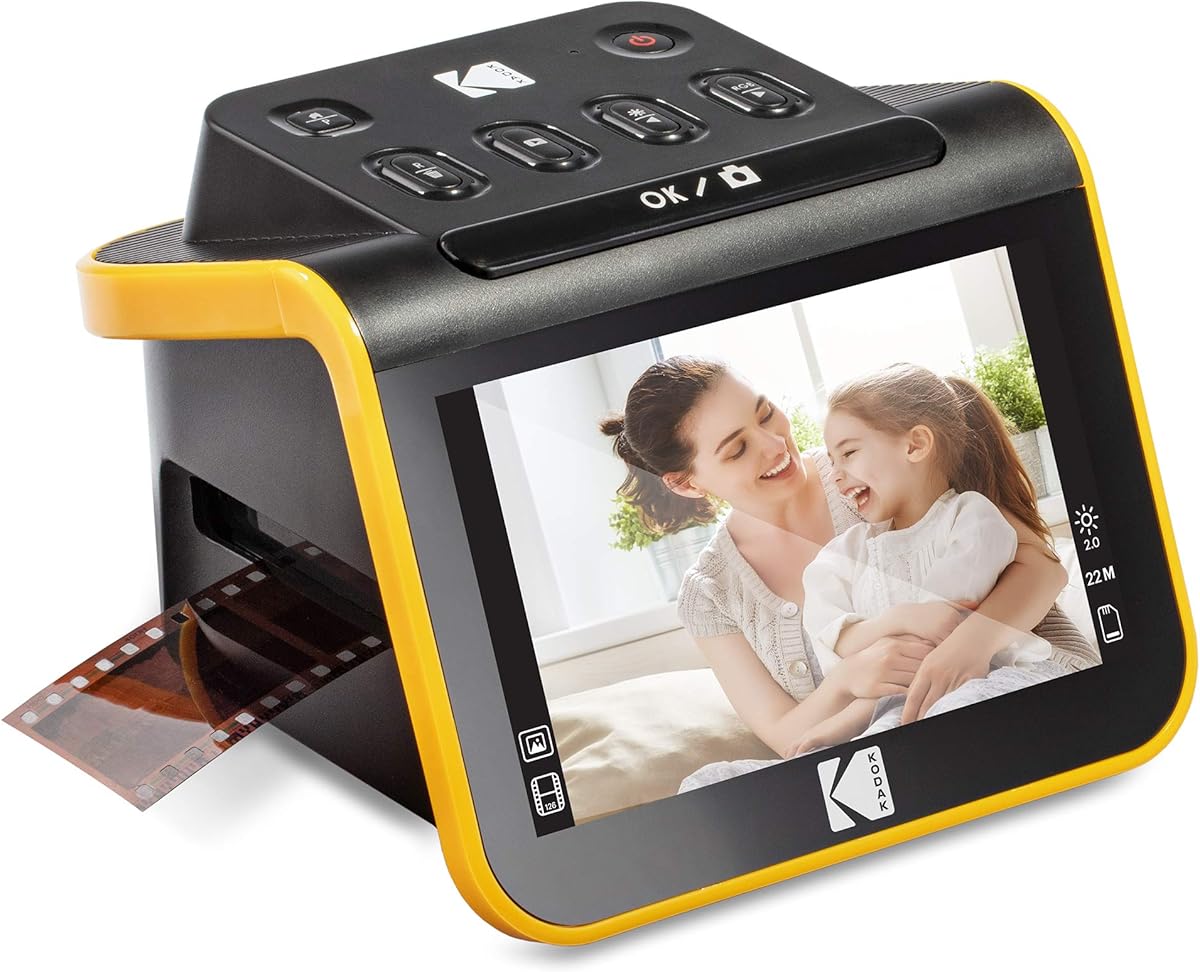
The KODAK Slide N Scan Film & Slide Scanner is the strongest general-purpose choice in this guide for families with a mixed collection of Kodachrome slides and negatives. Its 4.3 rating reflects a favorable balance of useful features, including 22MP interpolated output, a five-inch LCD, direct SD card saving, and straightforward capture software. It handles 135, 110, and 126mm material and includes a 50mm slide holder.
We may earn a commission when you buy through this link, at no additional cost to you.
The scanner's quick-feed tray is particularly helpful when digitizing a sizable archive because it reduces the need to reposition every frame. Its wide-angle display provides a convenient way to check focus, framing, and color before saving, while one-touch editing lets users select film type, adjust brightness, resize images, and assign a date or time without navigating dense menus. Compatibility with SD and SDHC cards up to 32GB also allows the device to operate without a computer.
There are some practical limitations. A memory card is not included, and a 32GB ceiling is more restrictive than the 128GB support offered by several competitors. The product information also describes a Type-C USB connection for compatible computers, so buyers should confirm that their current computer and preferred file-transfer method work with the included setup. Like most consumer scanners, it is intended to generate convenient digital copies rather than provide the level of control found in a professional film workflow.
This is the most approachable recommendation for someone who wants to preserve Kodachrome 35mm slides without assembling a specialized computer-based system. The five-inch screen is large enough for useful inspection, the editing controls are approachable, and the included holders cover common negative formats as well as slides. Choose it when convenience, physical controls, and a moderate feature set matter more than maximum optical resolution.
Scans can be saved directly to an SD or SDHC card, which makes the scanner useful without a permanently connected computer. The five-inch display gives enough room to inspect a slide before committing it to the card and can also function as a digital picture frame.
The quick-feeding tray and supplied 135, 110, and 126mm inserts streamline collections containing several common film formats. One-touch controls reduce the amount of menu work required for basic color, brightness, resizing, and date adjustments.
We may earn a commission when you buy through this link, at no additional cost to you.
The KODAK Slide N Scan Max stands out for people who want a generous preview screen in a consumer-friendly standalone scanner. Its 4.1 rating reflects a useful combination of a seven-inch tiltable LCD, quick-feeding tray, direct card saving, and one-touch editing. It supports 135mm, 110mm, and 126mm film, making it a sensible option for collections that include Kodachrome slides alongside standard negative formats.
We may earn a commission when you buy through this link, at no additional cost to you.
The large display is the model's defining feature. Tilting the panel can make it easier to inspect framing and color from different positions, and the screen can serve as a digital picture frame after digitization. The quick-feeding design supports a more continuous workflow, which is valuable when scanning many slides. Images can be saved to SD or SDHC media up to 32GB without requiring a computer.
The trade-offs are similar to those of other compact standalone Kodak scanners. A card must be purchased separately, and the 32GB maximum is less generous than the storage limits of the SCANZA, Magnasonic, and ClearScan P7. The supplied information also does not state a specific interpolated resolution for this model, so buyers who prioritize resolution specifications should verify those details on the current product listing.
Choose the Slide N Scan Max when screen size and a low-friction workflow are the leading priorities. Its tiltable seven-inch display makes checking slides more comfortable than on a small built-in screen, while the basic editing tools should appeal to users who do not want to rely on desktop software for every adjustment. It is especially attractive for shared family archiving sessions in which several people may preview and save memories.
The seven-inch tiltable LCD offers more room to inspect each image than the three-and-a-half-inch display found on the SCANZA. This larger preview area can help users check composition, brightness, and obvious color issues before saving.
A quick-feeding tray supports continuous scanning without repositioning each frame. One-touch editing handles resizing, conversion, and adjustments, reducing the need to navigate complicated menus during long sessions.
We may earn a commission when you buy through this link, at no additional cost to you.
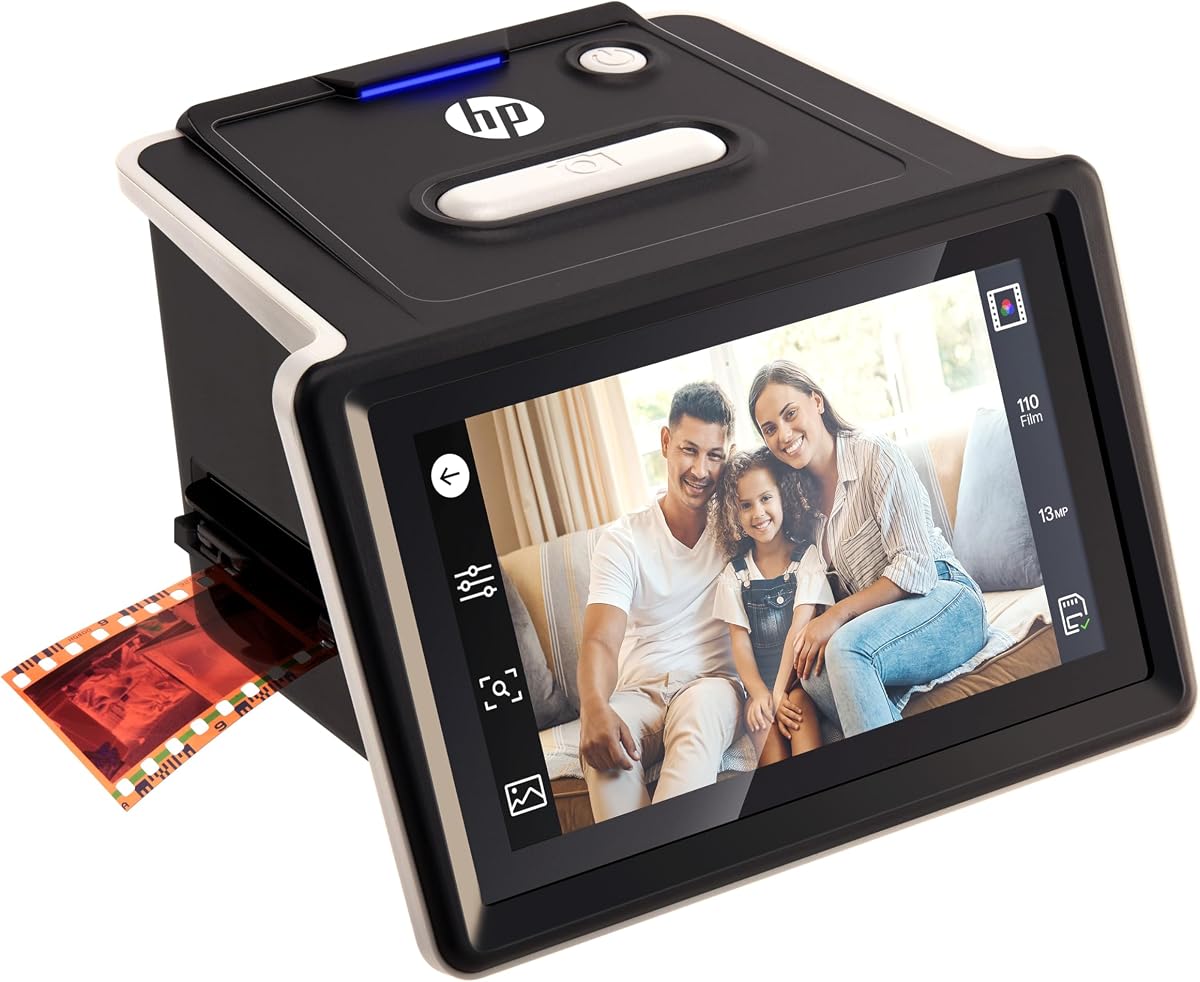
The HP FilmScan HPFS500 is a compact all-in-one option for users who want touchscreen control and a standalone workflow. It carries a 4.3 rating and pairs a five-inch all-angle LCD touch screen with a 13MP CMOS sensor capable of 22MP interpolation. The scanner can digitize 135, 126, and 110 negatives as well as positive slides without requiring a computer.
We may earn a commission when you buy through this link, at no additional cost to you.
Its interactive screen is the key advantage over simpler units. Users can preview and edit images directly on the scanner, while the quick-load tray is designed to speed transitions between frames. The physical 13MP sensor provides a meaningful foundation for detailed images, and 22MP interpolated output can make the resulting files convenient for common viewing and sharing applications.
The main caveat is that its smaller five-inch screen is not tilting, which may make the unit less flexible than the Slide N Scan Max. The product information does not mention a bundled memory card, so users should verify storage requirements before beginning a large project. It also uses a USB-C connection, which should be checked against the computer and workflow that will be used for transferring and organizing files.
The HPFS500 is a strong recommendation for someone who values a touchscreen and direct editing but still wants a relatively compact scanner. It is particularly well suited to mixed collections where Kodachrome slides appear alongside 135, 126, and 110 negatives. Its standalone operation, fast tray, and all-angle display make it approachable for users who want more direct control than a phone-based scanner offers.
The five-inch all-angle touch display allows users to preview and modify images without additional equipment. This direct interaction can make color and framing decisions more immediate for people unfamiliar with desktop editing software.
A 13MP CMOS sensor supports 22MP interpolated files, while the quick-load tray helps minimize pauses between captures. Together, these features balance image detail with a practical workflow for larger collections.
We may earn a commission when you buy through this link, at no additional cost to you.
The KODAK SCANZA is the most versatile option in this roundup for collections that extend beyond standard 35mm negatives. Its 4.2 rating accompanies support for 35mm, 126, 110, Super 8, and 8mm negatives and slides. The scanner can produce 14MP or 22MP JPEG files and includes multiple inserts, a one-touch capture workflow, and a built-in three-and-a-half-inch TFT LCD.
We may earn a commission when you buy through this link, at no additional cost to you.
For Kodachrome archiving, the relevant strength is its broad film compatibility and clear folder of supplied inserts. The 35mm slide support allows mounted 135mm transparencies to be digitized, while the same machine can handle the motion-picture film and other negative formats often found in family boxes. The display's adjustable brightness and tilt make it more practical than a fixed, extremely small screen.
The screen is still modest, and users undertaking detailed restoration may prefer the larger displays offered by the HP FilmScan models, Slide N Scan Max, and ClearScan P7. SD card storage up to 128GB offers more capacity than the 32GB limits of the two featured Kodak models, although a card is not included. Mac and PC compatibility, USB power, HDMI, and an AC adapter broaden connection options.
The SCANZA is best for archivists whose boxes contain many formats and who want one machine to cover more than conventional still-film negatives. Its simple one-touch controls, useful 128GB storage ceiling, and included cleaning brush make it a practical general-purpose choice. A buyer focused only on Kodachrome slides may find a larger-screen model easier to inspect, but few options in this list cover as many film formats.
Support for 35mm, 126, 110, Super 8, and 8mm material makes the SCANZA useful when an archive includes more than conventional 135mm negatives. Multiple supplied inserts and a labeled directory simplify selecting the correct holder.
The scanner supports SD cards up to 128GB, allowing a larger working archive than several competing devices. Its one-step scan-and-save buttons and gallery browsing reduce the complexity of the basic workflow.
We may earn a commission when you buy through this link, at no additional cost to you.
The HP FilmScan with a seven-inch touch LCD is built for users who want to inspect, edit, and showcase slides on a generous screen. Its 4.0 rating reflects a capable 13MP color CMOS sensor, a seven-inch color touch display, a quick-feed tray, and a 50mm adapter. It supports 135, 126, and 110 formats, providing enough flexibility for a mixed family archive.
We may earn a commission when you buy through this link, at no additional cost to you.
The display supports more than basic previewing. Users can crop and adjust scans directly on the device, and gallery mode can display digitized photographs like a digital picture frame. USB provides a route to a computer, while HDMI allows slideshows on a television. These features make the scanner useful both during capture and afterward, when the archive is ready to share.
The provided information does not confirm whether a memory card is included or specify a maximum storage capacity, so those details should be verified before purchase. The 13MP sensor is solid for general-purpose scanning, although models advertising 24MP may create more detailed source files. The 4.0 rating is also slightly lower than several alternatives, although ratings alone do not reveal every practical advantage or limitation.
Choose this model if a large touchscreen and easy post-scan viewing are central to your workflow. The quick-feed tray helps maintain momentum, while on-device cropping and adjustment reduce the need to open every file immediately. It is a particularly good fit for users who plan to involve relatives in the process and want a clear interface that does not resemble complex professional software.
The seven-inch color touch display provides room to examine images and use built-in crop and adjustment controls. Its gallery mode also makes it convenient to review completed scans or present them on a television.
A 13MP color CMOS sensor, quick-feed tray, and 50mm adapter support a streamlined workflow for mounted slides. USB and HDMI connections make the device useful both as a scanner and as a display source.
We may earn a commission when you buy through this link, at no additional cost to you.
The Magnasonic FS71 delivers an impressive combination of resolution, a five-inch display, and standalone operation. It has a 4.3 rating and converts 35mm, 110, 126, and Super 8 negatives along with 135, 126, and 110 slides into high-resolution 24MP JPEG files. The included fast-loading trays and onboard adjustments make it a practical option for large batches.
We may earn a commission when you buy through this link, at no additional cost to you.
No computer is needed for the basic workflow. Brightness, RGB color correction, flipping, and mirroring can be performed directly on the scanner, and images save to an SD card up to 128GB. Its five-inch LCD offers enough space to view slides and finished files, while HDMI output can connect the scanner to a television or monitor for larger viewing. The device is also Mac and PC compatible when a computer workflow is desired.
Two accessories are not included: an SD card and an HDMI cable. The storage capacity is otherwise notably generous, but users will need to add suitable media before beginning. The supplied specifications also indicate a USB power cable and software-based editing options rather than a modern touch interface, so buyers who prioritize direct on-screen interaction may prefer an HP touchscreen model.
The Magnasonic is our best value-oriented recommendation because it offers 24MP output, no-computer operation, multiple film formats, and a large card ceiling without adding the complexity of a professional system. It is well suited to families who want a straightforward path from Kodachrome slides to organized JPEGs and who are comfortable handling removable storage and a few physical controls.
The scanner produces 24MP JPEG images and performs essential adjustments directly on its controls. This makes it possible to complete a basic archive without installing editing software or keeping a computer beside the scanner.
SD card support up to 128GB provides ample room for extended collections. Fast-loading trays and a simple control layout help maintain an efficient pace when processing mounted slides and several common negative formats.
We may earn a commission when you buy through this link, at no additional cost to you.
The BEONEGLOBAL ClearScan P7 is attractive for beginners because it includes an SD card and can operate without a computer. Its 4.1 rating accompanies a seven-inch LCD, up to 24MP scans, and support for 35mm, 135, 126, 110, Super 8, and 8mm material. For a Kodachrome collection, the included storage removes one common obstacle to beginning a digitization project.
We may earn a commission when you buy through this link, at no additional cost to you.
A premium 1/2.3-inch CMOS sensor provides the stated basis for up to 24MP captures, while the large screen allows immediate review and adjustment. The redesigned interface places buttons beneath the display to reduce awkward hand movement. One-touch operation handles scanning, editing, and color enhancement, and an adjustable image-size function gives users some control over framing.
The product data does not specify a maximum card capacity, so users with extensive collections should confirm that detail before storing many files. It is also a physical-control device rather than a touchscreen model, which may feel less fluid to users accustomed to modern phones. Nonetheless, the large display, wide format support, and straightforward one-touch workflow reduce the learning curve.
Choose the ClearScan P7 when you want to begin scanning immediately without separately sourcing memory or installing software. It is a strong all-around choice for Kodachrome 35mm slides and mixed negative collections, particularly when a large display is preferred over a smaller built-in screen. Its included card and no-computer operation make it one of the most approachable standalone scanners in the guide.
The included branded SD card allows users to start working with the scanner immediately. Combined with no-computer operation and one-touch capture controls, it simplifies the initial setup considerably.
The 24MP CMOS scanning system and seven-inch LCD support detailed capture and clear review. Adjustable image sizing and physical controls below the display make the interface easy to operate without crowding the screen.
We may earn a commission when you buy through this link, at no additional cost to you.
The KODAK Mobile Film Scanner offers a radically different approach from the dedicated standalone units. It uses a smartphone camera, an app, a collapsible cardboard platform, and an internal LED backlight to capture 35mm color slides and negatives. Its 3.7 rating is the lowest in the group, but that figure is less important than the product's explicitly experimental and portable nature.
We may earn a commission when you buy through this link, at no additional cost to you.
The main advantage is convenience and portability. The platform folds into a small box, making it suitable for travel or for helping relatives digitize slides without setting up a larger machine. Users load the film, position the phone lens over the opening, and use the app to focus and capture. The Android app provides scanning, editing, and sharing tools.
Image quality is tied to the phone's camera, slide condition, lighting, and focus. The product information explicitly notes that resolution varies and that users may need to tap the screen to autofocus and try again when images are blurry. It is also described as a toy-like tool for experimentation, not a dedicated high-resolution archive scanner. Buyers with large collections should expect a slower and less consistent process than with a dedicated sensor.
This scanner is best for occasional users, experimentation, and portable access rather than a professional archive. It can be a helpful companion when an older relative has a small number of Kodachrome slides to share but no dedicated equipment. For a large or irreplaceable collection, a dedicated sensor and fixed scanning tray offer more predictable results.
The app-based process uses a smartphone to capture mounted slides, while the internal LED backlight provides illumination. This makes the unit useful for quick, low-commitment digitization sessions.
The collapsible cardboard platform is easy to carry, but focus and final resolution depend on the phone and user technique. It offers an accessible introduction to slide scanning rather than the consistency of a dedicated archive device.
We may earn a commission when you buy through this link, at no additional cost to you.
The Nikon Coolscan IV ED is the premier archival choice for users who prioritize optical image quality and color consistency. It has a 5.0 rating and provides 2,900 dpi optical resolution, a 42-second scan time, a 3.6 dynamic range, a color management system, and an LED light source. The USB interface supports plug-and-play connectivity for compatible computers.
We may earn a commission when you buy through this link, at no additional cost to you.
Unlike consumer scanners that advertise interpolated output, the Coolscan IV ED states a genuine optical resolution. That distinction is important for Kodachrome slides because fine detail and color transitions can matter when creating larger prints or preserving an archive for long-term use. The 3.6 dynamic range is designed to retain detail across a broad range of tones, while LED illumination provides more consistent color between sessions.
The trade-off is workflow complexity. There is no built-in LCD, and the scanner depends on a computer and compatible software workflow. It is not the right choice for someone who wants a compact appliance that saves directly to an SD card. It is also a specialist product for archivists, photographers, or dedicated hobbyists who understand computer-based scanning and want the highest level of control.
For a serious Kodachrome archive, the Coolscan IV ED is the strongest premium recommendation in this guide. Its optical resolution, high rating, color management, and tonal performance justify a professional approach. Choose it when preservation quality and repeatable results matter more than a screen, portability, or computer-free operation.
The stated 2,900 dpi optical resolution is designed to preserve fine detail without relying entirely on interpolation. This makes the Coolscan IV ED attractive for large Kodachrome transparencies intended for high-quality prints or careful archival work.
A color management system, 3.6 dynamic range, and LED light source support accurate and repeatable results. The 42-second scan time also provides a practical balance for professional archive work.
We may earn a commission when you buy through this link, at no additional cost to you.
The Nikon Super Coolscan 4000 ED is the highest-resolution model featured here, with 4,000 dpi optical scanning and 48-bit color output. Its 5.0 rating, LED light source, and 38-second scan time place it firmly in the specialist archival category. It supports film strips, slides, and Advanced Photo System formats, making it suitable for diverse mounted and unmounted collections.
We may earn a commission when you buy through this link, at no additional cost to you.
For Kodachrome slides, the combination of 4,000 dpi optical resolution and 48-bit color depth is especially relevant to demanding preservation work. The extra tonal information provides a strong starting point for color correction and high-quality reproduction. An LED light source contributes to color consistency, while the relatively quick scan cycle helps when processing a substantial archive.
The principal disadvantage is connectivity. The supplied product information lists an IEEE 1394 FireWire interface card and states PC and Mac compatibility, but this older connection may require compatible hardware, appropriate drivers, or extra configuration. There is no built-in screen, and the scanner is not a standalone appliance. These are meaningful barriers for users who want a simple, modern workflow.
The Super Coolscan 4000 ED is best for experienced archivists, photographers, or restoration enthusiasts who can manage a computer-based setup. Choose it when maximum optical resolution, deep color data, and support for film strips are more important than portability or ease of use. It complements the Coolscan IV ED as a higher-resolution specialist alternative within the same professional Nikon family.
The 4,000 dpi optical specification is the highest among the scanners in this guide. It provides a strong foundation for preserving fine slide detail and supporting demanding reproduction work.
The 48-bit color output preserves a wide range of tonal and chromatic information from Kodachrome material. An LED source supports color consistency, and the 38-second scan cycle keeps professional throughput practical.
We may earn a commission when you buy through this link, at no additional cost to you.
The right scanner for Kodachrome slides depends on collection size, desired image quality, computer experience, and preferred storage method. Format support, sensor resolution, preview quality, and included media can materially affect both the results and the amount of post-processing required.
Kodachrome is a color reversal film available in several formats, so a buyer should first identify the physical media in the collection. Most consumer scanners that handle 135mm slides can accommodate standard mounted 35mm Kodachrome transparencies, while some also support 126mm, 110mm, Super 8, or 8mm material. The supplied descriptions do not establish support for every Kodachrome variant, so the exact slide dimensions and whether frames are mounted should be confirmed before purchase.
Choose a scanner whose included holder matches the collection. A model with 135mm slide support and the correct 50mm adapter is likely to be suitable for standard 35mm slides, but format labels alone cannot establish complete compatibility with uncommon Kodachrome formats.
Resolution claims can sound more precise than they really are. Interpolated resolution combines data from neighboring pixels to create a larger file, whereas optical resolution describes the sensor's native capture. The HP FS500 combines a 13MP CMOS sensor with 22MP interpolation, while the Nikon models state 2,900 dpi and 4,000 dpi optical resolutions. For preservation, optical performance usually deserves more attention than a larger interpolated number alone.
Prioritize native detail, clean focus, and accurate color reproduction over file dimensions. Very large interpolated files can be useful for viewing, but they do not automatically add optical detail to the original transparency.
Kodachrome is known for saturated color, making color management and tonal handling important. Dedicated scanners such as the Nikon Coolscan IV ED offer stated color management, a 3.6 dynamic range, and consistent LED illumination. Consumer models generally provide on-device brightness, RGB correction, or one-touch enhancement tools that can make basic scans easier, though their level of manual control may be limited.
Look for a scanner that exposes useful adjustments without forcing complex settings. The best workflow is one that produces a faithful first scan while still allowing corrections to be made in a familiar editing program.
Standalone scanners save images to removable memory and often include an LCD for review. The Kodak Slide N Scan, HP FilmScan, Magnasonic, and ClearScan models follow this approach, which can make archiving easier for people who do not want to manage software. Nikon models deliver professional optical quality but require a compatible computer and suitable connection setup, with the Super Coolscan relying on FireWire.
Choose standalone operation for convenience and minimal setup. Choose a computer-based professional scanner when precise software control, workflow integration, and maximum archival fidelity justify the added technical requirements.
A larger screen makes it easier to inspect focus, framing, brightness, and color before saving. The HP seven-inch touch model and ClearScan P7 offer the largest stated displays, while the Kodak Slide N Scan Max provides a tilting seven-inch panel. Smaller three-and-a-half-inch screens are still functional, particularly in the SCANZA, but may be less comfortable for reviewing fine transparency detail.
Prioritize a screen that can be viewed comfortably at your workspace and controls that are easy to reach. Touch interfaces can feel intuitive, while physical buttons may be more tactile and less dependent on firmware responsiveness.
The ClearScan P7 includes an SD card, while several competitors require buyers to supply one. Capacity also varies considerably: the two featured Kodak Slide N Scan models support up to 32GB, while the SCANZA and Magnasonic list support up to 128GB. Larger capacity is useful for extensive archives because it reduces how often files must be transferred and cleared.
Check both maximum card size and included media before ordering. A generous card limit is less useful if the required card type is difficult to obtain, so verify device compatibility and purchase several cards for backup and sorting purposes.
A quick-feed or quick-load tray can substantially reduce the time spent moving between frames. Continuous feeding is particularly useful for hundreds of slides, whereas the smartphone-based Kodak Mobile Film Scanner requires manual placement and repeated focusing. Scan speed alone does not determine total throughput, but tray design, card saving, and software performance all contribute to the pace of a session.
For a large archive, favor a stable holder, quick-feed mechanism, and direct card saving. For only a few slides, these conveniences matter less than whether the unit is easy to set up and understand.
A scanner creates digital copies but does not replace careful handling of the originals. Clean glass and film paths, use proper slide holders, and avoid leaving fragile transparencies exposed to heat, moisture, and direct sunlight. A final file system should include original-resolution scans, descriptive filenames, and multiple backups so that one failed drive does not threaten the archive.
Plan for organization before the first scan. Decide how files will be grouped by event, date, box, or family member, and save untouched captures before making destructive edits or heavy compression.
Begin by cleaning the scanner's light box, film holder, and any accessible optical surfaces using the supplied brush where one is included. Dust and fingerprints can appear as bright spots or hazy marks in every scan. Work in a dim room, keep the scanner on a stable surface, and handle each mounted slide by its edges to avoid scratches, fingerprints, and warping.
Choose the correct holder for the slide format, load it carefully, and make sure the frame is positioned within the scanner's capture area. Select the matching film type and adjust brightness, color, orientation, or framing using the available controls. On the 13MP to 24MP consumer models, use a memory card with sufficient capacity; on the Nikon scanners, connect the unit to a compatible computer and follow the software setup for the relevant interface.
Scan a representative slide first, inspect it at full size, and adjust exposure or color before continuing with the box. Save the original capture, then organize files with consistent names and create at least two separate backups. Keep the physical slides in archival sleeves or boxes away from heat, humidity, and direct sunlight, and retain the negatives and holders together for easier future identification.
Yes, if the scanner supports the physical format of the slides and the holder fits the frames. Most consumer models in this guide support standard 135mm mounted slides, which are common for 35mm Kodachrome. Confirm the exact frame dimensions, mounting style, and scanner compatibility before processing an entire collection.
Resolution should be judged by optical capture rather than an interpolated file size alone. Native 13MP to 24MP sensors are appropriate for many viewing and printing needs, while the Nikon scanners provide stated 2,900 dpi and 4,000 dpi optical resolution. The right choice depends on how large you intend to print and how much post-processing the files will receive.
Usually, yes. Standalone models provide physical controls, an integrated display, and direct saving to SD or SDHC cards, reducing the need for drivers or editing software. Professional Nikon scanners offer finer optical capture but require a compatible computer, connection setup, and software-based organization.
No scanner should be expected to produce a final archival master without inspection. Consumer devices offer automatic or one-touch corrections that can provide a good starting point, while the Nikon Coolscan IV ED adds stated color management and an LED source. Reviewing scans and applying measured corrections remains an important final step.
Most standalone models require removable memory. The ClearScan P7 includes an SD card, while the other listed consumer scanners require the buyer to supply compatible storage. Verify the supported card format and maximum capacity before scanning, and use several cards if the collection is large.
All of the dedicated consumer scanners listed can handle positive slides and at least some negative formats. The Kodak SCANZA, Magnasonic FS71, and ClearScan P7 cover especially broad combinations of 35mm, 126, 110, Super 8, and 8mm material. The mobile model and professional Nikons also handle slides, but their workflows differ substantially.
Use a consistent naming system that includes a box number, roll or slide sequence, and event or date when known. Preserve an untouched original scan before editing, then create a separate organized copy for display. Maintaining backups on at least two drives or storage systems helps protect a collection from accidental deletion or device failure.
It is prudent to retain the original transparencies, negatives, holders, sleeves, and contextual information. Digital files can be copied and backed up more easily, but physical media and their organization may still hold details that a scan does not fully capture. Store the originals in a clean, dry, temperature-stable environment.
The KODAK Slide N Scan 22MP is the best overall option because it balances a five-inch display, 22MP output, quick-feed operation, and standalone SD card saving without becoming overly complicated. The Magnasonic FS71 is the best value choice, while the Nikon Coolscan IV ED represents the premium path for users who prioritize optical resolution, accurate color, and professional archival control.
Before buying, decide whether your priority is a convenient family workflow, a large display, broad film-format support, computer-free operation, or maximum image quality. Larger screens and direct controls help with review, while storage capacity and included media affect setup. Professional Nikon models offer superior stated optical specifications but require more technical involvement and a compatible computer.
Check the current listing, package contents, and available accessories before ordering because product configurations and pricing can change. Confirm the exact slide format, memory requirements, connection method, and included holders. With those details matched to the collection, any of these scanners can provide a practical foundation for preserving Kodachrome memories in digital form.