
USB Mini Speaker Computer Speaker Powered Stereo Multimedia Speaker
4.1Editor score
Direct USB laptop power
Compact dual-speaker design
No 3.5mm connection needed
Compare the best mini speaker for laptops across USB, AUX, and Bluetooth models, evaluating sound, controls, portability, setup, and compatibility today.
A mini speaker for laptops can transform a compact workspace without adding bulky equipment. The right model should match your computer’s available connections, deliver clear stereo sound, and suit where you listen. Wired desktop designs maximize reliability, while wireless portable speakers add flexibility for travel and shared spaces.
This guide compares ten compact speakers using information about their power methods, audio inputs, controls, dimensions, output, portability, and stated compatibility. It covers USB-only designs, speakers combining USB power with a 3.5mm AUX connection, a single-cable monitor bar, and portable Bluetooth options for laptops, tablets, and phones.
Each pick reveals a different practical advantage, from space-saving mounting to convenient volume control and flexible wireless playback. Ratings and specifications can change, and current prices vary across retailers and over time. Always confirm connector types, port availability, and your laptop’s audio output before making a final purchasing decision.
4.1Editor score

4.5Editor score
4.2Editor score
The following comparison highlights the major differences among wired USB speakers, AUX-powered desktop models, a clip-on monitor bar, and portable Bluetooth speakers. Focus first on connection compatibility, then consider output, controls, mounting options, portability, and the amount of desk space you want to preserve.


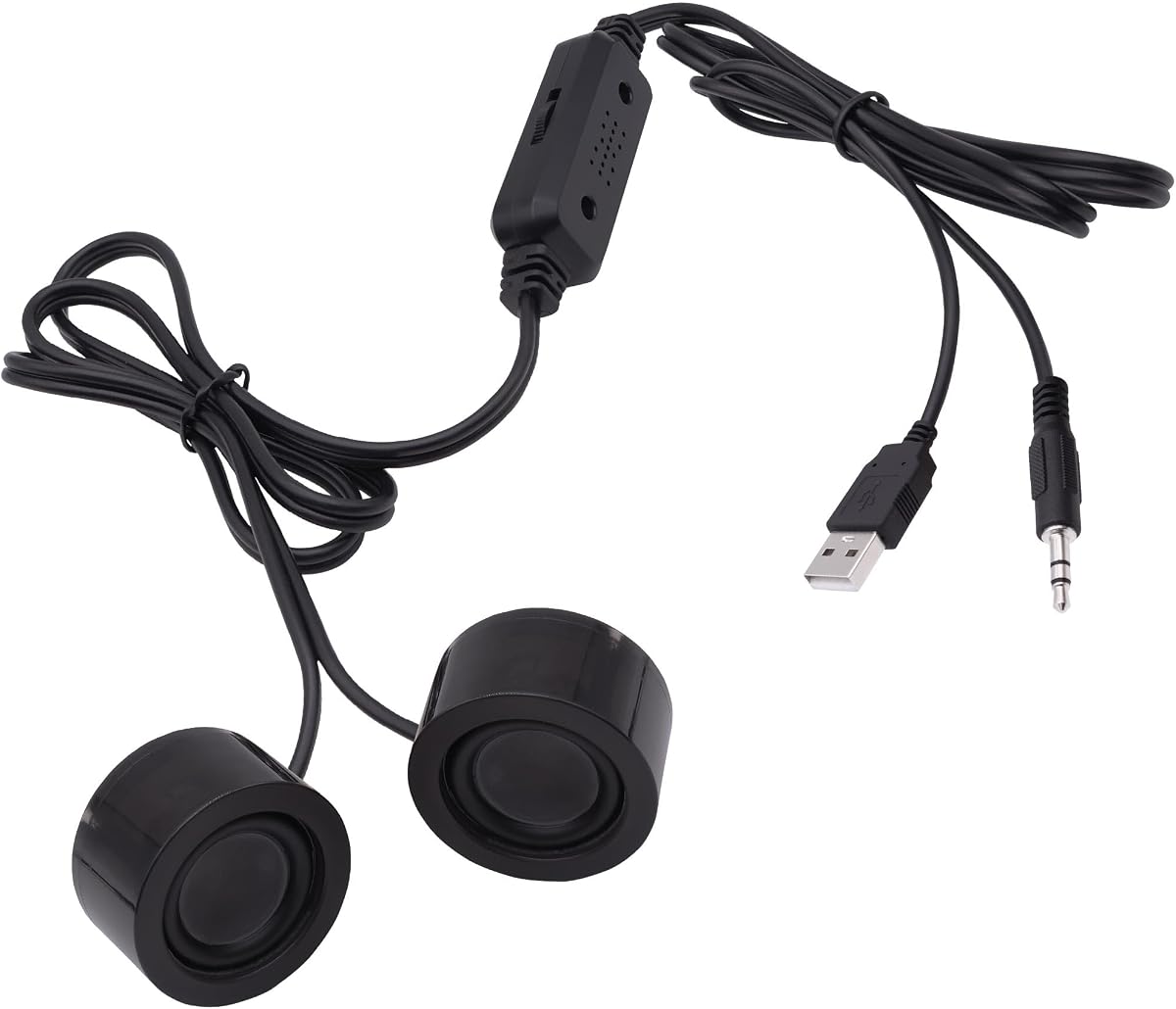
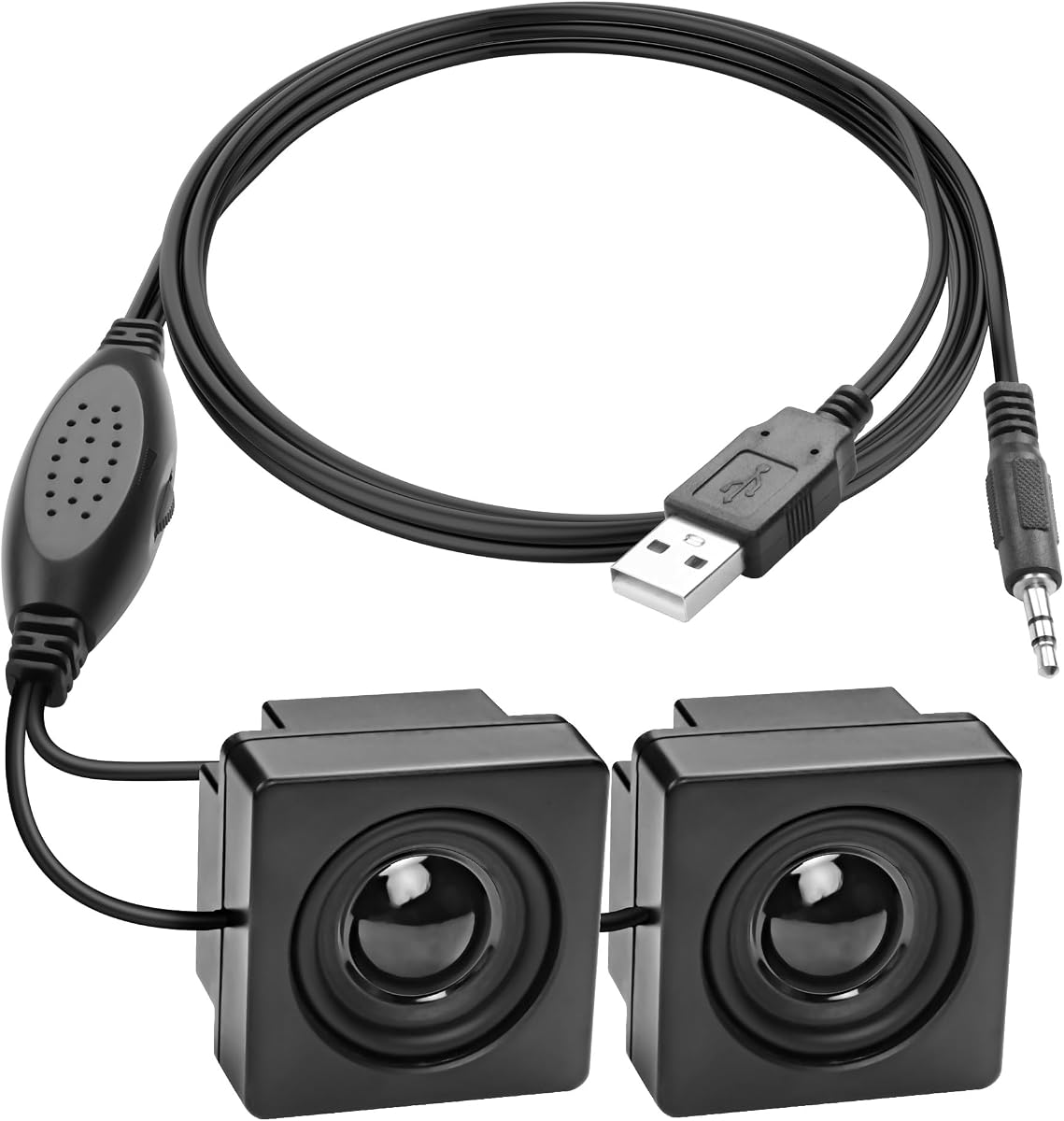


This compact USB multimedia speaker offers one of the most straightforward ways to improve audio from a notebook or desktop computer. It has a 4.1 rating and stands out for its exceptionally small footprint, simple USB connection, and dual-speaker stereo presentation. At just 3.14 by 1.2 by 1.78 inches and 90 grams, it is easy to place between a monitor and laptop or carry in a bag.
We may earn a commission when you buy through this link, at no additional cost to you.
Its main strength is reduced connection complexity. The included 47-inch USB cable supplies both power and the audio connection, so users do not need to locate a 3.5mm output or install drivers. Compatibility with both USB 1.1 and USB 2.0 broadens the range of computers that can use it. The integrated dual units are intended to create a balanced stereo effect for music, movies, games, and general multimedia use.
The notable trade-off is the absence of a physical volume control. Adjusting loudness therefore depends on controls in the computer, operating system, or media application. The product information does not describe a separate AUX input, and the one-cable design may offer fewer placement options than models with independent power and audio leads. Its small size also means it is better suited to near-field listening than filling a large room.
This is a practical choice for users who value simplicity, affordability, and a nearly clutter-free setup more than tactile controls or maximum loudness. It works especially well in offices, school environments, shared spaces, and temporary workstations where a tiny speaker should disappear into the desk. For anyone seeking a single-cable USB speaker with genuine stereo units and minimal desk use, it remains a strong budget-oriented recommendation.
Because the speaker receives both power and audio through USB, setup requires little more than connecting the supplied cable to a compatible computer. This removes the usual search for an AUX jack and keeps the visible cable count low.
The 3.14-inch dimensions and 90-gram weight make placement unusually flexible. It can sit beside a laptop, fit under a raised monitor shelf, or move easily between home and office use.
We may earn a commission when you buy through this link, at no additional cost to you.
The Amazon Basics Stereo 2.0 set combines the familiarity of a traditional two-speaker desktop arrangement with the convenience of USB power. Its 4.4 rating reflects a balanced mix of useful features, including a 3.5mm AUX input, inline volume control, a metal finish, and a padded base designed to protect the surface beneath each speaker.
We may earn a commission when you buy through this link, at no additional cost to you.
This model makes more sense than a single miniature unit when left-right stereo separation is important. It is designed to amplify PC or laptop audio, and the included control makes it unnecessary to reach for system settings during routine volume changes. USB power removes the need for a wall adapter, while the 3.5mm connection carries the audio signal from the computer.
The trade-off is that it is less portable and less minimalist than the smallest single-unit options. A pair naturally occupies more desk area, and the speaker needs both a USB port for power and a 3.5mm output for sound. Some newer laptops may require an adapter, depending on the ports available on the machine. The listed springy bass radiator is a useful enhancement, but the system remains primarily a conventional compact desktop speaker set.
The Amazon Basics pair is a strong recommendation for home offices, dorm rooms, and fixed laptop desks where a familiar stereo arrangement and straightforward volume control matter. It avoids complicated wireless pairing and works well for video calls, music, movies, and games. Choose it when you want a traditional pair with accessible controls; choose a single USB or Bluetooth model instead when desk space and portability take priority.
The inline control makes basic listening adjustments more direct. It is a meaningful convenience when a laptop is positioned at a distance, especially for music, movies, and gaming sessions.
Separate left and right speakers create a more conventional desktop presentation than a single enclosure. The padded bases also help prevent scratches while keeping the pair stable on a desk.
We may earn a commission when you buy through this link, at no additional cost to you.
The 1Mii Computer Speakers pair combines a clear feature set with a 4.3 rating. Its standout elements are dual 3W stereo drivers, a front rotary volume knob, broad support for devices with a standard 3.5mm AUX output, and a long, narrow enclosure designed to fit into confined desk areas.
We may earn a commission when you buy through this link, at no additional cost to you.
The rotary control offers more precise adjustment than a stepped button. Users can move the volume directly on the speaker instead of navigating operating-system menus, which is useful during movies, music, and gaming. The combined USB and AUX cable is described as connected together for organization, although it can be separated when placement requires it. A USB power adapter is also recommended for the best audio quality and to reduce static.
Compatibility depends on having both a 3.5mm audio output and a way to provide USB power. The product is not compatible with every device, and the two cables must be connected simultaneously. Users may also need to select the speaker as the audio output within the computer. These requirements make it less convenient than USB-only or wireless models, but they also provide a stable, conventional connection for compatible systems.
This speaker is well suited to Windows, Linux, and MacOS laptop users, desktop monitors, and other systems with a standard AUX jack. It is especially attractive for narrow desks where a long, low profile can tuck beneath a display. If straightforward wired playback, a visible volume knob, and an anti-slip base matter more than maximum portability, the 1Mii set deserves consideration.
The front knob allows continuous volume changes without software menus. Its accessible placement also makes it convenient for quick adjustments while watching a video or starting a game.
Measuring 10.2 by 2.4 by 2.5 inches, the enclosure is intended to fit beneath monitors or along the rear of a desk. Silicone pads help prevent sliding and surface scratches.
We may earn a commission when you buy through this link, at no additional cost to you.
The INSMY C17-max is the strongest portable option in this group, carrying a 4.5 rating and offering a 5W full-range driver with a hidden passive radiator. Its round metal body measures 50 by 50 millimeters and weighs 100 grams, giving it a pocketable form suited to laptop users who work and listen in changing locations.
We may earn a commission when you buy through this link, at no additional cost to you.
Bluetooth 5.3 connectivity removes the need for a dedicated speaker cable, while the stated range of up to 100 unobstructed feet provides flexibility around a room. The speaker supports wireless pairing of two units for stereo sound. It also includes a built-in microphone for hands-free calls, a feature that adds practical value for online meetings when used with a laptop.
Portable power introduces considerations that wired speakers do not face. The battery is rated for up to ten hours of playback at 50% volume, so charging time and remaining capacity matter. Although the speaker is described as waterproof and shockproof for outdoor settings, its rounded metal construction and wireless nature make it less suited to permanent monitor mounting. A single unit may also provide less conventional left-right separation unless two are paired.
Choose this model for travel, dorm rooms, outdoor work, or any setup where cable-free audio is more important than a permanently connected desktop system. It works with laptops, computers, tablets, and phones, making it a broader portable option than models designed only around AUX or USB. Its combination of compact dimensions, strong stated output, wireless stereo support, and hands-free calling makes it especially versatile.
At 50 by 50 millimeters and 100 grams, the speaker is small enough for a pocket, handbag, or backpack. The braided lanyard makes it easier to carry and hang from a bag.
A 5W full-range driver and passive radiator support fuller output than the product’s compact size suggests. The speaker can also be paired with another unit for a wider stereo presentation.
We may earn a commission when you buy through this link, at no additional cost to you.
This compact USB mini speaker offers a space-saving solution for laptops, desktops, tablets, phones, and MP3/MP4 players with a 3.5mm jack. It has a 3.7 rating, the lowest among the ten products here, but its dual magnetic drivers, rotating volume wheel, and included mounting tape create a focused set of useful features.
We may earn a commission when you buy through this link, at no additional cost to you.
Its most appealing feature is the ability to attach the speaker to a monitor, desk, or another smooth surface using the supplied double-sided tape. That creates room for a laptop where desk space is limited. A rotating wheel provides direct volume control, while USB power eliminates the need for a separate wall adapter. The speaker’s clear sound and lower distortion are intended to improve the experience for music, video, and games.
Troubleshooting is an important consideration. Some desktop computers may not have a default audio driver, and the product guidance recommends checking driver installation and sound settings. It also suggests connecting the 3.5mm and USB plugs to rear ports when possible because front-panel audio configurations may not be recognized. These are extra setup steps compared with USB-only models.
This is a practical option for a tightly packed workstation, a monitor-mounted setup, or a temporary computer station. It is less compelling when effortless setup is the priority or when a laptop lacks a 3.5mm output. Buyers should verify port availability and be prepared to adjust operating-system audio settings. Its adhesive placement and low profile nevertheless make it one of the more interesting space-saving designs in the guide.
The included adhesive strips allow the speaker to sit behind a monitor or along a desk surface. This is useful where a conventional speaker base would interfere with the laptop or keyboard.
A physical rotating control makes volume changes quick and visible. It is especially convenient for users who do not want to navigate system menus during media playback.
We may earn a commission when you buy through this link, at no additional cost to you.
The XMSJSIY Mini Computer Speaker is designed for users who want almost no visible desktop footprint. It has a 4.1 rating, a compact enclosure, and an adhesive-backed mounting design. The stated internal hardware includes a 16-core magnetic speaker with a carbon fiber diaphragm, aimed at dynamic sound, clear bass texture, and reduced distortion.
We may earn a commission when you buy through this link, at no additional cost to you.
Its mounting flexibility is a major advantage. The speaker can be attached behind a monitor, beside a computer, underneath a desk, or even inside a chassis according to the product information. The 1.2-meter, or 3.9-foot, cable provides some placement flexibility, and the included wire control allows volume changes without returning to laptop settings.
The design still relies on a wired signal. USB 5V power and a 3.5mm audio cable must both be connected, and the target device needs a compatible TRS output. Unlike the USB-only first pick, this model cannot draw both power and sound from one computer cable. The included 3.9-foot lead is also relatively short for installations where the laptop and mounting point are far apart.
This mini speaker is a strong option for permanent, tidy computer arrangements, especially behind a monitor where space is valuable. It suits laptop users who have both modern USB access and a legacy-style audio jack. Choose it when mounting flexibility, a small profile, and a dedicated volume wire outweigh the convenience of a single-cable or wireless configuration.
Adhesive backing allows the speaker to disappear behind a display or attach to the side of a desk. Once positioned, it avoids occupying a visible area beside the laptop.
The 16-core magnetic speaker and carbon fiber diaphragm are intended to provide a lively sound profile. The product information also emphasizes lower distortion for clearer listening at a compact size.
We may earn a commission when you buy through this link, at no additional cost to you.
This portable Bluetooth speaker is built around travel convenience, with a 4.0 rating, a round body, and a stated weight below 0.2 pounds. It uses Bluetooth 5.3, provides a 5W stereo output, and supports true wireless stereo pairing. Its IPX7 rating is intended to withstand rain, spills, and splashes during outdoor use.
We may earn a commission when you buy through this link, at no additional cost to you.
The stated connection range reaches up to 33 feet without obstruction, which is suitable for a desk, dorm room, picnic area, or nearby workspace. The included strap can attach the speaker to a handbag, backpack, bicycle, or car. It also supports a convenient recharge estimate of 1.5 hours and up to eight hours of continuous playback under stated laboratory conditions.
The product guidance notes that the volume and track-navigation functions may need adjustment through the connected phone. This is a reminder that generic Bluetooth controls can behave differently across devices. As with other portable speakers, actual runtime depends on volume, usage, and conditions, so the stated eight-hour figure should be treated as a maximum under specific conditions rather than a guarantee in every setting.
This model is a good fit for buyers who want a lightweight, water-resistant speaker for travel, camping, commuting, or casual laptop use. It also appeals to users who want the option of pairing two wireless speakers for a larger stereo image. It is less ideal for a permanently occupied office because it prioritizes mobility and battery operation over a stationary, always-connected desktop arrangement.
The IPX7 waterproof rating provides confidence around rain, poolside splashes, and other damp environments. Its light body and lanyard also make it straightforward to carry between locations.
TWS pairing lets two compatible units play together. That option offers more separation than a single speaker and is useful for video viewing or music in a temporary outdoor setup.
We may earn a commission when you buy through this link, at no additional cost to you.
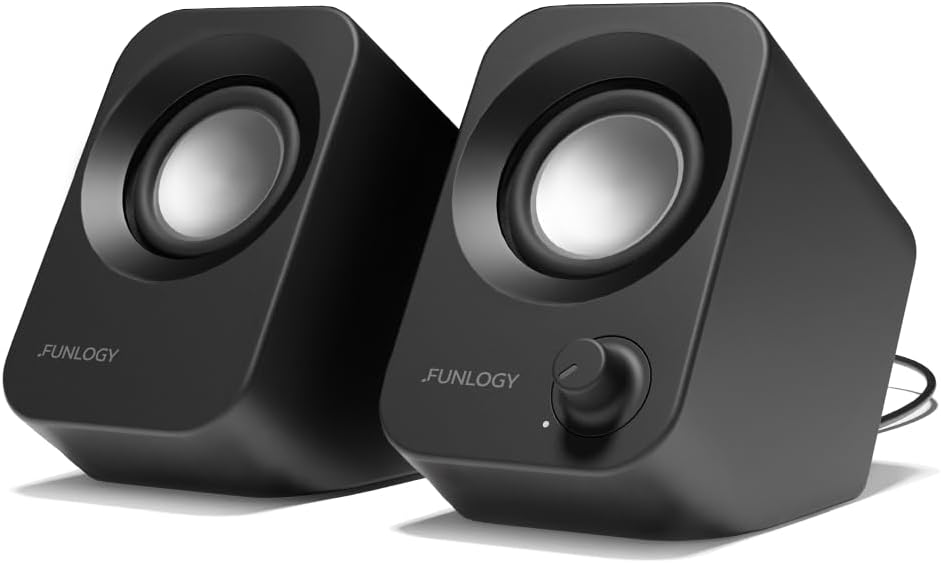
The FUNLOGY 14W Stereo PC Speakers stand out as the most deliberately engineered desktop option in the roundup. They have a 4.2 rating, a claimed total output of 14W, dual 48mm full-range drivers, passive radiators, a volume dial, and a distinctive 30-degree upward-facing layout designed to direct sound toward a seated listener.
We may earn a commission when you buy through this link, at no additional cost to you.
The angled construction is more than a visual feature. By raising the drivers and directing them upward, the speaker aims sound toward the ears on a desk rather than straight across the work surface. The drivers and passive radiators are intended to provide clear mids, crisp highs, and punchy bass while preserving a compact footprint. A gold-plated AUX input and noise-reducing design are also highlighted for cleaner signal handling.
Setup remains conventional rather than wireless. The included USB and 3.5mm cables connect the system to a compatible computer, smartphone, monitor, or gaming console, and no driver installation or pairing is required. A single laptop connection is therefore not possible unless the laptop itself supports the necessary combined arrangement. The product’s 14W figure also should not be confused with a 14W rating for each channel; the stated output is total across the system.
This is the strongest choice for a fixed laptop desk where sound quality, physical controls, and understated styling matter. It suits users who prefer a purposeful desktop design over a pocketable travel speaker. The angled enclosure, included volume dial, passive radiators, and broad wired compatibility justify its position as the premium desktop-oriented pick in this guide.
The 30-degree tilt changes how sound reaches the listening position. Raising the drivers toward the user can make a compact desktop system feel more natural during long listening sessions.
The gold-plated AUX input is intended to minimize signal noise, while the rotary volume control offers immediate adjustment. Passive radiators augment the compact full-range drivers with additional bass response.
We may earn a commission when you buy through this link, at no additional cost to you.
The Cyber Acoustics CA-2890 offers one of the cleanest laptop setups in the guide. With a 4.2 rating and 10W output, it combines a single USB connection, a clip-on monitor mount, integrated playback controls, and an elevated design intended to project sound forward. It can also operate as a standalone desktop speaker.
We may earn a commission when you buy through this link, at no additional cost to you.
The single-cable approach is the defining convenience. Unlike wired systems that need separate USB power and 3.5mm audio connections, the CA-2890 draws power and receives audio through USB. A USB-A to USB-C adapter is included for newer laptops with limited ports. The clip fits screens up to one inch thick, allowing the bar to sit directly beneath many displays without consuming desk space.
Its mounting method imposes a clear limitation. Screens with unusual brackets, curved profiles, or thicknesses beyond the stated limit may not accommodate the clip as intended. The bar also replaces a traditional left-right speaker pair with one elevated enclosure. That arrangement is visually tidy and can work well on a monitor, but it does not provide the same physical separation as two desktop speakers.
The CA-2890 is best for users with a monitor-based laptop or desktop setup who want minimal cable clutter. Its volume, mute, and play/pause controls make everyday operation direct, while the raised position helps audio reach the user. It is a compelling all-in-one choice for a compact workstation, especially when avoiding a separate AUX connection is a priority.
USB provides both power and audio, leaving the desk without a separate sound cable. The included adapter broadens compatibility with newer USB-C-focused laptops.
The clip-on design keeps the speaker close to the display and out of the main work area. It fits screens up to one inch thick and includes a user guide and one-year warranty.
We may earn a commission when you buy through this link, at no additional cost to you.
The GELRHONR Mini Computer Speaker combines a 4.5 rating with a particularly broad range of potential uses. It supports USB power and 3.5mm AUX audio, includes a rotary volume control, and can be attached to smooth surfaces. The product information also highlights its suitability for Raspberry Pi and other DIY electronics projects.
We may earn a commission when you buy through this link, at no additional cost to you.
Its small PVC enclosure is designed to be concealed or positioned wherever there is room. Adhesive backing allows installation behind a monitor, to the side of a desk, or on a wall. For computer users, the speaker provides clear sound for movies, music, and video conferences, while its compatibility with phones, tablets, and MP3 players makes it useful beyond a dedicated workstation.
The connection method is conventional. USB supplies power, while a 3.5mm TRS jack supplies the stereo signal, and no driver installation is required. It is not a two-speaker stereo set, and users must have a suitable audio output. The adhesive installation is convenient but may be less suitable for users who expect to reposition the speaker frequently or prefer a weighted desktop base.
This mini speaker is a strong candidate for compact desks, DIY electronics, hidden monitor installations, and straightforward laptop audio. Its 4.5 rating places it among the most highly rated products here, and the combination of clear controls, flexible mounting, and broad device support makes it a versatile compact option. Users primarily seeking a portable battery speaker should look to the Bluetooth models instead.
The speaker is specifically highlighted for Raspberry Pi and similar electronics projects. Its plug-and-play approach also makes it convenient for quick temporary installations.
Adhesive backing provides more placement freedom than a standard desktop base. It can be placed behind a monitor, along a desk, or on a wall where space is limited.
We may earn a commission when you buy through this link, at no additional cost to you.
The right mini speaker depends heavily on your laptop’s ports, listening location, need for portability, and preference for physical controls. Compare connection methods before output or appearance, because a speaker with excellent features is still inconvenient if it cannot connect cleanly to your computer.
Begin by inspecting the ports on your laptop. A USB-only mini speaker is the simplest option because it needs one cable for both power and audio, although it may limit independent placement. Models with USB power and a 3.5mm AUX input offer more control over where the speaker sits but require both a suitable audio output and a USB connection. Bluetooth avoids both physical connections, but it requires pairing, charging, and accepting possible wireless delay.
Choose based on what your computer actually provides, not merely what the speaker supports. Newer laptops may emphasize USB-C while retaining no 3.5mm jack, while older systems may have the opposite arrangement. Check whether the included cable fits the relevant port and whether a separate adapter will be necessary.
Mini speakers vary from a single tiny unit to a narrow soundbar or a separate stereo pair. A single enclosure uses the least desk space, while two speakers can provide more obvious left-right separation. Adhesive-mounted models can attach behind a monitor, beneath a desk, or to another smooth surface, making them attractive where a standard base would interfere with a laptop or keyboard.
Measure the available area and consider whether you want the speaker visible, movable, or permanently positioned. Adhesive mounting maximizes placement freedom but is less convenient for frequent repositioning. A clipped monitor bar saves surface space, while a conventional pair is usually easier to arrange symmetrically on a desk.
Output specifications provide a useful starting point for comparison, but they are most meaningful when considered with the enclosure and driver design. The guide includes compact single units with 5W drivers, dual-driver systems, a 10W monitor bar, and a 14W stereo setup. Some products emphasize clear vocals, others bass response, and some specifically use angled or elevated layouts to direct sound toward the listener.
For focused desk listening, even a modest system can be useful when it is clearer and more balanced than a laptop’s built-in speakers. Larger or more elaborate systems may suit movies and gaming, while portable designs often prioritize durability, battery life, and convenience over conventional stereo placement.
Physical volume control can materially improve daily usability. Inline controls, rotary knobs, and wheels let you adjust loudness without opening system menus, while the Cyber Acoustics bar adds mute and playback functions. Some compact USB speakers have no volume control at all, so all level changes depend on the computer or media application. That arrangement can still be acceptable for users who rarely change volume.
Decide which controls you actually use. A single knob is convenient, but extra playback or mute buttons are more valuable in a fixed workstation. Bluetooth speakers may add onboard track controls, although behavior can vary by the connected device. Always confirm the physical control layout rather than assuming every portable model behaves identically.
Portable speakers are the better option when audio must move between a desk, dorm room, kitchen, or outdoor setting. Look at the stated body dimensions, weight, carrying lanyard, water resistance, and playback duration. The guide includes models with stated maximum runtimes of eight and ten hours, generally under specific volume conditions. A USB desktop speaker may be equally compact but remains tied to a nearby power source.
Treat maximum battery figures as comparative rather than unconditional. Volume, track type, connection stability, and use of extras can all affect runtime. Water resistance also does not make every portable speaker suitable for submersion, so follow the stated IPX7 conditions and general care guidance.
Wired systems commonly separate power from audio: USB provides power, and a 3.5mm cable carries sound. The single-cable USB option and the Cyber Acoustics monitor bar reduce visible clutter, but they may not offer the same placement flexibility. Bluetooth products avoid a power lead during use but require charging before the listening session. Users should consider adapter availability, driver requirements, and whether their system needs an audio-output selection changed.
The best setup is the one that remains convenient after installation. A design that requires rear-port connections, driver checks, and multiple cables may create more friction than a simpler model. Read the troubleshooting notes before buying so that potential silence or configuration problems do not come as a surprise.
Construction materials should match the intended environment. A metal-bodied portable speaker may handle frequent transport well, while a PVC mini speaker can suit a stationary desk. Adhesive mounting, padded bases, and silicone pads all help keep a speaker stable while protecting nearby surfaces. Waterproof and shockproof claims add useful protection for travel, but they do not replace sensible handling.
Look for details that match your habits. A scratch-free base is valuable on a wooden desk, while a lanyard is more relevant to a bag. Users who move devices frequently may prefer a removable cable over an adhesive installation, while permanent workstation users may prioritize a secure mount.
A laptop speaker is one part of a broader audio setup, so think about what else you will connect. Some compact desktop models also support tablets, phones, monitors, gaming consoles, and MP3 players. Bluetooth units naturally work with phones, tablets, laptops, televisions, and other compatible devices, which makes them useful for media beyond the computer.
Fixed office or study users may favor a wired, always-ready system with a physical control. Frequent travelers are likely to prioritize wireless operation, battery life, and water resistance. DIY users should pay particular attention to USB power requirements, 3.5mm TRS support, and documented device compatibility.
Before connecting any speaker, inspect the laptop and select the correct output. For a USB-only model, plug the supplied USB cable into a compatible port. For a system with separate USB power and 3.5mm AUX connections, connect both cables and choose the speaker as the output device if necessary. For Bluetooth models, charge the speaker, enable Bluetooth on the laptop, select the speaker name, and wait for the connection to complete.
Place the speaker at a practical listening distance and begin with a low system volume. A compact desktop unit works best near the front of a monitor or beside the laptop, while an elevated or upward-facing model should be positioned with its drivers directed toward you. For adhesive models, clean the selected smooth surface before mounting, and make sure the speaker is firmly attached. Wireless stereo or TWS pairing requires two compatible units and should be configured according to the speaker’s controls.
Care for wired speakers by unplugging them rather than pulling on the cable, and avoid placing the cable where it can be pinched. Keep openings and drivers away from dust and moisture, even when a product has a waterproof rating. Charge portable speakers before long sessions, keep their ports dry, and remove attached lanyards when they are not needed. Periodically check the connection, mounting adhesive, volume control, and audio settings so a small maintenance task does not become a troubleshooting problem.
It depends on the connection method. USB-only speakers require a compatible USB port, while AUX-equipped models need a 3.5mm audio output as well as USB power. Bluetooth speakers need Bluetooth support and a successful pairing process. Newer laptops with only USB-C may also require an appropriate adapter, so check the computer’s ports and the speaker’s included cables before ordering.
A USB-powered model is usually simpler for a permanent desk because it remains ready to play and can provide sound through one cable. A Bluetooth model is more flexible for travel and shared spaces because it needs no audio cable, but it requires charging and pairing. The best choice depends on whether your priority is dependable desktop simplicity or portable flexibility.
Not all of them. The USB Mini Speaker Computer Speaker uses USB alone, while the Cyber Acoustics CA-2890 also combines power and audio through USB. Several other models use USB only for power and require a 3.5mm plug for sound. Always check both the power and signal requirements rather than looking only at the speaker’s USB label.
First, confirm that the 3.5mm plug is inserted fully and that the USB power connection is active. You may also need to select the speaker in the laptop’s sound settings or change the default output device. Some desktop systems require an audio driver to be installed or configured. If available, connecting the cables to rear ports can help when front-panel audio settings are not detected correctly.
Several models in this guide support adhesive mounting to smooth surfaces, including behind a monitor, on a desk, or along a wall. Clean the surface before applying the backing and allow the adhesive to establish a secure hold. The Cyber Acoustics CA-2890 uses a clip instead and is designed for the bottom of monitors up to one inch thick.
A Bluetooth speaker can be useful if it includes a built-in microphone or works with the laptop’s existing microphone and speakers. The INSMY model specifically includes a hands-free calling feature. For the clearest setup, keep the laptop microphone separate from the speaker playback position and test the call controls before relying on the arrangement for important meetings.
The right amount depends on room size, listening distance, and content. Compact near-field use may be comfortable with a 5W portable speaker, while a fixed workstation can benefit from a 10W monitor bar or a 14W angled desktop system. Higher stated wattage does not alone determine sound quality, so consider driver design, placement, and the intended environment as well.
The portable models in this guide state maximum playback times of up to eight or ten hours under specific conditions, including stated volume levels. Actual runtime may be shorter depending on volume, music, connection behavior, and other usage. Charging the speaker fully before travel and keeping a power cable nearby provides the most predictable experience.
The USB Mini Stereo Speaker is the straightforward budget choice, using one cable and a very compact footprint. The INSMY Small Bluetooth Speaker provides the strongest portable profile with wireless stereo support, while the FUNLOGY 14W PC Speakers stand out for refined angled construction, dedicated controls, and higher stated output. Each serves a different style of laptop setup.
Prioritize compatibility before every other feature. Confirm whether your laptop offers USB, USB-C, a 3.5mm audio output, or Bluetooth, and decide whether the speaker will remain at one desk or travel with you. Physical volume controls, mounting options, output, and water resistance should then reflect where and how you listen most often.
Ratings, specifications, availability, and prices can change, so verify the latest product details before purchasing. Compare the full feature set with the connector requirements of your specific laptop, read the setup guidance, and choose the model that offers the most useful combination of sound, convenience, and portability for your workspace.