
PowerA Joy-Con Charging Dock
4.7Editor score
Charges four Joy-Cons simultaneously
Individual charge-level LEDs
Weighted, stable base
Officially licensed Nintendo product
Compare the best Nintendo Switch Controller Charging Station choices for Joy-Con compatibility, capacity, lighting, safety, and setup in this buying guide.
A Nintendo Switch controller charging station keeps Joy-Con controllers organized, protected, and ready for play. A worthwhile model should match your exact controllers, charge several devices at once, provide clear status lights, and connect easily to a suitable power source without taking over your gaming area.
This guide compares ten charging stations based on controller compatibility, charging capacity, connection method, lighting, protection features, storage design, and overall convenience. It covers four-Joy-Con docks, multi-controller stations, a Switch 2 model, and options designed to work with compatible Pro or PS5 controllers.
Each review highlights the product's most useful qualities, limitations, and ideal owner, helping you distinguish between basic four-slot docks and larger multi-controller stations. Product ratings reflect the supplied marketplace feedback, while prices and availability can change at any time.
4.7Editor score

4.8Editor score

4.7Editor score
The comparison below shows each station's controller support, charging capacity, power connection, lighting or status features, and most important compatibility limitation.



The PURBHE Switch JoyCon Charging Dock is a compact four-slot station designed for original Nintendo Switch and Switch OLED Joy-Con controllers. Its 4.7 rating reflects strong marketplace feedback, while its plug-and-play format makes it approachable for anyone who wants a dedicated place to store and charge detached controllers.
We may earn a commission when you buy through this link, at no additional cost to you.
The dock can draw power from a game console, USB charging hub, or suitable wall charger through its USB Type-C connection. A one-meter USB-C cable is included, and an LED provides a general charging-status indication. The slide-in rail arrangement imitates the familiar original Switch dock, while an anti-slip pad helps keep the base stable.
Its built-in protection chip is designed to guard against overcharging, overvoltage, overcurrent, and short-circuit conditions. The product does not include any Joy-Con controllers, so it is only appropriate if you already own compatible hardware. A shared status light also makes it harder to identify the condition of each individual controller than a dock with separate indicators.
This is a good choice for households with several original Joy-Cons that need a straightforward charging and storage solution without a large footprint. It is less suitable if you need per-controller lights, support for Pro controllers, or compatibility with Switch 2 Joy-Cons. Check the controller model before ordering.
The ability to draw power from the console, a USB hub, or a wall charger makes the dock convenient in different gaming setups. Its USB-C input also uses a broadly familiar connection rather than requiring a proprietary adapter.
Four slide-in rails keep controllers together and reduce the chance of leaving a loose Joy-Con on a desk. The anti-slip base improves stability, although the dock does not provide a separate light for every slot.
We may earn a commission when you buy through this link, at no additional cost to you.
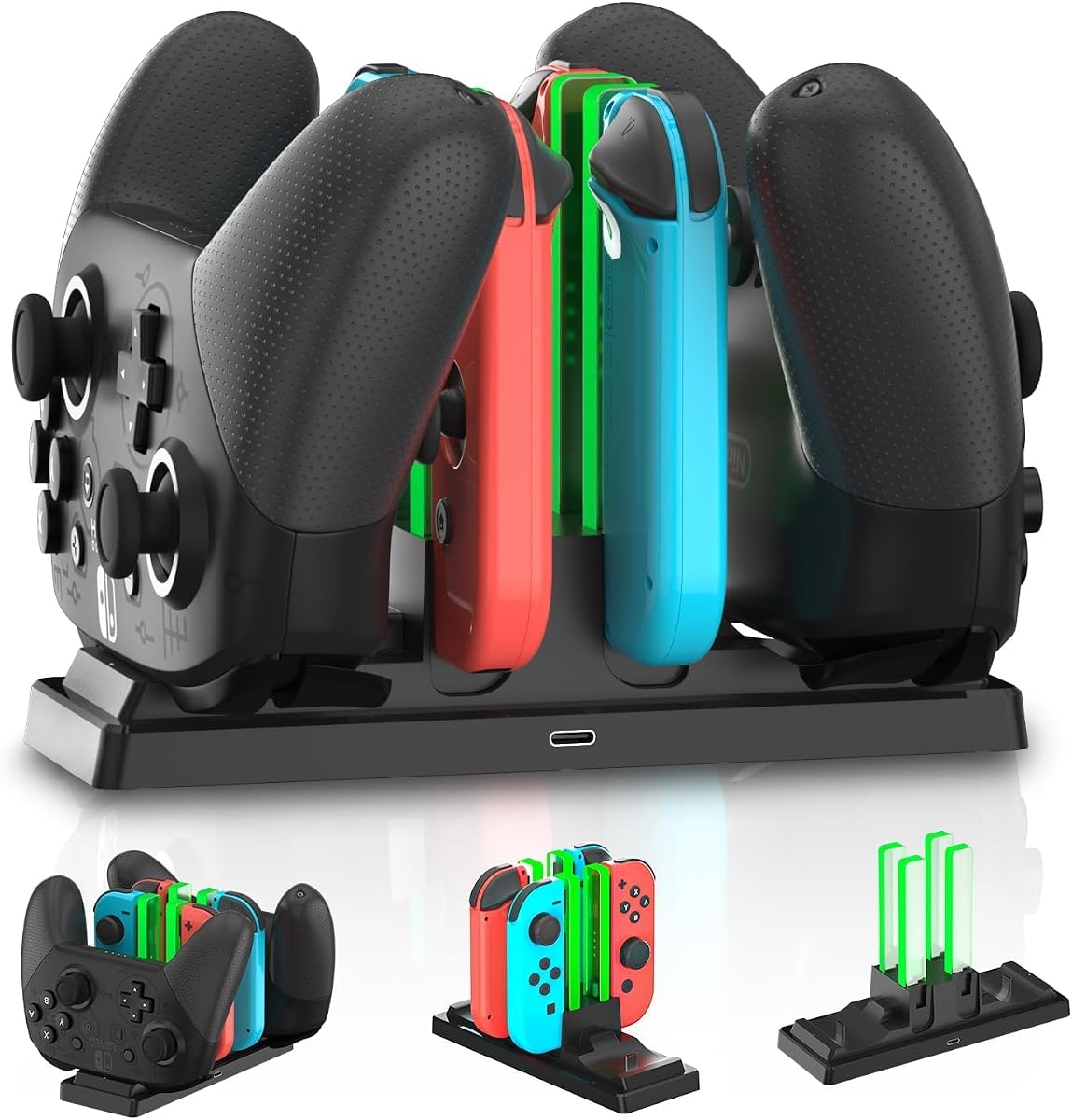
The PURBHE Six-Device Dock stands out for accommodating more than just original Joy-Cons. It supports Nintendo Switch Joy-Con controllers, Nintendo Pro Controllers, and PS5 controllers, giving the supplied 4.7 rating product broader usefulness for mixed-controller gaming setups.
We may earn a commission when you buy through this link, at no additional cost to you.
Its charging capacity can handle four Joy-Cons plus two Nintendo Pro Controllers, or four Joy-Cons plus two PS5 controllers. Power can come through the game console, a USB hub, or a wall charger using the USB Type-C input. A charging-status LED gives a general indication that the station is operating as intended.
The smart protection chip is listed as guarding against overcharging, overvoltage, overcurrent, and short-circuit issues. The package includes an 80-centimeter USB-C cable, but no controllers. Its ability to support Pro and PS5 hardware is the defining advantage, although individual third-party controller shapes may not fit every slot.
Choose this dock if your collection mixes Joy-Cons with compatible official-style Pro or PS5 controllers. It is a stronger fit than a basic four-Joy-Con dock for larger families, while being less specialized than the dedicated Switch 2 magnetic station later in this guide.
Supporting Joy-Con, Nintendo Pro, and PS5 controllers makes this useful for players who move between platforms. The six-device layout reduces the need for separate charging accessories.
Console, USB hub, and wall-charger inputs offer flexibility around an entertainment center. The included cable supports immediate setup with a compatible source.
We may earn a commission when you buy through this link, at no additional cost to you.
This two-port LED charging station is aimed at owners of several modern full-size controllers rather than players who primarily use detached Joy-Cons. It supports Switch Pro and Switch 2 Pro Controllers, PS5 controllers, Xbox Series X|S controllers, and Xbox Elite Series 2 controllers.
We may earn a commission when you buy through this link, at no additional cost to you.
Its 4.1 rating reflects useful cross-platform support, but it is lower than the ratings of the four-Joy-Con leaders in this guide. The station uses removable USB Type-C adapters for drop-in charging, helping reduce wear on the controller connector. A front LED uses red while charging and green when full.
A 5V/2A USB wall adapter is recommended for stable charging but is not included. Low-power USB sources may lead to slow or intermittent charging. The station also explicitly excludes PowerA, Luna, and other third-party Pro controllers, and thick protective cases may need to be removed when a controller does not fit properly.
This model is best for a two-player desktop setup with compatible official-style controllers. It saves space and offers clearer per-controller status than many four-Joy-Con docks, but buyers should confirm controller compatibility and source power before purchasing.
The two ports can serve controllers from Nintendo, PlayStation, and Xbox. This makes the station practical for a living room where players regularly switch among current-generation systems.
Separate red and green front indicators make it easier to see whether a controller is charging or full. Removable adapters can also be replaced without replacing the entire base.
We may earn a commission when you buy through this link, at no additional cost to you.
The PURBHE Six-in-One Dock combines four Joy-Con positions with room for two full-size controllers. Its 4.5 rating reflects a balanced feature set, and the station is aimed at players who want one organized charging point for original Switch, Switch OLED, Pro Controller, and compatible PS5 hardware.
We may earn a commission when you buy through this link, at no additional cost to you.
The listed charging estimates are approximately 3.5 hours for a Pro Controller and 2.5 hours for a Joy-Con. A light display helps communicate charging status, while smart-chip protection is designed to guard against excessive temperature, current, and voltage. The ABS construction and anti-slip pads support stability on a desk or TV stand.
This dock can also organize controllers as a display stand, giving it a secondary benefit beyond charging. PowerA controllers are specifically excluded, so that limitation matters for anyone who owns this licensed controller line. The supplied information does not identify a wall adapter, making the need for a suitable USB-C power source worth considering.
It is a strong match for a multi-controller household that values capacity and organization over a very small footprint. Buyers should confirm every controller's shape and model, especially if their collection includes PowerA accessories.
Six charging positions allow several players to leave controllers together after a session. The combination dock and stand format helps maintain a cleaner gaming area.
The integrated light display makes station activity easier to identify. Protection circuitry adds safeguards for routine charging, although the dock still requires compatible controllers and suitable power.
We may earn a commission when you buy through this link, at no additional cost to you.
The PowerA Joy-Con Charging Dock is an officially licensed four-slot station for Nintendo Switch. Its 4.7 rating places it among the strongest-rated products here, and its straightforward design focuses on the essential jobs of charging and storing detached original Joy-Con controllers.
We may earn a commission when you buy through this link, at no additional cost to you.
Each Joy-Con slides into an easy-to-reach rail, with an individual LED indicating its charge level. The weighted base adds stability, while USB power keeps the charging process familiar. The official license makes this an appealing option for buyers who prioritize established accessory design and straightforward controller fit.
The main limitation is specialization: the four positions are intended for Joy-Con controllers rather than Nintendo Pro Controllers. It therefore offers less flexibility than the six-in-one stations or the two-port universal model. It also has no decorative lighting, which may be a drawback for users who want their gaming setup to double as a display piece.
For anyone with four original Joy-Cons and a preference for a straightforward, licensed accessory, this is an excellent practical choice. It is particularly useful for families who regularly play multiplayer games and want a central location where every controller can be checked at a glance.
Individual LEDs are more informative than one shared indicator when several controllers charge at different rates. You can quickly identify which Joy-Con still needs time.
The weighted base helps prevent the dock from sliding while controllers are inserted or removed. Its licensed design closely reflects the familiar Nintendo dock format.
We may earn a commission when you buy through this link, at no additional cost to you.
The HEATFUN 6-in-1 Dock combines four Joy-Con charging positions with two slots for compatible Nintendo Switch Pro Controllers. Its 4.1 rating reflects a functional alternative for mixed-controller setups, particularly where two players use full-size Pro Controllers.
We may earn a commission when you buy through this link, at no additional cost to you.
Red and green LEDs indicate charging and completed status, while the unified base helps keep a collection of controllers organized. The station connects through a 5V/2A USB power adapter, which allows users to select an appropriate wall adapter or powered hub for the location.
Compatibility is limited to original Nintendo Switch Joy-Con controllers and compatible Nintendo Switch Pro Controllers. It does not support Switch 2 controllers, PowerA products, HORI controllers, or other third-party designs. That makes accurate model checking essential before buying.
The HEATFUN dock makes sense for a mixed Nintendo household that needs more than four charging positions and wants clear status lights. It is less versatile for collectors or players with multiple third-party controller brands.
The two Pro Controller positions complement the four Joy-Con slots. This arrangement suits families who alternate between solo and multiplayer play.
Keeping controllers in one compact base reduces clutter and gives each device a defined home. The lighting provides basic charging feedback without decorative effects.
We may earn a commission when you buy through this link, at no additional cost to you.
This four-Joy-Con dock takes a distinctive approach to power by drawing from an original Nintendo Switch console dock. The 4.6-rated product provides a useful solution for players who already keep the console docked and do not want another cable running across the entertainment center.
We may earn a commission when you buy through this link, at no additional cost to you.
A built-in USB plug connects to the console dock, which then supplies power to the charging station. Four controllers can charge simultaneously. Individual indicators turn red while charging and blue when fully charged or in standby, giving convenient feedback without adding a separate light per physical controller.
Protection circuitry is listed for overcharging, overvoltage, overcurrent, and short-circuit conditions, while low standby consumption helps limit unnecessary energy use. The limitation is dependence on the console dock and its power output; the product is not presented as a standalone wall-powered option.
This dock is ideal for a permanently docked Switch setup in which controllers are regularly removed and stored. If you use the console mostly in handheld mode or lack an original console dock, choose a USB-powered station instead.
The integrated side plug eliminates the need for a separate cable between the charging dock and the console dock. That can keep the area around a television or stand noticeably tidier.
Red and blue indicators show whether each slot is charging or ready. The low-power design also makes the dock practical for a permanent installation.
We may earn a commission when you buy through this link, at no additional cost to you.
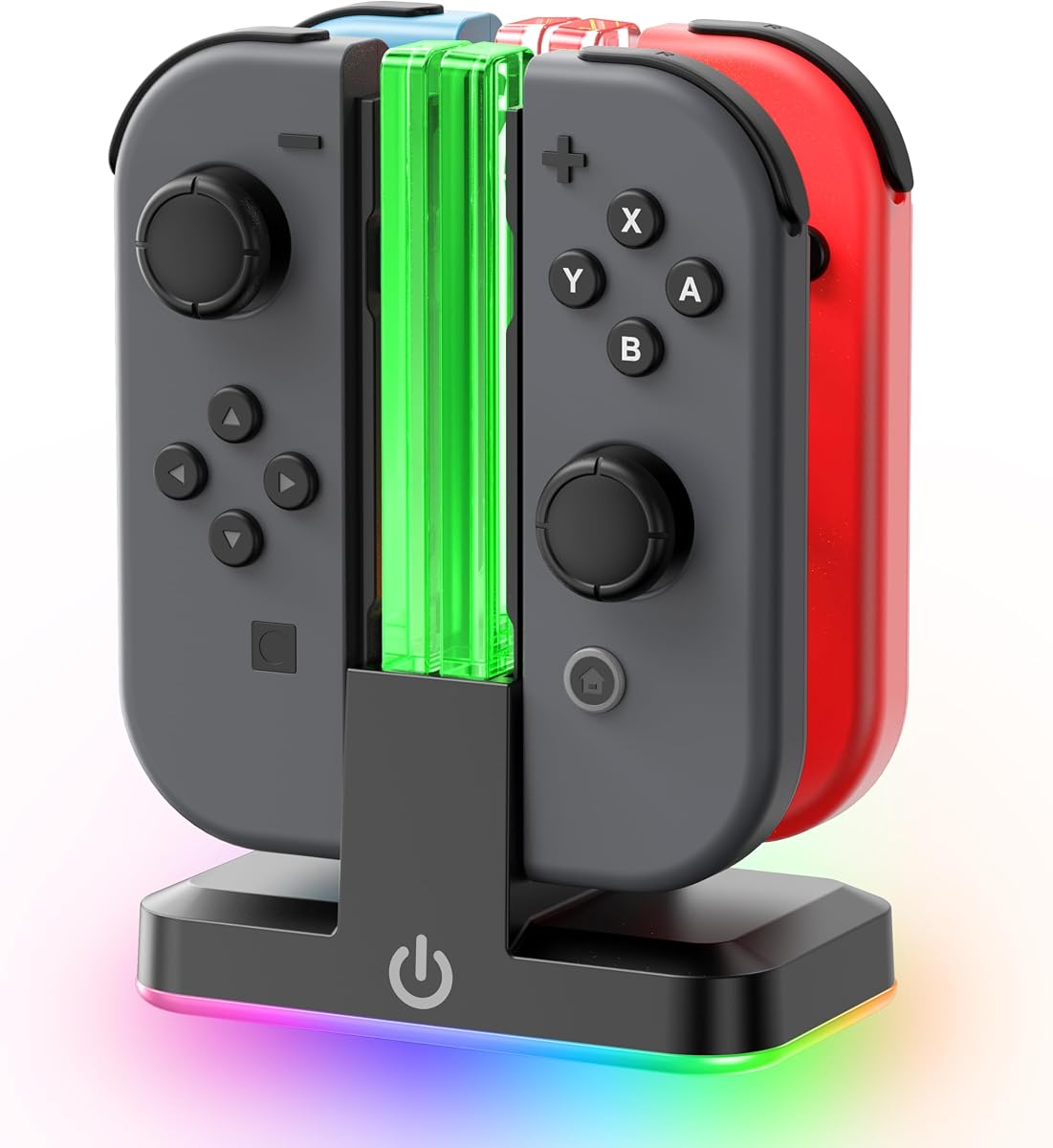
The Tokluck RGB Joy-Con Dock combines familiar four-slot charging with a more decorative presentation. Its 4.6 rating reflects the appeal of nine RGB light modes, individual charging indicators, and a slide-in design intended for original Nintendo Switch and OLED Joy-Con controllers.
We may earn a commission when you buy through this link, at no additional cost to you.
Four controllers can charge simultaneously, with a listed full-charge time of approximately 2.5 hours. Indicators beside each position turn red during charging and green when complete. An RGB strip along the base offers nine lighting modes, which can be changed or turned off through the touch control.
The package includes a USB-C cable, charging stand, and user manual; Joy-Con controllers are not included. Switch 2 Joy-Cons are explicitly incompatible, so the model should not be confused with the newer magnetic station in this list. Users who dislike decorative LEDs may also prefer the more restrained PowerA or HyperX docks.
Choose this station when a gaming setup benefits from customizable ambience as well as organization. It is a practical fit for original Switch and OLED owners who want visible status lights and a more distinctive display piece.
Nine RGB modes allow the dock to blend into a subdued or colorful gaming area. Touch control makes changing the effect convenient without navigating separate settings.
The dock is stated to charge four Joy-Cons in approximately 2.5 hours. Per-slot indicators make charging progress visible at a glance.
We may earn a commission when you buy through this link, at no additional cost to you.
The SUPCASE Charging Dock is built specifically for the 2025-release Nintendo Switch 2 Joy-Con controllers. Its 4.7 rating and feature-focused design make it the most relevant choice in this guide for Switch 2 owners, while its magnetic system offers a more refined alternative to traditional slide-in rails.
We may earn a commission when you buy through this link, at no additional cost to you.
Four controllers can charge at once, and dual-side charging allows either orientation for convenient placement. Magnets help align each Joy-Con securely and reduce repeated port contact. Individual LEDs indicate whether a controller is charging or fully charged, while nine RGB modes provide customizable lighting for a gaming shelf.
A built-in smart chip detects charging status and stops once a controller is full, helping protect against overcharging and overheating. The compact base also organizes controllers in a dedicated location. Joy-Cons are not included, and compatibility is specifically limited to the Nintendo Switch 2 release rather than original Switch controllers.
This is the premium pick for players who have committed to the Switch 2 ecosystem. Its magnetic convenience, flexible orientation, lighting, and compact design justify treating it as a display-oriented centerpiece for a newer gaming setup.
The magnetic design guides controllers into the correct charging position. Dual-side support means users do not need to memorize a preferred orientation before docking.
Nine RGB modes and a compact black finish allow the dock to function as part of a deliberate gaming display. Individual status lights add useful information to the visual design.
We may earn a commission when you buy through this link, at no additional cost to you.
The HyperX Chargeplay Quad is a refined four-slot charging station for original Nintendo Switch Joy-Cons. Its 4.8 rating is the highest among the ten products in the guide, reflecting a straightforward design that focuses on secure docking, useful battery indicators, and dependable organization.
We may earn a commission when you buy through this link, at no additional cost to you.
All four Joy-Con controllers can charge simultaneously. The stable docking design keeps controllers securely positioned, while the battery indicators show the charging status of the connected devices. A two-meter USB cable provides more placement flexibility than a short lead, making it easier to reach a nearby console, hub, or wall adapter.
Its focus keeps the product refreshingly uncomplicated. There are no decorative RGB modes, no Pro Controller positions, and no support for the magnetic arrangement found on Switch 2 Joy-Cons. Those limitations make it less flexible than several larger docks, but they also narrow its purpose to one of the most common charging tasks.
For an original Switch or OLED household seeking a clean, stable, and highly rated four-Joy-Con dock, this is the strongest all-around recommendation. It is especially convenient when a longer cable is needed to keep the charging station near a shared entertainment area.
Battery indicators provide useful information for each connected controller. This is helpful when players need to know which Joy-Con is ready before starting a session.
The included two-meter cable offers practical freedom when positioning the dock. It can reach a console, charging hub, or compatible wall adapter more easily than a very short lead.
We may earn a commission when you buy through this link, at no additional cost to you.
The most important consideration is controller compatibility, followed by the number of devices you regularly use and how the station receives power. Capacity, lighting, protection, and placement should then be matched to your gaming space and habits.
Choose the dock that explicitly matches your hardware rather than assuming every Joy-Con fits every station.
Match charging capacity to your typical multiplayer setup, not merely your collection size.
Use a compatible and appropriately rated power source to avoid slow, intermittent, or missing charging.
Exact model compatibility matters more than broad platform branding, especially for Pro Controllers.
Per-controller lights offer the clearest information during busy multiplayer sessions.
Look for documented electrical safeguards and use the station exactly as instructed.
Prioritize useful status indicators first, and treat decorative RGB lighting as an optional preference.
Select a size and footprint that fit the space where you will actually leave the controllers.
Before first use, confirm that every controller you intend to charge is compatible with the station. Place the dock on a stable, dry surface near a suitable power source. Connect the appropriate USB cable to the dock and then to a compatible wall adapter, powered hub, console, or console dock, depending on the model's design.
Slide or place each controller into its assigned position slowly until it sits securely and the charging indicator changes. Do not force an unfamiliar controller into a slot, and do not attempt to charge Joy-Con or Pro Controller hardware that the manufacturer explicitly excludes. If a controller does not charge, remove any thick case, reseat it, and verify both the power source and model compatibility.
Keep the charging contacts clean and dry, and avoid placing the station in direct sunlight, near heat sources, or where liquids can collect. Follow any indicator guidance supplied with the product, unplug the dock when it will not be used for an extended period, and inspect the cable and connectors periodically for visible wear or damage.
Most of the listed stations support only one Joy-Con generation. Original Nintendo Switch and Switch OLED models generally need an original Joy-Con dock, while Switch 2 Joy-Cons require a compatible magnetic charging design. The SUPCASE dock specifically supports the 2025 Switch 2 release. Do not assume that a station advertising Joy-Con compatibility supports both generations.
No. Every charging station in this guide is an accessory and requires compatible controllers to be purchased separately. Listings that include only a dock, cable, manual, or other included accessories should not be interpreted as a complete controller package.
Some six-in-one stations can charge two compatible Nintendo Pro Controllers, and the two-port universal dock supports selected official-style Pro controllers. Other products, including the basic four-Joy-Con models, are designed only for Joy-Cons. Many manufacturers explicitly exclude PowerA, HORI, Luna, and other third-party Pro controllers, so verify the exact model before purchase.
Follow the requirements stated by the station's manufacturer. The two-port universal dock recommends a 5V/2A USB wall adapter and does not include one, while many other stations include a USB-C cable but still require a suitable power source. A low-power port may produce slow or intermittent charging, particularly when several controllers are connected.
Charging time varies by dock, controller condition, and power source. The Tokluck dock states approximately 2.5 hours for four original Joy-Cons, while the PURBHE six-in-one station lists about 2.5 hours for a Joy-Con. Treat these as product-specific estimates rather than guarantees and use the recommended power source for the most consistent results.
Several stations can also function as storage racks or display stands, especially when they are connected to power. If you want to use a station primarily for storage, consult its instructions and avoid leaving controllers in a slot that does not fit securely. A powered dock should still be connected to the appropriate source whenever charging is expected.
On the listed docks, red generally indicates that a controller is charging, while green indicates a full charge. Some models instead use blue to show completion or standby. Since indicator behavior can vary, use the product's included instructions as the definitive guide rather than assuming every dock uses the same color scheme.
No. A six-device capacity usually describes four Joy-Con slots plus two full-size controller positions, and compatibility for those larger slots varies. Some models exclude PowerA, HORI, Switch 2, and other third-party controllers. Count the supported device types separately and confirm that each controller model fits before selecting a larger station.
The PowerA Joy-Con Dock offers the best focused four-slot option for original Switch owners, while the HyperX Chargeplay Quad pairs a 4.8 rating with secure docking, clear indicators, and a long included cable. The SUPCASE Switch 2 Dock is the premium choice for newer magnetic Joy-Cons, combining dual-side placement, individual status lights, and nine RGB modes.
For mixed-controller households, prioritize a six-in-one or universal two-port design only after confirming that your exact controllers are supported. Capacity, stable power, per-controller indicators, and a footprint that suits your shelf are more important than decorative lighting. A smaller four-slot dock is often the simplest solution when you only use original Joy-Cons.
Before ordering, verify the controller generation, connector format, included cable, power requirements, and compatibility exclusions in the current product listing. Ratings and product information can change over time, so checking the latest listing details and availability will help ensure the station still fits your setup.