
Govee Gaming Light Bars Pro
4.7Editor score
Triple-sided architectural lighting
Windows screen color syncing
Razer Chroma compatibility
Our Gaming Room Lights guide compares 10 smart, RGB, ambient, and music-sync options for gaming setups, TVs, bedrooms, and studios.
Gaming room lights do more than brighten a screen. They can frame a monitor, reflect game colors, animate to music, and create a more immersive atmosphere for play, streaming, and downtime. A good lighting setup should match the room, respond to your entertainment, and complement your existing equipment without creating distracting glare.
This guide compares ten indoor lighting products using their stated design, control options, lighting effects, installation requirements, smart-home compatibility, and customer ratings. The list covers TV light bars, flexible strips, gaming bars, corner floor lamps, and modular hexagon panels, giving shoppers several practical ways to improve a gaming space.
Each review explains the most useful strengths and the trade-offs associated with a particular form factor, helping you decide whether your setup needs desk-level illumination, wall-mounted color, floor-to-ceiling ambience, or a full decorative wall. Product availability and pricing can change, so confirm current details before purchasing.
4.7Editor score

4.6Editor score

4.5Editor score
The table below compares each lighting format, control method, compatibility, and installation style, making it easier to identify the right option for a monitor, television, wall, or floor.




The Govee Smart Light Bar is an all-around ambient lighting solution for a gaming room, living room, or television area. Its 4.6 rating reflects a strong balance of colorful segmented effects, straightforward smart control, and flexible placement. The combination of RGBIC color and tunable white light allows it to handle energetic game sessions as well as relaxed viewing.
We may earn a commission when you buy through this link, at no additional cost to you.
Its standout strength is the range of effects available without a complicated hub. Segmented zones can show multiple colors at once, while the built-in microphone reacts to surrounding sound. The Govee Home App adds brightness control, scene modes, schedules, room grouping, and access to community effects. Alexa and Google Home support broaden the smart-home options further.
The light bar is not a full desk-lighting solution, and the stated recommendation for monitors under 45 inches is worth noting. It is also designed primarily as ambient light, so its ability to illuminate a keyboard or provide task lighting is limited. The 106-inch cord provides useful reach, while flat, vertical, and mounted configurations help it fit different furniture arrangements.
This is the strongest general recommendation for shoppers who want polished ambient lighting around a modest television or monitor. It combines dramatic color, sound-reactive effects, and modern smart-home support without requiring a separate hub. Buyers with larger displays should consider a longer or more flexible system instead.
RGBICWW technology gives the bar more visual variation than a conventional single-color strip. Different sections can display different hues, while the white range supports more subtle everyday illumination for watching or relaxing.
App scheduling, room grouping, voice control, and direct effect selection make the light convenient for regular use. Music sync also adds atmosphere without requiring manual scene changes during every game or movie.
We may earn a commission when you buy through this link, at no additional cost to you.
This Govee RGBIC strip is a practical choice for adding color around a desk, shelving unit, gaming monitor, or bedroom wall. It carries a 4.4 rating and uses segmented color to produce a more varied look than a basic RGB strip. The 16.4-foot length provides enough reach for many compact gaming setups.
We may earn a commission when you buy through this link, at no additional cost to you.
The Govee Home App is the main control method, offering 16 million colors, custom modes, 64-plus preset scenes, and regularly updated AI-created themes. An integrated high-sensitivity microphone supports 11 music modes. Installation relies on adhesive backing, so the surface should be wiped clean and dried before mounting.
Compatibility is the main limitation. The product does not support Alexa, which makes it less suitable for a smart room built around voice commands. It is also intended for indoor use, and debris beneath the adhesive can weaken attachment. Despite those limits, the combination of flexibility, effects, and straightforward app control is appealing.
Choose this strip when you want colorful indirect lighting on a modest budget and do not need voice-assistant integration. It is particularly effective when hidden behind a monitor, beneath a desk, or along a shelving edge, where the light can spread across nearby surfaces rather than shining directly toward the player.
The strip can follow the edges of furniture or trace a wall, making it useful where rigid bars would not fit. Its segmented display creates a more layered look while preserving the convenience of a single continuous installation.
The extensive scene selection covers parties, holidays, movies, and everyday use. Music mode adds a lively response to sound, while custom color settings let users develop a consistent look for a specific gaming station.
We may earn a commission when you buy through this link, at no additional cost to you.
Govee Glide Wall Lights are designed to turn a plain wall into a gaming-room focal point. The two-panel set has a 4.5 rating and a rigid, segmented design that can create horizontal lines or flowing multicolor displays. Unlike a hidden strip, the visible hardware becomes part of the room's decor.
We may earn a commission when you buy through this link, at no additional cost to you.
Patented RGBIC technology can show up to 24 colors simultaneously, and the Govee Home App provides 16 million color choices, DIY modes, 64-plus scenes, and 11 music modes. Control can take place through the app, Bluetooth, Wi-Fi, Alexa, or Google Assistant. The AI Lighting Bot 2.0 can turn spoken, written, or image-based ideas into effects.
The panels are hard rather than flexible, which means installation requires more deliberate placement. All bars should be connected before plugging in the power. Included adhesive and hook-and-loop materials permit installation on smooth indoor surfaces, although each panel measures 37.6 centimeters long, 3.2 centimeters wide, and 2.6 centimeters high.
This product is ideal for a gaming room where visible wall lighting is the goal. It offers more dramatic decor than a concealed strip and more control than a basic TV backlight. Shoppers with small spaces should map the panel dimensions carefully, while those wanting a flexible outline may prefer a strip-based option.
The geometric panels create an intentional architectural appearance rather than hiding light behind a display. Their segmented sections allow overlapping gradients and color transitions that remain visible across the wall.
The included mounting materials allow horizontal or paired arrangements, but the panels cannot bend around furniture. Planning their position before securing the adhesive helps prevent an uneven or cramped final layout.
We may earn a commission when you buy through this link, at no additional cost to you.
The Govee RGBIC Gaming Light Bars H6047 are purpose-built for a desktop gaming setup and hold a 4.7 rating. Their segmented RGBIC illumination produces independent color zones across the bars, while the physical desktop dial provides quick access to power, brightness, colors, and modes without opening the app.
We may earn a commission when you buy through this link, at no additional cost to you.
One of the most useful integrations is Razer Chroma support through Razer Synapse 3 and the Govee applications. The bars also react to audio from games, videos, speakers, and headphones. There are more than 60 scene modes, 16.8 million available colors, and an AI Lighting Bot 2.0 that can create effects from spoken, typed, or photographed ideas.
The product does not contain a camera and does not support screen color picking, which distinguishes it from setups that automatically reproduce what appears on a display. Bluetooth and Wi-Fi app control, plus Alexa and Google Assistant compatibility, provide several ways to manage the lights. This breadth of features also means more setup consideration than a basic strip requires.
This is an excellent choice for a dedicated gaming desk, particularly for a gamer who wants a dial, app access, audio response, and Razer integration in one package. It is less suitable for someone whose main requirement is automatic screen color matching, because that function is not supported.
The desktop dial puts frequently used settings within reach during play. It is useful for dimming the bars for a late session or changing a mode without navigating an app while the game is running.
Razer Synapse 3 integration extends the product's appeal to an established gaming ecosystem. It is a more specialized feature than basic RGB automation and works best for users already invested in compatible Razer software and peripherals.
We may earn a commission when you buy through this link, at no additional cost to you.
The MATICOD TV backlight is a budget-oriented way to add color behind a television or gaming display. It has a 4.5 rating and is designed for 32- to 43-inch screens, with a 9.84-foot strip that can trace most or all of a smaller television's rear edge.
We may earn a commission when you buy through this link, at no additional cost to you.
It offers more ways to operate than many entry-level strips: Bluetooth app control, a 21-key infrared remote, and a three-key inline controller. The duoCo Strip app provides more than 16 million colors and over 21 dynamic modes, including timing and microphone modes. RGB 5050 LED beads form the light source.
As a TV-oriented strip, it is less versatile than longer products designed to wrap around ceilings or entire rooms. It also has no smart-home voice integration. Installation is simple, although the surface should be smooth, clean, and dry for the adhesive backing to hold properly.
This light is a sensible choice for a first gaming-room upgrade, a smaller television, or a bedroom gaming nook. It delivers the essential glow, color, and music response without the feature complexity of premium smart systems. For larger screens or broader room outlines, choose a longer strip instead.
The included physical controls provide a useful alternative to the app. This makes it easier to change brightness or effects when a phone is not nearby, while the app opens up the more extensive color and mode library.
The stated 32- to 43-inch compatibility and 9.84-foot length provide a useful sizing guide. Measure the television's perimeter and available cable path before installation to minimize excess length or gaps.
We may earn a commission when you buy through this link, at no additional cost to you.
The Bright RGB+IC Corner Floor Lamp brings a different scale of ambience to a gaming room. Rather than tracing a screen edge, it fills a vertical corner with saturated color and dynamic effects. Its 4.6 rating indicates a favorable reception, and the tall design can make a compact room feel more visually defined.
We may earn a commission when you buy through this link, at no additional cost to you.
RGB+IC technology supports 16 million colors and static or moving effects across the lamp's illuminated sections. A high-sensitivity microphone enables music synchronization, while the Magic Lantern app, remote control, and built-in control box provide three operating methods. The app supports brightness and light-speed adjustments for more precise tuning.
Assembly requires no tools: the detachable sections push together, and a patented foldable base helps with placement and stability. The lamp is indoor-only, and each remote must be paired individually with its corresponding lamp if several are installed. It connects through Bluetooth only and does not support Wi-Fi or Alexa.
This is a strong option for a corner, streaming backdrop, or gaming zone that needs a large vertical light source. It can replace a collection of smaller accent lights with one prominent fixture, although it does not illuminate a desk for close-up work and should not be placed in damp areas.
The lamp's height and segmented structure create a larger-than-life glow. It works particularly well when a corner is visible to a streaming camera or positioned behind the gaming chair as a color anchor.
The detachable poles and foldable base simplify assembly and movement between rooms. While smart-home voice control is absent, the remote, inline control box, and app still cover the essential lighting functions.
We may earn a commission when you buy through this link, at no additional cost to you.
The OIYN Smart RGBICW Corner Floor Lamp is a lightweight, portable option for gamers who want a large color source without permanent wall installation. It has a 4.3 rating and uses segmented RGBICW technology to show several colors simultaneously, plus tunable white for more conventional room lighting.
We may earn a commission when you buy through this link, at no additional cost to you.
Its app and included remote allow control of brightness, color, effects, timers, and schedules. The product offers 16 million DIY color choices and more than 68 scene modes. Music synchronization can react to music, movies, or game audio, making the lamp useful for both focused play and social viewing.
The tool-free setup and lightweight design make relocation straightforward. However, the product does not support Alexa or Google Assistant, so it is a less convenient choice for a fully voice-controlled room. Its 4.3 rating is still positive, but it trails the highest-rated products in the list.
This lamp is a good fit for renters, compact gaming rooms, and setups that need movable ambient lighting. Choose it over a fixed wall panel when portability and a broad collection of scenes matter more than smart-home voice integration.
The floor-lamp format can be repositioned as the room layout or gaming station changes. It offers a large luminous surface without requiring holes or permanent mounting points.
Timer and schedule settings can automate lighting for regular gaming sessions or evening relaxation. These features add convenience even without voice-assistant support.
We may earn a commission when you buy through this link, at no additional cost to you.
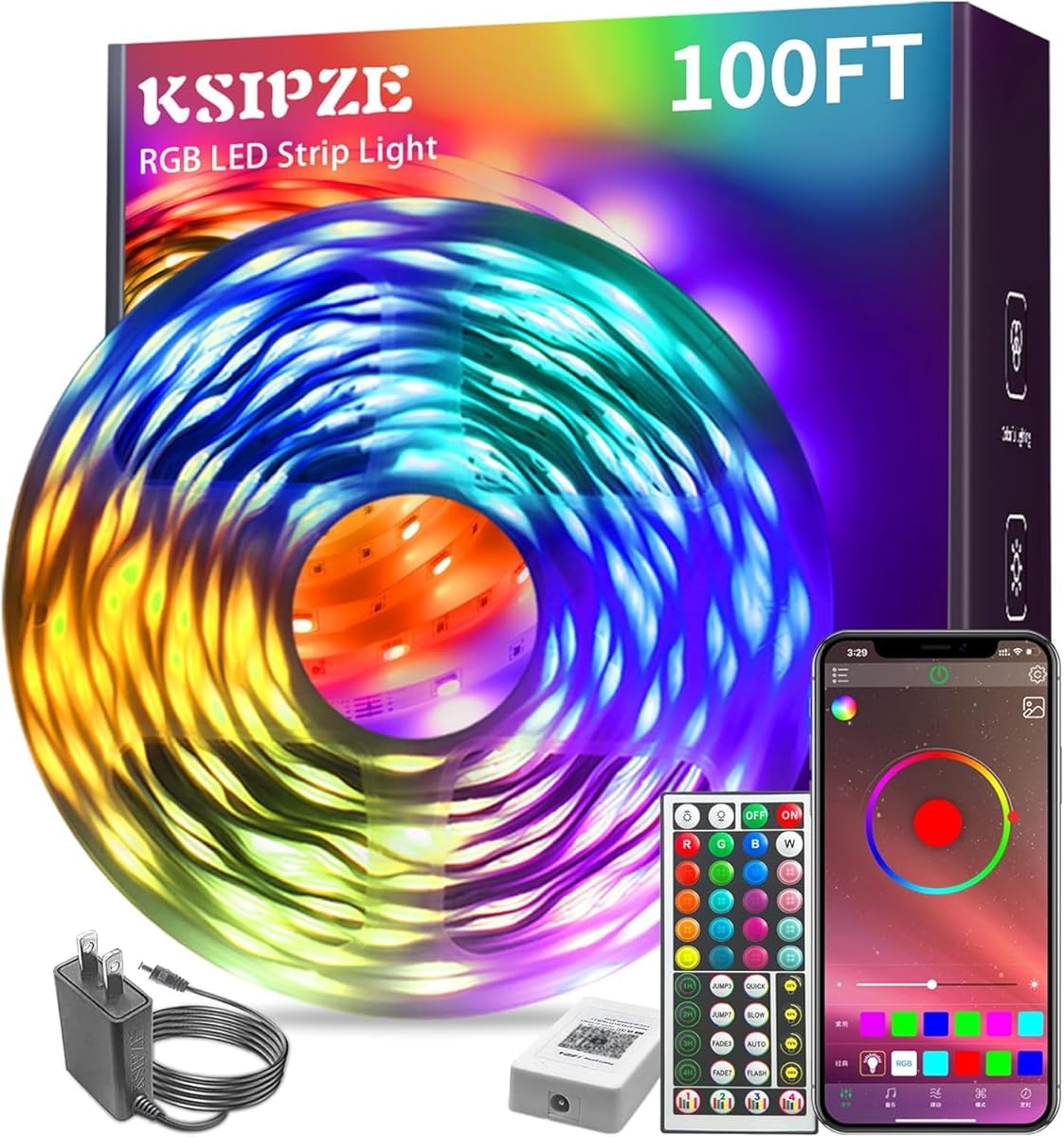
The KSIPZE 100ft RGB strip is designed for gamers who want a continuous line of color rather than a single screen accent. Its 100-foot length can outline a large room, wrap around shelving, or trace ceiling edges. The product has a 4.4 rating and is controlled through an app or infrared remote.
We may earn a commission when you buy through this link, at no additional cost to you.
Users can select among 16 million colors, adjust brightness, and choose modes such as flashing, jumping, and fading at different speeds. A built-in microphone enables music synchronization, while timing settings allow the strip to turn on and off automatically and repeat on selected dates.
The major distinction from RGBIC products is the absence of separately controlled color segments. It can still create a broad single-color gradient or repeating effect, but it will not deliver the same layered multicolor segmentation. The long adhesive installation also requires more planning and careful surface preparation.
This strip is ideal for large bedrooms, open-plan gaming spaces, and holiday or party decorating. It offers tremendous coverage and useful automation at a modest entry point, but buyers wanting advanced segmented color should examine an RGBIC model instead.
A 100-foot run can cover multiple walls or create a continuous ceiling effect. That scale makes the strip more useful for room-wide ambience than for a small desk-only installation.
Repeat timing is useful when the same lighting schedule supports gaming, study, or relaxation routines. It also reduces the need to switch the strip on manually each evening.
We may earn a commission when you buy through this link, at no additional cost to you.
The Govee Gaming Light Bars Pro are the most visually elaborate desktop option in this guide. Their 16-inch bars use triple-sided illumination, transparent mechanical-style plates, and suspended diffusion to produce a futuristic 3D glow. A 4.7 rating places them among the strongest customer-rated products listed.
We may earn a commission when you buy through this link, at no additional cost to you.
Govee Desktop for Windows can synchronize RGBIC lighting with the screen in real time, while Razer Chroma compatibility broadens ecosystem support. A built-in microphone handles music sync, and Matter support enables Alexa or Google Home control without a separate hub. The Govee Home App provides more than 60 scenes and AI-generated lighting options.
Screen color matching does not operate directly through the bars and depends on compatible Govee Desktop software for Windows. That platform limitation matters for users of other operating systems. The product also occupies more desk space than a basic rear strip and places the emphasis on appearance and gaming atmosphere rather than task lighting.
This is the premium recommendation for a dedicated gaming desk that can accommodate sculptural light bars. It combines stable hardware, broad smart-home support, music response, and genuine screen synchronization in a polished package, provided the computer runs Windows and the desk has sufficient space.
Triple-sided illumination and the weighted bases create a more dimensional appearance than conventional light bars. The futuristic styling is designed to remain visible as part of the setup rather than disappear behind equipment.
Real-time synchronization can make fast scene changes feel more immersive, especially during action games. The requirement for Govee Desktop and Windows is the main caveat for cross-platform users.
We may earn a commission when you buy through this link, at no additional cost to you.
The 25Pack RGB Hexagon Lights provide a completely different approach to gaming-room ambience. Five interconnected honeycomb panels contain 25 illuminated hexagons, creating a geometric wall display suitable for a gaming room, studio, garage, workshop, or car-detailing space. The product carries a 4.4 rating.
We may earn a commission when you buy through this link, at no additional cost to you.
Its modular design allows users to build a wall or ceiling arrangement and connect multiple sections. The app and remote provide access to 358 RGB colors, dimming, speed controls, and music synchronization. These features allow the installation to function both as decorative accent lighting and a brighter room or work-light source.
This is the most involved installation in the group. A multi-panel arrangement requires sufficient wall area, secure mounting, and more attention to cable routing than a single strip or light bar. Voice-assistant support is not stated, so direct app or remote control is the intended operating method.
The lights are a compelling choice when the gaming room benefits from a bold architectural backdrop. They are less appropriate for a small desk area or renters who need a temporary, tool-free installation. The modular format also makes it easier to expand the design as the room changes.
The honeycomb pattern adds visual structure that strips and corner lamps cannot provide. It can serve as the room's main decorative feature, especially above a desk, sofa, or display cabinet.
Interconnected sections can be arranged in many patterns on a wall or ceiling. Planning a layout before mounting also helps maintain balance and keeps power connections neat.
We may earn a commission when you buy through this link, at no additional cost to you.
The right gaming-room light depends on the display, room size, desired visual effect, and control preferences. Compare physical formats and smart features rather than judging every model by brightness alone.
TV and monitor bars concentrate color behind a screen, flexible strips outline furniture or walls, floor lamps fill vertical corners, wall panels become visible decor, and hexagon systems create a complete wall installation. Match the fixture to the surface you want to highlight. A rear bar is discreet but limited in reach, while a modular wall system can dominate a room and require much more space.
Choose the format that suits your screen size, floor area, and installation tolerance. The product list includes single bars, two-panel walls, portable lamps, long strips, and five-panel geometric displays.
A strip that looks substantial on a compact television can leave exposed sections on a larger display. Check the stated display compatibility, strip length, light-bar dimensions, and cord reach before buying. Also account for the depth of the television or monitor and whether the installation will block ventilation, cables, or nearby furniture.
Measure first, then compare dimensions. The MATICOD strip targets 32- to 43-inch TVs, while the Govee Smart Light Bar is recommended for monitors under 45 inches. Other products are designed to stand independently or cover a broader area.
Basic RGB lighting can change color across a continuous strip, while RGBIC systems divide the light into controllable sections. That segmentation produces simultaneous colors, gradients, and more dimensional effects. RGBICW adds tunable white, which can make the fixture more practical for everyday use and less visually aggressive during quiet moments.
If layered color and precise scene design matter, favor a segmented RGBIC product. For broad single-color illumination and a long room outline, a traditional RGB strip can be sufficient and may offer greater installation reach.
Music sync uses a built-in microphone to react to nearby sound, making effects more dynamic during games, movies, and streaming. Screen syncing can reproduce onscreen colors more precisely, but it may depend on particular software and operating systems. Confirm both the source of the audio and the compatibility of the required desktop application.
The Govee Gaming Light Bars Pro require Govee Desktop on Windows for color matching, and the H6047 supports Razer Synapse 3 integration without camera-based screen picking. For broader compatibility, several products include a microphone-driven music mode.
App control is useful for color selection, scene customization, scheduling, and brightness changes. Voice control adds hands-free operation, while Wi-Fi or Matter support can make a fixture easier to incorporate into an existing smart home. Bluetooth-only products remain perfectly capable but usually require the phone to be nearby for app adjustments.
List the voice assistants, hubs, and connections already in your setup before purchasing. Alexa and Google Assistant appear among the supported options for several Govee products, while the MATICOD strip, corner lamps, and hexagon system do not state voice-assistant support.
Adhesive strips need a smooth, clean, and dry surface, and dust or hair beneath the tape can reduce adhesion. Wall panels require careful alignment and curing time, while floor lamps and desktop bars need stable bases and accessible power connections. Multi-panel systems also call for cable planning and secure placement.
Factor in both initial installation and future adjustments. Renter-friendly options are generally portable floor lamps, while permanent-looking wall installations provide stronger decorative impact. Keep the original power supply and avoid damp locations for applicable products.
Most products in this category are designed to provide accent and atmospheric light rather than direct desk illumination. A bright screen in a dark room can feel uncomfortable, but adding visible fixtures directly in front of the display may introduce glare. Backlighting and corner illumination create a softer environment without occupying the keyboard area.
Use ambient fixtures for mood and indirect illumination. If you also need task lighting, add a separate focused desk lamp rather than trying to reposition a TV backlight or wall display into the viewing area.
A larger scene library is valuable only if you enjoy changing looks, while a physical controller is more useful when quick adjustments during play matter. AI-generated effects, room grouping, timers, and advanced software integrations can enrich a setup, but they should complement rather than outweigh reliable placement, good color, and easy operation.
Write down your top two or three desired functions before shopping. A budget strip with ample length may suit you better than a complex smart system you rarely configure, while a dedicated gamer may prioritize screen response and tactile controls.
Begin by planning the installation with the display or wall switched off. Measure the screen perimeter, furniture edges, floor corner, or intended wall area, then confirm that the power cable reaches a suitable outlet without crossing walkways. Clean and dry every adhesive surface before applying strips or mounting panels.
Connect all required components before powering the system, following the product instructions, and pair the app or remote before selecting a final layout. Start with moderate brightness and a neutral scene to evaluate the placement. For music sync, position the microphone where it can hear the intended audio without unnecessary room noise, and use a screen-syncing feature only with compatible software.
For long-term care, dust the light surfaces with a dry microfiber cloth and avoid moisture around electrical components. Do not pull on connected cables or remove adhesive-backed strips repeatedly. If an adhesive strip loosens, clean the surface before reinstalling it, and follow the manufacturer's guidance for cleaning, storage, and power accessories.
LED gaming lights are generally suitable for regular indoor use when installed according to the manufacturer's instructions. Keep power connections dry, avoid blocking ventilation, and do not exceed the supplied power supply. Users who are sensitive to flicker or bright light should begin at a lower brightness and select steady static effects rather than rapid flashing modes.
Placing light behind a screen can soften the contrast between the display and the surrounding wall without shining directly into your eyes. The result is especially effective with a light bar or strip sized for the display. Measure first, because a strip that is too short will leave uneven gaps and one that is too long may bunch around the edges.
RGB lighting displays colors along a continuous run, while RGBIC lighting divides the fixture into independently controlled sections. RGBIC can therefore show several colors simultaneously and create flowing gradients that conventional RGB strips cannot reproduce. The additional complexity is useful for layered gaming effects but is not necessary for every simple accent-lighting setup.
It depends on the product. Several Govee options in this guide support Matter, Bluetooth, or Wi-Fi and explicitly work without an additional hub, while other products use only Bluetooth app control. Voice-assistant compatibility also varies, so check the full connection list and the smart-home platform already used in your room before buying.
Many of the products include a built-in microphone that reacts to nearby music, movie, or game audio. More advanced desktop options can also connect with gaming software, including Razer Synapse 3 or Govee Desktop for Windows. Software-based screen matching has stricter compatibility requirements than microphone-based music sync, so verify your computer and installed applications.
A long strip can work well in a small room if most of it is hidden behind furniture or along a ceiling edge. The KSIPZE 100ft model offers substantial coverage but can dominate a compact space if every section remains visible. Choose a shorter TV-specific strip for a small display or choose a more concealed installation for a narrow room.
Wipe the mounting surface thoroughly and let it dry completely before applying the strip. Avoid dust, hair, moisture, textured paint, and frequently touched areas, and press each section firmly into place. Give the adhesive time to set, route cables without pulling the strip, and use a suitable alternative mount if the surface cannot support adhesive.
They are primarily designed for ambient illumination, decoration, and broad color effects rather than focused work lighting. Their vertical or wall-mounted output can brighten a room, but neither is intended to illuminate a keyboard at desk level. Pair them with a dedicated task lamp if the gaming area also requires comfortable close-up lighting.
The Govee Smart Light Bar is the strongest overall choice because it combines segmented RGBICWW color, music response, app control, voice support, Matter compatibility, and flexible placement. The Govee Gaming Light Bars Pro stand out as the premium desktop option with triple-sided construction and Windows-based screen synchronization, while the MATICOD TV Backlight delivers an approachable entry point for smaller screens.
Your priority should match the way you game. Choose a strip for long room outlines, a corner lamp for vertical ambience, wall panels for visible color, a desktop bar for screen-focused setups, or hexagon lights for a complete geometric display. Confirm dimensions, connection requirements, and operating-system limitations before making a final decision.
Product details, availability, and pricing can change, so check the current listing and included accessories at the time of purchase. With the right format and feature set selected, gaming room lights can make a setup more immersive while complementing the screens and furniture you already own.