
HP ZBook 8 G1i
4.1Editor score
RTX 500 Ada graphics
64GB DDR5 memory
2TB PCIe NVMe storage
Laptops for CAD work must handle demanding modeling, rendering, simulation, and multi-monitor workflows while remaining dependable enough for professional use. The right balance depends on processor capability, dedicated graphics, memory capacity, cooling, display quality, and whether portability matters as much as raw computing power.
We compared ten mobile workstations using the supplied specifications, focusing on the components that directly affect CAD performance. The list covers Dell Precision models, an HP ZBook, and a Lenovo ThinkPad, with attention to processor class, graphics memory, RAM, storage, screen size, connectivity, and operating system.
Each recommendation reveals what makes a particular laptop suitable for a different kind of CAD user, from a lighter design-focused system to highly expandable flagship workstations. Product configurations and marketplace listings can change, so readers should verify the current specifications against their chosen CAD software and peripherals.
4.1Editor score

4.4Editor score
5.0Editor score
As an Amazon Associate we earn from qualifying purchases.
The comparison below highlights the processor, graphics capability, memory, storage, and display of every laptop in the guide, making it easier to identify the right balance of performance and portability for individual CAD workflows.


This Dell Precision 7680 combines an Intel Core i9-13950HX vPro processor with 32GB of DDR5 CAMM memory and a 1TB PCIe NVMe SSD, making it a strong overall choice for intensive CAD work. Its 4.4 rating reflects a favorable balance of workstation performance, expandability, connectivity, and professional features.
We may earn a commission when you buy through this link, at no additional cost to you.
The processor reaches up to 5.5GHz and provides the headroom expected for large assemblies, detailed drawings, rendering, simulation, and multiple simultaneous applications. The 16-inch FHD+ anti-glare panel is practical for desktop work, while support for as many as three external 4K displays at 60Hz improves visibility across drawing palettes, reference images, and project schedules.
Its principal limitation is that the listed configuration relies on integrated Intel UHD graphics. That is acceptable for many 2D drafting tasks, but a CAD professional working with complex 3D views, realistic rendering, or GPU-accelerated visualization may prefer one of the RTX-equipped Precision 7680 configurations. The larger body and numeric keypad also favor a desk-based working style over maximum mobility.
Choose this model when processor speed, memory bandwidth, storage, multi-screen productivity, and the expandability of the Precision 7000 platform matter more than a dedicated GPU or minimal weight. It is a compelling recommendation for architects, engineers, and technical users who want flagship-class computing without moving to the larger 17.3-inch Precision 7780.
The 24-core i9 platform offers substantial parallel processing capacity, which is valuable when the workflow extends beyond drafting into rendering, data analysis, development, and simulation. Paired with 32GB of high-bandwidth memory, it is well suited to multitasking across demanding professional applications.
Thunderbolt 4, USB-C, HDMI, USB-A, and Ethernet create a flexible desk setup. Support for three external 4K monitors at 60Hz without a docking station can streamline multi-panel CAD layouts without requiring a separate high-cost display hub.
We may earn a commission when you buy through this link, at no additional cost to you.
This Precision 7680 pairs the Intel Core i5-13600HX vPro processor with an NVIDIA RTX 1000 Ada GPU containing 6GB of dedicated memory. The combination makes it a balanced mobile workstation for CAD users who need more graphics capability than integrated graphics can provide without moving to a top-tier flagship configuration.
We may earn a commission when you buy through this link, at no additional cost to you.
The 4.3-rated system includes 32GB of DDR5 CAMM memory and a 1TB PCIe NVMe M.2 SSD. Those specifications support comfortable multitasking, quick project loading, and room for common application working sets. Dedicated graphics are especially relevant for detailed model viewing, rendering, lighting, visualization, and other GPU-assisted design operations.
The i5 processor reaches up to 4.8GHz, which provides strong everyday performance but leaves the highest-end multi-core headroom to the Core i9 and Core i7 options elsewhere in the range. The 16-inch FHD+ anti-glare display is clear and practical, although users who routinely inspect fine textures may want a higher-resolution or wider-gamut panel.
This is an excellent choice for a professional who regularly uses 3D CAD but does not need the maximum processor tier. Its four-monitor support, dedicated RTX 1000 Ada graphics, 32GB of memory, and full workstation connectivity make it especially suitable for architectural visualization, product design, and general engineering work.
The RTX 1000 Ada GPU is the key feature for users who move between 2D drafting and more demanding 3D operations. Its 6GB of dedicated memory provides a meaningful advantage over integrated graphics when the workload includes rendering, shaded views, or GPU-accelerated application features.
Two Thunderbolt 4 ports, USB-C, two USB-A ports, HDMI, Ethernet, Wi-Fi 6E, and Bluetooth cover common workstation peripherals. The ability to drive up to four external 4K monitors makes this a capable central machine for a detailed CAD workspace.
We may earn a commission when you buy through this link, at no additional cost to you.
The HP ZBook 8 G1i is a carefully equipped mobile workstation with an Intel Core Ultra 7 255H processor, NVIDIA RTX 500 Ada graphics, 64GB of DDR5 memory, and a 2TB PCIe NVMe SSD. Its 4.1 rating and comprehensive feature set make it particularly attractive to designers and engineers who need a large memory and storage allocation.
We may earn a commission when you buy through this link, at no additional cost to you.
The processor offers 16 cores, 16 threads, a 24MB L3 cache, and speeds up to 5.1GHz, giving the laptop ample capability for CAD, simulation, 3D rendering, and AI development. The RTX 500 Ada GPU includes 4GB of dedicated GDDR6 memory, while the 64GB RAM configuration allows large assemblies, browser tabs, and multiple professional applications to coexist comfortably.
The 16-inch WUXGA touchscreen includes 300-nit brightness and anti-glare treatment. That is a good working combination for offices and project sites, although the 4GB of GPU memory is modest compared with the 8GB and 12GB alternatives in this guide. The 2TB drive is also an important differentiator for users who keep libraries, textures, project archives, and simulation files locally.
Buyers should choose the ZBook 8 G1i for its combination of memory, storage, dedicated graphics, touchscreen convenience, Wi-Fi 7, and broad professional certifications. It is a strong premium option for CAD users who value a complete, expandable mobile platform and frequently work across design, simulation, visualization, and communication applications.
The 64GB configuration is especially helpful for large CAD files, multiple linked drawings, virtualized environments, and heavy multitasking. It also provides room to grow as project complexity increases, making the system more adaptable than a typical 16GB or 32GB general-purpose laptop.
The anti-glare touchscreen supports direct interaction with design tools while reducing reflections during office use. A 5MP IR privacy-shutter webcam, facial recognition support, and AI-assisted call features make the system well suited to collaboration and remote engineering sessions.
We may earn a commission when you buy through this link, at no additional cost to you.
The renewed Dell Precision 3581 brings a 14-core Intel Core i7-13800H processor, 32GB of DDR5 memory, a 1TB PCIe NVMe SSD, and dedicated RTX A500 graphics to a compact 15.6-inch workstation. It is a practical option for CAD users who need more graphics capability than an ordinary office laptop without moving to a 17-inch flagship.
We may earn a commission when you buy through this link, at no additional cost to you.
The processor can boost to 5.2GHz, providing solid performance for drafting, BIM workflows, engineering analysis, and moderate 3D design. The RTX A500 includes 4GB of dedicated GDDR6 memory, while the 32GB RAM allocation supports multiple applications and browser tabs. A 1920 by 1080 non-touch display provides a familiar and portable workspace.
Its most significant trade-off is the renewed status. The supplied data does not provide a customer rating, so there is no published rating to use as a confidence signal. Buyers should also consider that Windows 11 Home, rather than Pro, is included, and that some organizations require Pro features for advanced administration, security, and networking.
This laptop makes sense for a student, independent contractor, or budget-conscious professional who understands the condition of a renewed system. Its dedicated graphics, fast processor, compact display, and memory capacity cover the essentials of mobile CAD, while the two-year on-site next-business-day service stated in the product information adds reassurance.
The 15.6-inch form factor is easier to carry than larger 16-inch and 17.3-inch workstations. Yet it does not sacrifice the two features that matter most for CAD: a high-core-count processor and dedicated graphics with 4GB of memory.
Thirty-two gigabytes of DDR5 RAM is a practical starting point for professional applications, while the 1TB NVMe drive provides fast startup and adequate room for active project files. Users working with much larger assemblies should verify application requirements before settling on this configuration.
We may earn a commission when you buy through this link, at no additional cost to you.
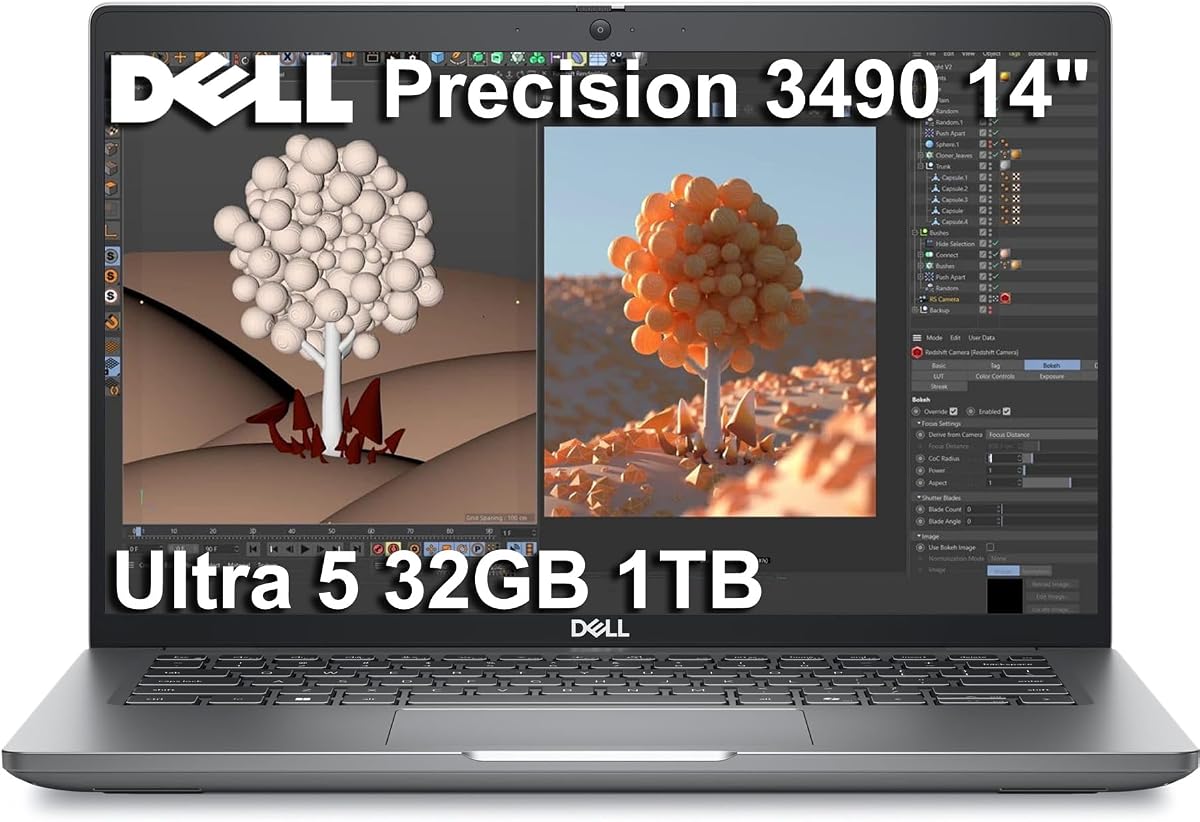
The Dell Precision 3490 is the most portable recommendation in the guide, combining a 14-core Intel Core Ultra 5 135H processor, 32GB of DDR5 memory, and a 1TB SSD in a 3.09-pound workstation. Its 5.0 rating makes it a strong value-oriented choice for architects, engineers, and technical users who regularly work away from a desk.
We may earn a commission when you buy through this link, at no additional cost to you.
The processor reaches up to 4.6GHz and supports multitasking across CAD applications, communication tools, and browser-based services. The 32GB memory configuration is healthy for a portable system, while the 1TB SSD provides useful local storage and quick file access. Its 14-inch FHD display keeps the overall footprint manageable without sacrificing a full-size workspace.
Integrated Intel graphics are the principal constraint. This configuration is most convincing for 2D drafting, BIM viewing, technical documentation, and less complex 3D applications; users who need advanced rendering or GPU-optimized 3D should examine the dedicated RTX options. The 14-inch panel also offers less physical workspace than the larger displays in this list.
Despite those limits, the Precision 3490 offers an unusual combination of mobility, workstation software, enterprise security, and multi-monitor support. It is a strong recommendation for site visits, travel, hybrid work, and CAD users who need capable everyday performance without the weight of a full-size mobile workstation.
At 3.09 pounds, the Precision 3490 is substantially easier to carry than the flagship Dell models in this guide. It retains Windows 11 Pro, ISV certifications, and MIL-STD-810H testing, making it suitable for organizations that expect more durability than a conventional business laptop provides.
Although the built-in display is only 14 inches, the system supports up to three external 4K monitors at 60Hz through HDMI and Thunderbolt. That makes it effective as a portable workstation that becomes a multi-screen CAD station when returned to a desk.
We may earn a commission when you buy through this link, at no additional cost to you.
The Dell Precision 7780 with RTX 4000 Ada is the premier graphics-focused choice in this guide. It combines the Intel Core i9-13950HX vPro processor, 32GB of DDR5 CAMM memory, a 2TB PCIe NVMe SSD, and 12GB of dedicated graphics memory, earning a 5.0 rating among the strongest configurations assembled here.
We may earn a commission when you buy through this link, at no additional cost to you.
The 12GB RTX 4000 Ada GPU is the defining feature for demanding 3D design, rendering, visualization, and large CAD scenes. It has substantially more dedicated memory than the 4GB options in the guide and more than the 8GB Precision 7680 alternatives. The i9 processor's 24 cores and boost speed up to 5.5GHz provide complementary CPU performance for simulation and rendering workloads.
The 17.3-inch FHD IPS display is unusually refined for this class, offering 500-nit brightness, 99% DCI-P3 color coverage, and anti-glare treatment. The trade-off is physical size: this is a substantial workstation that prioritizes screen area and sustained performance over travel convenience. The 32GB memory configuration is generous, though the 128GB alternative makes more sense for exceptionally large datasets.
Choose the 7780 RTX 4000 for serious 3D work, high-end rendering, detailed visualization, and professional workflows where GPU memory is the difference between smooth interaction and compromises. It is less convincing for someone who only needs occasional 3D and travels frequently, but for a desk-based professional it delivers an exceptional combination of compute, graphics, and color-capable display.
Twelve gigabytes of dedicated GDDR6 memory gives the RTX 4000 Ada configuration room for richer scenes, textures, and GPU-assisted workflows. It is a meaningful upgrade for users who regularly work in 3D rather than a minor specification difference for basic drafting.
The 500-nit panel and 99% DCI-P3 color gamut improve visibility and color consistency when reviewing renderings, materials, and shaded models. Anti-glare treatment helps in bright offices, while the large 17.3-inch canvas reduces the need for constant panel switching.
We may earn a commission when you buy through this link, at no additional cost to you.
This Precision 7680 combines an Intel Core i7-13850HX vPro processor, 8GB NVIDIA RTX 2000 Ada graphics, 32GB of DDR5 CAMM memory, and a 2TB PCIe NVMe SSD. It delivers a versatile mix of CPU and GPU performance for CAD, rendering, engineering, and other graphics-intensive professional workloads.
We may earn a commission when you buy through this link, at no additional cost to you.
The 8GB GPU configuration occupies a useful middle ground. It provides twice the dedicated memory of the entry RTX 1000 Ada and RTX A500 options while remaining less specialized than the 12GB RTX 4000 Ada machines. That makes it suitable for users who work in 3D but do not need the largest available texture or scene allowance.
Its 3.9 rating is the lowest published rating among the rated recommendations, though it still reflects a generally favorable customer response. The 16-inch FHD+ anti-glare display uses 45% NTSC color coverage, so it is less compelling for color-critical visualization than the 99% DCI-P3 panel in the Precision 7780. A separate calibrated monitor can be important for presentation-quality rendering.
Despite the lower display grade, this is a capable all-rounder with four external 4K monitor connections, two Thunderbolt 4 ports, Windows 11 Pro, and workstation certifications. It is a sensible recommendation for an architect, designer, or engineer who wants dedicated graphics, a capable processor, generous storage, and a 16-inch mobile format.
Eight gigabytes of dedicated memory gives the RTX 2000 Ada configuration more room for 3D assets and GPU-assisted operations than 4GB alternatives. It is a versatile option for users who sometimes work in visualization but do not require the memory ceiling of a top-tier workstation GPU.
A 2TB NVMe drive offers generous capacity for current project folders, texture libraries, CAD blocks, and archived drawings. Fast PCIe storage also helps reduce delays when opening and saving large working sets compared with slower magnetic storage.
We may earn a commission when you buy through this link, at no additional cost to you.
The Dell Precision 7780 128GB configuration is built for demanding professional workloads that benefit from unusually large memory capacity. Its 24-core Intel Core i9-13950HX processor, 128GB of DDR5 CAMM RAM, 12GB RTX 4000 Ada graphics, and 5.0 rating make it one of the most technically substantial laptops in this guide.
We may earn a commission when you buy through this link, at no additional cost to you.
The 128GB memory allocation is the standout. It gives architects, simulation specialists, data analysts, engineers, and developers room to keep large assemblies, analytical datasets, virtual machines, and multiple applications active simultaneously. The RTX 4000 Ada GPU adds 12GB of dedicated memory for 3D modeling, rendering, and visualization tasks.
Storage is the notable limitation. The supplied configuration includes a 512GB PCIe NVMe SSD, which is fast but modest for users who keep multiple large project archives and asset libraries locally. A larger drive or organized external storage would be sensible for such a power user. The 17.3-inch form factor also makes portability more challenging than with smaller systems.
The display nevertheless sets a high standard, with FHD resolution, 500-nit brightness, 99% DCI-P3 color coverage, anti-glare treatment, and ComfortView Plus low-blue-light technology. Choose this model when memory headroom and graphics capacity are non-negotiable, particularly for simulation, complex assemblies, virtualization, and high-end visualization.
One hundred twenty-eight gigabytes of DDR5 memory is far beyond a normal office workload. It provides the flexibility to keep large models, engineering data, browser sessions, and professional applications together without forcing users to close resources or rely on slower virtual-memory behavior.
Windows 11 Pro, ExpressSign-In, an IR camera with shutter, Intel vPro technology, and a contact smart-card reader support managed professional environments. These features are particularly useful for organizations with security, identity, and deployment requirements.
We may earn a commission when you buy through this link, at no additional cost to you.
This Precision 7680 blends 64GB of DDR5 CAMM memory with an Intel Core i7-13850HX vPro processor, an NVIDIA RTX 2000 Ada GPU with 8GB of dedicated memory, and a 2TB NVMe SSD. Its 5.0 rating reflects a strong overall configuration for users who need more memory and storage than a typical CAD laptop.
We may earn a commission when you buy through this link, at no additional cost to you.
Compared with the 32GB RTX 2000 Ada model, this version doubles the RAM and provides greater flexibility for large assemblies, detailed BIM environments, simultaneous rendering applications, and heavy multitasking. The Core i7 processor still provides ample performance for demanding design and engineering tasks, while the dedicated GPU ensures stronger 3D and visualization capability than integrated graphics.
The primary compromise is the internal display. Its FHD+ resolution and 45% NTSC color coverage are less refined than the 500-nit, 99% DCI-P3 display found in the 17.3-inch Precision 7780. Users who need accurate color review can rely on external 4K monitors, and the machine supports four of them without a docking station according to the supplied information.
This laptop is a strong recommendation for design professionals who regularly open large files, keep many application environments active, or want longer flexibility before reaching memory limits. It is particularly compelling for architects, engineers, content creators, and developers seeking a balanced workstation with dedicated graphics and generous local storage.
Sixty-four gigabytes gives professional users comfortable room for large project sets and multiple applications. It is a meaningful upgrade for users who want to keep CAD, visualization, communication, and browser tools open together rather than constantly closing and reopening software.
The i7-13850HX processor, 8GB RTX 2000 Ada GPU, and 2TB NVMe drive form a versatile combination for design, engineering, and rendering. The result is well matched to users who want a single notebook for both mobile productivity and a substantial desk-based workstation.
We may earn a commission when you buy through this link, at no additional cost to you.
The Lenovo ThinkPad P16s Gen 4 combines a 16-inch WUXGA display, an Intel Core Ultra 7 255H processor, 32GB of DDR5 memory, and a 1TB PCIe SSD. Its 4.0 rating reflects a balanced approach to mobility, professional durability, and workstation-class capability for CAD and engineering users.
We may earn a commission when you buy through this link, at no additional cost to you.
The eight-core processor can boost to 5.1GHz, providing capable performance for drafting, BIM workflows, technical design, and multitasking. The 32GB memory allocation is generous for a portable system, while the 1TB SSD offers fast application loading and enough space for active project files. The 400-nit anti-glare display is brighter than many competing mobile panels and remains practical for long sessions.
Integrated Intel graphics is the important limitation. The ThinkPad P16s Gen 4 is better suited to 2D-heavy drafting, model viewing, technical documentation, and moderately demanding 3D than intensive rendering or GPU-heavy simulation. Buyers who regularly manipulate detailed 3D scenes will receive more benefit from a system with a dedicated GPU and a larger graphics-memory allowance.
The P16s Gen 4 is still a compelling recommendation for architects and engineers who want a large display without choosing a bulky 17-inch flagship. It supports three external 4K monitors, includes Windows 11 Pro with BitLocker, Remote Desktop, Hyper-V, and Group Policy features, and offers a fingerprint reader for convenient security.
The 16-inch display provides more room for toolbars, property panels, drawing sheets, and reference images than the smaller portable alternative in the guide. At the same time, the P16s design is intended to be more manageable than heavier performance-focused workstations.
Two Thunderbolt 4 ports, USB-A, HDMI 2.1, Ethernet, Wi-Fi 7, and Bluetooth 5.4 support contemporary accessories and networks. Windows 11 Pro adds remote access, virtualization, encryption, and centralized policy tools expected in professional environments.
We may earn a commission when you buy through this link, at no additional cost to you.
A useful CAD laptop should be judged by the workloads it will actually run. Processor, graphics, memory, storage, display, portability, and connectivity should be balanced according to whether the priority is drafting, BIM, simulation, rendering, travel, or multi-screen production.
The processor affects model manipulation, file regeneration, rendering, simulation, and multitasking. The guide includes Core i5, Core i7, Core i9, and Core Ultra processors ranging from an eight-core Ultra 7 to a 24-core i9. More cores can improve parallel workloads, while higher clock speeds help single-threaded tasks that remain important in many drafting and modeling applications.
Choose a Core i5 or Core Ultra 5 for conventional 2D and moderately complex 3D work, a Core i7 or Core Ultra 7 for heavier professional use, and a Core i9 when rendering, simulation, development, or large assemblies are routine. Check your software's recommended processor requirements before choosing.
Dedicated NVIDIA graphics can accelerate 3D modeling, rendering, shaded views, and certain simulation tasks. The difference is especially relevant when the model is visually complex or the application needs substantial graphics memory. Options here include 4GB RTX A500 and RTX 500 Ada cards, 6GB RTX 1000 Ada, 8GB RTX 2000 Ada, and 12GB RTX 4000 Ada.
Integrated Intel graphics can be sufficient for 2D drafting and some model review, but they are not the safest choice for intensive 3D. Match graphics memory to the project rather than choosing solely by GPU name, particularly when working with dense assemblies, high-resolution textures, photorealistic rendering, or large engineering scenes.
CAD applications consume more memory as models become detailed and as additional tools, browser tabs, and communication platforms remain open. The list includes 32GB, 64GB, and 128GB configurations. Thirty-two gigabytes is a strong baseline for most professional users, while 64GB and 128GB offer additional headroom for large BIM environments, simulation, virtualization, and data-heavy work.
Prefer a system with a generous memory allocation and room for future growth. For 2D and moderate 3D workflows, 32GB may be sufficient, but heavy multitaskers benefit from 64GB. Treat 128GB as a specialized requirement rather than an automatic upgrade, and verify that the operating system and applications support the intended workload.
PCIe NVMe storage provides rapid application loading, file transfers, saves, and access to large project libraries. The guide includes 512GB, 1TB, and 2TB configurations. Capacity matters because CAD projects often include source drawings, textures, simulation inputs, rendered images, and multiple revisions, all of which can grow quickly.
A 1TB drive is a sensible middle ground for active work, while 2TB is more comfortable for large libraries and local archival. If choosing the 512GB option, plan for disciplined folder management and suitable backup or archive storage. In every case, maintain separate backups of critical project data.
CAD displays need enough resolution to expose fine lines, dimensions, and model details, while brightness and anti-glare treatment improve comfort in different environments. The featured internal screens range from 14-inch FHD to 17.3-inch FHD, with some 16-inch FHD+ and WUXGA options. The most advanced display specification is the 500-nit, 99% DCI-P3 panel offered in the Precision 7780.
Resolution, panel size, and color coverage are separate considerations. A large FHD screen provides workspace but not necessarily high pixel density, while a smaller high-resolution display can show more detail. Color-critical users should verify the requirements of their rendering and visualization software and consider a calibrated external monitor.
A mobile workstation is only useful if it can be carried and operated where work happens. The Dell Precision 3490 is the lightest option at 3.09 pounds, the ThinkPad P16s emphasizes a more portable workstation approach, and the 16-inch and 17.3-inch Precision models prioritize larger screens and sustained performance.
For frequent travel, favor weight, battery expectations, and screen size more strongly than maximum graphics memory. For office-based work, a larger workstation chassis may be worthwhile if it remains stationary or travels only between controlled environments. Actual battery duration varies with workload, wireless conditions, display settings, and power profile.
Professional CAD users often benefit from a larger, distributed workspace. Systems here support between three and four external monitors, with many connections offered through HDMI, USB-C, and Thunderbolt 4. The listed external resolutions reach 4K at 60Hz without a docking station, while the HP ZBook also advertises 8K at 60Hz through Thunderbolt 4.
Count the outputs and resolution requirements of every monitor before buying. Check whether additional accessories require a dock, verify adapter requirements, and arrange a comfortable ergonomic layout. A laptop that supports several external displays is more versatile for design, BIM review, and engineering dashboards than a model limited by output options.
Windows 11 Pro appears across most recommendations and adds business and workstation management capabilities such as BitLocker, Remote Desktop, Hyper-V, Group Policy, enterprise security, and vPro support. These tools matter when a laptop is enrolled in a company fleet, accessed remotely, or used for software development and virtualization.
Choose the operating system edition according to your organization and applications. Windows 11 Home may satisfy a home user, but it offers a different set of management features. Also consider warranty length, support coverage, ISV certifications, and any resealing or upgraded-component disclosures when comparing marketplace configurations.
Start by installing the current versions of your operating system, CAD application, drivers, and essential plugins. Create a project folder structure with separate locations for source files, imported assets, exports, and backups. Confirm that graphics drivers and the application appear correctly within the workstation software before beginning a large project.
For demanding models, save incrementally, use clean temporary directories, and avoid storing active project files on external drives that may be disconnected during a render or save operation. Keep the system ventilated, avoid blocking intake areas, and use a stable surface. When running extended calculations, let the laptop use its designed thermal profile and connect power where appropriate.
Protect the display and chassis by using a padded sleeve during transport, cleaning the panel with a suitable microfiber cloth, and avoiding pressure on the lid. Keep critical drawings on at least two separate storage locations or a reliable backup system. Periodically verify that memory, free storage, driver updates, and application performance still match the project being handled.
It depends on the type of CAD. Integrated graphics can handle many 2D drafting, documentation, and model-review tasks, while a dedicated NVIDIA GPU is preferable for detailed 3D work, rendering, shaded visualization, and GPU-accelerated engineering applications. Check the graphics requirements published by your CAD vendor and the complexity of your typical models before deciding.
Thirty-two gigabytes is a strong baseline for professional CAD use and allows several applications, browser tabs, and communication tools to remain open. Sixty-four gigabytes provides additional room for large assemblies, simulation, virtualization, and heavier multitasking. A 128GB configuration is most appropriate for specialized data-heavy workflows rather than ordinary drafting.
A smaller display generally supports easier travel, while a 16-inch model offers a balanced amount of canvas and portability. A 17.3-inch screen gives CAD users more visible workspace and is often paired with stronger workstation hardware, but it is bulkier. Many users can compensate for a smaller built-in screen by connecting external monitors at a desk.
A mobile workstation is ideal when projects require travel, client meetings, field work, or flexibility between locations. A desktop may offer better performance per component and easier cooling, but it cannot be carried between work environments. For users who remain at one desk, a powerful desktop can be more practical; for mobile professionals, the laptops in this guide provide a stronger balance.
Yes, because higher resolution can reveal finer lines, dimensions, small symbols, and interface text. Screen size also matters because it determines how much workspace is visible without switching applications. The best choice depends on whether portability or maximum desktop canvas is more important, and color-critical users should evaluate gamut and calibration separately.
Several can, particularly the configurations with 8GB or 12GB of dedicated graphics memory and 32GB or more system RAM. Actual performance depends on model size, rendering engine, add-ins, display configuration, and whether the task is viewing, modifying, or rendering. For very large federated models, prioritize memory capacity and verify the application and graphics driver requirements.
Windows 11 Pro is usually preferable for managed work environments because it includes security, remote access, virtualization, and policy features beyond Windows 11 Home. It can also fit organizational deployment and support requirements. A home edition may be sufficient for a student or independent user, but it offers fewer tools for business administration and complex software environments.
Confirm the exact processor, graphics model, dedicated graphics memory, RAM, storage capacity, display specification, operating system, and included warranty. Also read any resealing disclosure and seller upgrade notes, because they explain how the machine was configured. Finally, check that the ports and external-monitor support match the accessories you plan to use.
The Dell Precision 7680 with the Core i9-13950HX stands out as the best overall recommendation for users who prioritize processor power, multi-screen productivity, and workstation expandability. The HP ZBook 8 G1i is the premium all-rounder with 64GB of memory, 2TB of storage, a touchscreen, and dedicated graphics, while the lightweight Dell Precision 3490 is the most mobile choice.
For demanding 3D work, prioritize dedicated graphics memory: the RTX 2000 Ada configurations offer 8GB, and the RTX 4000 Ada Precision 7780 models provide 12GB. For document-heavy or moderately complex projects, 32GB of RAM and a 16-inch display can offer a better balance, but always consider the size of your models, rendering demands, and need for multiple monitors.
Before purchasing, verify the current listing against the specifications discussed in this guide, including processor, graphics, memory, storage, display, ports, warranty, and operating system. Marketplace configurations can change, so the most reliable purchase is one whose complete hardware and support package matches the CAD workflow you expect to run.