
Nylavee Plug-and-Play RGB PC Speakers
4.5Editor score
Dual passive radiators
Nine lighting modes
USB and AUX connections
Flexible vertical placement
Compare 10 of the best RGB speakers for desktop PC, including sound quality, connectivity, lighting, controls, and design, to help you choose the right model.
RGB speakers for desktop PC combine practical audio with lighting that can complement monitors, gaming peripherals, and compact workspaces. A capable set should deliver clear stereo sound, convenient controls, compatible connections, and a lighting effect that adds atmosphere without overpowering the desk.
The models in this guide range from slim two-speaker systems to soundbars and dedicated 2.1 setups with subwoofers. We compared their stated power, driver arrangements, connectivity, lighting options, control methods, dimensions, and practical compatibility to identify the strongest choices for different needs.
Each review explains the standouts and trade-offs of one model, while the comparison table provides a quicker view of the entire field. Product listings and promotions can change, so shoppers should verify current specifications, availability, and the latest purchase terms before ordering.
4.5Editor score

4.2Editor score

4.4Editor score
This side-by-side comparison highlights the main differences in audio architecture, wired and wireless connectivity, RGB customization, controls, and desktop footprint, making it easier to match a speaker system to your setup and priorities.


The Nylavee 2.1 RGB Speaker System is the most complete desktop audio package in this guide, combining two satellite speakers, a dedicated subwoofer, and adjustable lighting. Its listed 60W peak stereo output gives it more headroom than many compact alternatives. The 4.4 rating also places it among the stronger-rated options available here.
We may earn a commission when you buy through this link, at no additional cost to you.
Its defining strength is the separate low-frequency unit. Instead of asking the satellite speakers to reproduce every bass passage, the subwoofer handles low-end impact while the main drivers focus on mids, vocals, and crisp treble. The extended cable provides flexibility in positioning the cabinet beneath or beside a desk, while a single rotary knob handles power, volume, and lighting modes.
The main compromise is physical size. A 2.1 system naturally occupies more space than a pair of slim desktop speakers, and the external power adapter adds another item to manage. It also offers more than some buyers may need, particularly if the PC is used mainly for office applications. Even so, the combination of USB, AUX, and Bluetooth 5.4 makes it versatile across a desktop, laptop, and phone.
Choose this model when music, films, and games benefit from stronger bass and you have room for a subwoofer. It is our premium pick because it combines substantial stated output, flexible placement, wired and wireless connectivity, and eight RGB modes with adjustable brightness. For smaller desks or simpler setups, one of the two-speaker alternatives may be easier to accommodate.
The independent subwoofer gives explosions, music beats, and engine sounds more weight while keeping the satellites available for clear vocal and instrumental detail. Its adjustable placement also makes it easier to balance the system in different rooms.
USB and AUX support direct desktop use, while Bluetooth 5.4 allows convenient wireless playback from a laptop or phone. The three options make the system useful beyond a single fixed computer.
We may earn a commission when you buy through this link, at no additional cost to you.
The Nylavee Plug-and-Play RGB PC Speakers deliver one of the most balanced packages for everyday desktop listening. Two full-range drivers are supported by dual passive radiators, while a 4.5 rating is the highest numerical rating among the ten products compared. The speakers also offer nine lighting modes and an easy wired connection.
We may earn a commission when you buy through this link, at no additional cost to you.
The passive radiators add warmth and body without requiring a separate subwoofer, making this setup more appropriate for compact desks than the larger 2.1 alternatives. USB supplies power, and the 3.5mm AUX cable carries audio. No drivers or software are required, which keeps initial setup straightforward for desktop PCs, laptops, monitors, and compatible game consoles.
The lack of Bluetooth is the main limitation for shoppers who want to alternate between a computer and a phone. This model also cannot reproduce bass with the same separation offered by a dedicated subwoofer. However, its 4.5-foot cable and vertical-or-horizontal placement options help it fit wider desks and dual-monitor arrangements despite the absence of wireless audio.
This is the best budget choice for anyone who wants dependable stereo sound, distinctive lighting, and uncomplicated setup. It also suits buyers who prefer a permanent wired desktop connection and want to avoid spending space on a large subwoofer. For mobile switching or deeper low-end impact, the Edifier Hecate, Creative Pebble Pro, or Bluedee 2.1 system may be a better match.
Full-range drivers handle the main presentation, while passive radiators contribute additional low-end resonance. The result is a more substantial stereo profile than a basic monitor-speaker upgrade without requiring a separate floor-standing cabinet.
The lighting selection includes a breathing effect and eight solid colors. Users can also switch the lights off, making the same speaker pair practical for a clean workspace as well as a colorful gaming battlestation.
We may earn a commission when you buy through this link, at no additional cost to you.
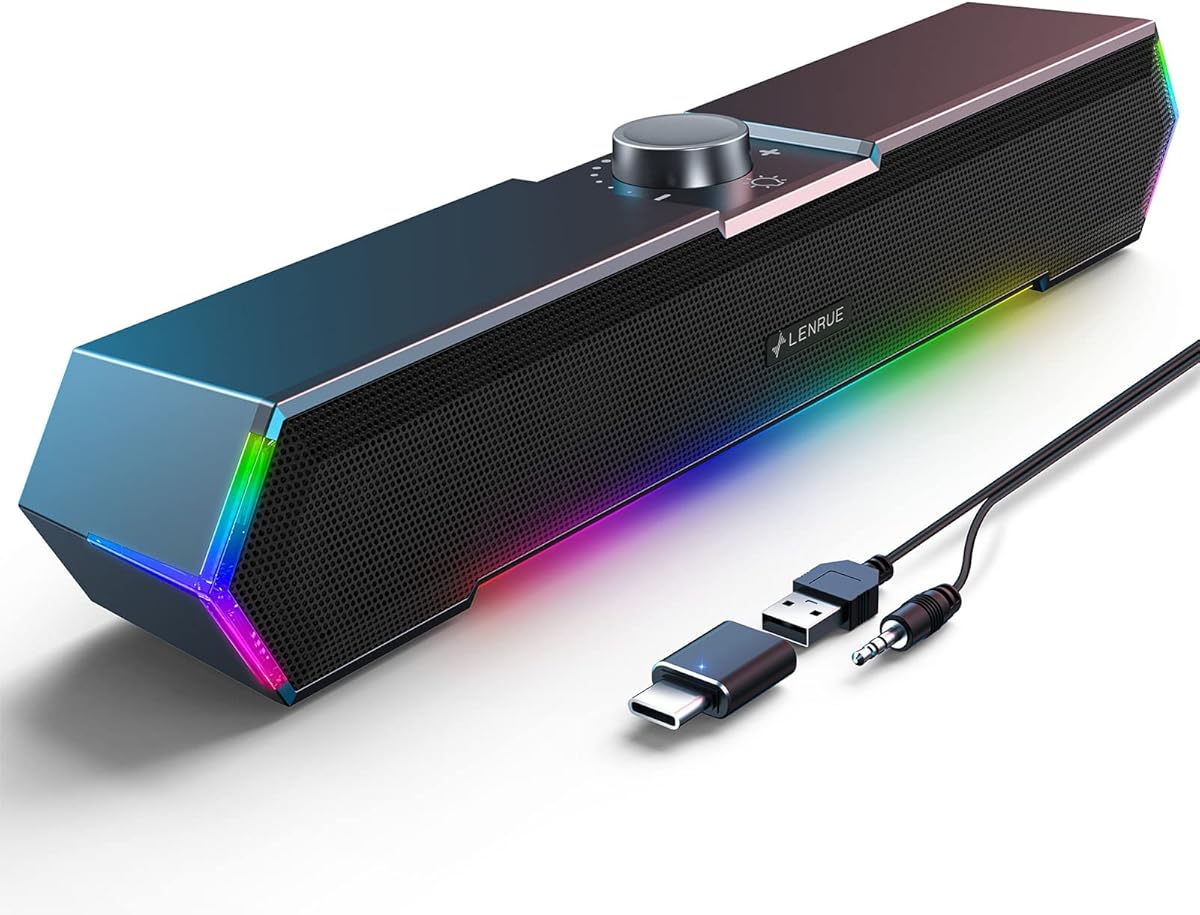
The LENRUE G11 is designed for users who want a small, straightforward desktop upgrade with a more distinctive appearance than basic plastic speaker pairs. Its angular housing, touch-operated game lighting, and compact footprint are aimed at desks where every piece of equipment matters. The product carries a 4.2 rating and a 3.5mm AUX connection.
We may earn a commission when you buy through this link, at no additional cost to you.
Its amplifier design uses four large amplifier IC horns, which the manufacturer describes as supporting distortion-free, low-noise stereo output for games, videos, music, and movies. A top-mounted volume knob provides straightforward level adjustment, while glued-together cables help reduce visual clutter. USB power and the included Type-C adapter simplify connections across compatible computers.
This is not a universal desktop speaker system. It has no Bluetooth, headphone output, or microphone port, and it is not designed for use with televisions or headphones. The angled visual design may also be less understated than a conventional office speaker, although the lighting can serve as a visual accent rather than an always-on feature.
The G11 is most appealing to owners of a compact gaming or productivity desk who want RGB character, simple controls, and straightforward wired playback. If wireless switching or headset integration matters, a model with Bluetooth and a headset connection would be more versatile. Within its focused feature set, though, the G11 provides a convenient way to add a gaming-oriented look and stereo sound to a PC.
The speaker pair is designed to sit neatly beneath a monitor, and its bundled cables are secured together. That attention to placement helps preserve usable desk area while keeping the visible setup tidy.
A top knob handles volume, while a touch control manages the angular lighting. This separates frequently used actions and avoids requiring desktop software for everyday adjustments.
We may earn a commission when you buy through this link, at no additional cost to you.
The Nylavee Nine-Mode Speakers offer a conventional two-speaker desktop format with an emphasis on full-range fidelity, bass response, and understated operation. Two dual-magnet full-range drivers are paired with rear ports designed to concentrate vibration energy and produce richer bass. The 4.4 rating reflects a well-received overall package.
We may earn a commission when you buy through this link, at no additional cost to you.
A single knob handles power, volume, and mode changes, reducing the need to navigate multiple small buttons or computer menus. The lighting provides a breathing mode and eight solid colors, controlled by touch. USB is used only for power, while the 3.5mm connection carries the audio signal, a setup compatible with PCs, laptops, phones, and tablets that have the appropriate output.
There is no Bluetooth, so this set is best treated as a dedicated desktop system rather than a portable speaker. Its stated dimensions also make it less space-efficient than the slimmer Nylavee model ranked second. These are modest limitations for buyers who prioritize simple operation, fuller sound, and a tidy wired connection over wireless flexibility.
This Nylavee pair is a strong recommendation for a fixed workstation where gaming, movies, and everyday music all matter. The single-knob design is particularly convenient, and nine lighting modes provide sufficient visual customization. Choose it when you want a balanced upgrade over built-in computer audio and do not need wireless switching.
The rear ports are intended to move air efficiently and add concentrated low-frequency energy. They provide a useful bass foundation for a two-speaker desktop system when a separate subwoofer would be impractical.
Power, volume, and operating mode are consolidated into one control. This makes the speakers easier to operate during work, entertainment, and gaming without opening any companion application.
We may earn a commission when you buy through this link, at no additional cost to you.
The Razer Leviathan V2 X takes a different approach to desktop audio by using a low-profile soundbar rather than two separate speakers. It combines two full-range drivers, two passive radiators, and a 14-zone Razer Chroma lighting system. Its 4.2 rating and broad integration features make it an especially attractive option for existing Razer setups.
We may earn a commission when you buy through this link, at no additional cost to you.
Placement beneath a monitor is one of its strongest practical advantages. A single USB Type-C cable handles both power and audio, reducing cable clutter, while Bluetooth 5.0 allows smooth switching to a paired mobile device. The Razer Audio App and Synapse expand the experience with lighting customization, device selection, and other configuration options.
The main drawback is dependence on the broader Razer software environment for some advanced adjustments. A soundbar also cannot offer the same channel separation as a widely spaced stereo pair, and there is no dedicated subwoofer in the listed specifications. Buyers who want completely app-free operation may find competing models simpler.
This is our editor's choice because it delivers a polished combination of compact form, strong connectivity, and unusually detailed RGB customization. The 14 lighting zones and dynamic effects make it particularly suitable for a gaming desk, while the clean under-monitor footprint leaves more room for peripherals. It is especially compelling for users who already use Razer software or Chroma-compatible devices.
Multiple independently addressable areas create more elaborate gradients, patterns, and dynamic effects than a simple color ring. This makes the Leviathan V2 X especially useful for a coordinated Razer battlestation.
USB Type-C carries both power and digital audio, helping keep the connection neat. Bluetooth adds a wireless alternative for phones and other compatible sources without sacrificing the primary wired desktop workflow.
We may earn a commission when you buy through this link, at no additional cost to you.
The Edifier Hecate RGB Gaming Speakers combine a strong 4.6 rating with 32W peak output, multiple inputs, sound presets, and 12 customizable lighting effects. Two 2.75-inch full-range drivers are housed in compact cabinets, creating a practical gaming setup for desktops where a large floor-standing speaker is unnecessary.
We may earn a commission when you buy through this link, at no additional cost to you.
Bluetooth 5.1, a USB sound-card connection, and 3.5mm AUX give users several ways to connect. One-click EQ modes are provided for gaming, movies, and music, while a multifunction control knob handles volume, source selection, and RGB effects. The stated 10-degree tilt and anti-slip pads are intended to direct sound toward the listener and keep the speakers stable.
The physical construction is designed to look more refined than basic desktop speakers, using matte panels, metal laser-engraved knobs, and scratch-resistant surfaces. As with any compact two-speaker system, though, bass depth will not match a dedicated subwoofer. Buyers who play games where low-frequency effects are the main attraction should account for that limitation.
This Hecate model is an excellent all-around gaming speaker pair for users who want wired fidelity, wireless convenience, source flexibility, and scene-specific sound modes. It works across Windows, macOS, PS4, iOS, and Android without additional drivers. Its compact dimensions, tilt, and broad RGB selection make it particularly well suited to a modern gaming desk.
Gaming, Movie, and Music modes let users tailor the presentation without navigating a detailed equalizer. These presets provide a convenient starting point for different media and reduce the time required to adjust the speakers.
Bluetooth serves mobile listening, USB provides a direct digital connection, and AUX covers legacy analog sources. The control knob makes moving among those inputs straightforward.
We may earn a commission when you buy through this link, at no additional cost to you.
The Creative Pebble Pro updates the familiar elevated desktop-speaker format with USB-C connectivity, RGB rings, digital amplification, and optional higher power. The pair can deliver up to 10W RMS and 20W peak through USB-C, with support for 30W RMS and 60W peak when connected to a compatible 30W USB PD adapter that is not included.
We may earn a commission when you buy through this link, at no additional cost to you.
BassFlex processing is intended to extend low-frequency response, while Clear Dialog processing emphasizes natural vocals in films and streams. The familiar 45-degree elevation directs the drivers toward the listener. RGB users can select a spectrum cycle, pulsate effect, or single-color glow, and can turn the rings off with a dedicated control.
The speakers also support Bluetooth 5.3 and 3.5mm AUX while powered through USB. A headset or microphone port can turn the system into a communications hub. The main trade-offs are that the higher output requires an additional adapter and that three lighting effects offer less variety than the eight-to-21-effect selections offered by several competing models.
The Pebble Pro is ideal for compact workspaces where attractive design, direct USB-C audio, and optional communications connections matter more than a large number of RGB presets. It also suits buyers who want clear dialogue in movies and videos. Its angle, modest footprint, and multiple source options make it a flexible companion to a laptop or desktop PC.
Clear Dialog processing helps spoken content remain intelligible as bass is enhanced, while BassFlex aims to add low-end extension without sacrificing clarity. These processing features are especially useful for movies and streamed video.
The included headset or microphone connection allows the speakers to support calls and gaming communication. That turns the pair from a simple playback system into a more functional workstation audio solution.
We may earn a commission when you buy through this link, at no additional cost to you.
The Bluedee 20W RGB Speakers balance a detailed physical layout with modern connectivity and restrained desk-friendly dimensions. Two tweeters, two full-range drivers, and two passive radiators form the speaker array, while DSP tuning is used to reduce distortion and smooth harsh highs. The system holds a 4.4 rating.
We may earn a commission when you buy through this link, at no additional cost to you.
Bluetooth 5.4, USB, and USB-C connections are all supported without required drivers or software. The all-in-one knob can adjust volume, play or pause, change lighting effects, and switch connection modes. Eight selectable lighting effects plus an off option let users choose dynamic color or a softer static glow.
The stated 20W peak output is modest compared with the 60W, 80W, and 32W systems in this guide, and the absence of a subwoofer limits the deepest bass. The multi-driver arrangement nevertheless suggests a more nuanced sound than a simple single-driver budget pair. The design is intended for music, video, and daily use rather than a dedicated home-cinema installation.
This Bluedee set is a strong recommendation for a mixed work-and-play desktop that needs modern ports and wireless flexibility. It is also appealing to users who want clear vocals, controlled highs, and compact RGB effects without a large subwoofer. Choose it when Bluetooth 5.4 and USB-C convenience are important parts of the buying decision.
Separate tweeters and full-range drivers divide the frequency workload, while passive radiators add additional low-frequency support. DSP tuning is used to smooth the overall result and reduce harshness.
Combining volume, playback, lighting, and source functions reduces the number of separate controls on the desk. The arrangement is particularly helpful for users who switch frequently between work media and games.
We may earn a commission when you buy through this link, at no additional cost to you.
The Bluedee 2.1 RGB System is built for desktop users who want more output and deeper bass than a conventional desktop pair can provide. It combines satellite speakers with an independent subwoofer, offers an advertised 80W peak system output, and carries a 4.4 rating. DSP tuning is included to improve clarity and reduce harsh highs.
We may earn a commission when you buy through this link, at no additional cost to you.
The independent bass unit handles low frequencies while keeping the satellite speakers focused on vocals and upper detail. Connectivity includes Bluetooth 5.4, USB, USB-C, and 3.5mm AUX, with adapter power supporting a simple plug-and-play arrangement. A single knob manages volume, playback, lighting effects, and connection modes.
The obvious compromise is footprint. A separate subwoofer needs space under or beside a desk, and the power adapter adds cable management. The system may also be more than necessary for a quiet office where speech and light background music are the priorities. Those constraints matter in compact work areas and on tightly organized dual-monitor desks.
This model is a compelling choice for PC gaming, film viewing, and music playback where bass impact is central. Its stated output is the highest among the products reviewed, and the subwoofer is better suited than smaller drivers to handling sustained low-end material. Buyers with adequate space and a preference for room-filling sound should favor it over a smaller two-speaker design.
The dedicated subwoofer takes on low-frequency material instead of forcing the satellite speakers to handle every bass passage. This separation supports punchier effects and more consistent midrange clarity.
Bluetooth 5.4 supports wireless listening, while USB, USB-C, and AUX cover direct digital and analog connections. The range makes the system easier to use across a changing collection of devices.
We may earn a commission when you buy through this link, at no additional cost to you.
The W-206RE RGB stands out for lighting variety, offering 21 dynamic modes in a compact two-speaker design intended to sit beside or beneath a monitor. It supports Bluetooth, 3.5mm AUX, and USB power, making it a flexible option for desktop PCs, laptops, and compatible monitor outputs. Its 4.1 rating is the lowest numerical score in this group.
We may earn a commission when you buy through this link, at no additional cost to you.
The top touch control changes RGB effects independently from the physical controls on the right speaker, which handle volume, mode, and power. That separation gives lighting a dedicated place in the user interface without complicating everyday playback. The available effects make the system especially suitable for gaming rooms, streaming spaces, dorm rooms, and colorful home offices.
The manufacturer describes the sound as clear, balanced stereo audio for general music, films, video, streaming, gaming, and work, but does not list advanced processing or a detailed driver specification. This makes the model harder to evaluate on technical audio terms than some of the more fully specified competitors. Its strongest documented advantages remain its variety of connections and broad lighting selection.
The W-206RE is a good fit for buyers who consider RGB customization a primary feature and want both wireless and analog connections. It may be less compelling for listeners who prioritize a precisely stated driver configuration, dedicated subwoofer, or higher rated power. Even so, the large lighting catalog and compact footprint give it a distinct place in this roundup.
The unusually broad lighting catalog includes multiple dynamic effects for different moods and setups. A dedicated touch control makes it easy to move away from a static accent color or coordinate the speakers with a gaming theme.
Bluetooth handles wireless streaming, AUX provides a conventional analog path, and USB supplies power. Physical speaker controls remain available for direct volume, mode, and power management.
We may earn a commission when you buy through this link, at no additional cost to you.
The right desktop RGB speaker depends on more than appearance. Sound architecture, room size, connection requirements, desk space, control preferences, and the way you use your PC should guide the decision.
Separate speakers placed on opposite sides of a monitor usually provide a wider stereo image than a single under-monitor soundbar. They are particularly useful for games, films, and music because effects and instruments feel more naturally distributed across the desk. A soundbar, by contrast, can create more open desk space and often presents a tidier profile beneath a display. The Razer Leviathan V2 X is the clearest soundbar example in this guide, while the Nylavee, LENRUE, Edifier, Creative, Bluedee, and W-206RE products use paired speakers.
Choose separated speakers when soundstage width matters most. Choose a soundbar when monitor placement, desk clutter, and a low-profile appearance take priority.
A two-speaker system is easier to place and usually sufficient for music, video calls, and general PC use. Passive radiators and rear ports can add useful low-end weight, but they do not create the same separation as a dedicated subwoofer. A 2.1 system gives the satellite speakers more freedom to handle mids and highs while a separate cabinet reproduces bass. That architecture is better suited to action games, cinematic films, and bass-forward music, provided the desk has room for the extra unit.
Choose a 2.1 setup for stronger low-end impact and a stereo pair when desk space, simplicity, and a smaller footprint matter more.
Stated peak wattage can indicate the system's maximum short-term output, while RMS power gives a more consistent measure of continuous performance. Neither figure alone guarantees sound quality, so driver size and acoustic design also deserve attention. The Edifier Hecate pair uses 2.75-inch full-range drivers and has a stated 32W peak output, while the Creative Pebble Pro is built around a more compact digital-amplification design. The 2.1 systems list 60W and 80W peak output for their broader configurations. Always interpret these numbers in the context of the product's full channel and subwoofer arrangement.
Compare RMS, peak power, driver size, and overall configuration together. A higher headline number is useful only when it reflects a suitably designed and properly powered system.
USB and 3.5mm AUX remain the most direct options for a fixed desktop PC, while USB-C can simplify modern laptops and monitors by carrying both power and digital audio. Bluetooth adds valuable flexibility for switching to a phone or pairing a second device. The Creative Pebble Pro even adds a headset or microphone connection, while the LENRUE G11 deliberately omits Bluetooth and those ports. Check the signal and power arrangement carefully: on several models, USB is used only for power, with audio still arriving through the 3.5mm connection.
Prioritize USB-C audio and Bluetooth for a flexible modern setup. For a permanent computer-only installation, a dependable USB-power and AUX arrangement may be all you need.
RGB features differ more than their names suggest. Some systems provide only a few effects, while others offer nine, twelve, fourteen independently addressed zones, or as many as 21 modes. The Razer ecosystem stands apart for its 14-zone Chroma implementation and dynamic game-oriented effects. Users who prefer a restrained office look should confirm that the lights can be turned off, as they can on the Nylavee Plug-and-Play model, Creative Pebble Pro, and several Bluedee systems. Touch controls can make lighting changes convenient, but physical knobs are often easier to locate and adjust by feel.
Choose extensive effects and software control for a gaming battlestation. Choose an off switch and simple controls if the speakers also need to fit neatly into a professional workspace.
Speaker dimensions matter because a technically capable system can still be impractical on a crowded desk. Compact pairs such as the Creative Pebble Pro, LENRUE G11, and W-206RE are easier to position around a monitor. Taller satellite speakers may offer more driver volume, while a soundbar naturally fits under a display. Subwoofer systems need additional room and flexible cable routing to place the bass cabinet away from the satellites. Also consider the power adapter, control knob reach, and whether the lighting will reflect from a glossy desk surface.
Measure the available area before buying, including space for cables and the subwoofer. A system that crowds the monitor or forces awkward speaker angles is less convenient than a more compact alternative.
Some desktop speakers work entirely with hardware controls, while the Razer Leviathan V2 X places RGB and device switching within Razer Audio App and Synapse. Dedicated software can provide detailed control, but it also creates a dependency on compatible operating systems and additional setup. Models advertised as driver-free and requiring only USB plus AUX are convenient for users who want their PC to recognize the speakers as standard audio output devices. A multifunction knob can provide a middle ground by keeping common adjustments physical without removing optional wireless connectivity.
Choose app-based control when deep customization matters. Choose simple hardware control when reliability, quick setup, and minimal software are your priorities.
Start with the content you listen to most. Office software and video calls benefit from clear voices, convenient controls, and a modest footprint. Games benefit from stronger low-end, lighting synchronization, and wide placement. Movies require dialogue clarity along with enough output and bass to avoid reaching for another system. Music listening may expose weak frequency balance more readily, making passive radiators, DSP tuning, and driver quality especially relevant. Communication-focused users should also check for a microphone or headset port, a feature offered by the Creative Pebble Pro but absent from several alternatives.
Match the system's strengths to your most frequent activity, then place the speakers to support that use. A work-focused setup may prioritize clarity and subdued lighting, while a gaming setup may benefit more from bass and synchronized RGB effects.
Begin by deciding whether the system will be permanently wired, occasionally used over Bluetooth, or connected through a USB-C cable that carries both power and audio. Place the two satellite speakers on either side of the monitor if possible, keeping them at a similar height and angle. A soundbar should sit directly beneath the display, while a subwoofer can be positioned under the desk or to one side. Confirm that the source supports the selected AUX, USB, USB-C, or Bluetooth connection before changing cables.
Raise the system volume gradually and set the computer or application volume to a moderate level. Most compact speakers perform best without being pushed to maximum output, which can introduce distortion or make the sound harsh. Use the physical volume knob for the speakers and the software mixer for the PC to maintain a balanced setup. For Bluetooth, pair only the intended device, select the speakers as the playback output, and reconnect the wired source before starting latency-sensitive gaming.
Keep the drivers, ports, and subwoofer vents clear of dust, papers, and desk accessories. Wipe the cabinets with a soft dry or lightly damp cloth, avoiding harsh cleaners and excessive moisture around the controls. Do not push the volume knobs beyond their normal travel. RGB brightness and lighting mode are cosmetic features, so turn the lights off or reduce brightness when a darker room or a less distracting workspace is preferred.
RGB speakers are not inherently better in sound quality; the lighting is primarily a visual feature. Audio performance depends on the driver design, power, enclosure, processing, and placement. Gaming-focused models can still be useful because they commonly provide touch lighting, game-oriented sound modes, wireless options, and controls designed for quick changes.
A subwoofer is not required for every type of gaming. Competitive titles, strategy games, and voice-focused sessions may benefit more from clear mids and positional cues than heavy bass. Cinematic games, racing titles, action adventures, and music can benefit from the deeper low end offered by a 2.1 system. Desk space and the desired level of impact are the key considerations.
Only if the monitor has a compatible audio output, such as 3.5mm, USB-C audio, or another supported connection. Many monitors include audio output but still require the PC to remain the sound source. Check the monitor's specifications and the speaker's input arrangement before buying, especially if USB is used only for power.
Bluetooth can be convenient for casual gaming and switching between a PC and phone, but a wired USB or AUX connection is generally preferable when minimizing latency matters. The exact performance depends on the Bluetooth implementation and the source device. Use Bluetooth for general entertainment, and favor a wired path for competitive or rhythm-sensitive games.
Two separate speakers usually create a wider stereo image and can improve the sense of direction in games and films. A soundbar takes up less visual space, sits neatly under a monitor, and may suit smaller or cleaner setups. Choose based on desk layout and soundstage preference rather than RGB appearance alone.
A USB-C connection can carry both power and digital audio, allowing a cleaner single-cable setup. Compatibility must be confirmed on both the computer and speakers because some USB-C ports provide power or data only. Some products also increase their maximum output when connected to a more capable USB PD adapter, which is not always included.
Many models in this guide provide an off option or a physical lighting control, but the exact behavior varies by product. The Nylavee Plug-and-Play, Creative Pebble Pro, and Bluedee models explicitly mention turning lights off or offering an off setting. Check the product controls if a subdued office setup is important.
Place paired speakers on opposite sides of the monitor and keep them at similar heights for a balanced stereo image. Angle the drivers toward the listening position and leave enough distance for airflow around ports. Place a subwoofer on the floor or beneath the desk, then adjust its position and the satellite balance by ear rather than pushing every control to maximum.
The Nylavee Plug-and-Play RGB PC Speakers stand out as the best budget option, offering a 4.5 rating, nine lighting modes, and a straightforward USB-and-AUX setup. The Razer Leviathan V2 X is the editor's choice for its polished under-monitor design, 14-zone Chroma lighting, single-cable USB Type-C operation, and Bluetooth flexibility. For fuller desktop audio, the Nylavee 2.1 RGB system provides a dedicated subwoofer, 60W peak output, and three connection methods.
Your priorities should determine the rest of the shortlist. Choose the Edifier Hecate for broad gaming features, sound modes, and a 4.6 rating. The Creative Pebble Pro suits compact workspaces and communication needs, while the Bluedee 2.1 system favors deep bass and high stated output. The W-206RE is the strongest option for shoppers who prioritize the largest selection of RGB effects.
Before ordering, confirm that the speaker's inputs match your computer or monitor, check the dimensions against your available desk area, and decide whether wired, wireless, or single-cable operation is most useful. Product specifications, availability, and promotions can change, so review the current listing before making a final purchase.