
Thermalright Assassin X120 Refined SE
4.7Editor score
Four 6mm copper heatpipes
120mm PWM fan at 1550RPM
Maximum airflow of 66.17 CFM
Noise level up to 25.6 dBA
Broad modern socket support
Our Noiseless Workstation CPU Cooler guide compares cooling capacity, acoustics, socket support, dimensions, reliability, and stability for demanding profession
A workstation CPU cooler must manage sustained processor heat while keeping background noise to a minimum. Quiet operation matters especially during audio editing, scientific simulation, rendering, compilation, and other prolonged workloads. The right cooler also needs sufficient heat-transfer capacity, dependable mounting, clearance for workstation components, and controls that let the fans remain unobtrusive during lighter tasks.
This guide compares ten air and liquid coolers based on their published specifications, cooling architecture, fan speed, noise information, socket coverage, dimensions, reliability features, and workstation-oriented design. The selection ranges from compact tower coolers for small systems to dual-pump liquid cooling for AMD Threadripper platforms. It also covers screen-equipped dual-tower models, premium server coolers, and more conventional dual-tower designs.
Each review explains the most important strengths, limitations, and ideal use for the cooler. The top selections are grouped by overall value, balanced performance, and premium features, while the comparison table provides a faster view of the main specifications. Product listings and technical details can change, so readers should confirm socket support, case clearance, mounting hardware, and current pricing before purchasing.
4.7Editor score

4.7Editor score
5.0Editor score
The comparison below highlights cooling architecture, fan behavior, processor support, and physical design. Specifications are drawn from the supplied product information, and socket, clearance, and installation requirements should be reconfirmed with the manufacturer and case vendor.



The Thermalright Peerless Assassin 120 SE earns a 4.7 rating and stands out as a balanced choice for quiet workstation builds that need more cooling capacity than a conventional single-tower design. Its dual-tower heatsink, six heatpipes, and pair of 120mm PWM fans give it a substantial thermal platform without relying on a radiator, pump, or complex liquid-routing arrangement.
We may earn a commission when you buy through this link, at no additional cost to you.
The cooler uses six 6mm pure-copper heatpipes with AGHP technology, a copper base, and electroplated reflow welding. Each TL-C12C fan operates at up to 1550 RPM, delivers a listed maximum airflow of 66.17 CFM, and has a specified noise level of 25.6 dBA or lower. Its 155mm height is substantial, but the stated memory-clearance design helps it fit more readily beside tall workstation memory modules.
The main compromises are installation planning and platform-specific hardware. Buyers must verify that the case accepts a 155mm cooler and account for the 125mm length and 135mm width. For AMD installations, the product information instructs users to use the motherboard's original backplate because it is not included. These are manageable constraints, but ignoring them can cause a difficult installation.
This is a strong recommendation for engineers, content creators, and developers who want substantial air-cooling performance with restrained acoustics and no liquid-cooling maintenance. It works especially well in spacious ATX and micro-ATX systems where a 120mm or 140mm rear exhaust can support the dual-fan arrangement. Buyers prioritizing simplicity, low published noise, and broad socket coverage should give it particular consideration.
The six-heatpipe dual-tower structure provides considerably more surface area than a basic single-tower cooler. That extra capacity is valuable when a workstation processor maintains high all-core workloads rather than alternating between light and heavy loads.
PWM control lets the motherboard reduce both fan speeds when the processor is cool. The listed maximum of 1550 RPM and 25.6 dBA noise specification also make this cooler more conducive to quiet operation than high-speed models built primarily for maximum performance.
We may earn a commission when you buy through this link, at no additional cost to you.
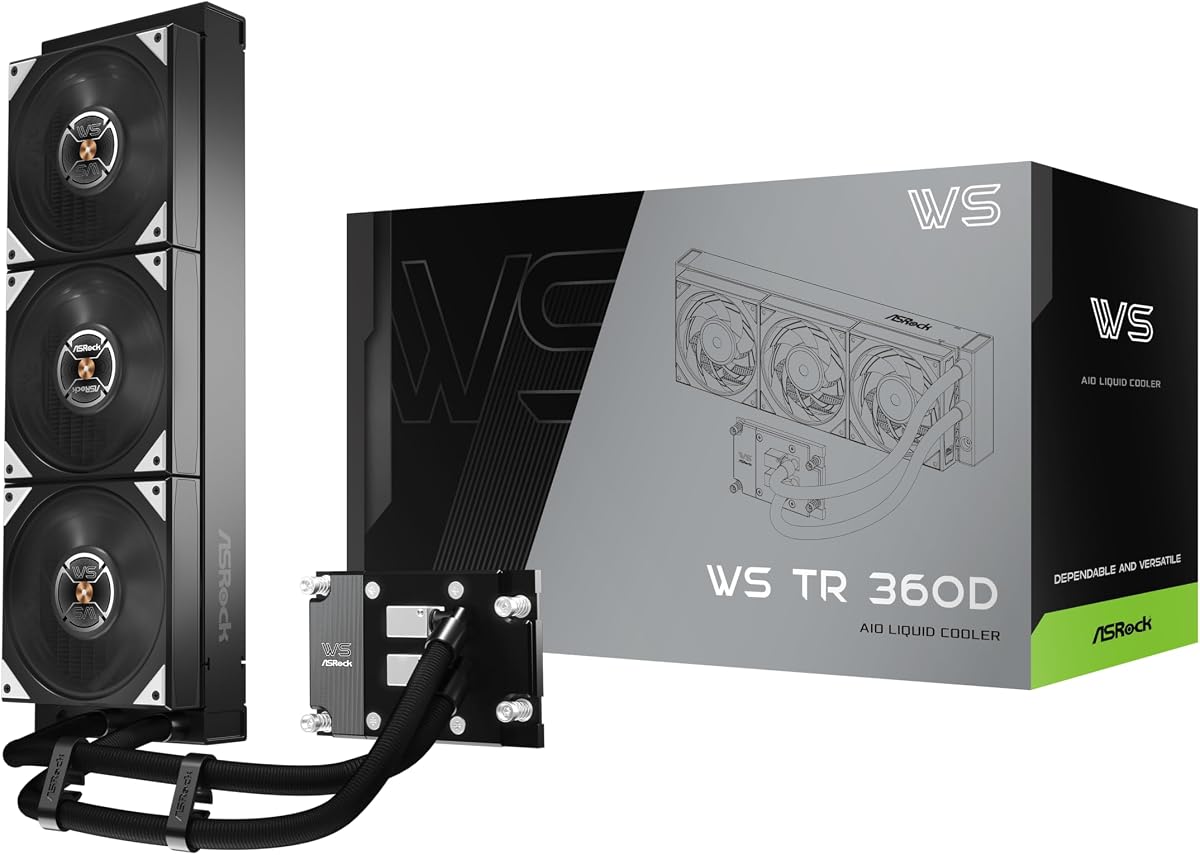
The ASRock WS TR 360D has a 5.0 rating and is purpose-built for AMD Threadripper TR5 and sTR5 workstation platforms. Rather than trying to adapt a general-purpose consumer cooler, it combines a 38mm high-density 360mm radiator, dual pumps, and a full-copper cold plate for systems expected to sustain demanding high-core workloads.
We may earn a commission when you buy through this link, at no additional cost to you.
Dual-pump redundancy is the defining feature. An audible alarm alerts the user if one pump fails, reducing the chance that a cooling problem goes unnoticed during a long rendering or simulation job. The brazed monolithic copper cold plate emphasizes reliable heat transfer and leak integrity, while industrial-grade tubing is designed for pressure resistance, low coolant permeation, and durable bending.
Its quiet behavior relies on the fans stopping completely under low load. That is different from merely reducing their speed, and it can make the system unobtrusive during editing, administration, or compilation phases that do not demand full cooling capacity. The trade-off is installation complexity, radiator-space requirements, and a design that is limited to the specified Threadripper platforms rather than general desktop sockets.
The WS TR 360D is best suited to professional Threadripper workstations that value uptime, load-dependent silence, and high thermal capacity over simplicity. Buyers should verify chassis support for a 360mm radiator and allow for the stated 38mm radiator thickness, tubing routing, pump area, and installed connections. For a compatible system, it offers the most specialized and workstation-focused design in this guide.
The dual-pump arrangement provides a meaningful reliability advantage in systems where prolonged high-core loads are routine. The failure alarm is particularly useful for unattended or overnight workloads because it signals that cooling capacity may have been reduced.
The ability to stop the fans completely at low load makes the cooler appealing in recording, editing, and general office environments. Users can still experience fan noise during heavy workloads because sustained performance requires continuous cooling.
We may earn a commission when you buy through this link, at no additional cost to you.
The Noctua NH-U14S TR5-SP6 is a quiet single-tower cooler designed for current AMD workstation platforms, including SP6 processors in the Epyc 8004 line and sTR5 processors in the Threadripper 7000 family. Its 4.2 rating is the lowest among the products here, but the rating should be considered alongside a design that is unusually focused on a specialized market.
We may earn a commission when you buy through this link, at no additional cost to you.
Six heatpipes and a premium 140mm fan provide the core cooling arrangement. PWM control allows the fan to remain silent at idle and increase airflow when necessary. The airflow runs perpendicular to the socket's long axis, a layout that can align well with chassis exhaust fans and is beneficial in rack-style or workstation-oriented cases designed around that direction.
Compatibility is the central limitation. This cooler supports SP6 and sTR5 rather than the older TR4 and SP3 platform served by the NH-U14S TR4-SP3. It also uses a single 140mm fan and a tower rather than the dual-fan arrangement found on several competitors. Buyers need to verify the CPU's socket and the case's clearance before ordering.
For users of supported Epyc 8004 or Threadripper 7000 processors, this is a compelling choice when near-inaudible behavior and a straightforward air-cooled installation matter more than maximum fan speed or display features. The included mounting tool and pre-applied NT-H2 compound streamline setup, while the focus on near-inaudible workstations directly addresses the core need behind this guide.
Unlike universal coolers that merely list a broad socket range, this model targets two current workstation platforms. It is a better fit for supported Threadripper 7000 and Epyc 8004 systems than for mainstream consumer processors.
A large 140mm fan can move substantial air at comparatively moderate operating speeds. PWM control and Noctua's quiet-operation design make this option attractive where audible fan noise would interfere with professional work.
We may earn a commission when you buy through this link, at no additional cost to you.
The Thermalright Phantom Spirit 120 EVO holds a 4.8 rating and combines a dual-tower heatsink with seven heatpipes and two high-speed 120mm PWM fans. It is aimed at users who want considerable air-cooling capacity and accept greater fan activity in exchange for strong performance under demanding processor loads.
We may earn a commission when you buy through this link, at no additional cost to you.
Its 2150 RPM fans are specified to provide up to 69 CFM of airflow, with an operating noise level of 27 dBA or lower. The heatsink uses seven fully plated, blackened heatpipes, a precision micro-engraved reflow-soldered copper base, and an anodized black finish. The offset arrangement is intended to avoid memory interference and improve compatibility with graphics cards.
The obvious trade-off is acoustic character. A 2150 RPM ceiling is higher than the 1550 RPM maximum listed for the Peerless Assassin 120 SE, so a noisy motherboard fan curve or poorly configured PWM control could make this model more audible. Its 157mm height also calls for careful case-clearance checks, especially in compact workstations.
This cooler is well suited to powerful desktop CPUs in systems with adequate airflow and case space. It may be particularly attractive to workstation builders who prefer straightforward cooling over screens or liquid hardware and want a seven-heatpipe design with a well-regarded 4.8 rating. Quiet operation remains possible with a carefully tuned fan curve.
The extra heatpipe and fin surface area creates a robust platform for sustained multi-core workloads. It gives the cooler useful headroom when the processor maintains high temperatures for long periods.
Its high maximum speed can support aggressive cooling, but the quietest results require motherboard PWM control. A tuned curve can keep the fans slow during light tasks and allow them to ramp only when temperatures justify it.
We may earn a commission when you buy through this link, at no additional cost to you.
The Peerless Assassin 120 Vision MAX ARGB Black combines a capable dual-tower cooler with a magnetic 5-inch IPS display, creating one of the most visually distinctive products in the guide. Its 4.8 rating reflects a strong combination of cooling hardware, customization, monitoring, and ARGB lighting.
We may earn a commission when you buy through this link, at no additional cost to you.
The thermal design includes six 6mm copper heatpipes, AGHP Gen 5.0 treatment, a nickel-plated micro-engraved copper base, and dual 120mm PWM fans. The display can show real-time system parameters, custom static or dynamic backgrounds, and video through TRCC software. It connects to the motherboard's nine-pin USB header, while the lighting uses a five-volt, three-pin ARGB interface.
This functionality introduces practical requirements beyond those of a simple tower cooler. The software must be installed from the official website, all necessary cables must be connected, and the case must accommodate the 164mm height. The display also introduces a powered component that does not exist on conventional coolers, making cable planning important in tightly managed workstation builds.
The Vision MAX is ideal for users who want practical performance monitoring and visual customization without moving to a liquid cooler. It is less appropriate for compact systems or builders seeking the simplest possible installation. With sufficient case space and a spare USB header, it can serve as an informative focal point while retaining solid dual-tower cooling capability.
The IPS display can present operating information without requiring a separate application window. That convenience makes thermal behavior easier to observe during long renders, stress tests, or troubleshooting sessions.
ARGB lighting and customizable display backgrounds allow the cooler to integrate with a coordinated workstation theme. These extras are optional benefits rather than requirements, so users can focus on the underlying cooling hardware.
We may earn a commission when you buy through this link, at no additional cost to you.
The Thermalright Assassin X120 Refined SE is a cost-conscious single-tower cooler that retains several features associated with more elaborate models. It carries a 4.7 rating and combines four 6mm heatpipes, AGHP treatment, and a 120mm PWM fan in a relatively compact 148mm-tall package.
We may earn a commission when you buy through this link, at no additional cost to you.
Its TL-C12C fan reaches 1550 RPM, provides up to 66.17 CFM of airflow, and is listed at no more than 25.6 dBA. A four-pin PWM connection permits automatic motherboard control, allowing the fan to slow during idle periods. The fan uses S-FDB bearings, and the product information cites an industrial service life of up to 20,000 hours.
The limitation is thermal scale. Four heatpipes and one fan cannot match the heat-transfer surface of the seven-heatpipe, dual-fan Phantom Spirit or the six-heatpipe dual-tower Peerless Assassin. It is better suited to mainstream processors and moderate all-core loads than to the highest-output Threadripper or Epyc configurations, although the exact limits depend on the CPU and workload.
For builders assembling a quiet workstation on a constrained budget, this is a strong option. Its 148mm height is easier to accommodate than many 155mm or 164mm alternatives, and the broad socket list supports both recent and older platforms. Users should still compare the cooler against the processor's thermal requirements and verify case clearance.
The fan's modest maximum speed and published 25.6 dBA ceiling favor quieter operation. Combined with PWM control, this allows the cooler to remain subdued during ordinary productivity tasks.
A single tower is generally easier to install and position than a dual-tower assembly. Its relatively moderate height can also make it a more practical choice for compact workstation cases.
We may earn a commission when you buy through this link, at no additional cost to you.
The white Peerless Assassin 120 Vision MAX provides the same general concept as the black Vision MAX: a dual-tower air cooler with an integrated magnetic 5-inch IPS display and ARGB illumination. Its 4.8 rating and 480-by-854 display resolution make it a polished option for visible workstation interiors.
We may earn a commission when you buy through this link, at no additional cost to you.
Six pure-copper heatpipes connect to a nickel-plated copper base, while dual 120mm fans provide a listed maximum of 69 CFM airflow at up to 2150 RPM. The fans use S-FDB V2 bearings and are controlled through four-pin PWM. With an operating noise level of 27 dBA or lower, quiet behavior depends on appropriate fan curves and the workload placed on the processor.
Its 164mm height is one of the most restrictive dimensions among the air coolers here. The magnetic display also requires power and data through the motherboard's nine-pin USB interface, so the installer must reserve an available internal USB header and plan the cable route carefully. AMD installations require the motherboard's original backplate, which is not supplied.
This model is best for builders who want a bright, display-equipped workstation with strong cooling and flexible monitoring. It may suit a glass-sided workstation or a clean desk setup where seeing temperatures and system information is valuable. Buyers should not select it for a space-constrained chassis unless they have confirmed both radiator clearance and internal USB availability.
The screen turns normally hidden thermal data into an easily viewed part of the system. Custom backgrounds and video playback add flexibility for users who want more than a static temperature readout.
The six-heatpipe tower and two high-speed 120mm fans provide ample capacity for demanding desktop processors. Quiet use remains achievable when PWM curves prevent the fans from running at their maximum under ordinary workloads.
We may earn a commission when you buy through this link, at no additional cost to you.
The Cooler Master Hyper 212 Black is a refined version of a widely recognized single-tower air cooler. It carries a 4.7 rating and combines four embedded 6mm copper heat pipes with an offset stack of grooved aluminum fins and a 120mm SickleFlow 120 Edge fan.
We may earn a commission when you buy through this link, at no additional cost to you.
The fan is specified to provide up to 70.3 CFM of airflow and 3.61 mmH2O of static pressure at a maximum speed of 2500 RPM. Its listed noise level of 32.8 dBA is higher than the figures given for several competing coolers, so achieving a quiet workstation depends heavily on PWM configuration, case acoustics, and processor load.
Its offset fin arrangement is intended to reduce air resistance and avoid interference with most memory and case requirements. The included mounting hardware supports current and older Intel sockets along with AM4 and AM5. Four heatpipes keep the design simpler and less thermally substantial than seven-heatpipe dual-tower alternatives, making processor pairing especially important.
The Hyper 212 Black remains a practical choice for mainstream and midrange workstation processors in cases with standard cooler clearance. It is less compelling for high-end, continuously loaded CPUs or users who require the lowest possible acoustic output without configuring the fan carefully. Its recognizable design and straightforward bracket system may nevertheless be exactly what some builders prefer.
Shifting part of the fin stack away from the memory area helps the cooler coexist with taller RAM modules. That practical consideration can make a difference in crowded workstation layouts.
The SickleFlow 120 Edge fan is designed to move substantial air through the heatsink. Its high maximum speed supports strong cooling but makes careful PWM tuning important for quiet operation.
We may earn a commission when you buy through this link, at no additional cost to you.
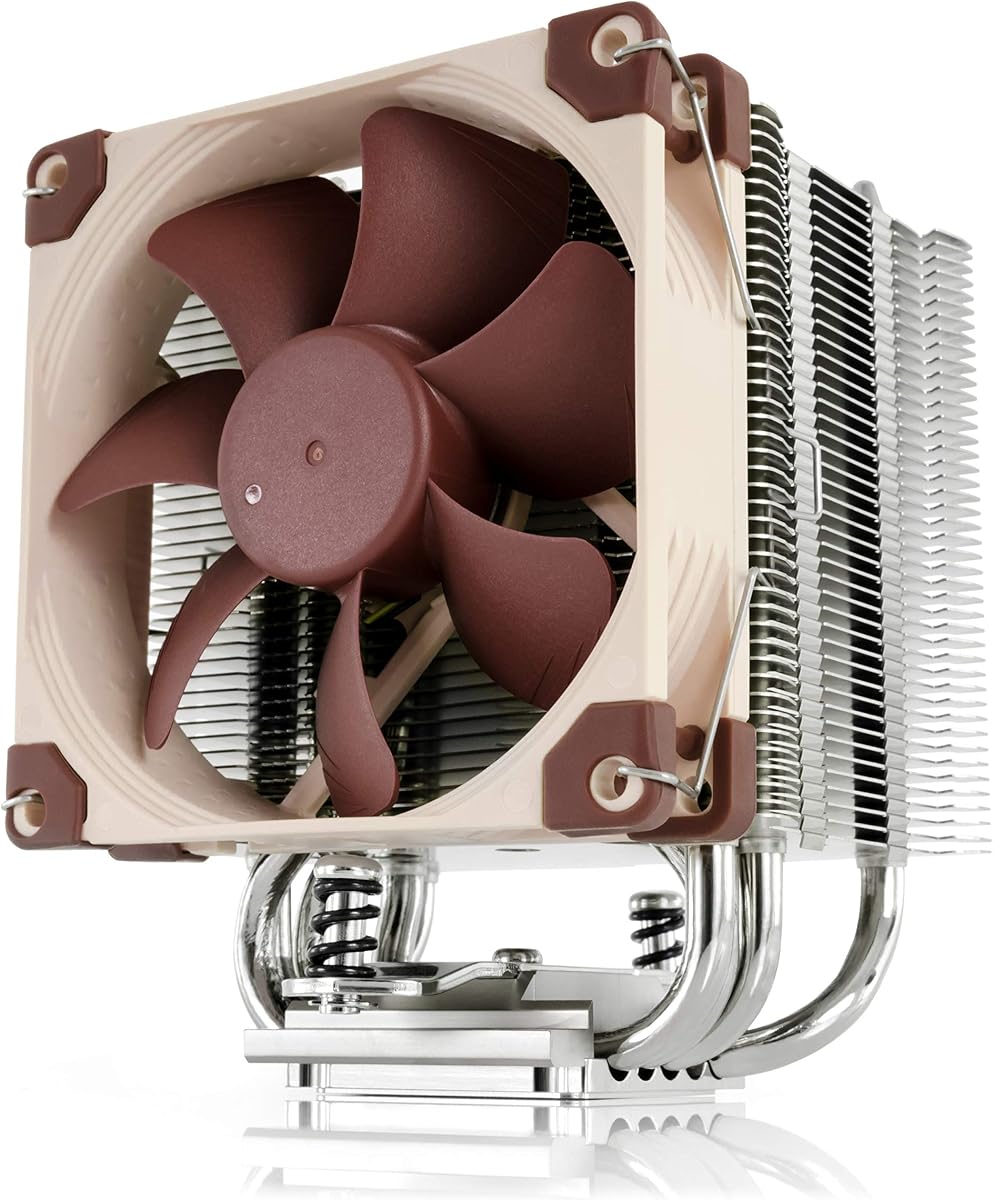
The Noctua NH-U9S is designed for situations where physical space matters more than maximum heat dissipation. Its compact single-tower body and 125mm height make it especially useful for HTPCs, ITX systems, and small-form-factor workstations that cannot accept a tall dual-tower cooler.
We may earn a commission when you buy through this link, at no additional cost to you.
The highly optimized NF-A9 92mm fan supports PWM control and can be paired with the included Low-Noise Adaptor for quieter operation. Its compact design avoids overhanging the RAM or PCIe slots on most current motherboards, improving build flexibility. Pre-applied NT-H1 thermal compound and the SecuFirm2 mounting system also simplify installation.
The trade-off is reduced thermal capacity compared with larger 120mm or 140mm fan coolers. A smaller fan may need to operate at higher speeds to move the same volume of air, and the cooler is less appropriate for unrestricted power on the most demanding flagship processors. The platform list is broad, covering recent Intel LGA platforms and AMD AM4 and AM5.
For compact professional systems, quiet offices, and builds where avoiding RAM or GPU interference is essential, the NH-U9S remains a highly practical choice. Its six-year warranty and low-noise accessories reinforce its value for users who want straightforward ownership. The processor should be checked against the cooler's expected thermal envelope before purchase.
The 125mm height and compact footprint allow this cooler to fit systems that reject conventional tower coolers. Its limited overhang also makes it easier to access memory, expansion cards, and other components.
PWM control and the included Low-Noise Adaptor provide two ways to tailor acoustic output. The adapter is particularly useful in offices and recording environments where continuous background sound should be minimized.
We may earn a commission when you buy through this link, at no additional cost to you.
The Noctua NH-U14S TR4-SP3 is a proven air-cooled option for older AMD Ryzen Threadripper and Epyc platforms. It carries a 4.8 rating and is built around a premium 140mm NF-A15 fan, giving it a quiet-performance profile designed for demanding server and workstation processors.
We may earn a commission when you buy through this link, at no additional cost to you.
The cooler supports AMD's sTRX4 and TR4 platforms, including examples such as Threadripper 3990X, 2950X, and 2920X, as well as several generations of Epyc processors. The PWM fan supports automatic motherboard speed control, allowing it to run quietly during lighter periods and increase output under sustained loads.
Its main limitation is platform currency. This model does not cover the newer TR5, sTR5, SP6, or TR4-SP3 sockets represented elsewhere in the guide, so it cannot be chosen solely from its broad Threadripper and Epyc associations. A prospective buyer must verify the exact processor and motherboard socket before ordering.
For owners of compatible Threadripper or Epyc systems that prefer air cooling over radiator installation, the NH-U14S TR4-SP3 remains a quiet and established option. It is especially valuable when reliability, low acoustic output, and a large fan matter, while avoiding the complexity of a custom liquid-cooling loop. The matching socket remains non-negotiable.
A 140mm fan can generate meaningful airflow while operating at relatively moderate speeds. That characteristic makes the design suitable for sustained workstation tasks where fan noise needs to remain unobtrusive.
The cooler has extensive award recognition and a long-established place in Threadripper and Epyc systems. Its value is strongest for users who already own compatible hardware and want to preserve a proven cooling configuration.
We may earn a commission when you buy through this link, at no additional cost to you.
Choosing a quiet workstation cooler requires balancing processor heat output, acoustic limits, chassis space, platform support, and reliability. The most important checks are socket compatibility and case clearance, followed closely by fan behavior and the type of workload the system will handle.
Start with the exact processor model and its socket rather than relying on a general platform label. The products in this guide cover AM4, AM5, Intel LGA115x and LGA1700 families, LGA1851, Threadripper TR5 and sTR5, SP6, TR4, sTRX4, and SP3. Some products are specialized to a narrow workstation range, while others cover a broader set of mainstream platforms. A cooler physically resembling a compatible model is not enough; mounting kits, backplates, retention hardware, and socket-specific offsets must all match. AMD installations for several Thermalright models require the motherboard's original backplate, which is not included.
Workstation cases vary from compact enclosures to spacious tower and rack-inspired designs. Air coolers in this guide measure roughly 125mm to 164mm in height, with the dual-tower models also occupying substantial width and depth. The ASRock liquid cooler requires room for a 38mm-thick 360mm radiator, tubing bends, pump hardware, and cable routing. Compare the cooler's full dimensions with the case's published CPU-cooler limit rather than estimating from the graphics card clearance.
Thermal capacity should be matched to the processor's sustained heat output. Four-heatpipe single-tower designs are sensible for mainstream processors and moderate workloads, while six- or seven-heatpipe dual-tower coolers provide more margin for powerful desktop chips. Specialist Threadripper and Epyc systems may need a cooler explicitly designed for those sockets. Consider whether the system performs continuous rendering, compilation, simulation, or virtualization rather than occasional short bursts, because longer workloads expose airflow and heat-transfer limitations.
Published maximum noise figures are useful for comparison, but they usually describe the fan at its highest speed under controlled conditions. Actual workstation noise depends on fan curve, processor temperature, case acoustics, fan position, and nearby hard drives or case fans. A model with a lower maximum speed may sound quieter in practice if it does not need to ramp aggressively. PWM-capable fans are important because they allow gradual control rather than abrupt full-speed operation.
The cooler should support the case's airflow path rather than fight it. The Noctua NH-U14S TR5-SP6 is specifically described as directing airflow perpendicular to the socket's long axis, which can align with suitable chassis exhaust fans. Dual-tower coolers also need enough front-to-back clearance for air to pass through both fin stacks. Large cases with multiple intake and exhaust fans can usually provide the most straightforward cooling environment.
A workstation may run continuously, making component reliability as important as peak performance. Noctua includes six-year manufacturer warranty coverage on the NH-U9S, while the ASRock WS TR 360D carries a six-year warranty and uses dual pumps with a failure alarm. Air coolers avoid pump failure as a category, although fan bearing longevity and mounting security still matter. Long warranty terms and redundant components can provide additional confidence for critical systems.
Display-equipped coolers add monitoring and customization that basic towers cannot provide. The Peerless Assassin 120 Vision MAX models use a magnetic 5-inch IPS screen with 480-by-854 resolution and connect through a motherboard USB header. Their ARGB lighting uses a five-volt, three-pin connection and can be controlled through compatible motherboard software. These features may be valuable in a visible workstation, but they require additional cables, compatible controls, and adequate space for the magnetic top cover.
Air coolers generally require no routine liquid maintenance and are easier for service technicians to handle. Liquid coolers move heat away from the processor but add a pump, radiator, coolant loop, and more potential leak points. Low-load fan-stop behavior can make a workstation especially quiet during editing or administration, although liquid installation demands careful tube routing and radiator placement. Existing owners of a compatible air cooler may also prefer to avoid replacing a proven installation with a more complicated system.
Install the cooler with the system powered off and disconnected from electricity. Confirm the socket, mounting hardware, backplate, case clearance, and fan orientation before attaching the heatsink or pump block. Apply the supplied thermal compound only if the product does not already have it pre-applied, and tighten the retention hardware in a gradual cross-pattern where applicable. Confirm that every fan connector is attached to the correct four-pin PWM or RGB header and that display-equipped models also have their internal USB data connection.
After installation, enter the motherboard's BIOS or monitoring software and verify that the processor is identified correctly. Check the idle temperature and fan curve before beginning a sustained workload. A sensible quiet profile keeps the CPU fan at low speed during light tasks and increases it gradually as load and temperature rise. For liquid systems, inspect the tubing, fittings, pump area, and radiator for signs of moisture or irregular installation, especially during the first few operating cycles.
Clean dust from the heatsink, fan blades, radiator fins, and case vents with compressed air while keeping the system powered off. Do not loosen the heatsink or pump block just to clean the exterior; doing so can disturb the mounting pressure or thermal paste bond. Monitor unusual fan noise, rising temperatures, unstable performance, or changes in liquid-cooler behavior, and contact the manufacturer or qualified service professional if a problem appears. Periodic inspection is especially important in dusty, high-humidity, or continuously operating workstations.
No. A larger fan or more efficient heatsink can move substantial air without reaching extreme RPM levels. The Thermalright Peerless Assassin 120 SE and Noctua NH-U14S TR5-SP6 demonstrate quieter design approaches, but actual acoustics still depend on fan curves, workload, case construction, and processor temperature. Proper PWM tuning matters at least as much as the headline speed figure.
Only if the cooler's mounting system explicitly supports the processor's socket. Threadripper and Epyc platforms have used specialized sockets such as TR4, sTRX4, TR5, sTR5, SP3, and SP6, and an LGA1700-compatible cooler does not automatically fit them. Check the exact model, socket, retention hardware, and mounting plate before ordering. A specialized workstation cooler is usually the safer choice.
An air cooler moves heat directly from the processor through heatpipes and fins, requiring fewer components and little routine maintenance. A liquid cooler transfers heat into coolant and then releases it through a radiator, which can provide more capacity and move cooling hardware away from the socket. Quietness depends on the whole system because both approaches still need fans, and high liquid-cooling capacity does not automatically guarantee silence.
It can, although several products use offset fans or heatpipes to preserve clearance. The Thermalright Phantom Spirit 120 EVO and Peerless Assassin 120 Vision MAX are designed with compatibility in mind, but users should still compare tower width, fan position, motherboard layout, and graphics-card dimensions. Installing tall memory or a large graphics card may require changing the cooler height or fan orientation.
They can reduce unnecessary fan activity and eliminate fan noise during low-load periods. The ASRock WS TR 360D explicitly stops its fans under low load, while other models use PWM to reduce speed. Fans still need to operate during demanding workloads, so users should configure a curve that responds promptly to rising temperatures rather than allowing processors to become unnecessarily hot.
A 140mm fan can provide useful airflow at moderate speeds, which is why the Noctua NH-U14S models emphasize this format. It is not automatically quieter or cooler than a 120mm fan because performance depends on frame design, static pressure, motor acoustics, and system resistance. Match the fan to the heatsink and case, then use motherboard control to tune it.
Confirm that the case can accommodate the display-equipped cooler and that the motherboard has an available internal USB header for power and data. The system also needs compatible software for monitoring and display controls, while ARGB lighting requires the appropriate five-volt, three-pin connection. Plan the cable route because the display cable adds clutter behind the motherboard tray.
Inspect it whenever you notice rising temperatures, unusual fan noise, or airflow performance that seems to have declined. Dust-prone environments may need more frequent checks, while a clean office system may require less attention. Powered-off visual inspections and careful compressed-air cleaning are generally sufficient for routine care, but mounting pressure and the thermal interface should not be disturbed unnecessarily.
The Thermalright Peerless Assassin 120 SE offers the strongest general balance in this guide, combining a six-heatpipe dual-tower design, two 120mm PWM fans, a listed 25.6 dBA maximum, and broad platform support. The Thermalright Assassin X120 Refined SE is the budget selection for quieter, more compact mainstream workstations, while the ASRock WS TR 360D is the premium choice for compatible Threadripper systems that require redundant pumps, high radiator capacity, and true low-load fan stopping.
Prioritize exact socket compatibility, case clearance, and sustained workload requirements before focusing on minor acoustic differences. A processor-specific workstation cooler may offer the most appropriate mounting and thermal design, while a dual-tower air cooler provides a straightforward alternative to liquid systems. Display-equipped models add convenience and visual appeal but also introduce additional power, data, software, and clearance requirements.
Technical specifications and product listings can evolve, and current pricing changes frequently. Before purchasing, verify the exact CPU socket, included backplate, cooler dimensions, radiator thickness, case support, connector availability, and manufacturer instructions. With those checks completed, the right selection should provide a workstation cooling solution that matches both its processing demands and its required acoustic environment.