
TNP Multi-Port Wall Plate
4.7Editor score
Four integrated connection positions
HDMI Ethernet coax and phone
Standard bracket compatibility
This HDMI Wall Plate guide compares ten options for port count, HDMI version, installation method, signal support, and wall-mounting convenience.
An HDMI wall plate creates a clean, permanent connection point for displays, projectors, game consoles, media centers, and other high-definition video equipment. A useful plate should match the room’s layout, fit standard electrical hardware, support the required video and audio features, and route cables where they are less visible.
This guide compares ten HDMI wall plates based on port count, HDMI generation, supported resolutions, installation requirements, connector style, and included hardware. It covers single-port and multiport options, 4K and 8K models, pigtail and keystone designs, and kits that include low-voltage mounting brackets.
Each review identifies the features that set its product apart and explains the compromises buyers should consider. Ratings and product details reflect the supplied listings, while prices and availability can change, so confirm the current listing and required installation accessories before purchasing.
4.7Editor score

4.4Editor score

4.4Editor score
The comparison below highlights each plate’s port arrangement, HDMI performance, connector design, and mounting package to make the differences easier to identify before installation.


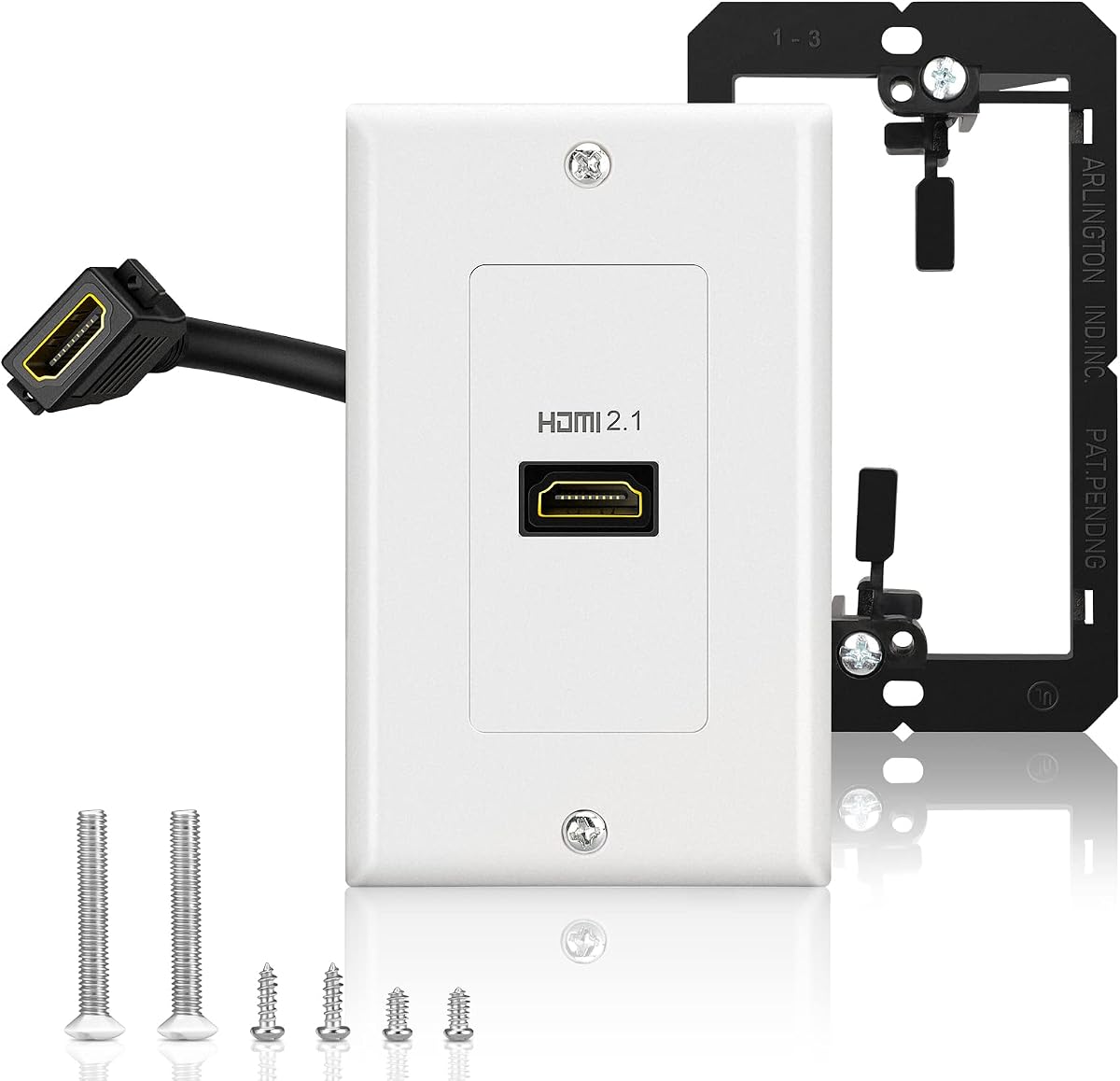
The Cable Matters 2-Pack 1-Port 8K HDMI Wall Plate is the most technically ambitious option in this guide, combining an HDMI 2.1 pass-through insert with a generous 48Gbps bandwidth rating. Its 4.4 rating reflects a strong overall reception, while the listed support for 8K video, 4K high-refresh gaming, eARC, VRR, and ALLM makes it a compelling choice for a modern entertainment system.
We may earn a commission when you buy through this link, at no additional cost to you.
The plate uses a female HDMI connection on the room-facing side and a 7.1-inch pigtail on the rear. That extra length provides useful flexibility when routing the in-wall cable into an equipment cabinet. The stated compatibility with 8K displays, Dolby Atmos, DTS-HD Master Audio, Dolby TrueHD, and 48-bit color makes the specification list particularly relevant to high-end televisions, projectors, and game consoles.
The main limitation is its single-port layout. Buyers who need HDMI, Ethernet, coax, and telephone connections in one faceplate should look at the TNP four-port option instead. In addition, achieving the headline resolution and refresh-rate combinations requires compatible HDMI 2.1 equipment and suitable cables; the plate alone cannot add capabilities that the connected devices do not provide.
This is an excellent recommendation for someone building a current-generation home theater, gaming room, or professional AV installation. The two-pack adds planning flexibility because the installer can place plates in two rooms or retain one as a future connection point. For buyers seeking comprehensive modern HDMI support, it leads the list.
Variable Refresh Rate and Auto Low Latency Mode support make this plate more than a basic cable pass-through. It is best suited to 8K televisions, 4K high-refresh-rate displays, modern consoles, and receivers that can take advantage of the full HDMI 2.1 feature set.
The 7.1-inch rear cable gives installers more room to bend and guide the connection than a very short fixed pigtail. It remains a passive plate, however, so signal quality also depends on the in-wall cable and connected equipment.
We may earn a commission when you buy through this link, at no additional cost to you.
The Cable Matters 2-Pack 1-Port 4K HDMI Wall Plate offers a straightforward way to add permanent HDMI access without leaving loose cables around a television or conference display. Its 4.5 rating places it among the strongest-reviewed products here, and the two-plate package is especially useful for rooms with more than one display location.
We may earn a commission when you buy through this link, at no additional cost to you.
This model supports HDMI 2.0 features including ARC, HEC, 48-bit color, 32-channel audio, Dolby TrueHD 7.1, and bandwidth up to 18Gbps. Its listed video modes cover 4K at 60Hz along with several popular computer and high-definition resolutions. The front female port and four-inch rear pigtail make the physical connection straightforward for either a new installation or an existing low-voltage wall opening.
Its limitation is the 4K-oriented bandwidth ceiling. It is not the appropriate choice for a display system designed around 8K or very high 4K refresh rates. The short pigtail can also constrain routing in a deep wall cavity, although the plate uses a standard 4.5-by-2.7-inch faceplate that should fit a conventional single-gang opening.
Choose this option for a 4K television, office monitor, classroom display, or secondary theater screen where dependable HDMI 2.0 pass-through matters more than next-generation specifications. It is a particularly balanced recommendation for buyers who want two locations covered without moving to a more complex multiport arrangement.
The listed 18Gbps bandwidth and 4K 60Hz support align well with mainstream 4K televisions, monitors, projectors, and presentation equipment. It is a practical choice where eARC, HDR, and high-resolution audio pass-through are desired without 8K requirements.
The included pair can serve separate rooms, support a display and nearby projector, or provide a spare outlet for future use. The included mounting screws and matching faceplates keep the installation visually consistent.
We may earn a commission when you buy through this link, at no additional cost to you.
The VCELINK 4K HDMI Outlet Wall Plate 1-Port Kit is a complete installation package with a 4.6 rating, the highest among the products in this roundup. It combines two white single-port wall plates, two HDMI cables, two low-voltage brackets, and multiple mounting screws, making it convenient for buyers who want more than the faceplate and insert alone.
We may earn a commission when you buy through this link, at no additional cost to you.
Its HDMI 2.0 specification supports 4K at 60Hz, ARC, HEC, 48-bit color, 32-channel audio, and Dolby TrueHD 7.1. Three-layer shielding is specified for the HDMI cable, while the detachable cable design can simplify connection and cable management. Compatibility extends to computers, televisions, game consoles, projectors, and other devices with standard HDMI ports.
The most important caveat is that this remains an HDMI 2.0 product rather than an 8K HDMI 2.1 option. It is also limited to one HDMI port on each plate, so a buyer seeking a consolidated data and media wall would need another design. Its larger included hardware package is a benefit rather than a disadvantage, provided the extra components are actually needed for the installation.
This kit is well suited to new construction, renovation, and DIY projects because the low-voltage brackets are included. The listed brackets fit walls from 0.15 to 0.75 inches thick, giving installers a helpful degree of flexibility. For a straightforward 4K setup, it is one of the most complete and convenient packages available.
Including two low-voltage brackets removes a common source of installation delays. The kit also supplies separate long, short, and white cross screws, giving the installer flexibility when fastening the plates and brackets in different wall positions.
A detachable HDMI lead makes the insert easier to connect than a permanently captured cable. It also offers a practical point of access if a cable needs to be replaced without removing the entire faceplate from the wall.
We may earn a commission when you buy through this link, at no additional cost to you.
The TNP 4-Port HDMI Ethernet Coax and Phone Wall Plate is the most useful choice when a room needs several low-voltage connections in a single standard opening. It combines HDMI, Ethernet, coax, and phone positions and earned a 4.7 rating, making it one of the most popular products in the supplied group.
We may earn a commission when you buy through this link, at no additional cost to you.
The HDMI section supports up to 18Gbps and pass-through for common 4K resolutions up to 3840×2160, along with ARC, eARC, HEC, 48-bit color, and 32-channel audio. The product listing also identifies support for DTS-HD Master Audio and Dolby TrueHD. Female connectors appear on both the room-facing and rear sides, eliminating soldering and allowing an in-wall cable run to plug directly into the back.
The main drawback is that the HDMI connection is not designed for the 48Gbps demands of HDMI 2.1. The multiport layout may also feel oversized for a room that only needs one video connection. Buyers should measure the available box and confirm that a one-gang low-voltage bracket is present or can be installed.
This wall plate is ideal for a home office, conference room, media console, or television wall that also needs wired networking, television coax, or telephone service. Consolidating those paths behind one faceplate can produce a cleaner installation than several separate low-voltage modules.
Combining HDMI with Cat6 Ethernet, coax, and phone positions is valuable in offices and living rooms where separate wall outlets would consume too much space. The design also gives installers a clear way to label each connection.
Both ends of the HDMI path use female connectors, so the room-facing cable and the in-wall cable can attach without soldering. This makes the plate practical for retrofitting an existing low-voltage opening.
We may earn a commission when you buy through this link, at no additional cost to you.
The HDMI Wall Plate with a one-port 4K keystone is a simple solution for adding a permanent HDMI connection in a standard wall. Its 4.5 rating indicates favorable customer reception, and the product is supplied as an assembled faceplate and insert, reducing the work required at the outlet.
We may earn a commission when you buy through this link, at no additional cost to you.
Installation is described as comparable to fitting a conventional wall plate: the front and rear cables plug into the female keystone, and the unit is secured with a screwdriver. The keystone can be detached for adjustment or replacement, while the stated 4K 60Hz support covers the needs of many televisions, projectors, monitors, DVD players, and game consoles.
One notable omission is the low-voltage mounting bracket, which is not included. Homeowners without an existing bracket will need to source one separately. The plate also lacks the advanced bandwidth and gaming features associated with HDMI 2.1, so it is better suited to conventional 4K equipment than 8K or very high-refresh-rate systems.
This is a practical choice for a straightforward retrofit, especially when the installer already has a standard low-voltage box. Its compact design, detachable jack, and included screws make it approachable for a DIY installation while still providing a neat connection point.
Because the plate and keystone arrive assembled, the installer can focus on attaching cables, aligning the opening, and tightening the screws. A standard screwdriver is the main tool described for the job.
The removable insert separates the connector from the decorative faceplate. That design can make cable alignment easier and allows the functional component to be serviced without replacing the entire visible plate.
We may earn a commission when you buy through this link, at no additional cost to you.
The TENINYU Single HDMI Wall Plate is a compact option for creating one permanent 4K-capable connection point. It has a 4.4 rating and supports the principal HDMI 2.0b functions listed for the product, including HDR video, 18Gbps transfer speed, 4K UHD, 3D, 48-bit deep color, and Audio Return Channel.
We may earn a commission when you buy through this link, at no additional cost to you.
The single port uses gold-plated contacts, while the coupler-style female connectors allow a cable to connect from both the room-facing and in-wall sides without soldering. The insert fits a standard wall socket plate, and the product description emphasizes quick setup for home theaters, game systems, and television boxes.
The single-port format is restrictive for a media wall with several source devices, and buyers with 8K or 4K 144Hz ambitions will need a newer HDMI 2.1 plate. There is also no mention of a low-voltage bracket in the supplied information, so the existing electrical-box arrangement should be confirmed before ordering.
This plate makes sense for one display, one gaming television, or a straightforward streaming location. It combines a small visual footprint with a broad HDMI 2.0b feature set, offering enough capability for common 4K setups without the complexity or bandwidth requirements of the newest standard.
A one-gang, one-port design works well where a dedicated display needs a clean cable route but additional connectivity is unnecessary. The small format also leaves more of the wall visually uncluttered.
HDR, ARC, 48-bit color, and an 18Gbps transfer rate cover many current television and projector arrangements. The actual formats and resolution combinations remain limited by the source device, display, and connected HDMI cables.
We may earn a commission when you buy through this link, at no additional cost to you.
The Two-Port HDMI Wall Panel provides two front-facing HDMI connections in one white wall plate, giving it an advantage over the many single-port choices in this guide. Its 4.4 rating reflects solid customer reception, and the female-to-female arrangement makes it suitable for a permanent media connection in a living room, game area, or home theater.
We may earn a commission when you buy through this link, at no additional cost to you.
The listed support covers 4K, UHD, HDR, 3D, and ARC, with backward compatibility stated for HDMI 2.0, 1.4, 1.3b, and 1.3a. Both sides of the connection use female sockets, so the equipment cable and in-wall cable can plug in directly. Its screw-free rear connector is designed to reduce the chance of damaging the back connection during installation.
This is not an 8K-capable HDMI 2.1 panel, and older HDMI standards do not guarantee modern gaming features or the highest bandwidth. Buyers should also consider that two ports in a single opening may still be insufficient if multiple source devices need simultaneous in-wall routing.
The product is a good fit for a wall-mounted television with two nearby source locations, such as a game console and streaming box, or for separating equipment and display runs. Its two-port layout and simple connector arrangement offer useful flexibility without the complexity of a full communications plate.
The dual-port layout reduces the need for separate HDMI wall openings. That is especially useful where space is limited, although each connected cable still needs an appropriate path through the wall.
The screw-free rear connection is intended to remain intact while the plate is secured. It provides a simpler installation experience than a rear connection that must be held or aligned with a small fastener.
We may earn a commission when you buy through this link, at no additional cost to you.
The TNP 1-Port HDMI Wall Plate uses a four-inch rear pigtail to bridge the connection between an in-wall cable and a room-facing HDMI lead. It has a 4.2 rating, the lowest among the ten products, but its feature set and installation design remain appropriate for conventional 4K home theater and office applications.
We may earn a commission when you buy through this link, at no additional cost to you.
The plate supports ARC, eARC, HEC, 48-bit color, 32-channel audio, Dolby TrueHD 7.1, and bandwidth up to 18Gbps. Its listed resolutions include 3840×2160 and several popular computer formats. The front female port and attached rear pigtail make the signal path easy to understand, and no soldering is required.
The four-inch pigtail is shorter than the 7.1-inch lead offered by the rank-one Cable Matters plate, potentially making it less forgiving when routing in a deep cavity. It also provides only one HDMI connection, and its 4K-oriented bandwidth does not meet HDMI 2.1 requirements for 8K or the highest 4K refresh rates.
This is a sensible choice for a new or existing single-gang low-voltage opening where the installer wants a simple, visible pigtail rather than a keystone module. The two-piece faceplate and insert design, included screws, and straightforward connectors make it especially approachable for straightforward home AV projects.
The attached pigtail makes it easy to identify where the room-facing HDMI cable belongs. Installers can connect the in-wall run to the short rear lead, secure the plate, and then attach the display cable at the front.
The plate is designed around an 18Gbps HDMI 2.0-class connection and common 4K resolutions. It works well with HD audio formats and modern displays, while high-end 8K installations require a different standard.
We may earn a commission when you buy through this link, at no additional cost to you.
The ELECTOP 8K HDMI 2.1 Outlet Wall Plate combines current-generation HDMI specifications with a low-voltage metal mounting bracket. Its 4.3 rating is slightly below the leaders, but the plate’s 48Gbps bandwidth and broad 8K-oriented feature list make it relevant to modern gaming and home theater installations.
We may earn a commission when you buy through this link, at no additional cost to you.
The listing identifies support for 8K at 60Hz, 4K at 120Hz and 144Hz, 1440p at 240Hz, and 1080p at 240Hz. It also lists ALLM, VRR, eARC, HEC, 48-bit color, 32-channel audio, Dolby TrueHD 7.1, and DTS-HD Master Audio. A detachable 0.66-foot extension cable connects the front female port to the in-wall run.
The included bracket is a meaningful convenience, but buyers still need compatible source hardware, a suitable display, and capable HDMI cables. As with other 8K plates, the specification is a pass-through capability rather than a guarantee that every source or display will operate at the maximum mode. The single-port design also limits flexibility.
This product is a strong option for a new 8K television installation, high-refresh-rate gaming display, or dedicated home theater wall. It is especially convenient when the project requires both the plate and its low-voltage bracket, simplifying the parts list for the installer.
The listed 48Gbps bandwidth and 240Hz modes target high-end gaming and large-format displays. These capabilities are most useful when every connected device, cable, and wall pathway can support the intended format.
The included no-gap low-voltage metal bracket supports a clean retrofit in a suitable single-gang opening. It also provides a more structured mounting option than a plate installed without a purpose-built bracket.
We may earn a commission when you buy through this link, at no additional cost to you.
The VCE UL-Listed 8K HDMI Keystone Wall Plate distinguishes itself with a listed safety designation, flame-retardant ABS construction, and shielded, gold-plated connectors. It has a 4.4 rating and targets installations where material safety, signal integrity, and a polished wall presentation are all important.
We may earn a commission when you buy through this link, at no additional cost to you.
Its HDMI 2.1 keystone supports up to 48Gbps, 8K at 60Hz, 4K at 120Hz, HDR, 3D, Dolby Atmos, and eARC. The coupler combines 24K gold-plated contacts with aluminum-magnesium alloy braid and aluminum foil shielding to resist corrosion and reduce EMI/RFI interference. These features are especially relevant in offices, medical centers, conference facilities, arcades, and finished home theaters.
The low-voltage mounting bracket is sold separately, which can make the complete installation more involved. Only one HDMI port is provided, so this is not the best choice for a multi-source wall opening. It also uses a glossy white faceplate, which may be less suitable for rooms with a matte or non-white decorative scheme.
Choose this plate when code-conscious installation practices, connector durability, and high-end 8K capability are priorities. It is a polished, technically capable option that rewards buyers who plan the full installation rather than simply adding a minimal faceplate to an existing opening.
Flame-retardant and impact-resistant ABS provides a durable housing, while gold-plated contacts resist corrosion. These material choices make the plate suitable for frequently used commercial rooms as well as residential media areas.
The combination of braided alloy and aluminum foil shielding is designed to limit electromagnetic and radio-frequency interference. The result is a connection design well suited to professional installations where long cable paths or nearby electronics may be present.
We may earn a commission when you buy through this link, at no additional cost to you.
The right HDMI wall plate depends on your source devices, display capabilities, wall construction, cable routes, and preferred installation style. These factors help narrow the choices before you begin cutting or modifying an outlet.
An HDMI 2.0 wall plate is appropriate for many 4K televisions, projectors, monitors, and standard entertainment systems, while an HDMI 2.1 plate supports newer 8K and high-refresh-rate formats. The stronger option is only worthwhile when the television, source device, cables, receiver, and content also support the desired capabilities. Paying for a higher-bandwidth plate cannot improve the output of older equipment.
Match the plate to the equipment, not merely to the screen size. A 4K 60Hz television has little need for 48Gbps pass-through, but a gaming display supporting 4K at 120Hz or 144Hz may benefit from HDMI 2.1 features such as VRR and ALLM.
A one-port plate keeps the faceplate compact and works well when only one display location is required. A two-port panel offers more flexibility, while a multiport communications plate can combine HDMI with Ethernet, coax, and telephone. Count the permanent wall openings you want to create rather than merely counting the devices currently in the room.
Consider future changes as well. Adding a second HDMI position can be useful for a game console, streaming device, or projector that may move later. However, every additional port needs a corresponding cable path and enough physical room behind the wall.
Most standard HDMI wall plates are designed to fit a single-gang low-voltage mounting bracket rather than a conventional electrical box. The bracket must also be deep enough to accommodate the faceplate, connectors, and any in-wall cables without forcing them against the wall. Several products include brackets, while others explicitly require one to be purchased separately.
For existing walls, inspect the box before removing the old component. For new walls, verify the cavity depth, stud placement, and cable route. The VCELINK and ELECTOP kits include brackets, while the VCE and generic keystone options require separate purchase.
A pigtail plate has a permanently attached short cable on the rear. The installer connects that lead to the in-wall cable and plugs the display cable into the front. A keystone design uses a removable insert, which can simplify service work and offers some flexibility in how the connector is positioned.
Compare pigtail length with the available cavity depth. A longer lead is easier to bend into position, while a very short lead may leave the connector under tension. Detachable keystone inserts are useful if future replacement or repositioning is likely, but their fit should be checked carefully against the faceplate.
Resolution support is only one part of HDMI compatibility. Buyers may also need ARC or eARC for television audio, HEC for Ethernet functionality, HDR for high dynamic range content, VRR for variable refresh rate gaming, and ALLM for automatic low-latency operation. Dolby Atmos and DTS-HD Master Audio support matter in a theater installation with an advanced sound system.
Use the feature list to identify the intended setup rather than assuming every port supports every function. A simple TV and streaming stick may need little beyond 4K pass-through, while a game console and modern television benefit from the latest gaming features.
The wall plate is only one link in the signal path. The quality and length of the in-wall cable, the visible cables on either side, and any intervening devices can all affect performance. Some product listings recommend keeping HDMI cables under 20 or 25 feet for 4K HDR, while higher bandwidth modes may demand even more careful cable selection.
Use quality cables suited to the intended resolution and refresh rate, avoid sharply bending cables, and do not force connectors into the plate. A wall plate cannot compensate for an undersized or damaged cable elsewhere in the installation.
A complete package can be easier to install than a plate sold with only a few screws. Check whether the package includes a faceplate, insert, low-voltage bracket, and the required fasteners. Some kits also provide different screw lengths or white-headed screws for a more finished appearance. These details can matter in drywall, plaster, or other finished surfaces.
Low-voltage installation should still be handled carefully. Disconnect relevant power where required, follow local electrical and building rules, and avoid working with exposed wiring unless qualified. A clean-looking plate is less important than a secure, properly routed, and code-compliant installation.
Most options are white, but their surfaces differ. Some have a matte or classic appearance, while others use a glossy finish intended to blend with bright white walls. A removable insert is helpful when a connector eventually needs service, and white-headed screws can create a more discreet final result.
Choose an appearance that coordinates with the room rather than relying solely on the word white. Also consider whether future equipment will change. A plate with multiple positions or an accessible keystone may offer more longevity than a minimal single-port design.
Begin by confirming that the wall opening matches the faceplate, the low-voltage bracket is secure, and the in-wall cable can reach the rear connection without being pinched. For a pigtail design, attach the in-wall cable to the rear lead before fastening the plate. For a keystone design, seat the insert squarely and route the cable through the opening without forcing a tight bend.
Secure the faceplate with the appropriate screws, then connect the source cable and display cable to the front-facing ports. Power on the display and source, select the correct HDMI input, and confirm that the intended resolution, refresh rate, HDR mode, and audio format are available. If a high-bandwidth mode is unstable, investigate the cable length and device compatibility before changing the plate.
For maintenance, disconnect both front and rear cables before removing the faceplate or insert. Keep the opening dry, avoid trapping dust inside the electrical box, and do not paint over the connector openings. Periodically check that screws remain tight and that cables are not sharply bent or pinched behind the wall.
Most HDMI wall plates require a standard single-gang low-voltage bracket rather than a conventional electrical box. Some listings include a bracket, while others sell it separately. Check the package contents before installation and confirm that the bracket is deep enough to hold the connector, plate, and cables without strain.
A pigtail plate has a short HDMI cable permanently attached to the rear, which provides a simple and direct connection. A keystone plate uses a removable insert that can be more convenient for adjustment or service. Both are passive pass-through designs, so neither improves the signal beyond the quality of the attached cables and source equipment.
An HDMI 2.0 plate is generally designed around the bandwidth required for conventional 4K modes and does not provide the full 48Gbps capability associated with HDMI 2.1. For 8K or very high 4K refresh rates, choose an HDMI 2.1 plate and verify that the television, source, cables, and any receiver in the signal path are compatible.
A two-port plate can be more convenient when one wall opening is available and both connections need to reach nearby equipment. Two separate plates may offer better cable routing or leave room for other connector types. Choose according to the available wall space, cable paths, and whether both ports will be used regularly.
The products in this guide use plug-style couplers, keystone inserts, or attached pigtails, so soldering is not generally required. The installer still needs to terminate or terminate and terminate no, must route the in-wall cable properly and secure the plate to a suitable bracket. Always follow local wiring practices and obtain qualified help when needed.
Yes, provided the opening contains a compatible low-voltage bracket and has enough depth for the plate and cables. The new outlet location does not have to be directly beside the television, but the in-wall cable must connect the plate to the source equipment. Avoid drilling without checking for wiring, plumbing, and structural obstructions.
Many HDMI 2.0 and 2.1 plates support ARC, and some explicitly list eARC, Dolby Atmos, Dolby TrueHD, or DTS-HD Master Audio pass-through. The plate does not decode audio independently, so the connected receiver or television must support the desired format. Check both ends of the signal path.
Use cables suitable for the target resolution and refresh rate, keep total cable length within the cable manufacturer’s guidance, and avoid sharp bends or pinching behind the plate. A stable wall connection also depends on a properly fitted bracket and clean connectors. Test the complete chain before finishing the wall.
The Cable Matters 8K HDMI Wall Plate is the strongest all-around choice for modern HDMI 2.1 installations, while the TNP four-port model offers the most practical consolidation of video, network, coax, and telephone connections. The VCELINK kit is especially attractive for new installations because it includes brackets and a complete set of mounting hardware.
Prioritize bandwidth that matches your actual equipment, adequate cable routing, and a compatible low-voltage bracket. Pigtails, removable keystones, included brackets, and multiport layouts affect convenience more than the basic pass-through function. If future devices are likely to change, a slightly more capable plate may reduce the need for another installation later.
Before purchasing, verify the included hardware, wall-box compatibility, port count, and required audio or gaming features. Product listings, ratings, and prices can change over time, so check the current description and current market cost before making a final decision.