
KINWIN 30W Charging Dock
4.0Editor score
30W adapter included
Magnetic USB-C interface
Eleven RGB lighting modes
Quest 3S and 3 support
Meta Quest 3 Magnetic Charging Dock guide comparing ten options for fast charging, magnetic alignment, controller batteries, RGB lighting, and setup.
A Meta Quest 3 Magnetic Charging Dock can simplify charging while keeping the headset, controllers, and replacement batteries organized in one place. The best docks balance convenient magnetic connections, dependable charging performance, secure storage, and compatibility with the accessories you already use.
This guide compares ten charging docks and related charging accessories based on headset compatibility, magnetic charging, controller charging, battery capacity, lighting, included power supplies, and storage design. Some products charge the entire Quest system, while others charge only the headset or provide controller battery replacements.
Each review highlights the features that distinguish the product, along with practical limitations to consider before buying. The recommendations reflect the supplied product information and customer ratings, not personal testing, while prices and product availability may change over time.
Magnetic charging is convenient, but not every dock in this guide supports it.
4.0Editor score

4.2Editor score

4.4Editor score
The following comparison covers the charging methods, headset support, controller features, battery inclusions, and design advantages of all ten products, revealing which options provide the most complete charging setup.



The DOBE FOMIS Electronics dock is an all-in-one charging and storage solution for Meta Quest 3 and Quest 3S owners. It has a 4.2 rating and stands out because it can charge the headset and both controllers in one place, using a magnetic headset connector and pogo-pin contacts for the controllers. The product also includes two 900mAh rechargeable controller batteries.
We may earn a commission when you buy through this link, at no additional cost to you.
Its magnetic USB-C connection is designed to make repeated docking easier while reducing wear on the headset port. The supplied 15W adapter is listed as capable of charging the headset in approximately 2.5 hours and the controllers in approximately two hours. Standard USB-C charging remains available, and the necessary cables are included, giving users more than one way to connect the headset.
The dock doubles as an RGB display stand with nine lighting modes and a one-touch light switch. This is especially useful in a bedroom or shared space where constant illumination would be distracting. Its rechargeable batteries are claimed to support more than 2,000 cycles and are designed to display real-time power status, although actual runtime will depend on the controllers and usage.
This is a strong choice for Quest 3 and Quest 3S users who want one station to handle the entire system. It is less suitable for someone with two Quest 2 systems who needs confirmed cross-model controller support, but within its stated compatibility range, it offers one of the most complete magnetic charging packages in the guide.
Instead of treating the headset and controllers as separate charging problems, this dock brings them together. Magnetic alignment and dedicated controller contacts reduce the need to reconnect loose cables every time a session ends.
The integrated stand keeps the headset, controllers, and rechargeable battery accessories together, while nine lighting modes make the dock easier to identify on a crowded desk or shelf.
We may earn a commission when you buy through this link, at no additional cost to you.
This KINWIN two-pack is a controller-focused accessory rather than a complete charging station. It is rated 4.2 and is intended for Meta Quest 3S and Quest 3 controllers that use a compatible magnetic charging dock. The package includes two customized rechargeable batteries and two controller covers designed to fit the charging system.
We may earn a commission when you buy through this link, at no additional cost to you.
Its main appeal is convenience for users who already own a compatible magnetic dock but need replacement battery covers or reusable controller batteries. The batteries are described as usable more than 1,000 times, offering an alternative to continually replacing disposable controller batteries. The covers are customized to match the controller layout and help maintain consistent charging contact.
Correct installation is essential. The battery polarity must match the markings in each controller, and the silver metal contacts on the battery must face upward so they can meet the corresponding contacts inside the cover. Getting either detail wrong can prevent charging or produce an unreliable connection.
Choose this product if you need a two-controller replacement set for an existing compatible KINWIN magnetic dock. If you are searching for a new complete dock that also charges the Quest 3 headset, look for a bundle that includes the stand, power adapter, headset connection, batteries, and controller covers.
A controller battery cover can wear, crack, or become difficult to align over time. This two-pack provides a practical replacement without requiring the purchase of another entire charging station.
The included batteries are intended for repeated use, making them most valuable to owners who play frequently and already understand the magnetic docking system.
We may earn a commission when you buy through this link, at no additional cost to you.
This VR Headset Charging Stand has a 4.4 rating, the highest among the products with a stated numerical rating, and offers a simple combination of headset charging and vertical storage. It supports Meta Quest 2, Quest 3, and Quest 3S, making it a flexible choice for owners with more than one supported headset.
We may earn a commission when you buy through this link, at no additional cost to you.
The headset rests on an elevated plastic bracket and charges through a USB-C cable, with a stated charging time of approximately three to five hours. The stand includes dedicated controller storage: Quest 2 controllers can sit on the side suspension, while Quest 3 controllers fit in the base. It does not charge those controllers, an important distinction from complete magnetic charging stations.
Its compatibility with third-party headstraps, headphones, cables, and silicone controller sleeves is useful for people who do not want to remove accessories every time they store the system. The enlarged contact area, four non-slip pads, and angled headset tray improve stability. Assembly requires no tools, and the stand can be disassembled for compact storage.
This is the best option for a straightforward charging stand when headset organization matters more than magnetic docking or simultaneous controller charging. Buyers should use a compatible power adapter and accept that the controllers are stored rather than replenished.
The upright headset position reduces the desk area occupied by the VR system. Controller slots add organization without turning the product into a more complex charging hub.
Compatibility with third-party straps and silicone controller sleeves means users can keep commonly worn accessories attached while placing the equipment away after play.
We may earn a commission when you buy through this link, at no additional cost to you.
This magnetic charging station is designed for Meta Quest 3S and Quest 3 and has a 4.2 rating. Its distinguishing feature is the pair of 2100mAh rechargeable controller batteries, which have a higher stated capacity than the 900mAh batteries included with several other docks in the comparison.
We may earn a commission when you buy through this link, at no additional cost to you.
The dock can charge the headset and both controllers at the same time, with a stated full-charge time of four to five hours. A magnetic, rechargeable design is used for the controller system, while the package includes a USB-C adapter, a charging head, a cable, two rechargeable batteries, two battery covers, and a guide.
The batteries are described as supporting more than 3,000 uses. That long-term reuse claim is especially relevant for intensive players who would otherwise replace disposable batteries frequently. LED indicators provide charging feedback, and the stand also offers a defined storage area for the Quest equipment.
This product suits users who prioritize controller battery capacity over a full RGB lighting package. Its stated charging cycle is longer than those offered by some 20W, 30W, or 45W competitors, so buyers with a short turnaround should consider charging time as well as battery capacity.
The 2100mAh controllers are designed for repeated use and provide a larger stated capacity than the 900mAh and 1100mAh alternatives elsewhere in the guide.
The included adapter, charging head, cable, batteries, and covers reduce the need to source separate accessories before using the magnetic station.
We may earn a commission when you buy through this link, at no additional cost to you.
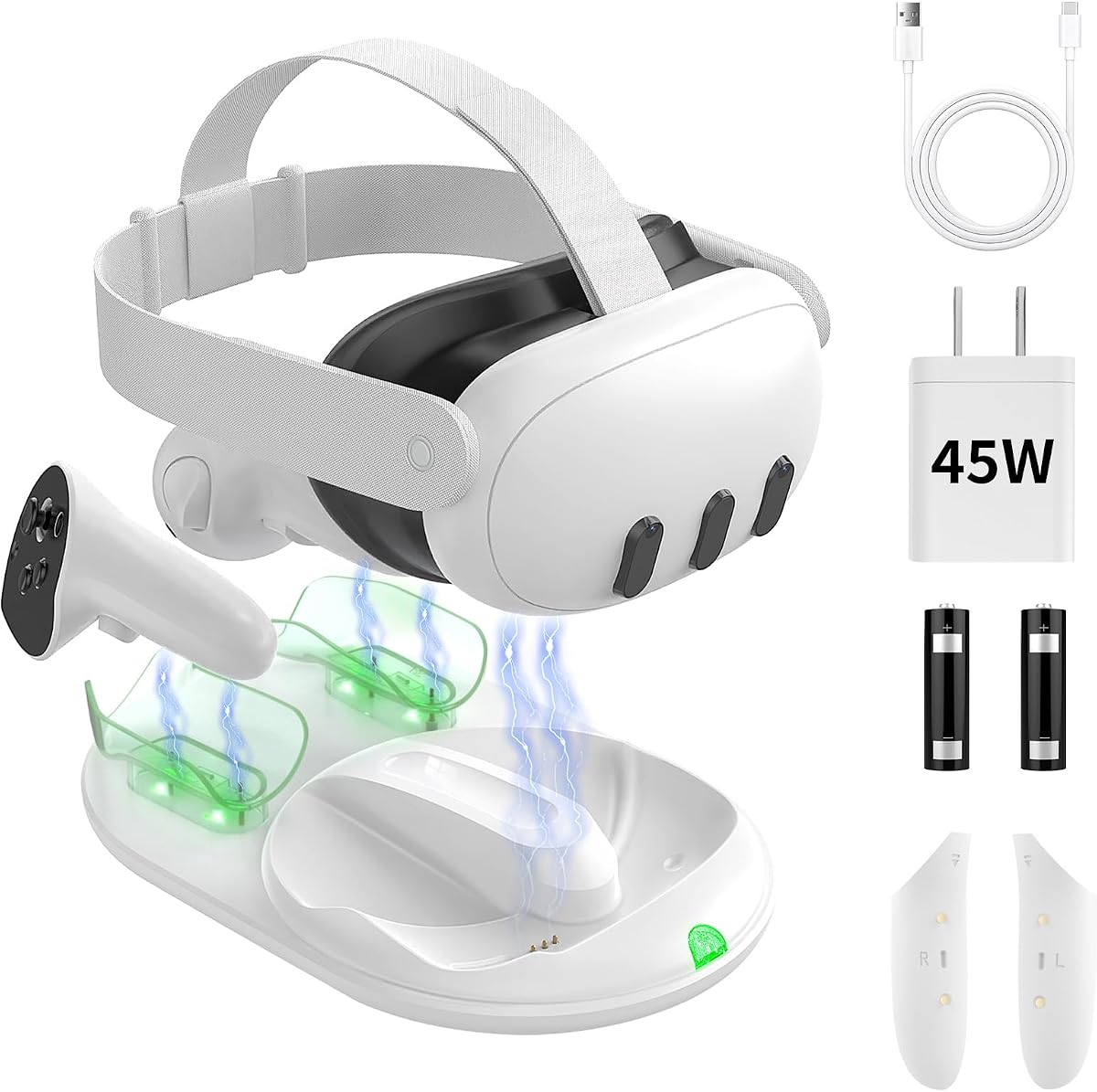
The KINWIN 30W dock combines a higher-power charging design, broad Quest compatibility, magnetic connections, and extensive lighting. It has a 4.0 rating and supports Meta Quest 2, Quest 3, and Quest 3S headsets, with controller battery covers supplied for both Quest 2 and the newer Quest models.
We may earn a commission when you buy through this link, at no additional cost to you.
A 30W PD adapter is included, and the product is stated to charge the headset in about two hours and the controllers in about 3.5 hours. The magnetic USB-C interface and flexible gold-plated pins are designed to maintain stable alignment and reduce port wear. Eleven RGB ambient modes add customization, while red and green lights communicate charging and full-charge states.
Safety features include 15 layers of protection, including overcharge and short-circuit prevention, and the product is listed as UL, CE, RoHS, and FCC certified. Two NiMH rechargeable batteries are included, with a stated life of more than 1,000 cycles. An extra USB-C port can also be used to charge another compatible device.
This is the most feature-rich option for a buyer who wants broad compatibility, a high-power adapter, magnetic charging, and a polished display stand. Two limitations deserve attention: the charging indicator cannot be turned off, although it is described as very dim, and a protection trigger can cause repeated restarts until the connected USB device is unplugged.
The included 30W adapter and extra USB-C port make the station useful beyond the headset itself. Using the recommended adapter also helps maintain the advertised charging performance.
Eleven RGB modes provide more visual variety than most competing docks, while the small status light is intended to remain unobtrusive in a darker room.
We may earn a commission when you buy through this link, at no additional cost to you.
TechKen’s vertical stand has a 4.4 rating and offers a restrained charging and storage solution for Meta Quest 2, Quest 3, and Quest 3S. Rather than emphasizing RGB lighting or a full battery kit, it focuses on holding the headset upright and connecting it with a Type-C cable.
We may earn a commission when you buy through this link, at no additional cost to you.
The vertical arrangement is designed to minimize desk and shelf space while keeping the headset accessible. Controllers can be stored with grip covers attached, and the headset can remain fitted with an elite strap. This focus on accepting real-world accessories makes the stand useful for users who regularly wear those additions.
The product description confirms headset charging through the original Type-C connection but does not specify a magnetic connector, simultaneous controller charging, or a bundled charging adapter. Its appeal therefore lies in simple organization rather than the most advanced charging technology represented in the guide.
Choose the TechKen dock for a clean, vertical charging station that accommodates grip covers and elite straps. If magnetic headset alignment and controller battery charging are essential, select a complete magnetic charging bundle instead.
Supporting grip-covered controllers and headsets with elite straps reduces the need to disassemble the system simply for storage.
Users seeking a straightforward stand can avoid the larger footprint of docks with multiple battery bays, decorative lighting, and several included accessories.
We may earn a commission when you buy through this link, at no additional cost to you.
This charging station is built for users who want more replacement batteries than a conventional two-controller kit provides. It has a 4.1 rating, supports Quest 2, Quest 3, and Quest 3S, and includes four 1100mAh rechargeable controller batteries alongside a dock, USB-C cable, manual, and 15W PD adapter.
We may earn a commission when you buy through this link, at no additional cost to you.
The station can charge the headset while also replenishing the controller batteries. Its battery slot can handle two batteries at the same time, making it useful for households sharing VR systems or for players who rotate several battery packs. The headset is stated to charge in about three hours, while a controller battery takes about four hours.
Color-coded indicators distinguish charging, full charge, and standby states. The ambient lighting can be switched off, and the battery indicators use combinations of red and green LEDs. An intelligent charging chip is listed with protection against overcharging, overvoltage, overcurrent, overheating, and short circuits.
The four-battery approach is ideal for Quest users who want flexible rotation and spare power. Be aware that a 15W-to-18W adapter is recommended for full-speed headset charging, and the supplied information does not clearly state whether separate Quest 2 controller covers are included.
With four rechargeable cells, users can keep two batteries in the controllers while charging or storing the other pair, reducing interruptions between sessions.
Separate headset and battery lights make charging states easier to identify, while the listed protection systems add safeguards for unattended charging.
We may earn a commission when you buy through this link, at no additional cost to you.
This dock combines a vertical Meta Quest stand, RGB lighting, and magnetic charging for the Quest 3 and Quest 3S. It has a 4.1 rating and is built around a 20W power delivery system, with the adapter included in the package.
We may earn a commission when you buy through this link, at no additional cost to you.
The stated charging time is approximately two to two and a half hours for the headset and four hours for the controllers. The product includes two rechargeable controller batteries, while overcharge and short-circuit protection are included for safer charging. Magnetic charging is intended to provide more convenient headset alignment than a loose cable connection.
The product combines a vertical display stand with lighting, making it more visually engaging than basic storage models. However, the supplied information provides fewer details about battery capacity, cable lengths, exact indicator behavior, and the precise power-delivery protocol than it does for some competing docks.
This is a balanced option for Quest 3 or Quest 3S owners who prioritize a short headset charging cycle and magnetic docking in a vertical format. Prospective buyers who need high-capacity batteries or extensive cross-model support should compare the specifications carefully before purchasing.
The stated two-to-two-and-a-half-hour headset charging window suits players who want to recharge the main device during a break between sessions.
Magnetic positioning can make repeated headset docking more consistent, while the vertical format keeps the device organized and visible on a desk.
We may earn a commission when you buy through this link, at no additional cost to you.
The TiMOVO dock is a magnetic charging station built specifically for the Meta Quest 3 and its controllers. Its 3.9 rating is the lowest numerical score among the complete docks, but it compensates with a 45W included adapter, a straightforward magnetic layout, and integrated storage.
We may earn a commission when you buy through this link, at no additional cost to you.
The headset and controllers can charge at the same time, with a stated full-charge time of about two hours. Magnetic contacts are intended to make alignment stable, and protection against overheating, overcharging, and short circuits is included. The front button controls the overall LED illumination, while rear indicators show controller charging states.
Compatibility with the official elite strap is explicitly noted. For a heavy third-party headstrap, the manufacturer warns that the center of gravity can shift backward and prevent magnetic alignment; raising the headset with a book or another suitable object may be necessary. Two NiMH batteries and matching covers are included for the controllers.
One battery-reporting quirk is worth noting. Because the NiMH cells have a stated voltage of about 3.7 volts, the Quest system may display 80 percent when the dock shows a full charge. The dock is a good fit for Meta Quest 3 owners wanting a high-power adapter, but compatibility and battery-status expectations should be considered before purchase.
The included 45W adapter removes the need to find a compatible high-output source separately, supporting the dock's stated simultaneous charging capability.
The official elite strap is supported, but a heavy third-party headstrap may shift the headset off its magnetic contacts. Checking the strap's weight and fit is important.
We may earn a commission when you buy through this link, at no additional cost to you.
The APEXINNO Haptic GunStock is an unconventional choice for the keyword because it is a VR gun accessory rather than a standard headset charging station. It supports Meta Quest 3 and Quest 3S controllers and combines simulated recoil and impact feedback with controller battery charging.
We may earn a commission when you buy through this link, at no additional cost to you.
The gunstock includes a detachable 1500mAh battery with a four-segment blue LED display for monitoring power and charging progress. It offers single and burst mode adjustments for different game scenarios. With 5V 2A input, the battery is stated to charge in three hours and provide up to three hours of continuous gameplay.
The product can charge two gun stocks at once because two data cables are included. To use the charging feature with Quest controllers, the original controller battery and cover are replaced with the APEXINNO battery and cover, and the controller grips must be removed while charging.
This is the right product for players seeking a haptic rifle accessory who also want an alternative controller battery solution. It is not a substitute for a dock that stores and charges a Meta Quest 3 headset, and its compatibility with third-party headsets and controllers is not stated.
Single and burst modes let players adjust the haptic response to suit different combat scenarios, adding a tactile element that a conventional charging dock cannot provide.
A four-segment blue display gives a more immediate view of remaining gunstock power and charging progress than the headset's standard controller battery readout.
We may earn a commission when you buy through this link, at no additional cost to you.
The right charging dock depends on whether you need only headset storage, a full-system magnetic charger, replaceable controller batteries, or a specialized VR accessory. Compatibility, power delivery, connection method, and included accessories should be considered before making a selection.
Start by confirming that the dock supports the exact Meta Quest model you own. The options in this guide variously support Meta Quest 3, Quest 3S, and Quest 2. A dock advertised for the Quest 3 is not automatically suitable for the Quest 3S, and the TiMOVO model is specifically described as compatible with Quest 3 rather than both Quest generations. If you switch between supported headsets, a broader stand such as the TechKen, KINWIN 30W, or four-battery station may be more convenient.
Magnetic charging is the central feature sought by many buyers because it can make repeated headset docking more consistent and reduce repeated handling of the USB-C port. The DOBE FOMIS, 2100mAh station, KINWIN 30W, PD 20W, and TiMOVO docks all describe magnetic headset or controller connections. The basic stands and controller-cover pack use conventional Type-C or pogo-pin charging rather than providing the same all-magnetic experience.
A headset dock is not automatically a controller charger. Some models recharge controllers through battery bays and included rechargeable cells, while the budget-oriented VR stand only stores them. KINWIN products and several complete docks provide compatible replacement battery covers, which is essential because controller batteries and covers are part of the charging path. The APEXINNO product takes a different approach by charging a specialized gunstock battery while the Quest controller grips are removed.
Charging speed depends on the dock's power rating, the included adapter, and the device being charged. The KINWIN 30W dock uses a 30W adapter, the TiMOVO dock includes 45W, the PD 20W model includes 20W, and the four-battery station includes 15W. Headset charging times in the supplied data range from approximately two hours to as much as five hours. For a simple cable stand, using an appropriate adapter is important because insufficient voltage can slow charging.
Battery capacity can affect how readily spare power is available during play. The listed options include 900mAh cells, 1100mAh cells, 1500mAh gunstock batteries, and 2100mAh controller batteries. Capacity alone does not reveal exact runtime because headset size, battery chemistry, controller features, and individual usage all matter. The four-battery station offers the largest included quantity, while the 2100mAh bundle provides the highest stated capacity among the conventional controller-cell options.
A useful charging dock should also keep the headset and controllers accessible without forcing you to remove commonly used accessories. The TechKen stand supports grip-covered controllers and elite straps, and the basic VR stand accommodates third-party headstraps, headphones, cables, and silicone controller sleeves. Magnetic hubs generally add more structure and battery storage, so consider shelf space as well as the width of the controller area and the position of the headset connection.
Lighting can add personality to a gaming setup, but it should not create unnecessary disturbance in a bedroom. The DOBE FOMIS dock offers nine modes and a light switch, the KINWIN 30W model has eleven modes and a dim indicator that cannot be turned off, and the TiMOVO dock lets users turn off the overall LED. Look for clearly differentiated charging states, especially when headset and controller batteries use separate indicators.
A complete package can include a power adapter, USB-C cable, magnetic charging head, controller covers, rechargeable batteries, and a manual. The KINWIN 30W package is especially comprehensive, while the TechKen and basic stand emphasize the dock structure. Protection against overcharging, overvoltage, overcurrent, overheating, and short circuits is also relevant. Check whether the manufacturer recommends its supplied adapter, as using an underpowered source may reduce charging performance.
Before first use, inspect the dock, connector, cable, and included batteries for visible damage. Install the rechargeable controller batteries with the positive and negative markings correctly aligned, and place the metal contacts facing upward as specified by the relevant battery and cover. If a product includes separate Quest 2 and Quest 3 controller covers, use the set designed for your controller rather than forcing a cover with a similar appearance.
Connect the dock to its recommended power adapter and place the Quest headset in its charging position. For magnetic models, align the headset connector with the magnetic contacts and confirm that it rests securely. Place each controller on the appropriate charging contact or insert it into the battery bay. Never operate the dock with a wet connector, a damaged cable, or a visibly loose battery, and remove attached controller grips when the product instructions require it.
Check the charging indicators before leaving the system unattended and avoid placing combustible or heat-sensitive materials near the dock. The three-hour KINWIN 30W supports charging Quest 2, Quest 3, and Quest 3S, with controller battery covers supplied for both Quest 2 and the newer Quest models.
A 30W PD adapter is included, and the product is stated to charge the headset in about two hours and the controllers in about 3.5 hours. The magnetic USB-C interface and flexible gold-plated pins are designed to maintain stable alignment and reduce port wear. Eleven RGB ambient modes add customization, while red and green lights communicate charging and full-charge states.
Safety features include 15 layers of protection, including overcharge and short-circuit prevention, and the product is listed as UL, CE, RoHS, and FCC certified. Two NiMH rechargeable batteries are included, with a stated life of more than 1,000 cycles. An extra USB-C port can also be used to charge another compatible device.
This is the most feature-rich option for a buyer who wants broad compatibility, a high-power adapter, magnetic charging, and a polished display stand. Two limitations deserve attention: the charging indicator cannot be turned off, although it is described as very dim, and a protection trigger can cause repeated restarts until the connected USB device is unplugged.
No. Some magnetic docks charge the headset and both controllers, while others charge only the headset and provide controller storage. The VR Headset Charging Stand and TechKen vertical stand, for example, are not described as charging controllers. Always check the individual product specifications and included battery covers before buying.
It depends on the model. Several docks in this guide support Meta Quest 2, Quest 3, and Quest 3S, but the TiMOVO magnetic dock is listed only for Meta Quest 3. The KINWIN controller-cover pack is intended for Quest 3 and Quest 3S. Check the stated compatibility before ordering, particularly if you own more than one headset generation.
Most complete magnetic charging bundles include two rechargeable controller batteries, matching covers, and a charging path. The four-battery station includes four 1100mAh cells. The KINWIN two-pack focuses on controller covers and batteries, while basic vertical stands generally do not include rechargeable controller cells.
The voltage and charge reporting of third-party rechargeable cells may not match the levels displayed by Meta Quest. The TiMOVO product specifically notes that its NiMH cells may show 80 percent when the dock indicates a full charge. This is a reporting difference between the devices, not necessarily an indication that the dock has stopped charging.
That depends on the dock and the adapter's output. The KINWIN 30W model recommends its included charger, and the basic VR stand warns that a low-voltage adapter can slow charging. A compatible higher-output USB-C adapter may work with other products, but using the supplied adapter is the safest way to follow the charging specifications.
It can. The TiMOVO dock supports the official elite strap, but warns that a heavy third-party strap may shift the headset's center of gravity backward and prevent proper alignment with the magnetic port. Several other stands are designed to store headsets with straps attached, so a storage-only model may be a better choice when a magnetic connector cannot align reliably.
A display stand primarily stores the headset and controllers vertically, while a charging dock also replenishes the headset, controller batteries, or both. Some products combine both roles. The APEXINNO gunstock is more specialized: it adds haptic feedback and charges its own controller-compatible battery rather than serving as a conventional headset stand.
No, but they can make a setup more attractive and make charging status easier to notice. Consider whether the light can be turned off, especially in a bedroom. Some models include several colors, some use a single dim indicator, and some omit decorative lighting entirely in favor of a simpler design.
The DOBE FOMIS dock is the strongest all-around choice because it combines magnetic headset charging, simultaneous controller charging, two rechargeable batteries, included cables, and adjustable RGB lighting. The KINWIN 30W model is the best feature-packed option, offering broad Quest compatibility, a high-power adapter, flexible magnetic contacts, and 11 lighting modes. The VR Headset Charging Stand is the best straightforward stand for buyers who mainly need organized headset charging and controller storage.
Prioritize the charging method that matches your actual routine. A magnetic all-system dock is most useful for frequent players, while a vertical stand may be sufficient when reducing desk clutter is the main goal. Check the exact Quest model, controller-cover compatibility, power adapter, battery capacity, third-party strap fit, and whether the indicator can be switched off before making a final decision.
Finally, compare the currently listed package contents and availability when you are ready to buy. Product bundles, included accessories, and charging specifications can change, and prices fluctuate, so the product page should be treated as the final source for current details.

