
LEKATO Wireless Page Turner
4.7Editor score
Five selectable control modes
Continuous scrolling repeat switch
Silent non-slip pedal operation
USB-C rechargeable 400mAh battery
Broad mobile and computer support
This Bluetooth Page Turners guide compares ten foot pedals for sheet music, reading, presentations, app control, device compatibility, range, and features.
Bluetooth page turners put page navigation under your foot, freeing your hands for a musical instrument, reading, presenting, cooking, or device-based workflows. The most useful models combine dependable wireless control, responsive switches, broad app compatibility, stable construction, and a practical way to manage power during rehearsal or performance.
We compared all ten products by examining their stated control methods, supported devices and apps, wireless range, battery options, switch design, programmability, and intended uses. The list covers basic rechargeable pedals, illuminated dual-switch models, compact units for stage use, and a handheld-style controller for reading and computer control.
Each review identifies the product's strongest use case, important limitations, and reasons it may or may not fit a particular setup. Ratings and specifications reflect the supplied product information, while feature availability and device support should be verified before purchase. Market availability and conditions can change over time.
4.7Editor score
4.5Editor score

4.4Editor score
The comparison highlights each pedal's control layout, power method, platform coverage, and standout capabilities, from illuminated and programmable foot switches to compact single-switch controllers and handheld-style page flippers.


The Donner Wireless Bluetooth Page Turner is a straightforward single-pedal controller for musicians and readers who want device navigation without touching the screen. It carries a 4.5 rating and stands out for broad platform support, including phones, tablets, Android devices, Mac, and PC. Its supplied description also emphasizes music reading, score control, lyric scrolling, and media functions.
We may earn a commission when you buy through this link, at no additional cost to you.
The pedal uses a built-in rechargeable battery that is stated to deliver more than 50 hours on one charge, and it includes a USB charging cable. Its wireless connection extends up to 30 feet, which should be sufficient for a rehearsal room, stage, lectern, or nearby chair. The single-switch format keeps the footprint manageable and makes the product approachable for beginners.
Its main limitation is that an external pedal only controls an app when that application supports external Bluetooth inputs. The instructions therefore direct users to check compatible pedal settings before assuming that every function will work. A single switch also provides less direct control than a dual-pedal model, particularly when a task requires independent forward and backward commands.
This is a practical choice for someone using a compatible music or reading app who values straightforward operation and long battery life over advanced programmability. It is especially suitable for basic score advancement, digital reading, and supported media control. Confirm that your preferred app recognizes external pedals and that your device's Bluetooth implementation matches the listed platform support.
The single-switch layout keeps setup and daily use uncomplicated. It can remove the need to tap or swipe a tablet during a practice session, and the stated 50-plus-hour battery life makes it suitable for repeated use without frequent charging.
A Bluetooth page turner cannot override an application's refusal to accept external commands. Check the app's settings for Bluetooth pedal support before purchasing, particularly when switching among reading, notation, or presentation software.
We may earn a commission when you buy through this link, at no additional cost to you.
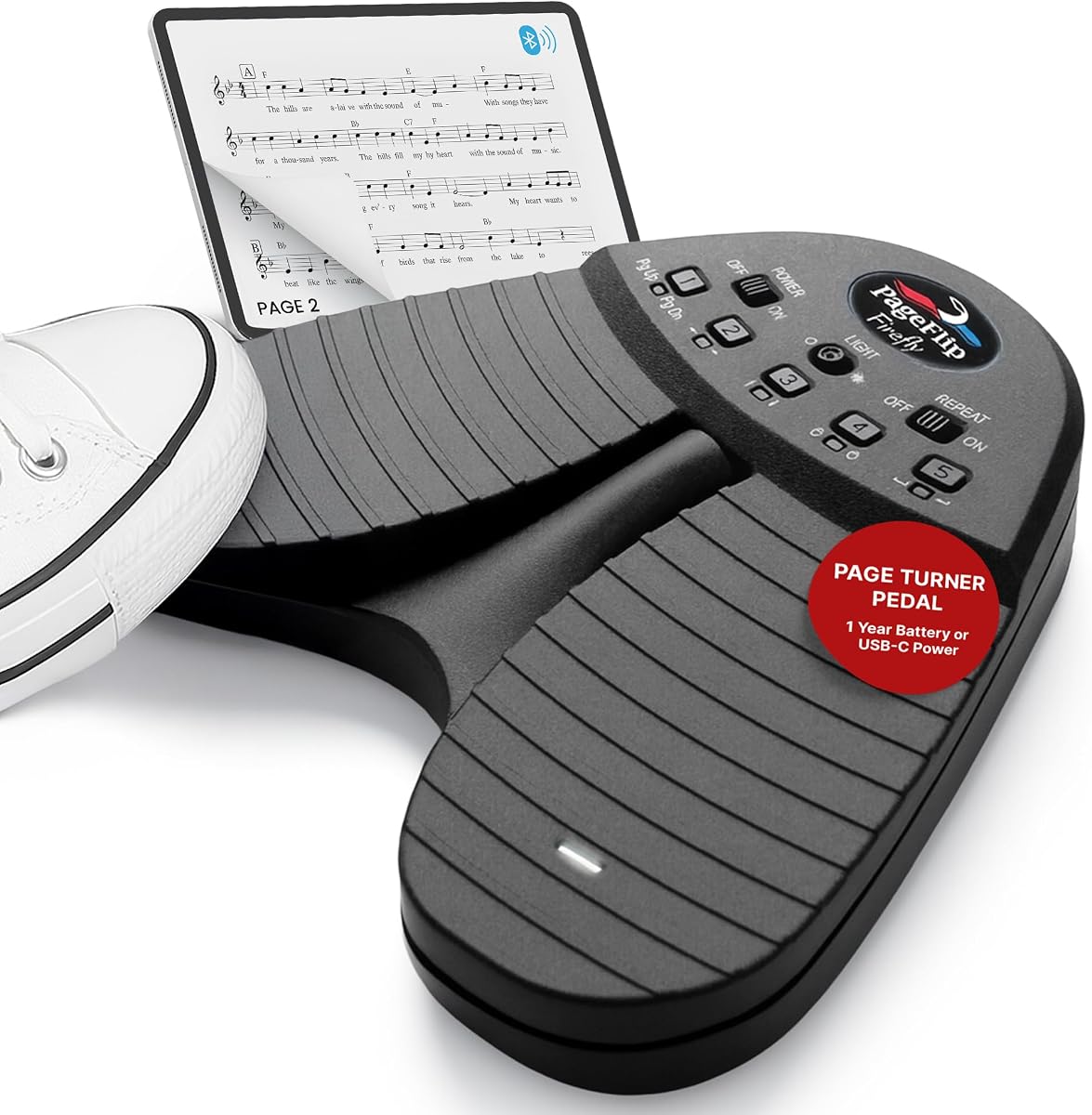
The PageFlip Firefly combines two illuminated foot switches with programmable controls, making it one of the most complete options in this guide. Its 4.5 rating reflects a feature set aimed at musicians who perform in dark venues, rehearse with notation software, or need a more adaptable foot controller. Silent operation and hands-free page changes are central to the design.
We may earn a commission when you buy through this link, at no additional cost to you.
Five preset modes allow users to assign commands such as arrow keys, mouse clicks, or page turns, while the included software provides further hotkey customization. The pedal supports iPad, Android, Mac, Windows, and Linux, and the supplied information names forScore, MobileSheets, and OnSong among compatible applications. Connecting through Bluetooth or USB-C adds flexibility for rehearsal and fixed installations.
The pedal can run on two AA batteries for as long as a year according to the product description, or it can be powered through USB-C. Auto sleep after 30 minutes helps conserve power, and illuminated switches improve visibility without requiring the user to look down. Dual auxiliary ports allow additional pedals or assistive switches to be incorporated into a more elaborate control system.
The Firefly is best for performers, educators, and serious readers who want more than a basic forward-page command. It justifies a higher level of setup because its programmability, lighting, and expansion capabilities can serve multiple workflows. Buyers should still verify the commands supported by their chosen app and take time to configure the presets before a performance.
Illuminated pedals are especially useful in dim stages, churches, and rehearsal spaces. Their visibility reduces the chance of looking down, while the stated silent action helps maintain focus and avoids distracting mechanical noise.
Preset modes and custom hotkeys make the Firefly adaptable to page turns, arrows, and mouse actions. Because each app may map inputs differently, testing the selected command set before an important session is essential.
We may earn a commission when you buy through this link, at no additional cost to you.
The Wireless Foot Pedal Double Switch is a versatile two-pedal controller rated 4.3 stars. It is designed for music scores, e-books, documents, and image browsing on iOS, Android, and Windows devices. Separate left and right switches provide more directional control than a single-button pedal without requiring complex programming.
We may earn a commission when you buy through this link, at no additional cost to you.
Five operating modes expand the available commands. The pedal can act like a wireless keyboard using Page Up and Page Down, send left and right arrows, send up and down arrows, emulate left and right mouse buttons, or produce space and enter presses. Compatibility information includes iBooks, Kindle, WPS, Foxit PDF, Adobe PDF, PiaScore, and forScore.
The built-in rechargeable battery is stated to provide around 60 hours of use, and the listed wireless range is 33 feet or 10 meters. An anti-skid pad helps the unit remain stable. The Classic and Plus versions share the same functions, but their dimensions and charging formats differ, with this version using the older micro-USB connection.
This pedal is a good fit for readers and musicians who want multiple command patterns without paying for a heavily featured professional system. The 4.3 rating and older charging interface may give cautious buyers pause, but the five modes and long battery life make it versatile. Check the dimensions and charging connector carefully before ordering.
Changing between page, arrow, mouse, and enter commands allows one pedal to suit scores, e-books, and software interfaces. The left and right switches also reduce reliance on a single repeated action.
The listed Classic version uses micro-USB, which may be less convenient if your other modern devices rely on USB-C cables. Confirm the exact version and its dimensions before placing it in your carry case.
We may earn a commission when you buy through this link, at no additional cost to you.
The Yueyinpu Plus Page Turner has a 4.7 rating, making it the highest-rated product in the supplied comparison. It combines two foot switches, five control modes, a rechargeable battery, and an anti-skid base in a format intended for tablets, iPhones, Android devices, and PCs. It is particularly relevant to musicians and readers who want separate forward and backward commands.
We may earn a commission when you buy through this link, at no additional cost to you.
Its modes cover up and down, left and right, mouse buttons, space, and enter functions, allowing the pedal to operate as a keyboard-like input device. The listed software support includes iBooks, Kindle, WPS, PDF applications, PiaScore, and forScore. The 33-foot or 10-meter wireless range and approximately 60-hour battery life support rehearsal, lessons, and extended reading sessions.
As a Plus-version model, it uses a Type-C charging port and measures 7.08 by 5.08 by 1.08 inches, compared with the smaller Classic version. The larger footprint may improve stability but can take up more room in a gig bag. The rating does not guarantee universal app compatibility, so users should still check whether their reading or notation program accepts the relevant commands.
This is an attractive pick for buyers who want modern charging, two-switch operation, and a high rating without moving to a programmable premium model. It offers the most balanced feature set for everyday page turning. Those who need an illuminated pedal, extended range, or advanced command mapping should compare it with the Firefly and Stomp models.
Independent left and right controls can mirror the user's preferred direction, while alternate keyboard and mouse modes broaden compatibility. This makes the pedal useful across notation, document, and image-viewing applications.
The Type-C port allows the Plus model to share a charging cable with many contemporary devices. Its larger stated dimensions should be considered if floor space or transport weight is important.
We may earn a commission when you buy through this link, at no additional cost to you.
The STOMP Mini is built for musicians who need page control without sacrificing stage space. It has a 3.8 rating and a compact 2-by-2-by-1-inch enclosure, substantially smaller than a traditional two-pedal controller. A single metal switch provides bidirectional navigation, allowing users to move forward or backward without a sprawling floor unit.
We may earn a commission when you buy through this link, at no additional cost to you.
Its triple-mode system offers 12 command configurations, and multi-unit pairing can support customized control arrangements. Compatible systems include iOS, Mac, and Android, while the supplied app list includes OnSong, Planning Center Music Stand, forScore, BandHelper, Music Sheets, and Orpheus. The built-in USB-C battery is stated to last more than 100 hours between charges.
The road-ready ABS housing avoids an external antenna and helps preserve signal reliability. A premium metal switch is described as quiet and tactile, making it appropriate for stages and sensitive rehearsal environments. Wireless range is stated at more than 100 feet, which provides ample separation between the performer and tablet.
The compact design and extensive configuration options make the STOMP Mini appealing to touring and gigging musicians. Its 3.8 rating is the lowest among the ten products, however, so buyers should assess the single-switch format carefully. It is best for users who prioritize footprint, battery life, and app breadth over conventional dual-pedal operation.
At only two inches square, the STOMP Mini is easy to position near a pedalboard, music stand, or front edge of a stage. Its compact enclosure also simplifies transport between engagements.
Twelve command configurations and multi-unit pairing offer more flexibility than a simple fixed switch. Test the desired forward and backward mappings with the exact app used during performance.
We may earn a commission when you buy through this link, at no additional cost to you.
The LEKATO Wireless Page Turner is a metal-enclosed pedal made for performers who read scores, scroll lyrics, display guitar tabs, or control photo presentations. It has a 4.1 rating, and its two-switch format allows separate left and right actions. The supplied information notes support for iOS versions above 13.4 and Android systems.
We may earn a commission when you buy through this link, at no additional cost to you.
Beyond conventional page turning, it can serve as an external pedal for a loop station. With both devices powered on, the pedal can switch between the previous and next loop, and it can assist with looper tuning. The connection procedure calls for the pedal and loop station to be powered before the indicator turns blue to confirm linking.
Its rechargeable lithium battery is stated to last more than 48 hours, and the listed wireless range reaches 60 feet. The solid metal enclosure and four anti-slip pads are intended to limit movement during active performances. These physical features give the product a more substantial feel than a lightweight plastic pedal.
This model is most useful for instrumentalists whose setup includes a compatible loop station or applications that accept the pedal's commands. Its stated system requirements may rule out some older iPads or iPhones, and the app must support external control. Confirm both hardware and software requirements before committing to it.
The metal body and anti-slip feet help keep the pedal steady while a musician is occupied with an instrument. That stability is important when a missed page change could interrupt a rehearsal or performance.
Loop selection and tuning support distinguish this pedal from basic readers. Compatible loop-station pairing still requires the correct startup sequence and a supported software or hardware combination.
We may earn a commission when you buy through this link, at no additional cost to you.
The Stomp Bluetooth Page Turner is a premium, gig-oriented pedal with a 4.4 rating. Its solid metal enclosure is designed for musicians who regularly transport and use equipment in demanding rehearsal and performance environments. A protective travel case is included, adding convenience for users who carry their gear between venues.
We may earn a commission when you buy through this link, at no additional cost to you.
Separate left and right switches can turn pages in either direction or scroll up and down. The pedal supports iPad, iOS, Android tablets, and most Bluetooth 4.0 devices, with named compatibility for forScore, Nkoda, MobileSheets, OnSong, and Planning Center Music Stand. Select applications can be configured to control several devices simultaneously, allowing an ensemble to change pages together.
Its 50-plus-foot range exceeds that of many standard controllers, while the stated 150-hour operating life from one 9V battery is among the longest listed. A 9V DC power supply can support continuous operation, though it is not included. The attached USB terminal can also keep a connected phone or tablet charged when external power is used.
The Stomp is best for touring musicians, ensembles, and users who place a premium on durability. Its larger metal housing and nine-volt battery arrangement are less convenient than a compact USB-C rechargeable pedal, but the construction and long range justify consideration for demanding use. It is designed and built in the USA according to the supplied product information.
The metal enclosure and included travel case target gear that is moved frequently between rehearsals, lessons, and shows. Its physical design is intended to withstand use beyond a stationary reading setup.
Compatible apps can assign control to multiple devices, helping groups move through shared music at the same time. This makes the pedal useful for ensembles that depend on coordinated page changes.
We may earn a commission when you buy through this link, at no additional cost to you.
The KYXAIN Wireless Page Turner is a dual-switch controller with a 4.3 rating and a broad set of intended uses. It uses Bluetooth 5.2 and can control pages, scores, presentations, photos, and other device functions across iPad, Android, PC, and Mac devices. The included app list covers forScore, OnSong, PDF software, Nextpage, Music Reader4, Do Gigbook, Teleprompter+3, Paperless Music, PiaScore, and Musicstand.
We may earn a commission when you buy through this link, at no additional cost to you.
Five customizable modes include Page Up and Page Down, arrow keys, swipe gestures, and a repeat function. That range makes the pedal useful for sheet music, presentations, photo browsing, slideshows, recipes, teaching, and other tasks. The supplied information describes a slim, silent ABS enclosure with a non-slip base and a height of 2.2 inches.
Its rechargeable battery is advertised for 60 hours of working time, and a three-color battery indicator provides a visible estimate of remaining capacity. The stated connection distance is more than 50 feet, although actual range can vary with the device, app, environment, and Bluetooth implementation. A 12-month warranty is also mentioned.
This pedal suits users who want one controller across several kinds of work rather than a music-only accessory. Its two switches and five modes offer good flexibility, but the less familiar product branding and broad compatibility claims warrant checking the user manual and current app requirements before buying.
Presentation mode, repeat scrolling, page navigation, and swipe gestures broaden the pedal's usefulness beyond music. This is valuable for educators, presenters, cooks, and readers working across several kinds of software.
The three-color battery indicator is a practical feature for a device that may sit unattended between uses. A full charge is stated to support approximately 60 hours, reducing the need for frequent charging.
We may earn a commission when you buy through this link, at no additional cost to you.
The LEKATO USB-C Page Turner is a feature-rich dual-pedal controller with a 4.7 rating. It supports tablets, smartphones, Mac, Windows, Android, and HarmonyOS devices, while a mode button and yellow LED make the active control configuration visible. Five built-in modes provide a high degree of flexibility for music and other compatible applications.
We may earn a commission when you buy through this link, at no additional cost to you.
A physical repeat toggle is one of its most useful distinctions. In ON mode, holding the pedal scrolls continuously through long documents or teleprompter text. In OFF mode, a light tap advances exactly one page, which helps prevent accidental jumps. Non-slip rubber is fitted to the top and bottom of the back, while the pedal itself is designed to operate silently.
The built-in 400mAh battery charges through USB-C and provides approximately 40 hours of continuous use. The pedal sleeps after 25 minutes when paired and after five minutes when unpaired, and a light step wakes it. Battery status appears through red, yellow, and green LED indications. A side reset hole clears old pairings after three seconds, simplifying reconnection to a new device.
This is a strong choice for readers, teachers, and musicians who want a small, quiet, easily reconnected pedal. Its 40-hour battery life is shorter than several alternatives, but the continuous-scroll switch, reset procedure, and high rating create an excellent balance of convenience and capability. Verify the command mapping in the intended app before regular use.
The repeat switch is valuable for long documents because a held pedal can scroll continuously. Turning repeat off gives precise single-page advancement for notation, presentations, or ordinary reading.
The dedicated reset procedure clears saved pairing information without navigating deeply through device settings. This is especially useful when moving between rehearsal, teaching, and performance devices.
We may earn a commission when you buy through this link, at no additional cost to you.
The Free2 Bluetooth Page Flip is a handheld alternative to the foot pedals that dominate this guide. It has a 4.0 rating and a built-in, non-removable 230mAh lithium-polymer battery. This particular listing is the Purple Android e-book reader version, so compatibility is narrower than the full family of mobile tablet and computer versions.
We may earn a commission when you buy through this link, at no additional cost to you.
In its Android e-book reader mode, the controller uses volume commands to turn pages and browse content. Kindle is explicitly unsupported. A Bluetooth receiver is required for a computer, and the listed computer functionality is centered on presentation navigation and media switching. Other versions of the Free2 are available for Kobo, phone, tablet, and PC workflows.
Official Windows software can customize button behavior, while Mac supports custom functions but not firmware upgrades. The three-legged and five-legged shaft design permits replacement of cross keycaps, adding a degree of personalization. RGB lighting can be switched on or off through its default hardware control or configured through the software for selected colors.
The Free2 is best for readers who want discreet, handheld control or need a specific Android e-book, Kobo, presentation, or computer workflow. It is not the right selection for a Kindle user or someone who specifically wants a foot-operated stage pedal. The battery is permanently soldered, and its certification information lists IEC62133 and UN38.3 standards.
The handheld design suits reading, presentation support, and situations where keeping a pedal on the floor is inconvenient. Multiple physical buttons can also offer more distinct commands than a single-switch pedal.
The listed edition is designed for an Android e-book reader and does not support Kindle. Read the version-specific compatibility notes carefully because function availability changes across the Free2 family.
We may earn a commission when you buy through this link, at no additional cost to you.
The right Bluetooth page turner depends on your device, software, power setup, and the degree of control you need. Use the following factors to narrow the field before choosing a model.
A pedal can only send the commands that its paired device and connected application are prepared to receive. The listed products support combinations of iPad, iPhone, Android, HarmonyOS, Mac, Windows, Linux, and compatible PCs, but no one listing guarantees every operating-system version. Read programs may require Bluetooth pedal support to be enabled in their settings, while notation and performance apps may map page turns to keyboard commands differently. Check the app's documentation for external controller support and verify that the tablet or phone has the required Bluetooth version. This is particularly important for the LEKATO model with an explicit iOS requirement and the Free2, whose functionality depends heavily on choosing the correct edition.
A single-switch pedal is smaller and often easier to carry, but it may require an alternate press-and-hold action to move backward. A dual-switch layout gives you independent left and right or up and down controls, which feels more natural when turning sheet music or reading a document. The Firefly, Yueyinpu, LEKATO models, and KYXAIN pedal use two switches, while the STOMP Mini offers a compact single-switch design. Consider the available floor space, your dominant foot position, and whether directional independence will improve your workflow. A dual pedal may be worth the additional size if backward navigation is frequent.
Programmable modes let one pedal serve reading, sheet music, slides, teleprompters, and media tasks. Some models provide five standard modes, while the Firefly offers five presets plus custom hotkeys and the STOMP Mini provides 12 command configurations. Look for mappings that match the commands accepted by your software, including Page Up, Page Down, arrow keys, mouse clicks, space, or enter. Fixed modes are simpler but less adaptable. A physical repeat switch can also be valuable for continuous scrolling, although a programmable repeat mode may achieve a similar result. Always test the configuration before relying on it in a live setting.
Battery expectations range from approximately 40 hours on the LEKATO USB-C model to 150 hours on the Stomp Bluetooth Page Turner. The Firefly can reportedly operate for up to a year on two AA batteries, while rechargeable models use built-in batteries and included cables. Consider how often the pedal is used, whether a spare cell is convenient, and whether the charging connector matches your other equipment. USB-C is increasingly convenient, but some older versions use micro-USB. For uninterrupted professional use, examine sleep behavior and external-power options as well as the headline battery figure.
The listed ranges range from 33 feet for the two Yueyinpu-related models to more than 100 feet for the STOMP Mini. A large stage, church platform, or rehearsal hall may require distance beyond the reach of a tablet, while a desk or bedside reader may need only a few feet. Bluetooth performance also depends on the device, physical obstacles, interference, and app behavior. Treat the maximum figure as a useful comparison rather than a guarantee. Choose enough range to separate the controller from the device without creating unnecessary pairing or latency concerns.
Metal enclosures, silent switches, and non-slip surfaces are particularly valuable for musicians and presenters who move during use. The Stomp Bluetooth Page Turner emphasizes a rugged metal body and includes a travel case, while the STOMP Mini prioritizes a very small ABS footprint. The Yueyinpu, LEKATO, and KYXAIN products emphasize anti-skid bases, and the Firefly focuses on illuminated dual pedals. Consider whether silence matters, how often the pedal is transported, and how much stage or floor space is available. A slightly larger pedal may remain more stable than a very compact alternative.
Illuminated pedals are useful in dark venues because a performer can locate the switch without taking attention away from the instrument. The PageFlip Firefly is explicitly designed around illuminated dual pedals. Other models may provide status LEDs for battery, mode, or pairing but not illuminated switch surfaces. If the primary environment is a dim stage, an illuminated model can reduce hesitation and improve confidence. For reading at a desk, lighting is less important, and battery indicators or a simple mode display may be sufficient.
Some page turners do much more than advance a page. The LEKATO loop-pedal model can switch loops, the Firefly includes auxiliary ports for extra switches, and the Stomp Bluetooth Page Turner can coordinate multiple devices. The Free2 offers handheld control, programmable functions, and customizable RGB lighting. These extras can be decisive if they match a specific workflow, but they may add complexity. Evaluate them against your actual needs rather than assuming every additional function will improve regular reading or performance.
Begin by fully charging the pedal or installing the specified batteries, then place it on a stable, non-slip surface near your normal foot position. Power on the controller and pair it with the intended tablet, phone, or computer. Open the application and enable its external pedal, Bluetooth foot switch, or keyboard-command option. Test forward, backward, and repeat actions before loading a complete score or beginning a presentation.
For a music performance, set the device on a stand or music stand, confirm the reading orientation, and use a cable to prevent charging interruptions when the pedal supports that arrangement. Learn the app's page-turn settings and test them in rehearsal. For document reading, define the first page and begin with short taps until you are comfortable with the force and travel of the switches.
Keep the unit away from moisture, excessive heat, and liquids, and wipe the enclosure and non-slip base with a soft dry cloth. Inspect the battery compartment and charging port for debris, and follow the maker's instructions for battery handling. Do not disassemble a model with a permanently attached battery. Store the pedal in its case, update pairing software when relevant, and reset saved device information before moving it to a new system.
No. The app must accept external pedal, Bluetooth foot switch, or relevant keyboard commands. Even when the operating system is supported, some applications disable or remap external controls. Check the app's settings and documentation before buying, and test the pedal with your exact device and software.
It depends on the product and version. The Free2 Android e-book reader version explicitly does not support Kindle, while the generic Wireless Double Switch and Yueyinpu listings include Kindle among supported applications. Review the product-specific limitations carefully and confirm that the Kindle model and software version are covered.
A single-switch pedal is usually smaller and easier to transport, which can be valuable on a crowded stage. A dual-switch pedal offers more direct forward and backward navigation and is often more intuitive for sheet music. Choose according to available space, movement, and how often you need independent directional commands.
The listed maximum ranges vary from about 33 feet to more than 100 feet, but actual performance depends on the device and environment. Choose enough range to place the tablet comfortably away from your foot, while remembering that walls, interference, and app behavior can influence the connection.
Many can, provided the software accepts the pedal's mapped commands. Compatible uses described across these products include slide navigation, teleprompters, photo browsing, recipes, online teaching, and media control. The available command modes determine which functions are practical.
Many models include preset modes for common page, arrow, mouse, space, and enter actions. Models with customizable software or hotkeys do need configuration to match your preferred app. Even with presets, a short test is advisable because reading, notation, and presentation applications may interpret commands differently.
Store it in a dry location away from direct heat, moisture, and direct sunlight, with the switches protected from pressure. Use a protective case for a travel-heavy setup, and avoid charging or using the pedal with visibly swollen or damaged battery components.
Confirm that the device is powered, the pedal is awake, and Bluetooth remains connected. Some models wake after a light step, while others can be reset with a side button. Check the app's external-control setting, reconnect or clear the saved pairing, and restart the app if a command has stopped mapping correctly.
The PageFlip Firefly is the most versatile overall choice for readers and performers because it combines illuminated dual switches, programmable commands, broad platform support, and expansion ports. The LEKATO USB-C Page Turner is a compelling budget-focused option with a high rating, five control modes, a useful repeat switch, and simple pairing reset. The Stomp Bluetooth Page Turner stands apart for those who want rugged metal construction, long wireless reach, and multi-device coordination.
For most musicians, start by verifying compatibility with the notation app, then choose between a compact single-switch design and a more intuitive dual-switch format. Readers should pay closer attention to repeat behavior, silent operation, and supported PDF or e-book software. Power, battery life, floor space, and lighting are secondary decisions that should reflect the environment in which the pedal will be used.
Before making a final selection, confirm the exact operating-system version, required app settings, physical dimensions, charging connector, and battery procedure. Product listings and manufacturer information can change, and market conditions also vary, so checking the current product page and documentation is advisable before purchasing.