
Dell OptiPlex 3050 SFF
4.2Editor score
16GB DDR4 memory
256GB solid-state drive
Dual 4K display support
Keyboard and mouse included
Choosing a desktop PC for seniors should emphasize clarity, comfort, and dependable everyday operation rather than complicated specifications. A clear display, accessible controls, sufficient memory, and straightforward connectivity can make email, video calls, web browsing, documents, and entertainment much more comfortable.
This guide compares ten Dell, HP, and Lenovo desktop computers across processor performance, memory, storage, display design, ports, wireless connectivity, included accessories, operating systems, and practical features for home or office use. Both traditional small-form-factor systems and all-in-one computers are included.
The selections show how priorities differ: some offer expansive all-in-one convenience, some provide flexible multi-monitor support, and others balance capable specifications with a smaller footprint. Ratings and configurations can change over time, so confirm the current listing, included accessories, condition, and warranty before purchasing.
4.2Editor score

4.5Editor score

4.3Editor score
As an Amazon Associate we earn from qualifying purchases.
The comparison covers renewed OptiPlex systems, modern all-in-one models, compact office computers, and a monitor bundle, making it easy to compare form factors as well as core specifications.






The Dell OptiPlex 7050 SFF combines a capable Intel Core i7-7700 with an unusually generous 32GB of DDR4 memory, making it a practical choice for seniors who keep many applications, browser tabs, or communication tools open. Its 3.9 rating reflects a capable renewed system, though the seventh-generation platform is not the newest hardware in this collection.
We may earn a commission when you buy through this link, at no additional cost to you.
Storage is handled by a 1TB SSD, which supports quick startup, responsive application access, and room for documents, photographs, videos, and downloaded files. The small-form-factor design keeps the computer relatively unobtrusive, while the front and rear connections cover common accessories. HDMI, DisplayPort, Ethernet, audio connections, and USB 2.0 and 3.0 ports provide useful flexibility.
Windows 11 Pro comes preinstalled, along with a wired keyboard, wired mouse, power cord, and wireless USB WiFi adapter. Bluetooth support and compatibility with two monitors are useful for users who want to enlarge text on one display while keeping a video call or family calendar visible on another. Renewed systems are professionally tested and certified, with a 90-day seller warranty.
This is a strong option when memory and storage matter more than having the newest processor. It should be especially appealing to a senior who browses heavily, joins frequent video calls, manages large photo collections, or wants room to remain productive for several years. The main compromises are the older processor generation, the need for a separate monitor, and the variability associated with renewed equipment.
Overall, the 7050 SFF is a capable and expandable-looking office computer. It is not the most visually integrated option, but its 32GB of memory, 1TB SSD, dual-display capability, and generous port selection create a comfortable foundation for home computing. Buyers should confirm the exact monitor connections and included wireless hardware before ordering.
The 32GB allocation is the headline advantage, leaving ample room for web browsing, email, document editing, video calling, and other programs open at the same time. That headroom can reduce the frustration of slowdowns when a user does not want to close one task before beginning another.
HDMI and DisplayPort outputs make the system suitable for two-monitor arrangements. Larger text and familiar information can remain visible on one screen while communication software or media plays on the other, provided the chosen displays support the system's available connections.
We may earn a commission when you buy through this link, at no additional cost to you.
The Dell OptiPlex 7060 SFF earns a 4.0 rating and offers a balanced combination of processing power, memory, and expansion potential. Its six-core Intel Core i7-8700 can reach up to 4.60 GHz, while 32GB of DDR4 memory supports smooth operation when several browser tabs and applications are active.
We may earn a commission when you buy through this link, at no additional cost to you.
A 512GB NVMe M.2 SSD improves boot and file-transfer responsiveness, making the system feel more current than a desktop equipped with a conventional hard drive. The product data also identifies built-in WiFi and Bluetooth, reducing the need to connect a cable for everyday internet browsing or pair compatible wireless accessories.
The port selection is particularly complete. Five USB 3.0 and two USB 2.0 ports make it easier to connect a keyboard, mouse, printer, external drive, webcam, or other peripheral without constantly changing adapters. Two DisplayPort outputs support dual-monitor use, although the user's preferred display may require a suitable adapter depending on its input.
Windows 11 Pro is preinstalled, and the listing includes a wireless keyboard and mouse, which is a helpful setup for a first desktop. The compact case is designed for home or business use and provides room for future expansion. As a renewed system, however, buyers should review the seller's condition details, included accessories, and 90-day warranty.
This model is well suited to a senior who wants desktop performance without an all-in-one display and needs frequent access to USB devices. It is also a strong choice for a two-screen workspace because of the dual DisplayPort configuration. Those wanting the newest hardware may prefer a current all-in-one, while most everyday tasks should be handled comfortably by this OptiPlex.
The NVMe drive provides a noticeable improvement over hard-drive-based systems, particularly when opening applications, transferring files, or resuming work. It also makes this renewed business desktop feel more responsive for routine browsing and communication.
Seven USB ports, two DisplayPort outputs, built-in wireless networking, and Bluetooth create a broad connection hub. That range is useful for printers, scanners, charging cables, external storage, and two monitors without requiring a desktop to rely on a single connection.
We may earn a commission when you buy through this link, at no additional cost to you.
The Dell 27-inch All-in-One has the highest listed rating in the group at 4.5 and provides the most visually complete senior-friendly setup. Its FHD IPS panel, narrow borders, 99% sRGB color coverage, and higher contrast make text, photographs, video calls, and streamed content more inviting on a large display.
We may earn a commission when you buy through this link, at no additional cost to you.
ComfortView Plus is designed to reduce harmful blue-light emissions during extended screen sessions, while the stated refresh-rate improvement supports smoother viewing. The tilt-adjustable stand lets users set a comfortable angle, and the design provides space beneath the display for the keyboard, helping keep the desk uncluttered.
A pop-up 5MP infrared camera can support detailed video calls, and pushing it down provides a simple privacy solution. Dual Bluetooth speakers and Dolby Atmos spatial sound handle music, conversations, and movies without requiring a separate speaker set. These integrated features reduce the number of devices that need setup, arrangement, and charging.
The Intel Core 5 120U and Windows 11 Home platform make this a modern all-in-one option, while Dell includes one year of onsite service and six months of its Dell Migrate transfer tool. The primary trade-off is reduced flexibility: a self-contained display design may be harder to reposition than a separate monitor and tower, and detailed port information should be verified before purchase.
This is the strongest recommendation for a senior who wants a new-looking, integrated computer with a large screen, comfortable viewing features, a capable camera, and simple built-in audio. It is particularly useful for video calling, browsing, entertainment, and keeping a single work area visually organized without assembling a separate desktop setup.
A 27-inch FHD IPS display provides enough room to enlarge interface text while keeping multiple application areas visible. ComfortView Plus adds a blue-light-reduction feature intended for longer viewing sessions, making the system appealing for reading, video calls, and browsing.
The pop-up infrared camera, dual Bluetooth speakers, and Dolby Atmos audio create a convenient communication and entertainment center. Because these features are integrated, the user can begin a call or listen to media without assembling extra peripherals.
We may earn a commission when you buy through this link, at no additional cost to you.
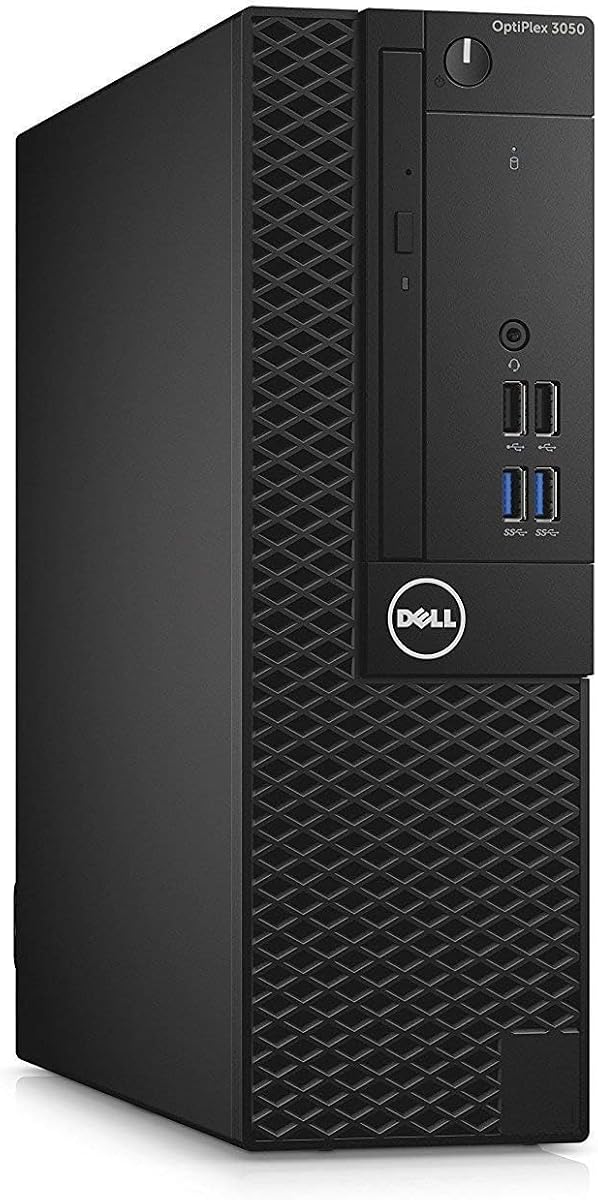
The Dell OptiPlex 3050 SFF combines a 4.2 rating with a 16GB memory configuration and solid-state drive, delivering the essentials of comfortable desktop computing in a compact renewed system. Its Intel Core i5-6500 is a quad-core processor capable of reaching 3.6 GHz, which remains suitable for email, browsing, documents, and routine communication.
We may earn a commission when you buy through this link, at no additional cost to you.
The 256GB SSD makes system startup and application access more responsive than a hard-drive-only configuration. Sixteen gigabytes of DDR4 memory is enough for common multitasking, while Windows 11 Pro 64-bit provides the familiar desktop environment and broader capabilities for home or business use.
Its display flexibility is a major advantage. DisplayPort and HDMI outputs support two 4K monitors at 3840 by 2166 resolution, allowing a user to run separate screens, mirror content, or expand a single workspace. The front and rear panel include four USB 3.0 and four USB 2.0 ports, plus Ethernet, making peripheral placement flexible.
A USB keyboard, mouse, and WiFi adapter are included, and certified refurbished systems undergo functionality testing, basic cleaning, inspection, and repackaging. The listing also mentions a 90-day warranty and the possibility of a generic box. These are sensible compromises for a renewed compact desktop, though the drive may become limited as files accumulate.
This OptiPlex is an appealing choice for a senior who wants dual-monitor support, useful physical ports, and a responsive compact computer without moving to a large all-in-one. It is best for web use, email, video calls, light creative work, and familiar office tasks. For extensive media libraries, 256GB may call for an external drive or cloud storage.
Dual 4K support can make a home office easier to navigate by separating communication, writing, and reference windows. Larger text and enlarged controls are particularly helpful when a single screen would otherwise require frequent zooming or scrolling.
The small-form-factor case reduces desk clutter while front USB ports make frequently used devices easy to connect. Including a keyboard, mouse, and WiFi adapter also simplifies the initial setup for a first-time desktop owner.
We may earn a commission when you buy through this link, at no additional cost to you.
The Dell OptiPlex 9020 bundle stands apart because it includes a 20-inch monitor, offering a more complete visual setup than the standalone OptiPlex systems. Its 3.6 rating is among the lower scores in this guide, reflecting the age of the underlying architecture and the less modern storage and memory configuration.
We may earn a commission when you buy through this link, at no additional cost to you.
Inside, the renewed desktop has a quad-core Intel Core i5, 8GB of DDR3 memory, and a 500GB hard-disk drive. That capacity can hold a substantial collection of documents and media, but the hard drive will not respond as quickly as the solid-state drives found in most other selections. More memory would also benefit heavy multitasking.
Windows 11 Pro 64-bit is installed, and the system is described as free of common manufacturer bloatware. Built-in wireless technology, stereo sound, and multiple-monitor connections support communication and flexible workspaces. A 90-day warranty and technical support accompany Amazon Renewed systems, providing some reassurance for a larger bundle.
The monitor is the main convenience, eliminating the need to choose and connect a separate display. It may also help a new owner create an immediate working area after setup. Nevertheless, the bundle's keyboard, mouse, and lighting accessories should be checked carefully, and a 20-inch panel may be smaller than the 27-inch all-in-one for comfortable text enlargement.
This is best for a senior who values a monitor-inclusive package and needs a general-purpose computer more than demanding performance. It can support browsing, email, video calls, document work, and entertainment, while the 500GB drive offers room for local files. Those wanting faster startup and broader multitasking should favor a system with an SSD and at least 16GB of memory.
A bundled monitor removes the need to match a separate display with the computer and makes setup more approachable. The included screen also provides an immediate area for enlarging text, reading messages, and joining video calls.
Windows 11 Pro gives users access to a standard, recognizable interface with support for common productivity and communication tasks. Its 64-bit installation also prepares the renewed OptiPlex for a broad collection of available applications.
We may earn a commission when you buy through this link, at no additional cost to you.
The HP 22-inch All-in-One carries a 4.3 rating and offers a modern, compact alternative to traditional desktop towers. Its 13th-generation Intel N100 is a four-core processor with integrated Intel UHD graphics, a 6MB cache, four threads, and boost speeds up to 3.4 GHz for efficient everyday computing.
We may earn a commission when you buy through this link, at no additional cost to you.
All-in-One construction reduces cable clutter and makes the display, computer, webcam, and likely audio functions part of a single unit. The 22-inch Full HD screen is a practical size for browsing, email, video calls, and documents, while 8GB of DDR5 memory gives the system a modern memory standard for routine work.
Storage is the main limitation because 128GB is modest for downloaded files, photographs, video, and installed applications. Users who need more room can rely on external storage or online file services. Connectivity is more contemporary, with HDMI, USB-C, WiFi, and an HD webcam providing the essentials for communication and accessories.
Windows 11 Pro makes this a flexible option for users who want a familiar operating system and access to a broad software library. The black enclosure and 2025-oriented configuration also give it a newer appearance than many renewed business desktops. As with any compact model, buyers should verify the exact port layout and whether an external display is supported.
This all-in-one is a strong recommendation for a senior seeking a small-footprint, current-looking system with minimal setup. It suits browsing, communication, document work, and streaming without requiring a separate tower. A user with large media libraries or intensive multitasking should prioritize more memory and storage, while everyone else will appreciate the approachable design.
The N100 processor and DDR5 memory create a current foundation for email, web browsing, video calls, and document work. This generation-focused design also gives the compact all-in-one a more modern feel than the older renewed OptiPlex options.
The built-in HD webcam supports video conversations without requiring a separate camera purchase. WiFi connectivity similarly keeps the system ready for online communication while reducing the number of desktop accessories that need to be arranged.
We may earn a commission when you buy through this link, at no additional cost to you.
The Lenovo 24-inch All-in-One offers an appealing balance of a moderately large display, 16GB of memory, and a 256GB PCIe solid-state drive. Its listing does not provide a customer rating, so the configuration specifications offer a clearer basis for comparison than a numerical review score.
We may earn a commission when you buy through this link, at no additional cost to you.
The 23.8-inch Full HD IPS display uses an anti-glare finish, a useful feature for users who position a computer near a window or bright room. Its 250-nit brightness, 99% sRGB coverage, and non-touch design support readable productivity, learning, and entertainment tasks without the complexity of a touchscreen.
Under the display, the Intel N100 provides four cores and four threads with a maximum turbo frequency of 3.40 GHz. The 16GB of DDR4 memory is more appropriate for simultaneous browsing, office applications, and communication than the 8GB configuration found in the HP all-in-one. A PCIe SSD supports quick startup and reliable file access.
Wireless capabilities include Intel WiFi 6 AX203 and Bluetooth 5.2, while the ports cover USB-A, HDMI, Ethernet, and a combined headphone and microphone connection. A wireless keyboard and mouse are included, although the listing specifies UK versions, which may matter for buyers in other regions.
This model is well matched to a senior who wants an uncluttered all-in-one with enough memory for active multitasking and a glare-resistant screen. It is suitable for home-office work, study, communication, and media use. Confirm the regional keyboard layout and detailed specifications before ordering, especially because no customer rating is listed.
The anti-glare IPS panel can make text easier to see under bright ambient light. Combined with Full HD resolution and a 23.8-inch size, it offers a comfortable middle ground between a laptop and a large home-office display.
Sixteen gigabytes of RAM provides more comfortable headroom than the 8GB HP model, especially when a senior keeps email, browser tabs, calls, and documents open together. The 256GB PCIe SSD adds responsive storage, although cloud or external storage may be needed for large media files.
We may earn a commission when you buy through this link, at no additional cost to you.
The Dell OptiPlex 5050 SFF has a 4.2 rating and pairs a quad-core Intel Core i7-7700 with 16GB of DDR4 memory. It delivers a useful balance of processing capability, responsive storage, and a compact business-desktop footprint for users who do not need the extra memory of the 7050 or 7060.
We may earn a commission when you buy through this link, at no additional cost to you.
The processor operates at 3.6 GHz and can turbo up to 4.2 GHz, while Intel HD Graphics 630 handles standard visual output. A 512GB NVMe SSD supports quick startup, efficient file transfers, and better responsiveness than a conventional hard disk, making daily navigation feel more immediate.
The small-form-factor enclosure is appropriate for a home office or an area where desk space matters. A wired black keyboard and mouse are included, and Windows 11 Professional is preinstalled in a 64-bit environment. These details reduce the initial work required to get the computer ready for basic use.
Wireless connectivity is not identified in the supplied product details, so a senior who relies on a home WiFi network should confirm whether the unit includes a wireless adapter or can be configured with one. The renewed status and older platform are the other notable trade-offs, although the core hardware remains more than adequate for common tasks.
This OptiPlex is a sensible recommendation for someone wanting a small desktop with a fast drive, comfortable memory capacity, and included input devices. It is suitable for email, browsing, video calls, schoolwork, and office applications. Buyers seeking extensive ports, newer processing, or turnkey all-in-one convenience should choose a more specialized model.
The combination of NVMe storage and a compact enclosure is especially useful for older adults who may prefer a modest desktop on the kitchen table, office shelf, or writing desk. It delivers modern storage behavior without the bulk of a full-size tower.
Windows 11 Professional and a wired keyboard and mouse are already part of the configuration. That makes the OptiPlex approachable for a first desktop, provided the user has an existing monitor and any required network connection.
We may earn a commission when you buy through this link, at no additional cost to you.
The Dell OptiPlex monitor bundle distinguishes itself with 2TB of hard-drive storage, 16GB of memory, and a new 22-inch Full HD LED monitor. Its 3.6 rating reflects the use of a third-generation Intel Core i5, an older processor architecture that is best suited to fundamental computing rather than demanding workloads.
We may earn a commission when you buy through this link, at no additional cost to you.
The 2TB drive offers ample room for family photographs, music, movies, and documents without immediate storage concerns. Its 16GB of RAM helps when several browser tabs and applications remain open. The trade-off is speed: because this configuration uses a hard disk rather than an SSD, startup and file access will generally feel slower.
The included 22-inch monitor provides 1920 by 1080 resolution, a 75Hz refresh rate, wide viewing angles, smart contrast, and a bezel-less appearance. It also supports tilt adjustment and VESA mounting, giving users some flexibility in positioning the screen. That flexibility is valuable for creating a comfortable viewing height.
The bundle includes an RGB keyboard, mouse, and speaker, along with WiFi and Windows 11 Pro. These additions create a more decorative and complete package, although the illuminated accessories may be less important than comfort, visibility, and simplicity. The renewed computer should be examined for condition, while the monitor is described as new.
This is a fitting choice for a senior who wants substantial local media storage and prefers receiving a monitor with the computer. It can support music, photographs, film, browsing, and video calls without constant storage management. For faster everyday response, a system with an SSD and newer processor would be the better direction.
Two terabytes gives users room to retain large photo libraries, music collections, movies, and backups without moving files to another service immediately. For a household that already uses online storage, this capacity remains a useful local complement.
The 22-inch Full HD monitor includes tilt adjustment and VESA mounting support, helping users find a comfortable viewing position. Wide viewing angles also help maintain visibility when the screen is not positioned directly in front of the user.
We may earn a commission when you buy through this link, at no additional cost to you.
The Dell OptiPlex 3060 combines 32GB of DDR4 memory, a 1TB SSD, and an eighth-generation Intel Core i5-8500 in a renewed desktop aimed at home or office use. Its 4.0 rating reflects a well-rounded configuration capable of supporting communication, browsing, media, and moderate content work.
We may earn a commission when you buy through this link, at no additional cost to you.
The hexa-core i5-8500 supports smooth multi-tab browsing, executive multitasking, media streaming, and photo or video editing with Intel HD 630 integrated graphics. The 32GB of RAM is particularly generous, while the 1TB SSD provides quick boot times and enough local space for applications, documents, and media collections.
Built-in WiFi and Bluetooth make the system ready for online communication and compatible wireless accessories. Its modern ports include four USB 3.0 and four USB 2.0 connections, DisplayPort, HDMI, an audio combo jack, separate audio output, and RJ-45 Ethernet. Three internal SATA connections are also listed, supporting additional storage options.
Windows 11 Professional is preinstalled, and the product is associated with a Microsoft-authorized refurbisher offering a quality guarantee and technical support. The tower requires a separate monitor, which allows the user to select a display with an appropriate size, brightness, and preferred connection. As a renewed system, exterior condition and included accessories should be reviewed.
This is a versatile recommendation for a senior who wants substantial memory, fast storage, modern connectivity, and the freedom to use one or two external displays. It is particularly capable for heavy browsing, family communication, large document collections, and light creative tasks. It may be excessive for basic use, but it provides useful headroom for a household that expects to do more.
The combination of 32GB RAM and a 1TB SSD provides a comfortable margin for demanding browsing, many open applications, and large local media libraries. It is a particularly useful configuration for a computer expected to serve several family members or handle heavier productivity work.
DisplayPort and HDMI enable flexible monitor choices, while the large collection of USB ports supports accessories without repeated hub use. Built-in WiFi and Bluetooth complete the setup for everyday communication, printing, media, and peripheral connections.
We may earn a commission when you buy through this link, at no additional cost to you.
The right senior desktop balances visual comfort, simple operation, reliable connectivity, and enough performance to avoid unnecessary delay. These factors matter more than whether a computer uses the newest processor generation.
A large, Full HD display can make websites, menus, messages, and documents easier to read without requiring a separate monitor. The Dell 27-inch all-in-one offers the largest integrated screen, while the Lenovo and HP systems use 24-inch and 22-inch panels. Anti-glare, blue-light reduction, tilt adjustment, and IPS color quality can further improve comfort during long sessions.
Choose a screen large enough for readable text but still appropriate for the available desk and viewing distance. For the simplest setup, prioritize an all-in-one; for greater control over screen size and placement, choose a desktop tower with a separate monitor.
Memory determines how comfortably several browser tabs, email accounts, video calls, and documents can remain open. Most of the systems include 16GB or 32GB, which is appropriate for regular multitasking, while 8GB is more modest and best limited to lighter workloads. The Dell 9020's 8GB configuration is the clearest example of a system that may benefit from more memory.
A senior who does not want to close programs while moving between tasks should favor 16GB or 32GB. More memory helps with smooth operation, although processor speed, storage, and software demands still influence overall responsiveness.
Processors range from older renewed Core i5 systems to recent Intel Core 5, Core i7, and N100 platforms. Newer generations generally offer improved efficiency and support for current features, but a capable older Core i7 can still handle browsing, communications, and office work. The N100 is designed for efficient everyday workloads rather than intensive computing.
Match the processor to the task. Choose a current all-in-one for general modern use, a Core i7 or i5 desktop for heavier multitasking, and avoid expecting high-end creative performance from a basic N100 or older renewed processor.
A solid-state drive is strongly preferable for a senior computer because it shortens startup delays, reduces the time spent waiting for applications, and makes the system feel more responsive. Seven of the ten listed computers use SSDs, while the OptiPlex 9020 and monitor-bundle OptiPlex rely on hard drives. The HDD models may need extra time and patience during updates and file transfers.
Prioritize an SSD with enough capacity for the operating system, applications, and important files. If additional space is needed, compare the available USB, SATA, or external-storage options rather than filling the primary drive completely.
An all-in-one combines the display and computer in one enclosure, reducing desk clutter and simplifying the number of components to position. The Dell 27-inch model adds a camera and speakers, while the HP and Lenovo systems emphasize compact communication and office use. A desktop tower is less visually integrated but allows the monitor to be selected independently, upgraded, or positioned more flexibly.
Choose an all-in-one for simplicity and a tidy work area. Choose a small-form-factor desktop when a larger or more comfortable monitor is important, multiple displays are desired, or the computer needs to be placed away from the viewing position.
Built-in WiFi and Bluetooth simplify daily use by allowing the computer to connect to a home network and compatible peripherals without cable management. These features are explicitly identified on the Dell 7050, 7060, 3060, OptiPlex 9020, HP, and Lenovo systems. The Dell 5050 listing does not identify wireless support, so buyers should confirm the configuration.
Verify the network standard, especially when choosing a current all-in-one with WiFi 6. For video calls, a built-in webcam, microphone, and speakers can make communication much easier, while separate peripherals may provide better microphone placement for a senior.
USB ports determine how easily a keyboard, mouse, printer, external drive, webcam, and charging device can be connected. DisplayPort and HDMI outputs support external displays, with several OptiPlex models offering dual-screen configurations. Some bundles include a keyboard, mouse, WiFi adapter, or monitor, while towers generally require a display.
Check exactly what is included before buying. Make sure the monitor uses a compatible connection, prefer easily accessible front USB ports for frequent accessories, and select a system with enough ports to avoid constant hub use if several devices are regularly connected.
Most systems in the guide include Windows 11 Pro, while the Dell 27-inch all-in-one includes Windows 11 Home. Renewed computers may be tested and certified and can include a minimum 90-day warranty, but their physical condition, packaging, and included accessories may differ from a new system. The Dell all-in-one additionally lists one year of onsite service.
Review condition notes, warranty coverage, and support terms before ordering. A new all-in-one may offer cleaner presentation and more convenient service, while a renewed OptiPlex can provide strong specifications and upgrade flexibility. Select the option whose condition and support model best match the buyer's comfort level.
Begin by placing the computer on a stable, ventilated surface and positioning the screen directly in front of the user. Connect the display, keyboard, mouse, power cable, and network equipment before turning the system on. For an all-in-one, check that the stand is stable and adjust the tilt so text appears straight and does not force the neck to bend.
After startup, enlarge the operating system's text and display scaling to a comfortable level, then adjust screen brightness and the monitor's viewing angle. Arrange frequently used applications in a simple order, save documents regularly, and use recognizable folder names. Wireless peripherals should be paired once and reconnected automatically, while USB devices should be removed properly before the system is shut down.
Keep the computer and vents free of dust, and avoid placing drinks directly beside the equipment. Use a surge-protected power strip where appropriate, save work before updates or shutdowns, and restart periodically to clear memory. For a renewed system, document the warranty details, preserve the included accessories, and contact the listed support provider if a hardware issue appears.
An all-in-one is usually easier to organize because the computer, display, webcam, and sometimes speakers are combined in one unit. A tower offers more flexibility, particularly when a user wants a larger monitor, two displays, or a computer placed away from the screen. The best choice depends on desk space, viewing needs, and the importance of a tidy setup.
At least 16GB is a comfortable amount for browsing, email, video calls, and document work, especially when several programs remain open. The 32GB systems provide more headroom for heavy multitasking or shared household use. An 8GB machine can handle lighter tasks, but it may feel constrained as the number of browser tabs and applications increases.
Yes, a solid-state drive is strongly preferable because it improves startup time, application loading, and general responsiveness. Models with hard drives may feel noticeably slower, particularly during updates or when opening large files. If storage capacity is a concern, a smaller SSD paired with cloud storage or an external drive can provide a practical solution.
Renewed systems can provide capable business hardware at a lower acquisition cost, and the listed Dell products are described as tested, inspected, or professionally renewed. Buyers should review the condition grade, included accessories, warranty length, and return policy. A new all-in-one may be more attractive when appearance, onsite service, and setup simplicity are the highest priorities.
Several models can support dual displays, including the Dell OptiPlex 3050, 5050, 7050, 7060, and 3060, depending on their video outputs and compatible adapters. Two screens can make enlarged text, email, calendars, and video calls easier to manage. Confirm the exact ports and display adapters before purchasing a second monitor.
Both provide the familiar Windows 11 interface and support common browsing, communication, and productivity applications. Windows 11 Pro is generally preferred for business environments, management features, and broader networking capabilities, while Home is suitable for a typical household. For most senior users, the distinction matters less than display comfort, performance, and ease of setup.
It varies. The OptiPlex 9020 and the Dell OptiPlex monitor bundle include displays, while several OptiPlex models include wired or wireless keyboards and mice. The all-in-one systems have integrated screens, and the standalone towers generally require a separate monitor. Check the product listing carefully so that every necessary item is present.
A clear Full HD or higher-resolution display, integrated webcam, speakers, microphone, and reliable WiFi matter most for communication. Processing power and 16GB of memory also help when a video call runs alongside email and browser tabs. Display scaling and a larger screen can then make controls and conversation text more comfortable to read.
The Dell 27-inch All-in-One stands out as the most visually complete and editorially preferred option, combining a large FHD IPS panel, eye-comfort features, a pop-up camera, and integrated audio. The HP 22-inch and Lenovo 24-inch all-in-one models provide strong modern alternatives, while the Dell OptiPlex 3050 SFF delivers a practical compact system with dual-display support.
Prioritize the factors that affect daily comfort: a large readable screen, 16GB or more of memory, solid-state storage, dependable WiFi, accessible USB connections, and an operating system the user already understands. Renewed OptiPlex systems offer capable hardware for intensive work, whereas all-in-one computers generally require less setup and produce a cleaner desk.
Before purchasing, confirm the current configuration, monitor inclusion, ports, wireless support, renewed condition, warranty, and included accessories. Product availability and prices can change, so compare the current listing carefully and confirm that the computer remains suitable for the user's specific tasks and physical setup.