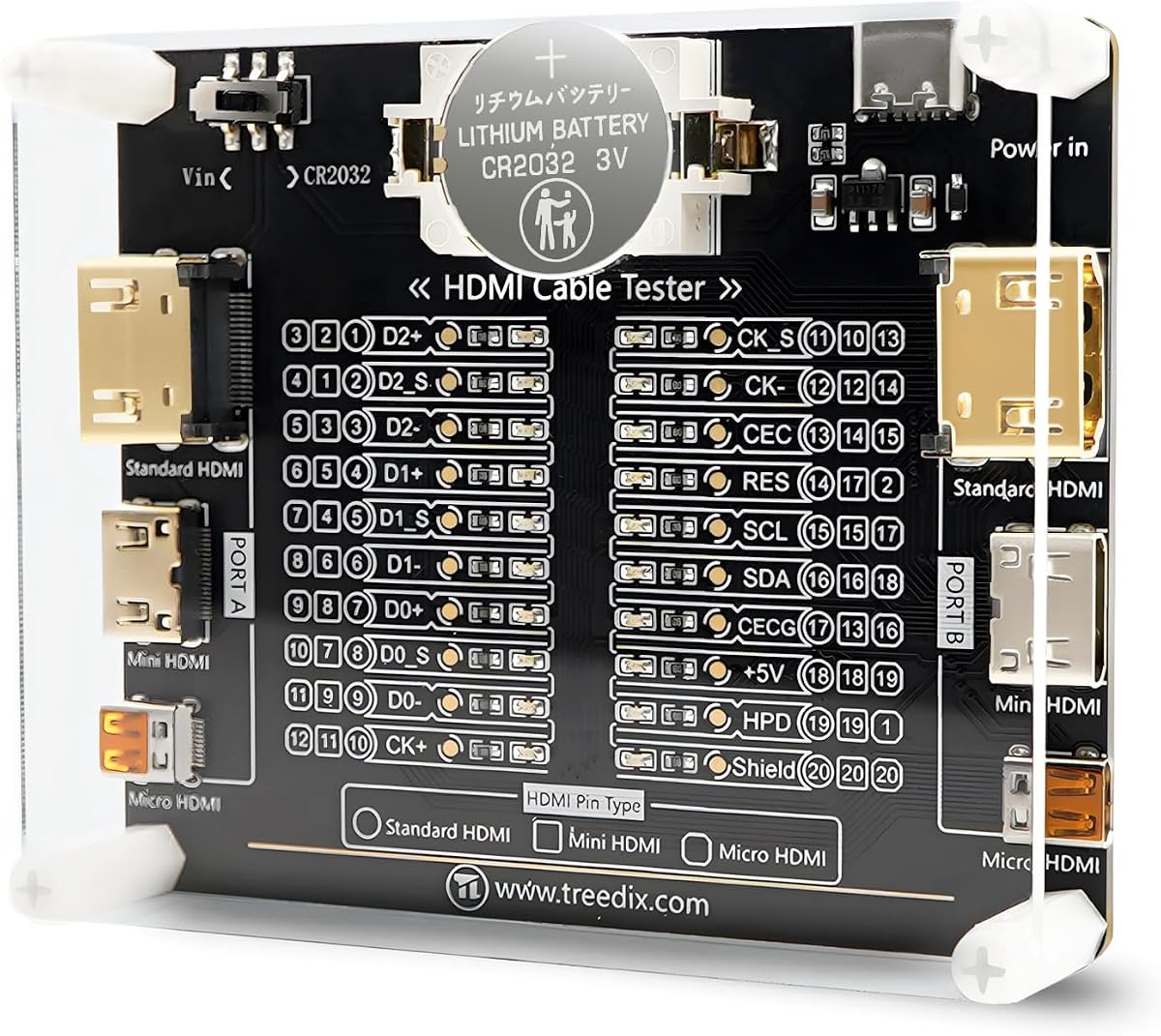
Treedix Cable Tester Board
4.6Editor score
Supports HDMI versions 1.0–2.1
Tests three connector formats
Uses twenty pin indicators
Accepts battery or external power
Compare the best HDMI cable and port testers for checking continuity, faults, pin wiring, signals, displays, and network cables.
An HDMI cable and port tester helps reveal broken conductors, crossed wires, short circuits, incompatible connections, and signal problems without replacing a cable at random. A useful model should provide clear results, support the connectors and cable versions you use, and be simple enough for quick troubleshooting at home or in the field.
We compared all ten products by examining their supported interfaces, testing capabilities, display methods, power options, portability, and practical diagnostic features. The list covers compact LED testers, multifunction network-cable tools, signal generators, display analyzers, and a full-color HDMI display tester for installation work.
Each review explains what the tester is best suited for, along with its notable strengths and limitations. Ratings reflect the supplied customer feedback, while features are drawn from the listed product information. Product availability and pricing can change, so confirm the current specifications and deal before purchasing.
4.6Editor score

4.8Editor score

4.5Editor score
The comparison below highlights each product's supported connections, diagnostic depth, display style, and best use case, helping distinguish a simple continuity checker from a broader cable-testing station or HDMI signal analyzer.


The UT681 is a focused HDMI diagnostic tool with a supplied customer rating of 4.8, making it the most highly rated option in this roundup. It is designed to inspect HDMI wiring rather than merely confirm that a source and display turn on. Its LED-based approach gives users a practical way to identify open, shorted, and mis-sequenced conductors.
We may earn a commission when you buy through this link, at no additional cost to you.
Its strongest feature is the ability to scan 19 wires and show abnormal connection points. The tool supports HDMI 1.2V, 1.3V, 1.4V, and 2.0V specifications across standard Type A and Mini Type C interfaces. A scanning mode uses on-and-off detection, while full display mode illuminates all 20 LED groups together to provide an overview of the cable's condition.
The detachable transceiver is useful because it permits field testing with one operator and avoids some of the awkwardness associated with checking both ends of a long cable. A low-battery warning appears when voltage falls below 7.2V, and automatic shutdown after ten minutes helps conserve power. These are sensible features for technicians carrying the device from one installation to another.
The main limitation is its specialization. The listed functions focus on HDMI continuity and fault detection rather than Ethernet, audio, or broader signal analysis. The UT681 is best for users who regularly troubleshoot HDMI cables, want to distinguish a failed cable from another installation problem, or need compact field diagnostics. For this kind of purpose-built testing, it is the leading pick in the group.
Individual LED zones make the result more useful than a single pass-or-fail light. A technician can narrow the problem to a short, disconnection, or incorrect wire sequence instead of repeatedly replacing an otherwise functional cable.
The separate transceiver, portable weight, broad operating-temperature range, and automatic power control make the UT681 convenient for installation, repair, and troubleshooting away from a dedicated workbench.
We may earn a commission when you buy through this link, at no additional cost to you.
The Treedix Cable Tester Board is a compact HDMI-specific diagnostic board rated 4.6 by customers. It sits between a simple continuity tester and a more specialized signal analyzer, offering enough detail to reveal internal shorts, open circuits, and line-sequence abnormalities while remaining focused on cable maintenance.
We may earn a commission when you buy through this link, at no additional cost to you.
Compatibility is a major strength. The board supports HDMI versions 1.0 through 2.1 and accommodates standard Type A, Mini Type C, and Micro Type D interfaces. Twenty LED indicators correspond to individual pins, helping users understand the cable's wiring and locate faults. It also works with cables of any length, according to the listed product information.
Power can come from a battery or an external 3–12V source through the Vin connection. Reverse-connection protection is included for external power, and the instructions call for the power switch to be set to the Vin position when using a Type C supply. An acrylic housing helps protect the board, while its small size supports easy storage and mobile use.
The product information notes that a multimeter can be used to measure HDMI line sequence, which means some users may want additional equipment for a complete electrical assessment. It is best for technicians supporting several connector formats, owners of mixed legacy and modern devices, and anyone seeking detailed pin-level fault information in a portable board design.
Supporting Type A, Type C, and Type D reduces the need to keep separate testers for different HDMI devices. That versatility is particularly valuable when servicing displays, adapters, capture equipment, and portable media hardware.
Twenty separate indicators provide a more informative result than a basic good-or-bad indicator. They help a user see which conductor is open, shorted, or connected incorrectly and use that information to guide cable repair.
We may earn a commission when you buy through this link, at no additional cost to you.
The Jonard Tools HDMI-100 has a 4.4 customer rating and specializes in thorough evaluation of HDMI and Mini HDMI cables. It is aimed at users who need more than a quick connector check, including technicians working with installed wiring, unusually long runs, or cables that intermittently produce picture problems.
We may earn a commission when you buy through this link, at no additional cost to you.
The detachable remote is central to its usefulness. It allows the main and remote units to sit at opposite ends of a cable, making it possible to test wiring already installed in a wall, rack, or furniture without forcing the entire cable into a small handheld device. The listed specification states that cables up to 500 meters can be tested.
Version coverage includes 1.2V, 1.3V, 1.4V, and 2.0V HDMI, along with Mini HDMI. Scan mode presents each connection as it is tested, while full display mode shows the tested connections together. The unit evaluates individual wire pairs for shorts, open circuits, and incorrect pairings, which helps distinguish physical cable damage from other setup issues.
Its design is less suitable for someone seeking an all-in-one cable station, as the listed capabilities do not include Ethernet or other connector formats. A 9V battery is required for operation. Even so, the combination of a remote unit, long-cable capability, and two diagnostic views makes this a strong choice for dedicated HDMI cable work.
The removable remote makes long or already-routed cables much easier to test. One person can place each unit at a different end and use the main unit to interpret the connection results.
Scan mode is helpful while watching connections appear one by one, while full display mode provides a broader view. Users can choose the presentation that best matches the depth of inspection required.
We may earn a commission when you buy through this link, at no additional cost to you.
The Monoprice HDMI Signal Generator and Display Analyzer is a more specialized option with a 4.0 customer rating. Instead of concentrating only on the internal conductors of a cable, it generates HDMI signals or acts as a display analyzer. That makes it relevant to installers and advanced users validating a source, display, or end-to-end signal path.
We may earn a commission when you buy through this link, at no additional cost to you.
A four-pin DIP switch controls video resolution and HDCP content. The listed output support includes 4K at 60Hz in 4:4:4 and 4:2:0, 4K at 30Hz in 4:4:4, and 1080p at 60Hz. HDCP can be disabled or configured for version 1.4 or 2.2, allowing a display to be evaluated under different copy-protection conditions.
Four test patterns are available for HDCP versions, which is useful for checking whether a display produces a stable picture when protected content is present. The dual generator and analyzer roles add flexibility, particularly when troubleshooting whether a problem originates in the source side, the display side, or an intermediate component.
This is not the strongest choice for simply finding a broken wire inside a cable. Its capabilities center on video signals and display behavior, and its customer rating is lower than the leading continuity-focused options. Choose it when the real objective is to reproduce a resolution, test HDCP behavior, or emulate a display.
The DIP switch allows users to set a known test condition quickly. Matching resolution and HDCP modes makes it easier to isolate compatibility problems that may not appear under ordinary playback.
Using the unit as either a signal generator or a display analyzer gives troubleshooting sessions a repeatable reference. This can be valuable when comparing problematic equipment against known inputs and outputs.
We may earn a commission when you buy through this link, at no additional cost to you.
This portable checker combines HDMI and RJ45 network-cable testing in a compact format. It carries a 3.9 customer rating, placing it toward the lower end of the group, but its defined features cover the essentials many homeowners and installers need when diagnosing common wiring faults.
We may earn a commission when you buy through this link, at no additional cost to you.
For HDMI, it scans up to 19 wires and can identify a short circuit, an open circuit, or incorrect wire order. It supports HDMI versions 1.1, 1.2, 1.3, 1.4, and 2.0 with standard Type A connectors. RJ45 testing uses rotating LED lights to show whether the network cable's conductors are properly connected.
Two operating modes balance speed and detail. Fast scan mode supports a quick preliminary check, while full display mode offers a more comprehensive view of the result. An automatic shutdown after ten minutes of inactivity helps preserve battery life, making the device convenient to keep in a toolbox without worrying that it will remain powered indefinitely.
The most significant limitations are its lower customer rating and narrower connector support compared with several alternatives. It does not list Mini or Micro HDMI support. It is best for a basic household or technician's toolkit where both HDMI and Ethernet continuity checks are useful and compact simplicity is more important than signal generation.
Combining HDMI and RJ45 testing reduces the number of small diagnostic devices a user needs to carry. It is particularly handy for home networks, office installations, and basic AV repair kits.
The scanning and full-display modes let users move quickly through a basic check or pause for a more detailed status view. Automatic power control further reduces the chance of overlooking battery upkeep between jobs.
We may earn a commission when you buy through this link, at no additional cost to you.
The MFL. Detachable Professional Cable Tester is the most comprehensive multi-interface product in this list, carrying a 4.5 customer rating. It is designed for technicians who work across audio, video, control, and network connections rather than users interested only in a single HDMI cable.
We may earn a commission when you buy through this link, at no additional cost to you.
Its connector selection includes XLR, HDMI, USB, RCA, BNC, 3.5mm and 6.35mm TRS or jack connections, Type-C, and RJ11. A ten-position switch and LED display provide visual feedback for connectivity and pin-configuration status. This combination gives the device broader utility than a dedicated HDMI continuity tester.
The detachable design supports separate working modes, allowing the units to be positioned in different locations. That is valuable for testing permanently routed cables or runs between equipment racks. Its metal housing, clearly labeled ports, and organized switches are also appropriate for repeated field use, although the breadth of features may feel more complicated than a simpler model.
Users focused on very basic HDMI checks may find the additional interfaces unnecessary. The listed set also centers on RJ11 rather than the RJ45 Ethernet format found in some HDMI multifunction tools. Even so, for an installer or repair technician who regularly handles mixed cable types, this is the most versatile and premium-oriented selection in the roundup.
Covering XLR, HDMI, USB, RCA, BNC, analog audio, Type-C, and RJ11 allows the tester to serve multiple disciplines. A technician can use one familiar interface instead of maintaining a separate tool for each cable family.
The metal enclosure and clearly marked controls are practical for busy work environments. A detachable setup adds flexibility, especially when the cable ends are too far apart for a single handheld position.
We may earn a commission when you buy through this link, at no additional cost to you.
The UT681 is another strong performer in this category, earning a 4.8 customer rating. Its emphasis on rapid analysis and visible fault points makes it especially useful for users who want to know which internal connection has failed rather than receiving only a general pass-or-fail result.
We may earn a commission when you buy through this link, at no additional cost to you.
The tester scans 19 wires and can identify short-circuit conditions, disconnections, and mis-sequencing. Standard Type A and Mini Type C interfaces are supported, with compatibility listed for HDMI 1.2V, 1.3V, 1.4V, and 2.0V. LED indicator zones show abnormal points, helping users connect the displayed result to the likely cause of a failed display, flickering image, or missing functionality.
Two display styles serve different workflows. The boot-state scanning mode relies on on-and-off detection, while full display mode lights all 20 LED groups to communicate the overall connection status. A low-voltage warning appears below 7.2V, and the device turns itself off after ten minutes without work.
This model is similar in purpose to dedicated HDMI diagnostic tools rather than a broad signal analyzer. It does not list Ethernet or full display emulation. The combination of a high rating, detailed fault indication, and separate transceiver nevertheless makes it one of the most compelling options for cable-level troubleshooting.
The 19-wire scan and abnormal-point indicators shorten the path from a failed picture to a probable cable defect. This is especially helpful when several cables or ports must be checked in succession.
Full display mode provides a broad visual summary of the cable's condition. Users who do not need individual pin-level interpretation can obtain a quick overall status without navigating a complex menu.
We may earn a commission when you buy through this link, at no additional cost to you.
The Parts Express HDMI Cable Signal Tester is a compact signal-oriented tool rated 4.3 by customers. It focuses on determining whether individual HDMI signal components are present, providing a useful middle ground between a basic plug tester and a full pin-mapping diagnostic board.
We may earn a commission when you buy through this link, at no additional cost to you.
Its straightforward setup uses DVI-F and HDMI-F connectors. Rather than requiring a complex sequence of settings, the tester is intended for quick insertion into a cable and observation of the resulting status. It can be located at either the source or display end, which gives flexibility when testing a system from different access points.
The listed applications are particularly practical. A tester that diagnoses the cause of color shift, sparkle, or a missing picture can help users determine whether replacing a cable is likely to solve the issue. Displaying the status of each HDMI signal component adds more insight than a tester that only confirms a visible picture or lights a single indicator.
The feature set does not mention Mini HDMI or Micro HDMI compatibility, and it provides less explicit pin-level detail than the Treedix, Jonard, or UT681 options. It is best for service personnel or advanced consumers who need a simple way to check actual signal components at the source or display end.
The ability to investigate color shift, sparkle, and missing pictures helps narrow down a malfunction. It turns the tester into more than a basic continuity tool when a cable appears connected but the image remains abnormal.
Positioning the tester at the source or display end allows the user to examine the system where access is easiest. The compact format also keeps it practical for carrying between displays and entertainment equipment.
We may earn a commission when you buy through this link, at no additional cost to you.
The HDMI and RJ45 Network Cable Tester has a listed 5.0 customer rating, the highest numerical score in the group. It is a compact multifunction tool for checking standard HDMI Type A and RJ45 cables, with particular value for users who support both home entertainment and Ethernet networks.
We may earn a commission when you buy through this link, at no additional cost to you.
HDMI support extends through versions 1.2V, 1.3V, 1.4V, 2.0V, and 2.1V. The tester scans as many as 19 wires and can determine whether a conductor is shorted, open, or connected in the wrong order. For RJ45 cables, LED lights rotate when all wires are properly connected, and the corresponding light fails to rotate when a problem is present.
The remote stores conveniently along the side of the main unit, making the device easier to carry and preventing the two pieces from becoming separated. It can be powered by a 9V battery or a phone USB charger. The network-checking function is also compatible with the common Cat5, Cat5e, Cat6, and Cat6a UTP categories named in the product title.
The chief limitation is its HDMI connector range. Only Type A is listed, so users with Mini or Micro HDMI cables will need an adapter or a different tester. Even with that restriction, the strong customer feedback, useful 2.1 support, and combined HDMI and Ethernet functionality make this a compelling everyday diagnostic tool.
Including HDMI 2.1V makes this tool more relevant for users who own newer displays and source hardware. The result remains a wiring-focused checker rather than a signal generator, but it covers a broad range of common cable standards.
A 9V battery supports standalone use, while USB power offers another option when working near a charger. That flexibility helps avoid a dead tester interrupting an otherwise simple diagnostic session.
We may earn a commission when you buy through this link, at no additional cost to you.
The STEREN Handheld HDMI Tester is a feature-rich installation tool with a 4.5 customer rating. Unlike simple LED continuity testers, it includes a full-color LCD that displays both audio and video, allowing an installer to confirm that a source is producing usable content without connecting a television or monitor.
We may earn a commission when you buy through this link, at no additional cost to you.
That capability makes it especially useful for set-top box installation. Technicians can check a box, review the displayed channel lineup, confirm that audio and video appear correctly, and validate a cable before leaving a customer location. Auto-scaling resolution and a 19-pin continuity check add both practical display verification and wiring-level diagnosis.
The hardware is designed for mobile use. A tempered-glass screen resists scratches, shattering, dust, water, and shock, while a hybrid silicone-rubber and plastic housing adds ruggedness. Three HDMI ports provide flexibility: two support input or output continuity tests, and an additional port connects to the set-top box. The included 2300mAH battery offers roughly three to four hours of use through its micro USB connection.
This is a specialized premium tool rather than an economical continuity checker. Its focus is 1080p full-color verification, so users needing exhaustive high-resolution signal analysis may prefer a dedicated generator. Nevertheless, it is the strongest choice for installation professionals who want an independent display, audio confirmation, and pin testing in one handheld unit.
The built-in screen acts as a compact display for compatible source equipment. This can shorten installation checks and help a technician confirm that a box is producing the expected audio and video before reconnecting the customer's display.
The shock-resistant housing and protective screen suit technicians who carry equipment between installations. A rechargeable battery and portable three-port layout support extended on-site use without relying on a television.
We may earn a commission when you buy through this link, at no additional cost to you.
The right tester depends on the fault you need to diagnose, the connectors you own, and whether you need wire-level checks, actual signal verification, or a broader collection of cable diagnostics.
Continuity testers check whether the conductors inside a cable are connected, open, shorted, or incorrectly sequenced. Signal testers go further by generating a known video output or displaying received audio and video. A user troubleshooting a new or inexpensive cable may need only continuity diagnostics, while an installer confirming a set-top box may benefit more from a color display and audible output.
Choose continuity testing for damaged, intermittent, or poorly connected cables. Choose signal or display testing when the cable appears physically intact but the picture is missing, distorted, protected, or incompatible.
HDMI specifications have progressed over time, and a tester that supports the versions present in your equipment is more useful than one limited to older standards. The featured tools cover combinations ranging from HDMI 1.0 or 1.1 through HDMI 2.1. Version support matters when troubleshooting newer displays, gaming equipment, computers, and high-bandwidth source devices.
Check both the version and voltage notation in the specifications. If you own a mix of recent and legacy equipment, choose a model that explicitly supports the relevant standards rather than assuming all HDMI cables behave identically.
Standard Type A is the most common HDMI connector, but portable devices and compact equipment may use Mini Type C or Micro Type D. Some testers in this guide cover all three formats, while others require an adapter. The connector must physically match both the cable and the device being checked.
Review the full collection of cables in your home or workplace before buying. A model that covers Type A, Mini, and Micro can prevent adapter-related confusion, especially if you troubleshoot several kinds of displays and adapters.
A basic indicator may only show whether a cable passes, while a pin-level tester can reveal which conductor failed. Multi-LED tools, scan modes, and full-display views make open circuits, shorts, crossed wires, and sequencing errors easier to interpret. These details can also prevent needless cable replacement when the fault lies elsewhere.
Prioritize models that identify the type of fault and the relevant connection point. A detailed result is especially useful for repair work, recurring failures, and cables routed through inaccessible installations.
A detachable remote allows the main and remote units to sit at opposite ends of a cable. This is essential for long runs, wall-mounted wiring, rack installations, and furniture-routed connections. Some models also advertise very long testing ranges, while others are better suited to cables that can be handled in one location.
Consider where the cable is installed before choosing. A compact main-and-remote design is more practical for installed wiring than a fixed test board, while a board with fine indicators may be preferable for bench-level cable repair.
Battery operation makes a tester independent of nearby outlets, which is essential in a rack, wall, or client room. Some models use a standard 9V battery, others use AAA power, and several accept USB power. Automatic shutdown and low-battery warnings help prevent unexpected power loss during field work.
For frequent mobile use, balance battery convenience against screen size, device weight, and connector access. For permanent bench work, external power support may reduce interruptions, but portability still matters when the fault is found in a live installation.
A multifunction tester can save space by combining HDMI checks with RJ45 Ethernet or other common AV interfaces. The featured options include tools for network cables, analog audio, USB, Type-C, RCA, BNC, XLR, and RJ11. Broader support is helpful for technicians but can make a device more complex than necessary for a household user troubleshooting one HDMI cable.
Match the tester to the equipment you actually service. A broader connector selection offers more value for a professional, while focused HDMI and Ethernet support is usually easier to learn for occasional residential use.
LED-only tools communicate through lights and are ideal for identifying physical faults. A screen-based tester provides a more intuitive visual result and may display color, resolution, and audio. Signal generators add controlled test patterns, resolutions, and HDCP modes, allowing users to reproduce a specific condition on a display or other endpoint.
Choose LEDs for straightforward pin diagnostics, a color screen for installation verification, and a signal generator for advanced compatibility work. The more elaborate options are best when the troubleshooting task requires visible media or a controlled test signal.
Begin by identifying the cable type, connector format, and symptom. Inspect both ends for bent pins, loose shielding, visible cuts, or strain damage. Disconnect the cable from all powered equipment before attaching a tester, and consult the unit's instructions to confirm the required connector orientation and operating mode.
For a continuity test, connect the main and remote units to opposite ends of the cable. Power the tester using the specified battery or external supply, select the relevant interface and mode, and compare the displayed pin sequence with the expected result. For a signal generator or display tester, connect the source and test device as directed, choose the target resolution, and verify both picture and sound.
After testing, disconnect the cable carefully rather than pulling it from the device by the wire. Remove batteries if the tester will be stored for a long period, especially if the battery compartment is not designed for long-term contact. Keep the tester dry, protect its screen or LEDs from impact, and use a protective case to prevent test leads or accessories from being lost.
A basic HDMI cable tester checks whether the internal conductors are properly connected. More advanced models can identify open circuits, short circuits, crossed wires, and incorrect pin sequences. Signal generators and display analyzers go further by producing controlled video patterns, testing supported resolutions, or displaying received audio and video.
That depends on the model. The Treedix board supports standard Type A, Mini Type C, and Micro Type D interfaces, while several others list only Type A. Check the connector list carefully because a broad HDMI version range does not necessarily mean support for every physical connector format.
Use a tester with a detachable remote and place the two units at opposite ends of the installed run. A model such as the Jonard HDMI-100 is designed for remote testing and is listed for cables up to 500 meters. Make sure the cable is disconnected from powered equipment and follow the manufacturer's setup instructions.
A physical fault can cause missing picture, color shift, sparkle, or intermittent connection, but similar symptoms may come from the source, display, adapter, or input setting. Testing identifies shorts, opens, and crossed conductors so you can avoid replacing a cable that is working correctly or repeatedly troubleshooting a cable that is not the real problem.
Not usually. A continuity tester is sufficient for checking damaged wiring, and a screen-based display tester is helpful when confirming a source's audio and video output. A signal generator becomes more valuable for reproducing a particular resolution, testing HDCP behavior, or emulating a display in an advanced installation workflow.
HDMI testing examines the conductors used by a multimedia cable, while RJ45 testing checks Ethernet twisted-pair wiring. Some multifunction products support both and use separate ports or modes. This is particularly useful for installers who maintain both entertainment systems and wired computer networks.
Check the tester and cable connections first, then retest with another known-good cable if available. Inspect the cable ends for damaged contacts and examine the route for crushing, sharp bends, or strain. If the fault is repeatable, the cable likely needs replacement, although a technician may repair certain fixed installations.
A continuity tester reports the electrical state of individual conductors and usually relies on LEDs. A display analyzer creates a visual image, verifies audio, or emulates a display, allowing a user to confirm that a source is producing working media. The right choice depends on whether your primary question concerns wiring or the active signal.
The UT681 stands out for detailed HDMI fault analysis, a high customer rating, and a detachable remote. The Treedix board is an appealing budget-oriented choice for users who need broad HDMI version and connector support, while the MFL. professional tester offers the most extensive multi-format cable coverage in the group.
Prioritize the capability that matches your actual troubleshooting problem. Cable-level checks are best for damaged or intermittent wiring, signal generators suit controlled compatibility testing, and screen-based tools help installers verify audio and video without a separate television. Connector format, remote access, power method, and readable diagnostics should guide the final decision.
Before buying, confirm the current specifications, included accessories, and compatibility with your cables and devices. Ratings and product configurations can change, and prices are subject to change as well. Review the latest listing and current cost to make sure the selected tester still represents the best fit for your needs.