
Canon MegaTank G3270
4.1Editor score
Wireless print copy scan
Up to 6,000 black pages
Compact 1.35-inch display
Ink tank printers use refillable reservoirs instead of replaceable ink cartridges, making them practical for households that print documents, school projects, photos, and colorful work regularly. The best models balance useful page yields, simple refilling, wireless connectivity, scanning, and dependable print quality without creating unnecessary maintenance headaches.
This guide compares ten ink tank products by considering refill convenience, included ink, wireless and mobile printing, scanning or copying, paper handling, productivity features, and the practical differences between Epson EcoTank, Canon MegaTank, and HP Smart Tank models. It also examines one compatible refill bottle set and explains the compatibility considerations involved.
The picks show why the Canon G3270 suits straightforward home printing, why the Epson ET-2903 is a balanced all-rounder, and why the Epson ET-4800 appeals to users who want more flexibility. Product ratings and availability can change, so readers should verify the latest listing details, ink compatibility, included supplies, and current pricing before purchasing.
4.1Editor score

4.2Editor score

3.8Editor score
As an Amazon Associate we earn from qualifying purchases.
The table below compares all ten products, including nine refillable printers and one compatible ink bottle set, across their core capabilities, included ink, connectivity, and practical trade-offs.






The Canon MegaTank G3270 is a straightforward wireless all-in-one aimed at home users who want dependable refillable printing without paying for a large productivity machine. Its 4.1 rating reflects a practical balance of useful features, while its headline strength is the generous amount of ink supplied with the printer. Canon states that a single set can cover up to 6,000 black-and-white pages or 7,700 color pages, giving new owners a substantial starting point.
We may earn a commission when you buy through this link, at no additional cost to you.
Printing, copying, and scanning are handled through one compact unit, so it can serve as the central home print station rather than a single-purpose printer. Wireless connectivity adds useful placement flexibility, and the square 1.35-inch LCD provides a more convenient way to navigate common settings than an interface made up entirely of physical buttons. Canon also promotes the MegaTank system as a way to reduce ongoing ink expense and avoid the disruption caused by frequently replacing small cartridges.
The clearest compromise is the lack of automatic two-sided printing. Documents that require duplex output will need manual page flipping, which is inconvenient for large jobs but rarely troublesome for short school assignments, forms, and personal projects. The small screen is another limitation, although it does not affect the printer's core printing, copying, and scanning functions. Buyers who need automatic duplexing or a larger display should examine the Canon G3290 instead.
The G3270 is a strong choice for a first ink tank printer, especially for households that regularly print color worksheets, lesson materials, reports, and occasional photographs. It provides wireless printing, generous ink capacity, and scanning in a simpler package than many higher-feature alternatives. It is best for users who value straightforward operation and refill convenience over advanced productivity, and it remains our Best Budget selection among the printers reviewed.
Canon says the included ink can produce as many as 6,000 black-and-white or 7,700 color pages. That is especially helpful for households that do not yet know how quickly their printing needs will grow or want to avoid an early refill after setup.
Wireless printing, copying, and scanning make the G3270 adaptable to rooms other than a dedicated office. The physical LCD also provides a compact visual interface for navigating common copy and scan tasks.
We may earn a commission when you buy through this link, at no additional cost to you.
The Epson EcoTank ET-2803 is one of the most approachable all-in-one supertank printers in the guide. It carries a 4.2 rating and includes wireless printing, copying, and scanning in a home-oriented design. Its key advantage is a strong starting supply of ink, with Epson stating that the included bottles can print up to 4,500 pages in black or 7,500 pages in color.
We may earn a commission when you buy through this link, at no additional cost to you.
Epson's cartridge-free system is designed to make replenishment less complicated than replacing a series of small cartridges. The high-capacity tanks accept EcoFit bottles, and Epson says one replacement bottle set is equivalent to about 80 individual cartridges. Micro Piezo Heat Free technology supports sharp text and impressive photos and graphics, while the built-in high-resolution flatbed scanner makes the unit useful for copies as well as printing.
Modern connectivity broadens its appeal. It supports wireless printing, hands-free voice-activated printing, AirPrint, and the Epson Smart Panel app, allowing users to print or scan from a compatible smart device. These features are especially valuable in busy homes where a shared network printer can save time. The product data does not list automatic two-sided printing, so duplex jobs will require manual handling.
This printer is well suited to students, remote workers, families, and home offices that want one device for color documents, photographs, copies, and scans. It may be less attractive for users who print very large stacks of double-sided reports, but for typical household output it offers an excellent combination of included capacity, refill simplicity, connectivity, and output quality. That balance makes it our Editor's Choice.
Wireless connectivity, AirPrint, voice-activated printing, and the Epson Smart Panel app make the ET-2803 convenient for printing from compatible phones, tablets, and computers. Users no longer need to send every job to a machine physically beside them.
High-capacity EcoFit bottles reduce the number of separate consumables a household must track. Epson's claim that one bottle set is equivalent to roughly 80 cartridges illustrates the intended benefit of fewer replacement events.
We may earn a commission when you buy through this link, at no additional cost to you.
This HP Smart Tank 5003 listing offers a clean, high-volume approach to home printing, with a 4.1 rating and support for printing, copying, scanning, and borderless output. HP describes the included supply as lasting up to three years and covering as many as 6,000 pages in either black or color, reducing the chance that a new owner will need ink almost immediately.
We may earn a commission when you buy through this link, at no additional cost to you.
Its refill process is a major selling point. Instead of squeezing bottles or handling small cartridges, users plug compatible ink bottles into the cartridge-free tanks and allow the ink to drain into the reservoirs. HP promotes this as a mess-free system, and its refill approach is easy to understand even for users who have never owned a tank printer.
The model also supports mobile and wireless printing, giving households flexible placement and convenient access from compatible devices. HP describes its print system as producing sharp text and richer colors, while borderless support is useful for photographs and other images intended for photo paper. The listing is best-for-home oriented and does not emphasize automatic duplex printing or a large display.
This Smart Tank is a good match for families that want substantial included ink and minimal refill complexity. It is also worth comparing carefully with other HP Smart Tank 5003 listings because the guide includes two model variants with different ratings and identifiers. Users should verify the exact package contents and specifications shown on the listing they intend to buy.
HP's bottle-and-drain system removes the need for repeated squeezing and small cartridge handling. That makes routine replenishment approachable for students, families, and anyone who wants to maintain a shared printer without tracking several separate cartridges.
The stated allowance of up to 6,000 black or color pages makes this attractive for high-volume home printing. Actual results vary with document content, coverage, settings, and maintenance, so the figure should be treated as a manufacturer estimate.
We may earn a commission when you buy through this link, at no additional cost to you.
The Epson EcoTank ET-2903 is the most explicitly featured home printer in the guide, with a 4.2 rating and a detailed set of productivity specifications. It combines refillable color ink, wireless printing, a high-resolution flatbed scanner, a 100-sheet paper tray, and a 1.44-inch color display in one unit intended for home workspaces.
We may earn a commission when you buy through this link, at no additional cost to you.
Its speed figures are useful for comparing expected workflow: Epson lists 11 pages per minute in black and six pages per minute in color using ISO measurements. It also states that these speeds require zero warmup time. For photographs and text, the listed 5760 by 1440 dpi resolution provides ample detail, and the printer supports a wide range of media according to the product data.
The refill system uses supersized tanks and uniquely keyed EcoFit bottles to reduce mess and prevent mix-ups. Epson says the included ink can produce up to 3,600 black pages or 6,500 color pages, while each replacement bottle set is equivalent to about 80 cartridges. Heat Free technology uses a permanent printhead designed to last for the life of the printer, which Epson positions as a reliability advantage.
This model is a compelling choice for users who want more than basic printing but do not need a large office machine. The color screen, larger paper tray, stronger stated speed, and high resolution make it particularly appealing for home offices and families balancing documents with photo printing. Automatic two-sided printing is not listed, however, so those needing duplex output should verify alternatives before purchase.
The stated 5760 by 1440 dpi resolution supports the model's positioning for both photos and text. Combined with support for a wide range of media, it offers flexibility for school projects, labels, reports, and images.
Epson lists 11 black and six color ppm with no warmup time. Those specifications indicate a model more oriented toward active daily use than a basic printer intended mainly for occasional jobs.
We may earn a commission when you buy through this link, at no additional cost to you.
The Canon Megatank G3290 is the more productivity-focused member of the Canon duo in this guide. Its 4.2 rating reflects a well-rounded feature set, including wireless print, copy, and scan functions, a 2.7-inch color touchscreen, and automatic two-sided printing. Those additions distinguish it from the simpler G3270.
We may earn a commission when you buy through this link, at no additional cost to you.
Automatic duplexing is the most meaningful upgrade for anyone producing reports, notes, assignments, or other multi-page documents. Instead of manually reversing every sheet, users can print both sides automatically. The larger color touchscreen also makes settings and scan-related functions easier to access than the compact square display on the G3270.
Canon states that the included ink can cover up to 6,000 black-and-white or 7,700 color pages using a single set. This generous starting supply suits households that may print a mixture of monochrome and color documents without immediately replenishing the tanks. Wireless support adds placement flexibility and allows compatible devices to send jobs directly to the printer.
The G3290 is best for users who regularly create multipage documents and want a more polished control interface. It is also a natural choice for a home office that performs scanning and copying alongside printing. Those wanting the lowest-cost Canon option can consider the G3270, but the G3290 offers the more complete productivity package.
Automatic duplex printing removes a recurring inconvenience from reports, forms, and school projects. It can also reduce paper consumption when users need both sides of a document.
The 2.7-inch color screen provides a larger and more visual interface for common tasks. It is particularly useful for navigating copy, scan, and print options without relying exclusively on small buttons.
We may earn a commission when you buy through this link, at no additional cost to you.
The Epson EcoTank ET-4800 is a wireless color all-in-one supertank printer positioned as a more premium home-office option. Its 3.8 rating is lower than those of several competitors, but the product's appeal lies in its combination of refillable ink, scanning, copying, a color display, and Epson's established heat-free printing technology.
We may earn a commission when you buy through this link, at no additional cost to you.
Its high-capacity tanks eliminate the need for a row of small cartridges, while EcoFit bottles are designed for simple filling. Epson's Micro Piezo Heat Free technology produces sharp text and supports photos and graphics across a variety of paper types. This combination makes the printer suitable for users who need respectable output in both business and creative applications.
The integrated high-resolution flatbed scanner expands its utility beyond printing. Owners can copy and scan documents without buying separate equipment, and the color display helps with navigation. Epson also highlights the reduction in cartridge waste associated with choosing a tank-based system, an environmental consideration that extends beyond the convenience of fewer replacement cycles.
The ET-4800 is most appropriate for buyers who prioritize a mature premium package and comprehensive multifunction features over a higher rating or a longer list of headline specifications. It could be less compelling for users focused primarily on maximum speed or automatic duplexing, because neither feature is highlighted in the supplied listing data. Even so, it remains a strong premium choice for scanning, copying, and refillable color printing.
Large tanks, straightforward EcoFit bottles, and an integrated scanner make the ET-4800 a cohesive all-in-one system. It is aimed at users who want fewer consumables and a separate scanner without adding another device.
Epson's Micro Piezo Heat Free technology is designed to produce sharp text and capable photos and graphics. The approach also underpins the brand's emphasis on long-term reliability and reduced cartridge waste.
We may earn a commission when you buy through this link, at no additional cost to you.
The Epson EcoTank ET-2980 is a wireless all-in-one color supertank printer with a 4.0 rating and an attractive stated page capacity. Epson says the ink in the box can print up to 6,600 pages in black or 5,500 pages in color, giving users either monochrome or color output at a useful starting level.
We may earn a commission when you buy through this link, at no additional cost to you.
Its refill design relies on supersized tanks and EcoFit bottles that are intended to make replenishing simple. Epson describes each replacement set as equivalent to about 90 individual cartridges, which suggests significantly fewer replacement events. The product listing emphasizes wireless operation and enhanced mobile printing through the Epson Smart Panel app, including the ability to print and scan from a compatible phone or other device.
Compared with the ET-2903, the ET-2980's supplied data highlights ink capacity and mobile access rather than detailed speed, resolution, or paper-tray specifications. Automatic duplex printing is not listed, so buyers who need it should not assume it is present. The absence of stated speed figures also makes it harder to compare workflow performance directly with models that publish ISO ppm measurements.
The ET-2980 is best for households and home offices that want high yield in both black and color along with straightforward wireless control. It suits users who expect to print substantial quantities and want to refill whole tanks rather than manage many cartridges. Its main appeal is capacity and convenience rather than a broad suite of premium office features.
The stated 6,600-page black and 5,500-page color allowances are among the strongest capacity figures in the guide. They are manufacturer estimates, so actual output will vary depending on coverage and print settings.
The Epson Smart Panel app supports printing and scanning from compatible mobile devices. This makes the printer convenient for shared homes where users may not be working at the same desk or computer.
We may earn a commission when you buy through this link, at no additional cost to you.
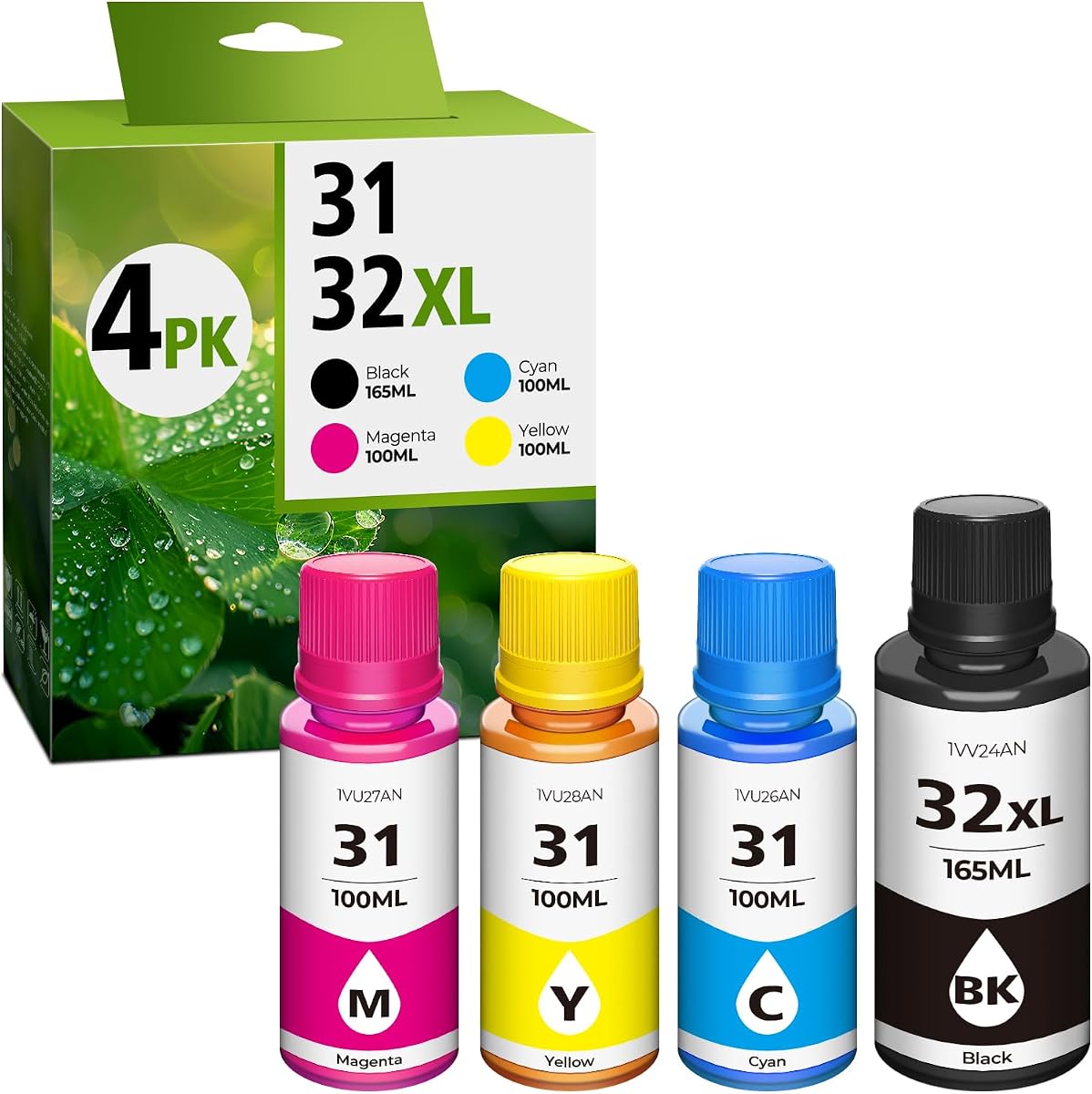
This 31 ink and 32XL black bottle set is the only refill product in the guide rather than a complete printer, and it earns a 4.4 rating. It is intended for owners of compatible HP Smart Tank, Smart Tank Plus, older Smart Tank, and Ink Tank models who want a four-bottle refill solution for black, cyan, yellow, and magenta ink.
We may earn a commission when you buy through this link, at no additional cost to you.
The listed compatibility is extensive, covering numerous HP Smart Tank 5101, 7602, 6001, 5000, 5003, 5100, 6003, 7603, 7001, 5102, 5103, 7301, 7002, 7006, and 7302 models. It also names Smart Tank Plus models including 651, 551, 555, 557, 559, 655, 617, 570, 571, 578, 600, 615, and 675, plus several Smart Tank 450 through 750 models and Ink Tank 310, 319, 410, 415, 416, 418, and 419 printers.
The set contains a 165 milliliter 32XL black bottle and 100 milliliter cyan, yellow, and magenta bottles. The seller states page yields of up to 9,500 pages for black and 9,000 pages for each color at five percent coverage on A4 paper. It also states that the inks are dye-based rather than OEM black pigment ink and advises cleaning the printheads before refilling.
This product may be useful for a compatible printer owner, but it should not be treated as a printer or purchased without checking the exact model number. The pigment-versus-dye distinction may affect print quality and printer performance, and Epson and Canon models in this guide require their own specified inks. For anyone still choosing a printer, the other nine products provide a complete route to wireless printing, copying, and scanning.
The listing names many supported models, but buyers should match the complete printer model number rather than relying on a similar family name. This is especially important because several Smart Tank generations share branding.
The seller states that these bottles contain dye ink, while the original black ink may be pigment-based. Its guidance not to mix formulations and to clean the printheads first should be considered before use.
We may earn a commission when you buy through this link, at no additional cost to you.
This HP Smart Tank 5003 listing provides the same broad home-printing proposition as the other 5003 entry, including wireless printing, copying, scanning, borderless output, and a claimed initial supply of up to 6,000 black or color pages. Its rating is 3.8, which should prompt buyers to compare the listing and package details carefully.
We may earn a commission when you buy through this link, at no additional cost to you.
The defining feature is the refill method. Users insert HP ink bottles into the cartridge-free tanks and let them drain, a process HP describes as requiring no squeezing and creating no spilling. The approach is particularly accessible for households that want to avoid managing several separate ink cartridges and their individual replacement schedules.
Mobile and wireless printing allow compatible phones and computers to send jobs without a direct connection to the printer. Flatbed copying and scanning add household utility, while borderless printing expands the range of photo and graphic output. The listing is explicitly oriented toward home users and does not highlight automatic duplex printing, a large control display, or detailed paper-handling specifications.
Because the guide includes two listings with the same HP Smart Tank 5003 family name, it is important to distinguish model identifier D06BKA from 9B2D3A. Buyers should compare included accessories, connectivity details, warranty information, and exact product dimensions on the listing. For users who prioritize simple refilling and multifunction support, this variant remains a practical ink tank option.
The refill process is designed around bottle insertion rather than cartridge replacement. This reduces the number of separate components users must track and makes replenishment more approachable for shared household printers.
Scanning and copying turn the Smart Tank into a general home-office device. Borderless output and wireless mobile printing broaden its usefulness for image-heavy and distributed workflows.
We may earn a commission when you buy through this link, at no additional cost to you.
The Epson EcoTank ET-2988 is a renewed wireless color all-in-one supertank printer with a 3.9 rating. Its standout productivity specifications include automatic two-sided printing, a 1.44-inch color display, a 100-sheet paper tray, and listed speeds of 15 pages per minute in black and eight pages per minute in color.
We may earn a commission when you buy through this link, at no additional cost to you.
Automatic duplexing makes this one of the more practical models for report-heavy users. Its stated speed figures are also the highest black-page rate among the Epson models in the guide, and Epson states they require zero warmup time. These characteristics suit a busy home office where multipage documents are a regular part of the workflow.
Epson says the included ink can produce up to 6,600 black pages or 5,500 color pages. Its 4800 by 1200 dpi resolution supports detailed photos and text, and the model supports printing and scanning through the Epson Smart Panel app, Apple AirPrint, Mopria Print Service, and Mopria Scan. The high-resolution flatbed scanner and color display add further multifunction value.
The renewed status is the main consideration. Cosmetic condition, included accessories, warranty terms, and packaging may differ from a new unit, so buyers should review the seller's condition notes and return provisions. Within those terms, the ET-2988 is a strong choice for users who prioritize speed and automatic duplexing over having the highest-rated model.
Automatic two-sided printing and a listed 15 black ppm make the ET-2988 well suited to reports, notes, and office documents. The 100-sheet tray also supports a more active workflow than very compact printers.
Because this is a renewed product, buyers should examine the condition description and included accessories carefully. A renewed status can provide a different ownership proposition, but it should be evaluated against the available warranty and return policy.
We may earn a commission when you buy through this link, at no additional cost to you.
The right ink tank printer depends on how much you print, whether you need duplex output, how you refill, and which functions you actually use. Comparing capacity, connectivity, paper handling, and ongoing ink requirements is more useful than focusing on a single headline specification.
Choose a model with enough included ink to match your expected output. High-volume households should favor larger stated allowances, while occasional users may not consume the full supply for a long time. Confirm the page yields for both black and color rather than assuming a high black yield also applies to photo-rich printing.
Use genuine or clearly approved ink for the exact printer model, especially when print quality and warranty coverage matter. Check the model number before buying bottles, follow the manufacturer's filling instructions, and never mix inks without confirming compatibility. The broad compatibility claims of the third-party set still require exact model verification.
Confirm that your preferred devices and applications are supported before buying. A stable wireless connection, appropriate router placement, and the availability of the manufacturer's app matter more than whether a printer has a generic wireless label. Consider the added convenience of app-based scanning when choosing between similar models.
If you mostly print, a scanner may add little daily value. If you copy or digitize papers regularly, it can eliminate a separate device. Confirm the scanner resolution, display size, and copy controls for the exact model, and place the printer where flatbed scanning will be physically convenient.
Choose a model with automatic duplexing if you frequently print long reports or want to conserve paper. Do not infer duplex support merely because a printer has an all-in-one label. Where speed data is missing, review the current manufacturer specifications and consider whether your typical jobs are short or substantial.
For photos, inspect supported media and borderless capability, not resolution alone. For routine document use, check ordinary paper capacity against how often you refill it. Heavy paper and specialized media support can be verified in the current listing or manufacturer documentation.
Favor a screen that matches your comfort with technology and the complexity of your jobs. A touchscreen may be easier for selecting scans and photos, while a basic display can be perfectly adequate for straightforward printing. App-based control should also be considered if you prefer managing the printer from a phone.
Follow the setup guide, use the specified ink, and avoid leaving a reservoir empty for long periods. Before buying a third-party refill, compare its formulation and warranty implications with the manufacturer's guidance. Simple refilling saves time, but informed maintenance protects output quality and device longevity.
Begin by unboxing the printer in a clean, stable area and consult the setup guide before adding ink. Install the ink, printhead, and any included maintenance components exactly as directed, load suitable paper, and complete the printer's initialization process. Connect the unit to the intended wireless network and install the manufacturer's app on any phone or computer that will print regularly.
For the first test page, choose ordinary document paper and inspect text alignment, color, margins, and sharpness. Run the appropriate calibration or cleaning cycle if the setup process requests it. Scan a short sample and make a basic copy to verify those functions. Test wireless printing from a compatible device as well, and confirm that the selected paper type and print settings match the job.
Refill only with ink approved for the exact printer model. Follow the bottle insertion sequence and filling instructions, reseal each container promptly, and avoid overfilling the tanks. Keep the printer powered and used regularly enough that ink does not remain unused for long periods. Clean the printhead when the manufacturer recommends it, keep the scanner glass clean, and use a dry, lint-free cloth on exterior surfaces. Report abnormal colors, leaks, or repeated errors to the appropriate support service.
They are generally designed to lower ongoing ink costs because refillable bottles replace many small cartridges. The actual savings depend on print volume, ink used, refill prices, and the printer model. A tank printer is most attractive for people who print regularly enough to avoid wasting the included supply.
Ink lasts until the tank is used up, and the time depends heavily on the color mix, coverage, images, and frequency of use. Manufacturer yield figures are estimates under specified conditions. Heavy photo printing consumes color ink faster than ordinary text documents, while intermittent use can make unused ink sit longer between jobs.
Compatibility depends on the exact printer model and the ink formulation, so buyers should verify both before purchasing. Epson warns that non-genuine ink may damage a printer in ways not covered by its limited warranty. The separate 31 and 32XL set in this guide also warns that its dye black differs from OEM pigment black and advises cleaning the printhead beforehand.
The Canon G3270 is a simple option with wireless print, copy, scan, and a generous claimed page supply. The Epson ET-2903 adds more explicit speed, resolution, paper, and display specifications. The right choice depends on whether you prioritize simplicity, detailed specifications, automatic duplexing, or a particular refill system.
Modern ink tank printers can produce strong color documents and photographs, especially models with high listed resolution and borderless support. The Epson ET-2903, for example, lists 5760 by 1440 dpi and support for a wide range of media. Photo quality also depends on the ink, paper, driver settings, and original image.
Regular use helps keep ink moving through the print system and can reduce problems associated with prolonged inactivity. Epson models use heat-free technology, but each model's setup guide still provides the appropriate maintenance guidance. Follow the manufacturer's cleaning schedule and avoid leaving a reservoir empty for extended periods.
EcoTank, MegaTank, and Smart Tank are Epson, Canon, and HP branding for refillable ink systems. They share the general benefit of replacing small cartridges with bottled ink, but their bottles, fittings, software, and supported models differ. Ink from one ecosystem should not automatically be used with another.
A renewed model can be worthwhile when the seller clearly describes its condition, included accessories, warranty, and return policy. The Epson ET-2988 in this guide combines useful productivity features such as automatic duplexing with renewed-condition uncertainty. Review the listing details carefully and compare them with the cost of a new alternative.
The Canon MegaTank G3270 stands out as the Best Budget option because it combines wireless printing, copying, scanning, and a generous included ink supply in a straightforward design. The Epson EcoTank ET-2903 is the Editor's Choice for users who want more fully stated productivity specifications, including speed, resolution, paper capacity, mobile support, and a color display.
The Epson EcoTank ET-4800 earns the Best Premium distinction for its refined refillable multifunction design and heat-free printing approach. Between those picks, prioritize automatic duplexing if you print long reports, mobile control if household members print from different devices, and ink yield if you want to delay the first refill. Buyers should also compare scanning needs, physical space, and the manufacturer's ink compatibility requirements.
Finally, check the current listing, manufacturer documentation, included accessories, warranty terms, and latest pricing before ordering. Ratings and product bundles can change over time, particularly when the same printer appears under more than one model identifier. The most reliable ink tank printer is the one that combines the features you regularly need with ink and refill support appropriate for your chosen brand.