
Dell 16 Plus Touchscreen Laptop
4.5Editor score
Core Ultra 9 288V processor
32GB LPDDR5X memory
16-inch FHD+ touchscreen
Intel Core Ultra 9 laptops target demanding users who need more processing power, integrated AI acceleration, and generous memory than mainstream ultraportables provide. The strongest choices pair the flagship processor with a sharp display, effective cooling, fast storage, and enough battery capacity for a productive day away from an outlet.
This guide compares ten Core Ultra 9 systems from Dell, HP, GEEKOM, LG, and Acer. We examined processor details, graphics, memory, storage, screens, ports, wireless connectivity, portability, security features, and practical productivity features, while also considering how each configuration fits different users and working environments.
Each review identifies the strongest reasons to consider a particular model and any meaningful compromises. The list covers business notebooks, creator systems, touch-screen ultraportables, and a discrete-GPU performance option. Product listings and prices can change, so readers should verify current specifications, configuration details, and availability before purchasing.
4.5Editor score

5.0Editor score

4.6Editor score
As an Amazon Associate we earn from qualifying purchases.
The table below compares all ten models by processor, memory, display, and most important form factor, making it easier to separate compact daily drivers, spacious business machines, and high-performance creator systems.





This Dell 16 Plus combines the Core Ultra 9 288V with 32GB of fast LPDDR5X memory, a 1TB PCIe NVMe drive, and a 16-inch touch display. Its 4.5 rating reflects a well-rounded configuration that delivers enough performance for intensive office work, research, content creation, and multitask without the complication of a discrete graphics card.
We may earn a commission when you buy through this link, at no additional cost to you.
The processor offers 12 cores and boost speeds up to 5.3 GHz, while the integrated Intel Arc 140V GPU is positioned for AI-accelerated creation and mainstream video editing. Dell also highlights an NPU supporting up to 48 TOPS. Practical connectivity is particularly strong, with Wi-Fi 7, Bluetooth 5.3, HDMI 2.1, USB-A, USB-C with DisplayPort and power delivery, and a full-featured Thunderbolt 4 port.
The main limitation is the 1920-by-1200 panel, which offers useful 16:10 space but less resolution than higher-end alternatives in this roundup. Windows 11 Home also makes this a better fit for consumers, students, and independent professionals than for organizations that require domain management or other business-only IT controls. Despite those points, the combination of memory, storage, processor, and ports is unusually complete.
This is our Best Budget selection because it avoids obvious compromises in the areas that affect daily productivity. It suits people who want a large, touch-friendly business notebook with modern connectivity and substantial memory. Buyers who need a sharper screen should compare the Dell 14 Plus 2.5K or Dell 16 Plus QHD+, while organizations needing Windows Pro should look at the similarly equipped Dell Plus 16.
The 12-core Core Ultra 9 288V and 32GB of LPDDR5X provide ample headroom for large spreadsheets, many browser tabs, remote meetings, and creative applications. The low-power NPU can handle supported background AI functions more efficiently than relying entirely on the CPU or integrated GPU.
Thunderbolt 4, DisplayPort, HDMI 2.1, USB-A, Wi-Fi 7, and Bluetooth 5.3 make it straightforward to connect monitors, docks, storage, and peripherals. The backlit keyboard, numeric keypad, fingerprint reader, and FHD+ webcam add convenience for long work sessions.
We may earn a commission when you buy through this link, at no additional cost to you.
This Dell 16 Plus earns our Editor's Choice designation by balancing a flagship Core Ultra 9 processor, 32GB of memory, a touch screen, and Windows 11 Pro in a conventional business-laptop format. The supplied 5.0 rating also makes it one of the strongest-rated products in the group, although its practical value ultimately depends on the available configuration.
We may earn a commission when you buy through this link, at no additional cost to you.
The Core Ultra 9 288V reaches speeds up to 5.1 GHz and includes a dedicated Intel AI Boost NPU. Intel Arc 140V graphics should handle high-resolution media, presentations, photo editing, and light video creation well, while the 32GB of LPDDR5X supports heavy multitasking. The 1TB PCIe SSD offers room for business documents, communication apps, media libraries, and active projects.
Its 16-inch 1920-by-1200 touchscreen uses a 16:10 aspect ratio and 300-nit brightness, making it productive for documents, spreadsheets, web research, and meetings. The relatively modest resolution may disappoint buyers accustomed to 2.5K or QHD+ panels, but the added vertical workspace helps offset some of that limitation. The larger chassis also will not be as pocketable as the 14-inch alternatives in the roundup.
This model is ideal for professionals who need a capable Windows Pro machine without a separate gaming laptop or workstation. It handles busy office days, video collaboration, research, and routine creative tasks particularly well. Choose it over similarly equipped Dell systems when the current configuration, display size, and included operating system align best with your workflow.
A dedicated NPU, 12-core processor, and 32GB of LPDDR5X create a strong foundation for AI-assisted productivity. The configuration can keep several demanding applications open while handling online meetings and large working files.
Windows 11 Pro, a fingerprint reader, backlit keyboard, FHD webcam, dual-array microphones, Wi-Fi 7, and Bluetooth 5.3 cover common professional needs. Thunderbolt 4 and HDMI make it easy to move between a desk and mobile working setup.
We may earn a commission when you buy through this link, at no additional cost to you.
The Dell 16 Plus QHD+ is built for users who want a more detailed view than a standard FHD+ business display. It pairs the Core Ultra 9 288V and 32GB of memory with a large 16:10 panel, making it a natural fit for complex spreadsheets, side-by-side documents, design review, and long sessions of visual work.
We may earn a commission when you buy through this link, at no additional cost to you.
Its principal advantage is display resolution. The larger screen and 16:10 ratio can show more rows, text, timelines, and application windows without forcing constant scrolling. Dell also emphasizes efficient AI performance, cooler and quieter operation, a FHD+ webcam with Windows Hello support, and a premium aluminum design intended to balance rigidity and portability.
Service is another meaningful advantage. The listing references one year of onsite service for covered hardware issues that cannot be resolved remotely, as well as six months of Dell Migrate for transferring data to the new PC. This can be more valuable to an organization than a small specification difference, particularly when downtime has a real cost.
This laptop is most suitable for business users, analysts, and creators who value screen detail and room to work. It is also a sensible alternative to the first two Dell 16 Plus models. Confirm the exact storage capacity, port arrangement, keyboard details, and operating system with the current listing, since those specifications are not fully stated in the supplied information.
QHD+ resolution gives documents, interfaces, and images more definition than a 1920-by-1200 panel. The 16:10 format is particularly useful for professional applications that place a premium on vertical workspace.
Onsite service can reduce the disruption caused by qualifying hardware problems. Dell Migrate also provides a structured starting point for transferring files, personal records, and other important information to a newer system.
We may earn a commission when you buy through this link, at no additional cost to you.
The Dell 14 Plus 2.5K combines a compact 14-inch footprint with one of the sharpest native resolutions in this roundup. Its Core Ultra 9 288V, 32GB LPDDR5X, and 1TB SSD configuration is well suited to professionals who want a portable notebook that does not feel underpowered.
We may earn a commission when you buy through this link, at no additional cost to you.
The 2560-by-1600 display provides substantially more working detail than the FHD+ Dell models. That makes it useful for photo review, code, financial sheets, presentations, and precise visual work. The 16:10 ratio also creates a taller workspace, while Intel's platform supports on-device AI functions such as drafting, summarizing, and image-related assistance where supported.
Its 3.8 rating is lower than those of several competitors, so prospective buyers should consider the available reviews and warranty terms carefully. Windows 11 Home also restricts certain business-specific functions, and the Core Ultra 9 288V is powerful enough that thermals and battery behavior may vary under sustained load. Dell highlights military-grade testing and a premium aluminum construction as additional quality signals.
This is the pick for mobile professionals and students who prioritize a sharp display in a smaller body. It should also appeal to creators who need more definition than an FHD+ screen but do not require a discrete GPU. Business organizations may prefer a comparable Windows Pro machine, while those needing the most screen space can consider the Dell 16 Plus QHD+.
The 2.5K panel packs more pixels into a 14-inch body than the FHD+ alternatives. That improves text clarity and allows denser interfaces, creative tools, and application panels to remain readable.
With 32GB of LPDDR5X and 1TB of storage, the laptop has enough resources for heavy browser use, large project folders, and multiple open applications. The efficient Core Ultra platform adds useful AI capabilities without requiring a separate graphics processor.
We may earn a commission when you buy through this link, at no additional cost to you.
This Dell 16 Plus configuration is a practical Windows Pro system for creators, designers, and business professionals who value a touch display, modern ports, and a Core Ultra 9 processor. Its 32GB of RAM and 1TB SSD provide a strong foundation for daily productivity, and the listing identifies Intel Arc 140V integrated graphics.
We may earn a commission when you buy through this link, at no additional cost to you.
The 16-inch WUXGA touchscreen measures 1920 by 1200 and suits documents, web browsing, media playback, and presentations. Port coverage includes USB-A 3.2, USB-C 3.2, Thunderbolt 4, and HDMI 2.1, allowing the notebook to connect with several common accessories without requiring a dock. Wi-Fi 7, a backlit keyboard, fingerprint reader, FHD camera, and Waves MaxxAudio Pro round out the practical features.
The principal concern is its 3.3 supplied rating, the lowest among the rated products here. That may reflect limited review volume, configuration differences, or buyer expectations rather than a fundamental weakness, but it warrants more careful checking. The display also lacks the higher resolution offered by the Dell 14 Plus 2.5K and Dell 16 Plus QHD+ models.
This configuration is best for users who prioritize Windows Pro, connectivity, and familiar 16-inch proportions over maximum display resolution. Its dedicated processor, generous memory, and security features make it a solid professional daily driver. Compare its current customer feedback with the better-rated Dell 16 Plus alternatives before deciding.
Thunderbolt 4 and HDMI 2.1 support modern displays and accessories, while USB-A maintains compatibility with existing peripherals. The fingerprint reader adds a convenient security option, and the backlit keyboard supports low-light use.
Intel Arc 140V graphics, 32GB of RAM, and 1TB of storage create a flexible platform for light photo editing, presentations, media work, and business applications. A discrete GPU would be preferable for demanding 3D or high-end video workloads.
We may earn a commission when you buy through this link, at no additional cost to you.
The HP OmniBook 5 16 stands out with a 16-core, 16-thread Core Ultra 9 processor, 32GB of DDR5 memory, and Intel Arc 140T graphics. Its supplied 5.0 rating and broad productivity emphasis make it one of the most attractive all-round systems for demanding users who want substantial CPU parallelism.
We may earn a commission when you buy through this link, at no additional cost to you.
HP describes the processor as 15th-generation Intel Core Ultra 9 hardware with an Intel AI Boost NPU rated at 13 TOPS. The 2K-class 1920-by-1200 IPS anti-glare touchscreen offers wide viewing angles and a large workspace. DTS Ultra and Windows Studio Effects support the entertainment and collaboration emphasis, while an IR camera with a physical privacy shutter improves meeting privacy.
The connectivity package is extensive. It includes Wi-Fi 6E, Bluetooth 5.3, two USB-A ports, two 10Gbps USB-C ports with power delivery and video support, and HDMI 2.1. HP states that the notebook can support triple external displays, which is valuable for desk-based productivity. Windows 11 Pro is also included for users who need business management features.
This model is ideal for business professionals, programmers, designers, and students who want high core count and generous RAM. It may be less compelling for travelers because the 16-inch chassis is substantial and the wireless standard trails newer Wi-Fi 7 Dell options. It is also a better creative choice than basic integrated-GPU rivals when Intel Arc 140T is sufficient for the intended workload.
The 16-core processor is especially appealing for compilation, complex spreadsheets, multitasking, and software that benefits from many threads. The 32GB of onboard DDR5 gives applications a large working set without relying on slow virtual memory.
Two USB-C ports, two USB-A ports, and HDMI 2.1 make it easier to connect several monitors and accessories. Windows 11 Pro, the IR webcam, privacy shutter, and secure sign-in support make the system suitable for office and hybrid-work environments.
We may earn a commission when you buy through this link, at no additional cost to you.
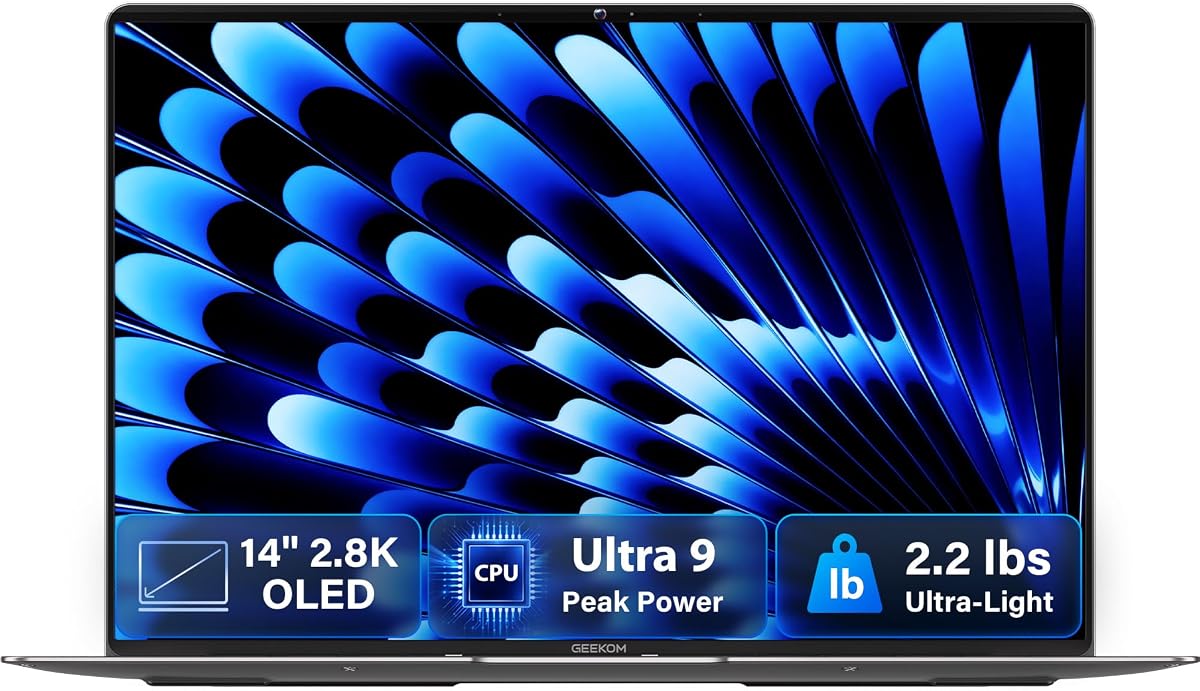
The GEEKOM GeekBook X14 Pro is built around the idea that a high-end Core Ultra 9 laptop can remain exceptionally portable. At 2.2 pounds and 0.23 inches thick, with an aerospace-grade magnesium-alloy chassis, it is the lightest option in this roundup and a strong candidate for frequent travelers.
We may earn a commission when you buy through this link, at no additional cost to you.
Its 14-inch 2.8K OLED display is among the visual highlights. The panel covers 100% of DCI-P3, reaches up to 450 nits, and refreshes at 120Hz, making it well suited to photo review, entertainment, and color-sensitive work. The Core Ultra 9 185H provides 16 cores, 22 threads, speeds up to 5.1 GHz, and a dedicated NPU, while 32GB of 7500MHz LPDDR5X supports intensive multitasking.
GEEKOM includes a 72Wh battery, a compact 65W GaN charger, and a docking station. Two 40Gbps USB4 ports with DisplayPort 2.1, HDMI 2.1, USB-A, and an audio jack create a strong connection platform. A fingerprint reader and physical camera shutter add privacy, while the IceBlade 2.0 cooling system is designed to limit thermal throttling.
This is the pick for mobile creators and professionals who value display quality and low weight more than the newest wireless standard. Its Meteor Lake Core Ultra 9 generation is older than several 288V systems here, and gaming remains integrated-GPU work, so buyers needing maximum gaming or 3D performance should look to the LG gram Pro.
The combination of 2.8K resolution, OLED contrast, 100% DCI-P3 coverage, and a 120Hz refresh rate creates an excellent canvas for images, video, and general desktop use. The matte-like clarity and brightness also make the screen practical for varied lighting.
The 16-core processor, 32GB of high-speed memory, 1TB PCIe Gen4 drive, and 72Wh battery provide a rare combination of capability and mobility. USB4 and the included dock help compensate for the small footprint by offering flexible desktop connectivity.
We may earn a commission when you buy through this link, at no additional cost to you.
The LG gram Pro 16 is the clear premium performance option because it combines the Core Ultra 9 285H with an NVIDIA RTX 5050 laptop GPU. Unlike the other systems, it includes a discrete graphics processor capable of more demanding gaming, rendering, and AI-assisted creative work while retaining the portability of a three-pound notebook.
We may earn a commission when you buy through this link, at no additional cost to you.
Its 32GB of DDR5 memory and 2TB SSD are generous, and the 90Wh battery is unusually large for a portable 16-inch computer. LG advertises up to 27 hours of video playback, although real results depend on workload, display settings, and wireless conditions. The internal dual cooling system is intended to keep sustained performance stable and prevent overheating.
The display supports variable refresh from 31Hz to 144Hz, which is well suited to fluid scrolling, gaming, and switching between static and animated content. Other highlights include a chassis that is just 0.6 inches thick, military-grade resilience testing, LG gram Link device integration, and hybrid AI features that combine local intelligence with cloud services.
This laptop is best for creators, gamers, engineers, and professionals who need discrete-GPU capability but still value portability. It is less appropriate if the additional graphics power will go unused or if Windows 11 Home does not meet organizational requirements. Among these ten options, it offers the clearest performance upgrade for accelerated workloads.
The RTX 5050 gives the gram Pro an advantage over systems relying entirely on integrated graphics. That benefit is most meaningful for 3D work, GPU-accelerated editing, modern games, and AI applications that can use supported acceleration.
The three-pound, 0.6-inch chassis keeps the large display surprisingly portable. A 90Wh battery and variable-refresh display support long, efficient work sessions, while the cooling system is designed to maintain performance under load.
We may earn a commission when you buy through this link, at no additional cost to you.
The Dell Plus 16 Touchscreen is a strong Windows Pro option with a 5.0 supplied rating. It uses the eight-core Core Ultra 9 288V, with boost speeds up to 5.1 GHz, and pairs that processor with 32GB of LPDDR5 memory and a 1TB SSD. The configuration is well suited to multitaskers who need a large work area and useful AI capabilities.
We may earn a commission when you buy through this link, at no additional cost to you.
Dell divides the processor's AI responsibilities among a high-throughput APU for digital creation and video editing, a low-power NPU supporting up to 48 TOPS for features such as Microsoft Studio Effects, and the CPU for general processing. The 16-inch 1920-by-1200 touchscreen has 300-nit brightness and is intended for browsing, streaming, and general interactive work.
Its Windows 11 Pro license is a meaningful distinction from several Dell alternatives that list Home. The fingerprint reader, backlit keyboard, and 1TB storage make it a conventional professional notebook. Wi-Fi 6 is modern but not the newest standard represented here, so buyers who require Wi-Fi 7 should choose one of the newer Dell 16 Plus configurations.
This model is best for organizations or professionals that want Windows Pro, a large touchscreen, and a capable Core Ultra 9 platform without moving to a discrete-GPU system. Its strong rating and balanced specifications make it a credible choice, but a higher-resolution display would improve its appeal for detailed creative work.
The NPU's advertised 48-TOPS support makes this configuration well equipped for supported low-power AI tasks. Features such as noise cancellation and live transcription can benefit from dedicated acceleration while the main processor handles other work.
Windows 11 Pro provides greater administrative flexibility than Home, while the fingerprint reader and backlit keyboard support daily security and comfort. The combination of 32GB memory and 1TB storage is well matched to a multi-application workday.
We may earn a commission when you buy through this link, at no additional cost to you.
The Acer Aspire 14 AI is a feature-rich portable option with an octa-core Core Ultra 9 288V, 32GB of RAM, and a 1TB SSD. Its defining advantage is connectivity: two USB-A ports, two 40Gbps USB-C ports with 100W power delivery, HDMI 2.1, and RJ45 Ethernet provide more flexibility than many similarly sized rivals.
We may earn a commission when you buy through this link, at no additional cost to you.
Its 14-inch WUXGA IPS ComfyView matte touchscreen covers 100% of sRGB and uses a 16:10-style 1920-by-1200 resolution. The matte finish can make the laptop easier to use in bright environments, while the color coverage benefits photo review and general design work. Intel Arc 140V graphics handle mainstream content creation and media tasks.
The processor combines four performance and four efficient cores, has a 3.3GHz base clock, reaches 5.1GHz boost, and includes 12MB of Smart Cache. The listing advertises up to 48 NPU TOPS, while the laptop weighs 3.09 pounds. A 65Wh battery, Wi-Fi 6E, FHD IR webcam, and backlit keyboard complete a balanced mobile package.
This Acer makes the most sense for buyers who prioritize ports, wired networking, a matte color-accurate display, and light weight. Its lack of a supplied star rating means it does not carry the same social-proof advantage as the top-rated systems. Verify customer feedback, warranty coverage, and the precise Windows configuration before ordering.
The two USB-C ports provide high-bandwidth data transfer, charging, and display connectivity, while USB-A preserves access to legacy peripherals. RJ45 Ethernet is a welcome inclusion for offices, conference rooms, and locations where a stable wired connection matters.
At 3.09 pounds, the Aspire remains easy to carry while housing a large touch display, 32GB of memory, and 1TB of storage. The matte IPS panel and 100% sRGB coverage also give it useful credentials for visual work.
We may earn a commission when you buy through this link, at no additional cost to you.
A Core Ultra 9 laptop can deliver exceptional performance, but processor class alone does not determine the right purchase. Display quality, memory, graphics, cooling, connectivity, portability, and operating-system requirements should guide the decision.
Choose for the workload rather than the model number alone. Core Ultra 9 is ample for demanding office tasks, and either generation can handle creative software, but specialized rendering, engineering, or gaming may also require strong graphics and cooling. In short, favor the newer efficient platform for mobility and AI, or a higher-core-count H-series chip for CPU-heavy production.
Prioritize at least 32GB for serious productivity and consider whether the manufacturer offers higher-memory configurations. Check whether memory is onboard or replaceable. The short advice is simple: do not accept 16GB for a flagship processor when 32GB options are widely available in this category.
Match graphics to the task rather than assuming integrated is always sufficient. For office productivity and moderate creative work, Core Ultra 9 integrated graphics can be efficient and effective. For sustained gaming or professional GPU workloads, prioritize a discrete GPU and adequate cooling over a marginally lighter chassis.
Choose a 14-inch model for portability and a 16-inch model for a roomier desktop replacement. Creative users should consider OLED color coverage, brightness, and refresh rate, while business users may prioritize 16:10 proportions and text clarity. In short, evaluate resolution, color accuracy, brightness, and size together rather than treating any single number as decisive.
For frequent travel, balance weight, battery capacity, and charger size rather than relying on advertised runtime alone. A 16-inch machine offers more screen but generally demands a larger bag and consumes more power. The best advice is to choose the lightest system that still provides the display size and battery capacity your work requires.
Check the connector mix against your desk and travel gear before choosing. More ports can reduce adapter dependence, but a dock may make a cleaner setup. In short, prioritize the port types you actually use, and treat Wi-Fi 6E or Wi-Fi 7 as one factor rather than the sole basis for a purchase.
Do not assume an upgraded operating system can be added later without cost or complications. Confirm the exact license included with the configuration. In short, business users should prioritize Pro and centralized management, while personal buyers can save money by choosing Home when it meets their needs.
Start by completing the operating system setup, creating a local administrator account, enabling Windows Update, and installing your essential applications. Use the built-in fingerprint reader or Windows Hello where available, and confirm that system firmware, graphics drivers, and the NPU software are current before beginning an intensive workload. If the laptop includes Dell Migrate or a similar migration utility, transfer important files before retiring the previous device.
For the best balance of performance and thermals, use a compatible high-output USB-C charger when working away from the desk and avoid blocking the underside vents. Close unnecessary applications when battery life matters, and let the system cool naturally rather than placing it on soft fabric. For OLED models, reducing brightness and using adaptive refresh settings can conserve power while limiting long-term static-content burn-in concerns.
Protect the display with a suitable microfiber cloth, avoid leaving the laptop in direct heat or intense cold, and keep liquids away from the keyboard and ports. Use the included case or a padded sleeve for transport. Periodically back up important documents, verify that recovery options are available, and update the system when stable firmware and driver releases appear.
It can be worthwhile for heavy multitasking, large project files, programming, professional applications, and workloads that benefit from many CPU cores or dedicated AI acceleration. For basic browsing and office tasks, a lower-tier processor may be sufficient. The best value is realized when your software genuinely uses the extra performance, and when the laptop also provides adequate memory, storage, cooling, and display quality.
The 288V is an eight-core, 12-thread processor built around a new efficient architecture, with strong integrated graphics and up to 48 TOPS of advertised NPU performance. The 285H is a Series 2 H-series chip with 16 cores and 22 threads, offering more parallel CPU throughput. In this list, the 288V models emphasize efficiency and AI, while the 285H appears in the higher-performance LG configuration with a discrete GPU.
For sustained productivity, 32GB is the most sensible minimum in this premium category. It helps when many browser tabs, communication tools, large spreadsheets, and creative applications are open simultaneously. Users with highly specialized workloads may want even more, while basic home use can operate with less. Because memory is soldered on many thin laptops, buyers should confirm the capacity before ordering.
They are suitable for photo editing, presentations, high-resolution media, and lighter video workflows, especially when paired with 32GB of memory and a capable display. They are less appropriate for intensive 3D rendering, demanding modern games, or sustained professional GPU workloads. The LG gram Pro 16 is the clear choice in this group when a discrete RTX 5050 is important.
A 14-inch model is generally easier to carry and may offer a sharper display because of its more compact panel, as seen with the Dell 14 Plus 2.5K, Acer Aspire 14 AI, and GEEKOM GeekBook X14 Pro. A 16-inch model gives you more workspace and is often better for spreadsheets, presentations, and desk-based work. The best choice depends on how often you travel and how much open-screen space you need.
Look for Thunderbolt 4 or USB4 for fast data transfer and broad external-display support, HDMI for straightforward monitor use, and at least one USB-A port if you own legacy accessories. Wi-Fi 6E or Wi-Fi 7 improves wireless networking, while RJ45 is useful in fixed offices. Buyers should also check whether a docking station is included.
Not for most personal tasks, but it can be valuable for business accounts, device management, advanced security, and certain organizational features. Several models in this guide include Pro, while others ship with Home. Choose Pro if your employer requires it or if you need those management functions; otherwise, Home can be the more economical choice.
Verify the exact processor, memory, storage, display resolution, operating system, port selection, and included accessories on the current product page. Reviews can reflect different configurations, so check recent feedback and questions as well as the overall rating. Availability and pricing also change, making it wise to compare the final configuration rather than relying on the product name alone.
The Dell 16 Plus Touchscreen with Core Ultra 9 288V, 32GB of memory, and 1TB SSD offers the strongest overall balance for most buyers. Its touch display, modern connectivity, and balanced specification make it the top choice for productivity, while the LG gram Pro 16 takes the premium performance crown thanks to its RTX 5050 graphics and large battery.
Prioritize the features your workload will actually use. Compact buyers should examine the GEEKOM GeekBook X14 Pro or Acer Aspire 14 AI, while sharp-screen seekers may prefer the Dell 14 Plus 2.5K. High-core-count users and heavy multitaskers may favor the HP OmniBook 5, and Windows Pro organizations can select one of the Dell business configurations.
Finally, confirm the current configuration and compare live listings, customer feedback, warranty coverage, and compatibility with your accessories. Core Ultra 9 laptops span very different designs, and the processor alone does not determine their value. Prices and availability change, so the most capable configuration is the one that meets your needs at a fair point in the market.