
Lexar OC DDR5 8GB
4.8Editor score
Single 8GB DDR5 module
6000 MT/s with CL38
Compact 39mm aluminum heatsink
Intel XMP and AMD EXPO
Our Lexar DDR5 RAM guide compares ten kits for speed, capacity, latency, platform support, thermal design, RGB lighting, and the best upgrade options today.
Lexar DDR5 RAM is designed for modern desktop builds that need faster memory transfer, responsive multitasking, and dependable operation with current Intel and AMD processors. The right kit depends on capacity, latency, motherboard support, physical clearance, and whether you want understated styling or synchronized RGB lighting.
We compared the two Lexar options in this guide with eight closely related DDR5 desktop kits that use the same target class of 6000 MT/s performance. Our evaluation focuses on memory configuration, supported overclocking profiles, platform coverage, thermal and physical design, capacity, and useful features rather than price alone.
Each review shows why a particular kit may suit a different kind of builder, from a single-module upgrade to a dual-module gaming system or a 64GB workstation. Product ratings, specifications, and availability can change, so check the current listing and your motherboard compatibility list before ordering.
4.8Editor score

4.4Editor score

4.8Editor score
This side-by-side comparison covers the available capacity, memory speed, latency, profile support, and physical design of two Lexar DDR5 kits and eight relevant alternatives.



The Lexar OC DDR5 8GB module combines a straightforward desktop upgrade with a compact 39mm aluminum heatspreader and support for both Intel XMP 3.0 and AMD EXPO. Its 4.8 rating reflects a favorable buyer experience, although the single 8GB configuration makes it best understood as a capacity-conscious option rather than a complete high-end memory kit.
We may earn a commission when you buy through this link, at no additional cost to you.
The module is rated for up to 6000 MT/s with CL38 latency when the motherboard and processor support that target and the appropriate BIOS profile is enabled. On-die error correction and an onboard power management IC are valuable additions for sustained operation, while the low-profile heatspreader offers more clearance with large tower coolers and compact cases.
Its chief limitation is obvious: one 8GB module cannot provide the bandwidth of a matched dual-channel kit. A single DIMM may also be less convenient for users who expect to add a second module later, because mixing separately purchased memory can create compatibility and stability complications. The safest way to obtain dual-channel performance is to install a factory-matched two-module kit.
This Lexar option makes sense for a basic DDR5-compatible desktop, a compact system that cannot accept taller modules, or a builder who specifically wants a single low-profile stick. For a new gaming system, however, the Thor Z RGB 32GB kit is the more balanced Lexar choice, while the XPG Lancer Blade RBG model offers tighter rated latency for performance-focused builds.
The 39mm height is the standout physical feature because it improves the chance of clearance beneath a wide air cooler. It also keeps the module visually restrained, making this stick useful for a clean workstation or a case where RGB lighting would serve no practical purpose.
Intel XMP 3.0 and AMD EXPO support make the module adaptable across both major desktop ecosystems. Compatibility still depends on the motherboard, processor, BIOS, and memory controller, so the manufacturer guidance should take priority over assuming every board can reach the advertised transfer rate.
We may earn a commission when you buy through this link, at no additional cost to you.
The Lexar Thor Z RGB 32GB is the most complete Lexar kit in the lineup. It combines two matched 16GB modules, a 6000 MT/s target, CL38 latency, and customizable RGB lighting. Its 4.4 rating is lower than the leading options in this comparison, but the package gives new builders several of the features they most often prioritize: adequate capacity, dual-channel operation, and coordinated illumination.
We may earn a commission when you buy through this link, at no additional cost to you.
The matched 2x16GB configuration is more suitable for gaming, content creation, and general productivity than the single-module Lexar OC. The sandblasted aluminum heat spreaders are designed to manage heat while maintaining a sharp, minimalist appearance, and the brighter RGB system is intended to coordinate with other illuminated components. On-die ECC and the onboard PMIC add stability and power-management features for sustained workloads.
The rated 6000 MT/s and CL38 timings require compatible hardware and an enabled XMP or EXPO profile. At default settings, the memory may operate at a slower JEDEC profile depending on the platform. Its latency is not as aggressive as the CL30 XPG option, and RGB-equipped modules can be too tall for some large air coolers even though the product data does not specify the exact height.
This kit is the best general recommendation among the Lexar products because it avoids the very limited capacity of the 8GB module without moving into the 64GB category. It is especially attractive for a gaming or productivity desktop where RGB is part of the desired build. Buyers who prioritize tighter latency over lighting should investigate the XPG Lancer Blade RBG CL30 kit instead.
Two matched 16GB modules give a new DDR5 desktop a more conventional memory configuration, supporting dual-channel operation and offering enough headroom for modern games and applications. A matched kit also removes much of the uncertainty associated with combining modules bought at different times.
The RGB diffuser provides a visible upgrade for transparent or windowed cases, while the aluminum construction serves the more practical role of heat dissipation. Neither feature guarantees overclocking headroom, so CPU and motherboard support remain the decisive considerations for reaching the rated speed.
We may earn a commission when you buy through this link, at no additional cost to you.
The G.SKILL Flare X5 32GB is a strong alternative for builders who want 6000 MT/s memory without a tall, illuminated design. It uses a matched pair of 16GB non-ECC UDIMMs rated at CL36-36-36-96 and 1.35V, with a 4.7 rating indicating broad buyer satisfaction.
We may earn a commission when you buy through this link, at no additional cost to you.
Its appeal lies in the combination of useful capacity, relatively low-profile construction, and support for AMD EXPO and Intel XMP 3.0. The stated platform list includes several current Intel and AMD chipset families, and the kit boots at its JEDEC default when the relevant BIOS profile is not enabled. Users can consult the G.SKILL QVL and RAM Configurator for more detailed hardware validation.
The 6000 MT/s target requires compatible motherboard and CPU support as well as the proper profile. G.SKILL specifically advises against mixing memory kits because unmatched combinations can cause instability or system failure. Its modest appearance also means buyers seeking coordinated lighting will need to look elsewhere.
This Flare X5 kit is a compelling option for a clean workstation, an air-cooled gaming desktop, or any build where cooler clearance and understated styling matter. It offers stronger all-around specifications than the single Lexar OC module and a less ornamental presentation than the Thor Z RGB, although the XPG CL30 kit is more aggressive on latency.
The low-profile matte-black modules are easier to coordinate with restrained cases and professional-looking systems. Their two-module arrangement is more appropriate for sustained desktop use than a single stick, particularly when applications benefit from additional memory bandwidth.
The listed chipset support and QVL guidance are more valuable than the headline speed because DDR5 performance depends on the processor's integrated memory controller and motherboard design. Confirming the exact board and CPU before purchase can prevent avoidable boot or profile complications.
We may earn a commission when you buy through this link, at no additional cost to you.
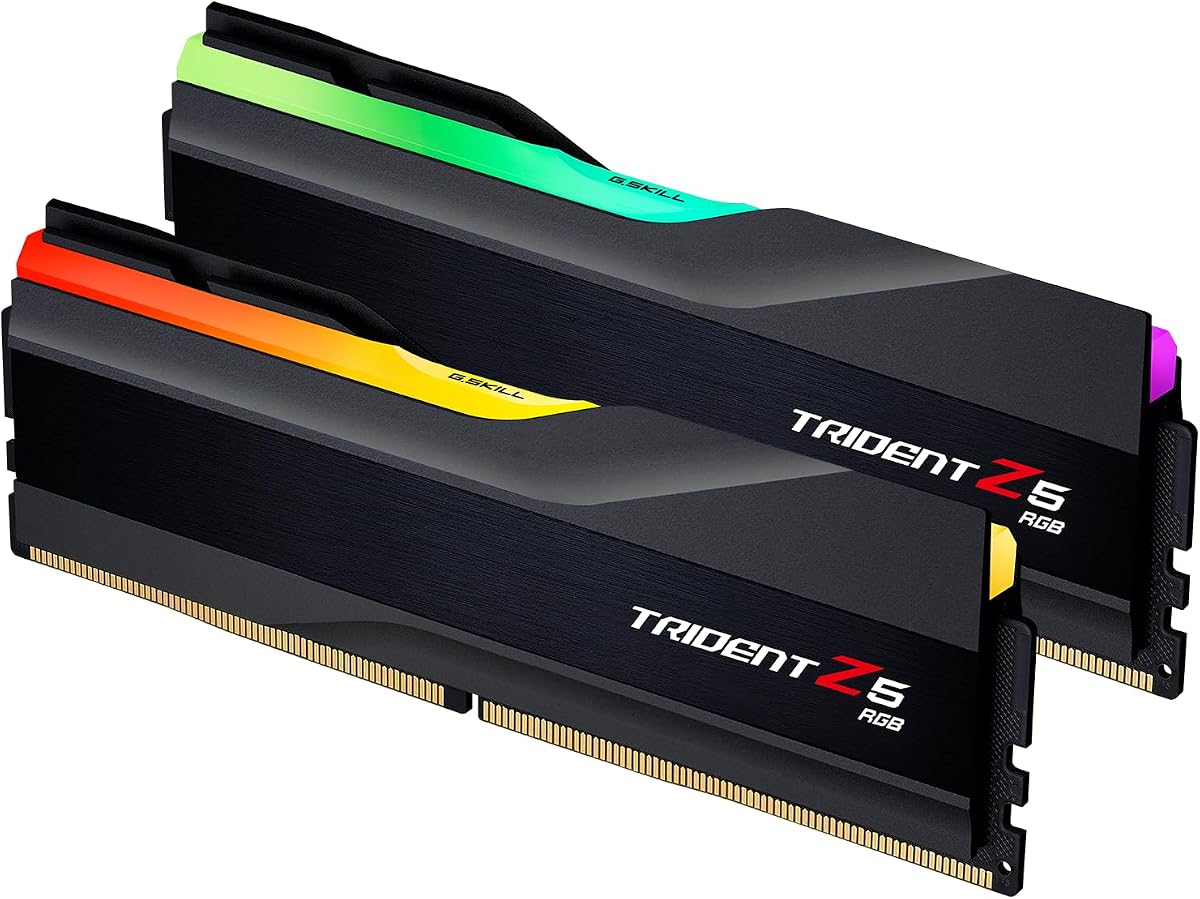
The G.SKILL Trident Z5 RGB 32GB is designed for builders who consider memory part of the visual centerpiece. Its matched 2x16GB configuration, 6000 MT/s target, CL36 timings, and RGB-equipped heat spreaders offer a conventional enthusiast feature set, supported by a 4.7 rating.
We may earn a commission when you buy through this link, at no additional cost to you.
The kit provides both Intel XMP 3.0 and AMD EXPO memory overclocking profiles, making it suitable for a wide range of compatible desktop platforms. Its listed support covers major Intel Z and B series chipsets and AMD X and B series platforms. As with the other enthusiast kits in this guide, attaining the rated transfer rate depends on the CPU memory controller, motherboard, BIOS, and enabled profile.
Compared with the low-profile Flare X5, the Trident Z5 emphasizes appearance and may present more of a clearance challenge beneath large air coolers. The supplied information does not state a module height, so the case and cooler dimensions should be checked before installation. Its CL36 latency also does not match the more aggressive CL30 rating of the XPG model.
The Trident Z5 RGB is best for a gaming system with a glass side panel and a coordinated lighting theme. It is also a solid all-round desktop kit for users who want 32GB without opting for 64GB. For a purely functional or cooler-constrained build, the Flare X5 is the quieter-looking and more compact alternative.
The kit combines capacity, high transfer rates, latency information, and lighting in a matched package. That makes it easier to select than assembling a memory solution from unrelated modules, provided the chosen motherboard and processor are validated for the target profile.
RGB modules often sit taller than plain low-profile alternatives, and lighting control can vary by motherboard utility. Check the module dimensions, CPU cooler fan position, and available synchronization software before finalizing the build.
We may earn a commission when you buy through this link, at no additional cost to you.
The G.SKILL Flare X5 64GB is the capacity-focused member of this group. Its two matched 32GB modules are rated for up to 6000 MT/s with CL36-36-36-96 timings and 1.35V, and the kit carries a 4.6 rating. It is most relevant to workstations that need more working memory than a conventional 32GB desktop configuration.
We may earn a commission when you buy through this link, at no additional cost to you.
Sixty-four gigabytes can be valuable for large project files, extensive multitasking, virtual machines, content-creation workflows, and other memory-intensive applications. The matched pair preserves a straightforward dual-channel layout, while support for both EXPO and XMP 3.0 provides flexibility across AMD and Intel systems. The restrained matte design also fits professional enclosures better than a heavily illuminated kit.
Most mainstream gaming systems do not require 64GB merely to run games, and additional capacity alone does not guarantee higher frame rates. Buyers should assess their actual workload rather than assume more memory always produces a visible improvement. As with every high-speed kit here, the 6000 MT/s profile depends on compatible hardware and correct BIOS settings.
This Flare X5 configuration is the right selection for a workstation that regularly operates beyond a 32GB working set. It may also make sense as a future-proof upgrade for users who want to keep a demanding desktop for many years. For general gaming, a 32GB kit offers the more efficient balance of capacity and component cost.
The 64GB total gives applications more room to retain data and reduces the likelihood that a demanding multitasking session will exhaust available memory. The benefit is most apparent in professional software and virtualized environments rather than ordinary web browsing.
A high-capacity kit should be selected because the workload requires it, not because a larger number appears on the specification sheet. Match the memory to the operating system, applications, and any planned future expansion.
We may earn a commission when you buy through this link, at no additional cost to you.
The ADATA Lancer Blade 16GB is a 6000 MHz black RGB desktop memory option supplied as one 16GB module. Its 4.8 rating is among the strongest in this group, but the provided product information is limited, so this review avoids assuming details that are not stated, such as exact latency, voltage, profile support, or module height.
We may earn a commission when you buy through this link, at no additional cost to you.
A single 16GB module can be attractive when a builder wants to populate only one of two available memory slots or needs a simple way to introduce DDR5 into a compatible system. The black RGB treatment gives it more visual personality than a plain module, while the stated 6000 MHz speed targets the same broad performance class as the dual-module kits in the comparison.
One module normally operates with less memory bandwidth than a matched pair, which can matter in bandwidth-sensitive games and productivity applications. Adding another module later may not create a perfectly matched kit, and mixing separately sourced memory can affect stability. For a new system, a factory-matched 32GB pair is generally the more straightforward route to dual-channel performance.
This ADATA option is most useful for a selective upgrade or a builder who prefers the Lancer Blade RGB appearance. Because the supplied listing provides limited compatibility and timing information, buyers should confirm the full model details, supported profiles, physical height, and motherboard qualifications before purchasing. A fully specified matched kit is preferable when those factors are uncertain.
A single module leaves a second slot open and can be convenient for incremental upgrades. The trade-off is that adding an unmatched stick later may not deliver the same behavior as a tested matched pair, so the intended upgrade path should be considered before purchase.
The available information identifies the model and its 16GB, 6000 MHz, black RGB configuration. Check the complete product page for exact timings, profile support, dimensions, and platform qualifications before relying on those details in a build plan.
We may earn a commission when you buy through this link, at no additional cost to you.
The G.SKILL Trident Z5 Neo RGB 32GB combines a matched 2x16GB arrangement with a 6000 MT/s target, CL36 timings, and RGB lighting. The kit carries a 4.7 rating and supports both AMD EXPO and Intel XMP 3.0, making it a flexible option despite the Neo branding.
We may earn a commission when you buy through this link, at no additional cost to you.
Its detailed 36-36-36-96 timing specification gives buyers more information than a basic speed label, while the 1.35V operating specification is included in the product title. The listed platform coverage includes current Intel Z and B families and AMD X and B families. As always, the exact motherboard and CPU should be checked against G.SKILL's QVL or RAM Configurator.
The RGB presentation makes this a more expressive alternative to the plain Flare X5, but it may be less suitable for a compact or minimalist build. The Trident Z5 Neo also occupies the same broad performance territory as other CL36 6000 MT/s kits, so its visual design and validated platform support are likely to be the decisive buying factors.
Choose the Neo version when a polished RGB appearance, detailed timings, and strong platform support are priorities. AMD builders will appreciate the advertised EXPO support, although Intel XMP 3.0 expands the possible audience. For tighter latency, the XPG CL30 option is the stronger performance-focused pick in this list.
Offering both EXPO and XMP 3.0 means the kit can be configured within familiar BIOS interfaces on either major platform. The appropriate option depends on the board, and the memory may initially run at a lower JEDEC setting if no profile is selected.
The Trident Z5 Neo suits a visible gaming build where coordinated lighting is important. If the system is tucked away in an office, under a desk, or behind a solid side panel, the Flare X5 offers a more understated alternative with the same broad capacity and speed class.
We may earn a commission when you buy through this link, at no additional cost to you.
This G.SKILL Flare X5 32GB listing offers a balanced combination of matched capacity, a 6000 MT/s target, detailed CL36 timings, and a low-profile matte-black appearance. Its 4.5 rating is solid, and the specification set aligns closely with the other Flare X5 32GB kit included in the comparison.
We may earn a commission when you buy through this link, at no additional cost to you.
The two 16GB modules provide a conventional dual-channel configuration and enough memory for current games, mainstream productivity, and heavy multitasking. Support for AMD EXPO and Intel XMP 3.0 broadens its compatibility, while the lack of RGB keeps the appearance neutral. It is a sensible option for builds where the memory should complement rather than define the visual theme.
The 6000 MT/s rating is conditional on compatible hardware, BIOS configuration, and the memory controller. G.SKILL advises against mixing kits and notes that the modules boot at the JEDEC default under standard settings. Since the specifications align closely with rank three's Flare X5 kit, buyers should compare the complete listings, seller details, warranty information, and current terms rather than assuming one listing is functionally different.
This is a strong general-purpose kit for a new gaming or productivity desktop when a plain aesthetic is preferred. It also provides a sound alternative to RGB-equipped memory in systems with a large CPU cooler. The XPG CL30 kit remains the pick for users who prioritize the lowest rated latency among the dual-module options here.
Thirty-two gigabytes remains a versatile capacity for a new desktop, allowing games and several background applications to operate without immediately exhausting memory. A matched pair also avoids the mixed-kit risks that can arise when separate modules are combined.
The rank three and rank eight products use the same named series, capacity, speed class, timing, voltage, and stated model number. The practical distinctions may be found in listing details, bundled documentation, seller information, or warranty terms, all of which are worth checking before choosing between them.
We may earn a commission when you buy through this link, at no additional cost to you.
The XPG Lancer Blade RBG 32GB is the strongest premium performance option in this comparison. It pairs two 16GB modules with a 6000 MT/s target and CL30 latency, giving it a more aggressive specification than the CL36 and CL38 kits. Its 4.8 rating and distinct feature set make it attractive to buyers who want more than a generic 6000 MT/s label.
We may earn a commission when you buy through this link, at no additional cost to you.
The compact low-profile heatspreader design reduces the visual and physical bulk often associated with RGB memory. Customizable lighting and XPG Prime support allow the modules to become part of a coordinated showcase build, while PMIC and on-die ECC provide power stability and error correction. Intel XMP 3.0 and AMD EXPO support simplify profile selection when the hardware is compatible.
The tighter CL30 rating does not guarantee a greater difference in every application, but it is a meaningful specification for a performance-focused kit. Attaining the rated speed and timings still depends on the motherboard, CPU, BIOS, and memory controller. The RGB styling is also less appropriate for a deliberately minimalist or entirely non-illuminated build.
This kit is our top premium pick because it combines the lowest listed latency with a useful matched capacity, compact styling, and robust platform-oriented features. It is a particularly compelling choice for a modern gaming system with a windowed case. If lower rated latency is not important, the Lexar Thor Z RGB remains the more directly Lexar-focused all-round option.
Lower rated latency means the kit is specified to respond more quickly at comparable settings, which can benefit latency-sensitive workloads. Real-world gains depend on the application, processor, and memory controller, so the tighter number should be treated as a meaningful specification rather than a guaranteed performance lead.
The low-profile heat spreaders, RGB effects, PMIC, and on-die ECC create a feature-rich package without requiring an oversized module design. A compatible lighting utility and sufficient CPU cooler clearance should still be confirmed during planning.
We may earn a commission when you buy through this link, at no additional cost to you.
The XPG Lancer Blade RBG 32GB pairs two 16GB modules with a 6000 MT/s target and CL36 latency. It retains the compact, low-profile black heatspreader design associated with the Lancer Blade line and earns a 4.5 rating, making it a capable alternative to more elaborately illuminated kits.
We may earn a commission when you buy through this link, at no additional cost to you.
The supplied information specifically highlights the compact low-profile heatspreader design. The 32GB matched configuration is well suited to modern gaming and general desktop use, while the 6000 MT/s target places it in the same broad performance category as most of the leading alternatives. The black styling can be easier to incorporate into a restrained build than a heavily illuminated module.
The limited supplied details make it important to consult the full listing for profile support, RGB behavior, dimensions, and warranty terms. CL36 is also less aggressive than the CL30 version of this kit, so performance-focused buyers may prefer the rank nine model. Neither high-speed rating is automatic; motherboard, processor, and BIOS compatibility determine the achievable result.
This version is a good fit for a builder who values a matched 32GB pair, a compact design, and the Lancer Blade RBG appearance without prioritizing the tightest listed latency. It works as a sensible general-purpose option once the full specifications have been verified. For a clearly specified low-latency alternative, the CL30 model is easier to distinguish by its headline timing.
A low-profile design improves the odds of fitting beneath a large tower cooler and inside a smaller enclosure. It also reduces visual clutter, making the kit suitable for builders who want the Lancer Blade identity without prominent illumination.
The CL36 and CL30 Lancer Blade RBG kits share several headline specifications but differ in latency. Reviewing the complete listing lets buyers confirm the exact model, supported profiles, lighting features, and included components before making a final choice.
We may earn a commission when you buy through this link, at no additional cost to you.
Choosing desktop memory requires balancing capacity, speed, latency, module layout, platform support, and physical design. Use the factors below to identify the configuration that fits your processor, motherboard, cooler, and intended workload.
Choose capacity based on realistic workload requirements, not merely on the largest supported amount. More memory can prevent slowdowns when working sets exceed available capacity, but it does not automatically improve performance in games that use only a small portion of system memory.
For a new build, choose two matched modules in the capacity you need. Reserve single-stick options for a specific upgrade path or a system where dual-channel operation is not a priority.
Prioritize 6000 MT/s when the platform supports it, then compare latency among qualified kits. Avoid paying for a tiny timing difference if capacity or physical compatibility is more important to the build.
Check the motherboard's memory support list, confirm the processor generation, and update the BIOS before installing high-speed memory. If stability problems occur, return to the JEDEC default and verify that the profile is enabled correctly.
Validate the exact motherboard model, not just the chipset name. If your processor or board is absent from the qualified list, choose a more conservative kit or contact the manufacturer before ordering.
For a large air cooler or compact case, favor a manufacturer with a published low height. RGB should never be prioritized over ensuring that the modules physically fit.
Look for an aluminum heatspreader, on-die ECC, and onboard PMIC when the design and specification are clearly documented. Also maintain sensible case airflow so memory does not share a poorly ventilated area with hot components.
Choose RGB when it genuinely improves the build, and verify which software controls the lighting. Treat illumination as a design benefit rather than a substitute for better timings or more capacity.
Before installation, power the computer down completely, disconnect the power cable, and use the motherboard manual to identify the correct DIMM slots. For a matched dual-module kit, consult the manual's recommended slot arrangement. Install the modules with the retention clips open, align the notch in each module with the slot key, and press both ends evenly until the clips close.
Start the system with the default JEDEC profile to confirm basic recognition. If the listed capacity and modules appear correctly, update the motherboard BIOS if needed, enable Intel XMP 3.0 or AMD EXPO for the appropriate platform, and save the settings. The first profile-enabled boot may take longer, and the system may restart while training or validating the memory configuration. Run a stability test before changing any other major hardware settings.
To maintain long-term stability, keep the case ventilation effective and avoid placing memory directly against storage or components that restrict airflow. Do not change voltages, timings, or frequency without understanding the hardware limits. If crashes, memory errors, boot loops, or application failures occur, return to the default profile, reseat the modules, update the BIOS, and test one change at a time. Never force a module into a slot or mix kits solely to obtain a higher target speed.
Yes, 6000 MT/s is a widely targeted DDR5 speed class for modern desktop gaming because it offers strong transfer performance without requiring the highest possible data rates. Results depend on the processor, motherboard, timings, and workload. A matched 32GB kit is generally a practical starting point, and the correct XMP or EXPO profile must be enabled to reach its rated settings.
The number represents total system memory capacity, not the number of modules. An 8GB or 16GB single module can suit basic or specialized systems, while a matched 32GB pair is the most versatile option for current gaming and productivity. A 64GB matched kit makes the most sense for memory-heavy professional workloads rather than ordinary games.
To run compatible DDR5 memory at its advertised speed and timings, you usually need to enable the appropriate BIOS profile. Intel XMP 3.0 applies to supported Intel platforms, while AMD EXPO applies to supported AMD platforms. Without a selected profile, the memory normally uses a conservative JEDEC setting and may run at a lower speed.
Mixing kits is best avoided because modules may use different specifications, profiles, and internal configurations. The G.SKILL products in this guide explicitly warn that mixing memory kits can cause instability or system failure. A factory-matched 2x16GB or 2x32GB kit is the safer route to consistent dual-channel behavior and easier troubleshooting.
No. A lower CL number represents tighter rated memory timings, but actual gains depend on the processor, motherboard, game, and settings. The difference can be modest in many games and more noticeable in some memory-sensitive workloads. Capacity, a matched dual-module layout, and stable operation should usually take priority over a small latency difference.
A motherboard may support DDR5 yet be unable to run every kit at 6000 MT/s. The processor's memory controller, board design, BIOS, and QVL all matter, so verify the exact hardware combination before buying. If the target profile is unstable, a lower JEDEC speed can still be used while troubleshooting or contacting the manufacturer.
RGB is a visual feature and does not automatically make a kit faster or more reliable. It may be ideal for a glass-sided gaming build, while a low-profile plain module often fits professional cases and large CPU coolers more easily. Prioritize compatibility, capacity, and timings, then choose lighting according to the design you actually want.
A matched 32GB kit is the most broadly sensible recommendation for a new gaming PC in this lineup. It leaves room for the operating system, background applications, launchers, voice chat, browser tabs, and games without relying on a single small module. Move to 64GB only when a demanding application or multitasking workflow regularly needs more working memory.
The Lexar OC DDR5 8GB stands out as the best budget and most compact choice in the guide, particularly for a basic desktop or a build with severe cooler-clearance constraints. The Lexar Thor Z RGB 32GB is the stronger general recommendation for gaming and productivity because its matched 2x16GB layout provides a more balanced foundation, while the XPG Lancer Blade RBG CL30 earns the premium selection for tighter rated latency and extensive platform-oriented features.
When choosing among these options, begin with capacity and workload, then confirm the exact processor, motherboard, and profile support. Prefer a factory-matched pair over separate modules, verify the physical height before ordering, and use the motherboard QVL whenever possible. A modest capacity increase is often more valuable than chasing a small timing advantage, especially for a new general-purpose system.
Ratings, product pages, bundled components, and availability can change over time, so review the current listing and manufacturer compatibility information immediately before making a purchase. Comparing the live product details with the workload, case dimensions, and BIOS features will produce a more reliable result than relying on the headline speed alone.