
0.96-inch HD IPS TFT LCD
4.8Editor score
Compact 0.96-inch IPS screen
Full-color 80×160 resolution
SPI interface with backlight control
Optoelectronic displays turn embedded electronics into visible, interactive systems, but choosing the right module involves more than comparing screen size. Resolution, viewing angle, touch technology, driver compatibility, interface complexity, and available expansion options can determine whether a display suits a simple sensor readout or a sophisticated control panel.
This guide compares ten optoelectronic display modules using their stated specifications, including display technology, dimensions, resolution, controller, interface, power requirements, touch capabilities, and practical expansion features. The selections cover compact OLED and TFT screens, character LCDs, seven-segment boards, and larger ESP32 human-machine interface displays for maker and IoT projects.
Each pick demonstrates a different path for bringing visual feedback into an embedded project. The list includes the best options for small monochrome readouts, colorful round instruments, touch-operated controllers, larger connected panels, and straightforward numeric displays, while current prices and availability should be checked before purchasing.
4.8Editor score

4.5Editor score

5.0Editor score
As an Amazon Associate we earn from qualifying purchases.
The table below places all ten modules on a common footing, highlighting their display format, resolution, interface, and defining capability. These comparisons show how the products range from simple numerical indicators and text-only screens to colorful touch interfaces and fully connected ESP32 panels.



This compact IPS TFT module is an affordable way to add full-color visual feedback to a small Arduino or embedded project. Its 4.8 rating reflects a favorable balance of useful specifications, including an 80×160 resolution, 65K color support, an ST7735 controller, and a straightforward 3.3V SPI connection.
We may earn a commission when you buy through this link, at no additional cost to you.
The physical footprint is only 24 by 30 millimeters, making it appropriate for instruments, compact enclosures, wearable-inspired builds, and status panels where a larger screen would be impractical. IPS technology is described as producing more vivid colors than an ordinary TFT LCD, while the adjustable screen direction helps builders orient the output for a particular enclosure or viewing position.
Its main limitation is size. At 0.96 inches, the 80×160 panel is best for concise labels, icons, basic charts, and short status messages rather than dense documentation or expansive touch interfaces. Development also requires the appropriate graphics library and wiring for the controller, backlight, reset, command, clock, and data lines.
This is a strong choice for a first color display, a portable sensor monitor, or any project that needs a readable graphic screen without giving up board space. The included pair provides useful project flexibility, making it our best budget selection among the optoelectronic displays reviewed here.
The IPS panel delivers full-color output with a 65K color palette, while the 80×160 resolution is sufficient for compact icons and short messages. Its viewing-angle benefit is particularly valuable when the display must remain legible from a slightly off-center position.
SPI communication keeps the module appropriate for common microcontroller projects, and the backlight control pin allows a builder to suspend illumination when it is not needed. The 3.3V operating specification and documented pin functions make initial wiring comparatively approachable.
We may earn a commission when you buy through this link, at no additional cost to you.
The 1602 I2C LCD is among the most approachable modules in this guide because it focuses on readable alphanumeric output rather than complex graphics. Its 4.3 rating is supported by a familiar 16-character by two-line format, an I2C interface, and compatibility with boards such as Arduino and Raspberry Pi.
We may earn a commission when you buy through this link, at no additional cost to you.
A character-based screen remains useful for sensor measurements, status messages, clocks, temperature readings, and menu prompts. The built-in potentiometer allows the blue backlight to be adjusted, while the four-wire arrangement reduces the number of GPIO connections compared with a directly parallel character LCD.
The obvious trade-off is flexibility. The module cannot provide the graphical freedom of a TFT display, and the limited character grid demands careful formatting. It is also specified for 5V operation, so projects with strict 3.3V-only components should verify the power arrangement before connecting it.
Choose this module when a dependable text readout matters more than color, animation, or touch. It is especially well suited to IoT demonstrations, classroom electronics, environmental monitors, and simple appliance interfaces where clear information should be visible without complicated rendering.
The I2C adapter consolidates the character display's control signals into a practical four-wire connection: ground, power, SDA, and SCL. This makes the module much less demanding to connect than a bare parallel LCD.
The stated compatibility includes Arduino, Raspberry Pi, Tinkerboard, Nano Pi, Banana Pi, and STM32 boards. That broad platform support gives the module considerable appeal for mixed maker environments and educational projects.
We may earn a commission when you buy through this link, at no additional cost to you.
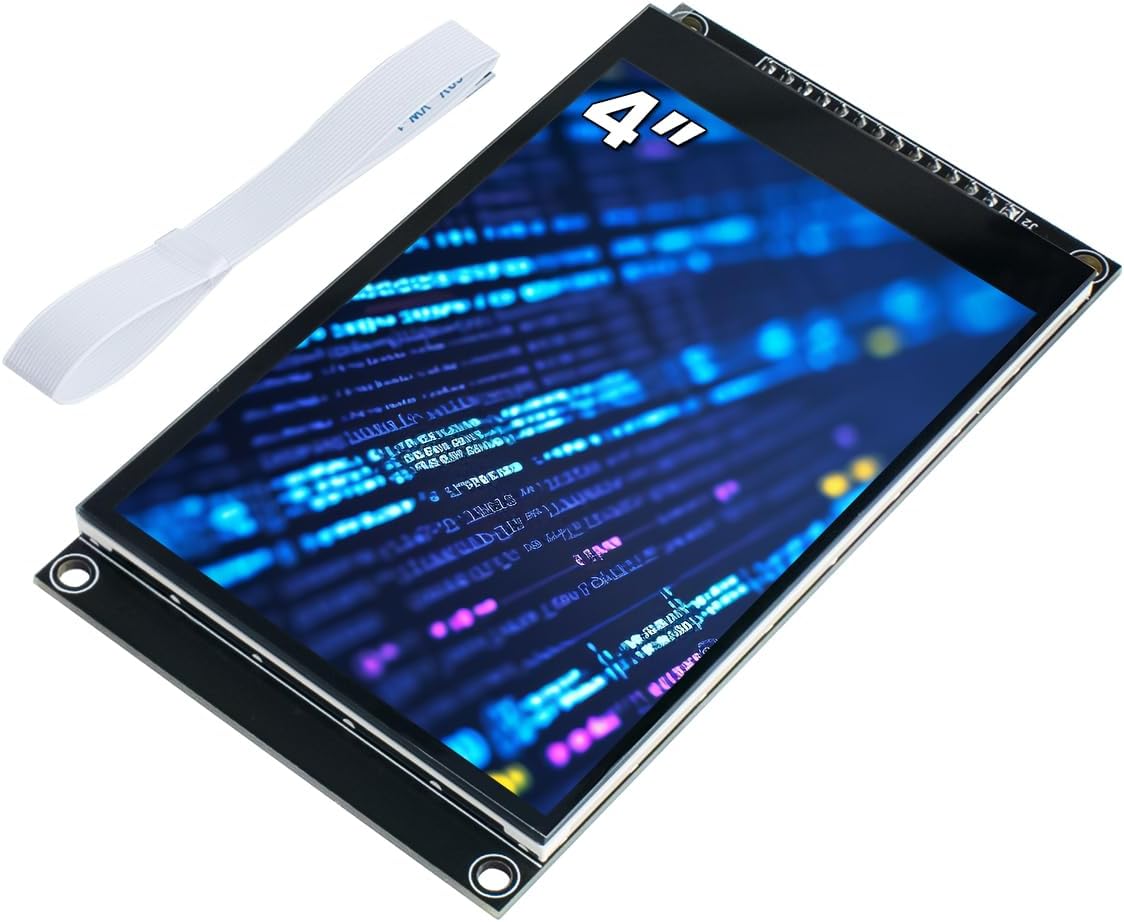
This 4-inch capacitive touch module is a capable middle ground between tiny sensor screens and full ESP32 human-machine interface panels. It carries a 4.0 rating and offers 320×480 resolution, 65K colors, 300 cd/m2 brightness, and an ST7796S display driver.
We may earn a commission when you buy through this link, at no additional cost to you.
Capacitive touch is the defining feature. Compared with resistive alternatives, it is described as more convenient and accurate, which makes the module suitable for dashboards, configuration menus, and projects where users need to interact directly with the displayed information. Onboard level conversion also allows operation with both 5V and 3.3V microcontrollers.
The 4-wire SPI interface preserves GPIO availability, but graphics and touch libraries still require appropriate configuration. The product also supports a 2.54-pin interface, an FPC extension interface, and a micro TF card slot, making it more versatile than a basic screen-and-controller board.
This display is a sensible choice for builders who want touch without the complexity of a complete wireless panel. It suits Arduino R3, Mega2560, and ESP32 projects, particularly when a four-inch format, a visible 65K-color palette, and local storage are desired.
The upgraded capacitive panel is intended to provide more accurate and convenient input than a resistive screen. At four inches, there is enough room for controls, labels, and status information without requiring the physical space of a seven-inch panel.
Support for 2.54-pin headers, an FPC extension, and a micro TF card slot provides several paths for expansion. Example learning programs and low-level driver support can also reduce the initial development burden.
We may earn a commission when you buy through this link, at no additional cost to you.
The 7-inch ESP32 display is the most ambitious connected panel in the list, combining a large IPS touch screen, an ESP32-S3 processor, wireless connectivity, audio hardware, and numerous expansion interfaces. Its 4.5 rating reflects a broad feature set rather than a simple module format.
We may earn a commission when you buy through this link, at no additional cost to you.
At 800×480 resolution, the panel provides enough space for dashboards, equipment controls, environmental monitoring, and graphical IoT interfaces. The stated 178-degree viewing angle and high color fidelity are useful for a display that may be viewed from different positions, while capacitive touch supports direct interaction.
This is not simply a screen attached to a microcontroller. It includes an ESP32-S3 with dual-core Xtensa LX7 processing, Wi-Fi, Bluetooth 5.0, SRAM, PSRAM, and flash memory. The acrylic case, SD card slot, USB, UART, I2C, battery socket, speaker port, and RTC make it closer to a compact embedded computer with a display.
The complexity and size are the main compromises. A seven-inch panel requires a suitable enclosure, a stable power source, and more involved software than a basic character LCD. Even so, it is the strongest choice here for a sophisticated standalone human-machine interface, particularly when wireless control and audio interaction are priorities.
The 7-inch IPS panel goes well beyond a conventional display module. Its resolution, capacitive touch, wide viewing angle, and integrated controller create a platform for rich dashboards and interactive embedded controls.
Wi-Fi and Bluetooth 5.0 are built in, while the product supports replacement wireless modules for protocols including Zigbee, Matter, Thread, LoRa, nRF2401, Wi-Fi HaLow, and Wi-Fi 6. This makes the platform unusually adaptable for connected experiments.
We may earn a commission when you buy through this link, at no additional cost to you.
The 0.96-inch OLED is an excellent choice when a small readout must remain clear and visually crisp. Its 4.6 rating corresponds to a well-specified 128×64 module with an embedded SSD1306 controller, I2C communication, and support for 3.3V to 5V operation.
We may earn a commission when you buy through this link, at no additional cost to you.
Because an OLED generates its own visible output, it does not require a conventional backlight. The product specification highlights ultra-high contrast, bright and clear pixels, a viewing angle above 160 degrees, and readability even with small fonts, all desirable qualities for compact meters and status indicators.
Its limitations are inherent to the format. The screen is monochrome, so it cannot reproduce the full-color interfaces possible with TFT modules. The controller also has no embedded fonts, meaning the project must define or generate the characters it wants to show.
The module is a good match for Arduino Nano, R3, Mega, Raspberry Pi, 51 MCU, and STM32 projects that need an economical, low-power display. Choose it for sharp text, simple graphics, and dependable contrast rather than for colorful interfaces or touch interaction.
The self-luminous OLED design provides strong contrast and clear pixels on a very small panel. It is particularly useful where every millimeter of enclosure space matters or where the display must remain readable from a broad range of angles.
The I2C interface uses only two I/O ports, reducing wiring demands and freeing microcontroller pins. Compatibility with a broad range of popular development boards also makes it convenient for prototypes and educational kits.
We may earn a commission when you buy through this link, at no additional cost to you.
The 1.28-inch round TFT combines a distinctive physical format with a sharp 240×240 full-color screen. Its 4.7 rating makes it one of the strongest compact modules in the comparison, particularly for projects where appearance and a near-square drawing area matter.
We may earn a commission when you buy through this link, at no additional cost to you.
The round display is useful for gauges, indicators, wearable-inspired devices, compact dashboards, and decorative interfaces. Its 32.4 by 32.4 millimeter display area fits within overall dimensions of 38 by 45.5 by 3.2 millimeters, helping it fit small custom enclosures.
The module uses the GC9A01 driver and a four-wire SPI interface, with operation specified from 3 to 5V. IPS full-perspective technology provides broad viewing, but the circular mask still requires careful interface design. Designers should use circular masks and radial graphics rather than assuming a conventional rectangular layout.
This is an appealing option for anyone wanting a small color display that stands apart visually from a standard LCD. It offers a good balance of compactness, color depth, and resolution, although its unusual shape demands more deliberate artwork and interface planning.
The circular screen gives embedded projects a more specialized visual identity than a standard rectangular display. Its square 240×240 pixel canvas is still useful, but it is best used for radial gauges, dials, icons, and text arranged around the center.
The IPS full-perspective panel supports off-axis viewing while the RGB configuration delivers full color. A relatively thin 3.2 millimeter module depth also helps when fitting the screen inside a custom enclosure.
We may earn a commission when you buy through this link, at no additional cost to you.
This four-inch touch TFT is aimed at Arduino builders who want a larger interface without moving to a complete ESP32 HMI panel. It offers 480×320 resolution, a 65K color palette, touch support, and an ST7796S driver, earning a 4.2 rating.
We may earn a commission when you buy through this link, at no additional cost to you.
Compared with the 3.2-inch-class character and OLED modules in this list, it provides a much larger canvas for menus, live measurements, control panels, and instructional graphics. A micro SD card slot and included touch pen add practical value for projects that need local assets or a more conventional pointing interface.
The SPI serial bus requires only a small number of I/O lines to operate the display, which is important for boards with limited connectors. However, software still has to initialize the controller, transfer pixel data, and manage touch input. The screen's size also means enclosure design cannot be treated as an afterthought.
It is well suited to Arduino R3, Nano, and Mega projects that call for a touch interface and richer graphics. Buyers who only need a few characters should choose a character LCD, while those needing a complete connected panel should examine the ESP32 HMI options.
The 480×320 canvas is large enough to present buttons, icons, live graphs, and multi-panel status information. That makes the module more useful than a simple text display when the user interface is central to the project.
A built-in SD card slot allows image and data storage options, while SPI communication helps preserve microcontroller I/O pins. Sample programs and underlying driver support are included to support development.
We may earn a commission when you buy through this link, at no additional cost to you.
The 5-inch ESP32 HMI display earns a perfect 5.0 rating in the supplied data and stands out as a polished, ready-to-develop embedded panel. It combines an 800×480 touch TFT, an ESP32-S3-WROOM-1-N4R8 processor, wireless connectivity, and an acrylic case in one integrated unit.
We may earn a commission when you buy through this link, at no additional cost to you.
The display uses EK9716BD3 and EK73002ACGB driver ICs and provides responsive touch operation. Its processor is a dual-core 32-bit LX6 design operating up to 240MHz, with integrated Wi-Fi and Bluetooth, giving the module more standalone capability than a conventional screen attached to a separate microcontroller.
Development flexibility is another advantage. The panel supports Arduino IDE, Espressif IDF, PlatformIO, and MicroPython, along with the LVGL graphics library. A TF card slot, USB, speaker, battery, and multiple peripheral interfaces make it appropriate for automotive-style HMIs, medical equipment concepts, smart homes, industrial controls, and connected devices.
The main trade-off is complexity and physical size compared with small displays. A complete HMI demands careful electrical design, software planning, and enclosure work. For makers who want a capable, polished control surface rather than a minimal output screen, however, this is the premium option in the guide.
The 800×480 resolution gives the five-inch panel a good balance between detail and manageable rendering demands. Touch controls can be arranged into a polished control surface without the physical bulk of a seven-inch display.
Support for Arduino IDE, Espressif IDF, PlatformIO, MicroPython, and LVGL accommodates different programming backgrounds. This makes the panel approachable for both rapid Arduino-based prototypes and more structured embedded development.
We may earn a commission when you buy through this link, at no additional cost to you.
The four-digit seven-segment board is the most specialized choice in the roundup, focused on bright numerical readouts. Its 4.6 rating reflects a straightforward TM1637 design that can display decimals, letters, and other supported segmented characters through only two control signals.
We may earn a commission when you buy through this link, at no additional cost to you.
For clocks, counters, temperature displays, timers, and appliance indicators, this format can be more effective than a graphical screen. Red illuminated segments are easy to identify, and the stated working current of 30 to 80mA gives designers a basis for power planning.
The display cannot show arbitrary graphics, scrolling text, or detailed charts, so it is unsuitable for sophisticated interfaces. Builders must also accept the recognizable seven-segment character limitations and design around fixed digit positions.
Its strengths are simplicity and visibility. The four-pin interface handles ground, power, data, and clock, while 3.3V and 5V operation supports many common development boards. For a dedicated numeric readout, this is one of the most effective and economical optoelectronic displays available.
Large segmented digits remain easy to interpret at a glance, making this board effective for frequently changing measurements. The red illumination also provides a clear visual target in instrument-style projects.
The TM1637 controller reduces four digits to a four-pin module that needs only data and clock signals beyond power. Eight levels of brightness adjustment let the project balance readability against current draw.
We may earn a commission when you buy through this link, at no additional cost to you.
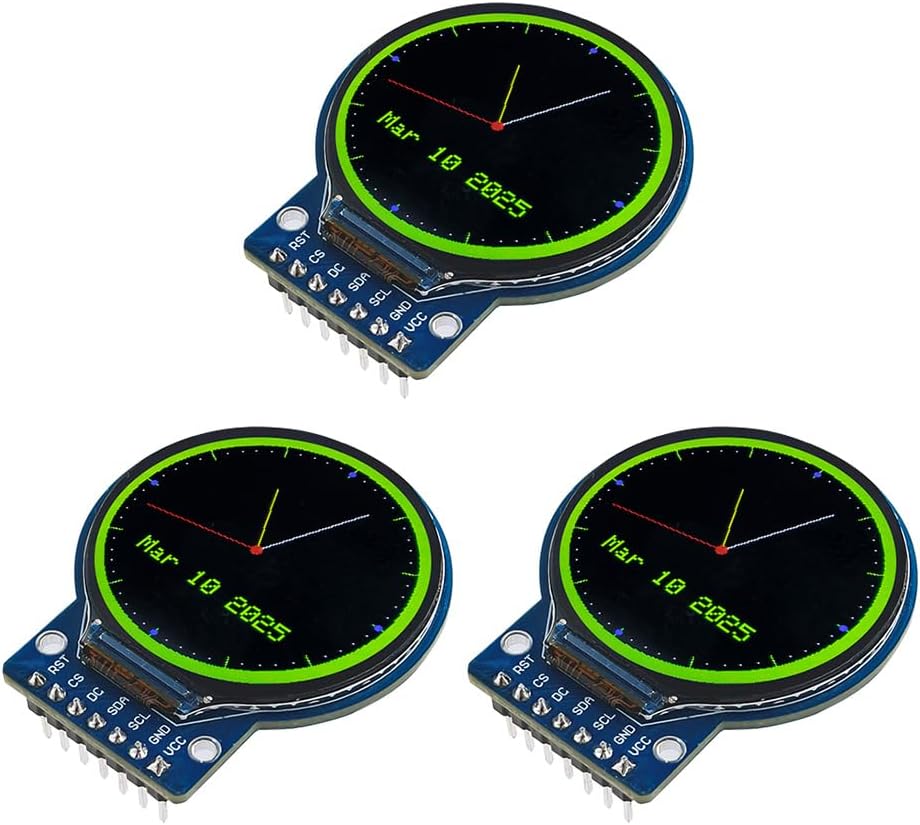
The 1.28-inch round TFT is a colorful alternative for compact dashboards, embedded devices, and watch-inspired interfaces. It carries a 4.4 rating and combines a 240×240 full-color RGB screen with an integrated GC9A01 controller and four-wire SPI communication.
We may earn a commission when you buy through this link, at no additional cost to you.
Two white LED backlights are designed to maintain good readability in outdoor conditions, while the round form creates a visually distinctive instrument. The screen's full-viewing-angle design also helps when the device is not always viewed directly from the front.
The circular mask remains the primary design challenge. Interfaces must be composed around the shape, and rectangular dashboard layouts cannot simply be scaled down. At 45.5 by 48 by 11.5 millimeters, the module is also deeper than many slim display boards, which must be considered during enclosure design.
The product is compatible with mainstream controllers including Arduino, ESP32, and Raspberry Pi and operates from 3 to 5V. It is a strong choice for a small round gauge or status instrument, especially for builders who value bright color and backlit readability over a conventional rectangular layout.
The two white LED backlights support the module's stated outdoor readability, while full-color RGB output differentiates it from monochrome OLED and character LCD options. The result is well suited to a small gauge, wearable-style display, or embedded control dial.
With a 240×240 canvas, the round screen can present radial graphics, central status symbols, or compact text. Its four-wire SPI interface and 3-5V operation make integration with common microcontrollers practical.
We may earn a commission when you buy through this link, at no additional cost to you.
The right optoelectronic display depends on what the user needs to read, how the project will be controlled, and how much space the finished enclosure allows. Interface simplicity, display technology, controller support, and expansion requirements should be evaluated together before selecting a module.
Start with the type of information the screen must present. A character LCD is ideal for short lines of text, a seven-segment LED board is optimized for numbers, an OLED offers high-contrast monochrome graphics, and a TFT supports richer color, icons, and touch interfaces. Round TFT modules are particularly suitable for gauges and instrument-style layouts, while larger HMI panels suit dashboards and control systems.
Choose the technology that matches the interface, not merely the largest available screen. A simple measurement often reads better on a dedicated character or numeric display, whereas a graphical TFT earns its added complexity when animation, icons, or touch input are essential.
Resolution determines how much information can be displayed at a useful size. The 80×160 screen in this guide favors concise labels and icons, the 128×64 OLED works well for compact text and simple graphics, and 240×240 round panels provide enough pixels for a radial gauge. Larger 4-, 5-, and 7-inch screens can show detailed dashboards, menus, and multiple status areas.
Do not judge resolution by pixel count alone. A higher-resolution screen can still look small if its physical diagonal is too small, while a lower-resolution display may be perfectly legible in a dedicated instrument. Consider viewing distance, text size, and the amount of information shown at once.
Capacitive touch generally offers a more modern and accurate interaction than a resistive panel. The 4-inch modules, 5-inch ESP32 HMI, and 7-inch ESP32 IPS panel include touch support, making them appropriate for menus, controls, and direct manipulation. Non-touch OLED, character, and seven-segment options can be better when the project only needs to present information.
Touch adds software complexity as well as hardware requirements. The controller must read coordinates, the interface must provide feedback, and the enclosure must account for the panel and any needed touch pen. If users only read changing values, touch may add complexity without improving the experience.
Every display must communicate with a controller through a compatible interface and accept compatible voltage levels. Modules in this guide use I2C, SPI, or the TM1637 two-signal protocol, with support stated for combinations of Arduino, Raspberry Pi, ESP32, STM32, and other development boards.
Check the data sheet for the exact board and library in the project. A display described as compatible with Arduino may not support every current or retired board without adjustments. For large ESP32 HMI panels, also verify the development environment, graphics library, and available drivers before committing to the design.
Power requirements range from a 3.3V OLED to 5V character LCD modules, with several TFT boards accepting a 3 to 5V range. Backlights, wireless radios, SD cards, and touch controllers can affect the overall current draw, particularly in battery-powered projects. The seven-segment board's stated 30 to 80mA working current is one example of a value that should influence the power budget.
Operating temperature is also relevant for equipment that may be used indoors, outdoors, or in an enclosure. The compact IPS TFT and round TFT modules specify a -20 to 70 degrees Celsius range. Builders should pair the screen with an appropriate power source and consider thermal conditions rather than assuming every display suits every environment.
A display controller determines how pixel data and commands are transferred. These products use controllers such as ST7735, ST7796S, SSD1306, GC9A01, and TM1637, each with its own initialization sequence and graphics approach. Some of the ESP32 HMI products support established libraries such as LVGL, while other modules require setup with included examples or vendor drivers.
Account for learning time before selecting a display. A complex 800×480 interface may need considerably more software work than a fixed-layout character LCD or numeric board. Review the stated example programs, driver support, and supported IDEs to ensure the development path fits the maker's experience.
Larger touch modules often include features needed for serious interfaces: micro TF card slots, USB connections, speaker ports, battery sockets, UART, I2C, and RTC. The 4-inch capacitive module and 4-inch touch TFT both include SD card support, while both ESP32 HMI panels offer a broad set of expansion connections.
Expansion is valuable only when the project uses it. A dashboard with many icons may benefit from storing images on a card, while a compact sensor indicator gains little from unused ports. Consider available enclosure volume, power management, and the peripherals the application genuinely needs.
The display diagonal is only one part of the mechanical decision. Overall module dimensions, mounting hole positions, connector orientation, cable clearance, and backlight depth all affect enclosure design. The small 0.96-inch IPS module fits into tight spaces, whereas the five- and seven-inch HMI products need a substantially larger housing and more stable support.
For a round display, plan the graphics around the circular active area rather than a rectangular assumption. For large panels, leave room for ventilation, access to ports, and any speakers or antennas. A mechanically sound enclosure protects the display and makes touch operation more consistent.
Before wiring a module, identify every power, ground, communication, control, and touch connection from its documentation. Confirm the controller, logic voltage, pin arrangement, and supported development board. Begin with a minimal example that clears the screen, draws basic shapes, or displays a short test message before adding sensors, graphics, and touch interaction.
Handle the modules by their edges and avoid pressing on the active glass, touch surface, flex connections, or backlight. Secure displays in a nonconductive enclosure that does not place pressure on the panel. Route power and SPI or I2C wiring away from motors, relays, radio transmitters, and other potential sources of electrical noise, and use common ground connections between the display and controller.
Care also includes operating within the stated voltage and temperature limits, cleaning with a soft dry or lightly damp cloth, and preventing moisture or conductive debris from entering the board. For OLED and TFT screens, use conservative brightness and avoid leaving a bright static image on screen for long periods when that is appropriate for the project. Firmware should update the display only when data changes to reduce unnecessary bus traffic and power use.
An OLED produces its own light and does not need a conventional backlight, often giving very high contrast in a compact package. A TFT LCD uses a backlight and can provide full color, larger touch interfaces, and more flexible graphics. OLED is well suited to sharp monochrome readouts, while TFT is usually preferable for colorful dashboards, images, and touch controls.
I2C needs fewer signal wires and is convenient for simple text, small OLEDs, and character LCDs. SPI usually provides higher transfer rates and is better for pixel-heavy TFT graphics, although it uses more connections. The correct choice depends on the display controller, available pins, library support, and refresh requirements.
It depends on the display and controller board. Some modules include onboard level conversion, while others expect signals and power to match the microcontroller. Verify the stated operating voltage and logic compatibility before connecting, and do not assume that a 5V-tolerant power pin also makes every data pin 5V tolerant.
A 0.96-inch OLED works well when the monitor needs sharp text, strong contrast, and minimal wiring. A 1602 character LCD is even simpler for basic values, while the 0.96-inch IPS TFT is preferable if color and small graphical status indicators matter. Choose based on legibility, enclosure space, and the amount of information to display.
A round TFT is ideal for gauge-style interfaces, wearable-inspired projects, compact dashboards, and visually distinctive indicators. Its square 240×240 canvas can support radial graphics, but interface artwork must be designed for the circular active area. It offers more layout freedom than a seven-segment display while remaining far smaller than a conventional HMI panel.
Yes. The featured ESP32 panels integrate a processor, wireless connectivity, touch display, and multiple expansion interfaces into a single platform. They can run graphical interfaces through supported development environments and LVGL, but software complexity is higher than for a basic display module connected to an Arduino or Raspberry Pi.
The featured four-digit board uses four primary connections: ground, power, data input/output, and clock. The TM1637 controller handles the digit multiplexing internally, so the microcontroller does not need separate lines for every segment. This makes a numeric display convenient even on boards with a limited number of GPIO pins.
Consider brightness, backlighting, viewing angle, contrast, operating temperature, and whether the display will be read in direct sunlight. The 4-inch capacitive module states 300 cd/m2 brightness, while the 1.28-inch round TFT has two white LED backlights. A rugged cover or enclosure may also be necessary because brightness alone does not guarantee outdoor usability.
The 0.96-inch HD IPS TFT is the best budget pick for a compact full-color screen, the 7-inch ESP32 IPS touch display is the editor's choice for a sophisticated connected HMI, and the 5-inch ESP32 HMI panel is the premium option for a polished embedded interface. Each serves a different scale and complexity of project.
Prioritize display format, controller compatibility, interface availability, and enclosure constraints before considering extra features. A simple readout can be more reliable and easier to maintain with a character LCD, OLED, or seven-segment module, while a large touch panel is justified when a graphical dashboard or direct user interaction is central to the application.
Finally, check current prices, package contents, availability, documentation, and development examples before ordering. Component revisions and seller offerings can change, and the included quantities, drivers, or accessories may vary. Confirm that the exact display and its stated specifications match the controller, power system, and design planned for the project.