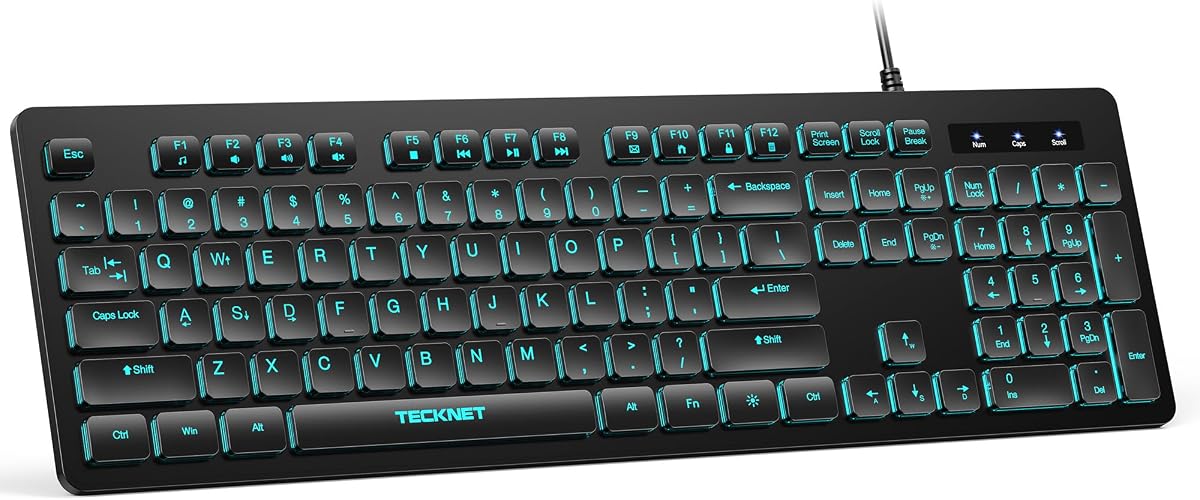
TECKNET Wired Silent RGB Keyboard
4.5Editor score
Quiet low-profile membrane keys
Seven-color RGB backlighting
Spill-resistant 104-key layout
Our Slim PC Keyboard guide compares ten compact, low-profile models for quiet typing, wireless convenience, full-size layouts, portability, and everyday use.
A slim PC keyboard can make a crowded desk feel more open while preserving the controls needed for productive work. The best models balance a low profile, comfortable key travel, dependable connectivity, and enough functionality for spreadsheets, browsing, coding, and everyday office tasks. Compact designs can also travel more easily than conventional full-size boards.
This guide compares ten slim PC keyboards across connection style, layout, portability, noise level, battery design, platform support, lighting, and dedicated controls. It includes wireless, wired, rechargeable, battery-powered, and full-size alternatives so readers can compare compact footprint, typing feel, and desk flexibility rather than focusing on one feature.
The list shows which product suits each priority: a portable mini board, a complete number pad, a quiet typing experience, a dependable wired connection, or seamless switching among several devices. Ratings reflect the supplied customer feedback, while specifications are based on manufacturer information. Prices and availability can change, so check the current listing before purchasing.
4.5Editor score

4.4Editor score

4.4Editor score
The comparison below highlights the main differences among ten slim PC keyboards, from tiny wireless layouts to full-size boards with number pads. It is designed to make the most important distinctions in size, connectivity, typing mechanism, and everyday convenience easy to assess.


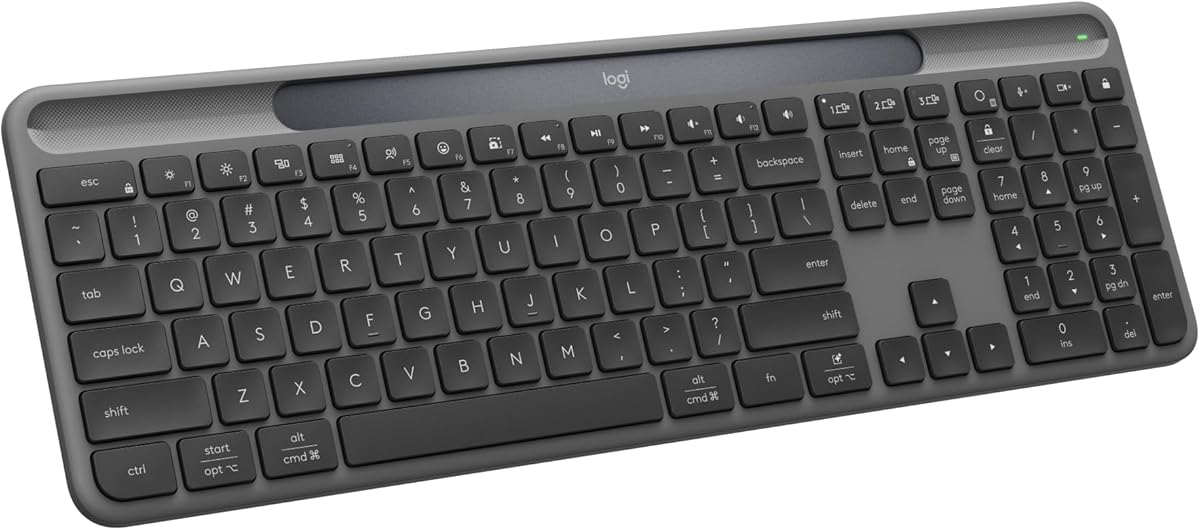


The Arteck 2.4G USB Wireless Keyboard offers an unusual balance between low-profile styling and traditional full-size functionality. It carries a 4.4 customer rating, and its most important advantage is the combination of a slim 0.6-inch profile, a complete number pad, and wireless freedom. It is aimed at users who want a conventional set of keys without the height and bulk of a traditional desktop keyboard.
We may earn a commission when you buy through this link, at no additional cost to you.
Low-profile keys are designed to deliver quiet, comfortable typing, while the stainless-steel body provides a sturdy, substantial feel. The 16.9-by-4.9-inch footprint preserves the arrow cluster, number pad, and shortcut keys. A rechargeable lithium battery is stated to last for six months when the keyboard is used for two hours per day, making routine charging more convenient than replacing cells.
The main compromise is footprint. Although the keyboard is thin and light at 14.9 ounces, retaining the number pad means it occupies more desk space than a mini wireless keyboard. Its 2.4GHz receiver also requires a free USB-A port, and the supplied connection is not the multi-device Bluetooth system offered by some premium alternatives. Despite those limitations, the core package is well suited to a single primary PC.
This is a strong recommendation for a home office, shared workspace, or student desk where full-size data entry matters and a conventional keyboard feels too bulky. Choose it when quiet operation, a number pad, and a rechargeable wireless design outweigh the need to switch instantly among a computer, tablet, and phone.
The keyboard preserves the familiar 104-key-style working experience with a number pad, arrow keys, and shortcut controls. That makes it a practical middle ground for spreadsheet work, accounting, inventory tasks, and other number-heavy jobs where a tenkeyless or mini layout would be inconvenient.
Low-profile keys and a wireless 2.4GHz link reduce visual clutter and help the keyboard fit into a modern desk setup. The rechargeable design adds another layer of convenience, although keeping the supplied USB charging cable nearby is advisable when the battery approaches depletion.
We may earn a commission when you buy through this link, at no additional cost to you.
The Logitech MK470 Slim Wireless Combo is the most complete starter package in this guide because it includes both a keyboard and mouse. It carries a 4.4 rating and combines a compact, modern keyboard with low-profile scissor keys and a matching ambidextrous three-button mouse. For a new desk setup, that combination reduces the need to source both peripherals separately.
We may earn a commission when you buy through this link, at no additional cost to you.
The keyboard includes a number pad, but its layout is optimized for Windows and arranged in a compact form. It is designed to offer whisper-quiet typing, while the included mouse uses high-precision optical tracking, a mechanical scroll wheel, and 1000 DPI sensor resolution. The stated 2.4GHz wireless range reaches up to 33 feet, depending on environmental and computing conditions.
Some buyers may find that the number pad makes the keyboard less portable than a true tenkeyless model, and people who already own a preferred mouse may see limited value in the bundled one. The supplied 2.4GHz receiver may be inside the mouse or attached to the packaging, depending on where it is stored. Software-based customization of the 12 FN keys is also an optional extra rather than a requirement for core use.
The MK470 is an excellent choice for someone building a quiet home office or replacing a basic keyboard-and-mouse set. It is especially convenient for Windows users who want a coordinated, low-profile desktop with straightforward wireless setup and do not need to type across multiple operating systems.
The included mouse uses the same single-receiver approach as the keyboard, helping avoid an extra USB connection. Its ambidextrous shape, 1000 DPI optical sensor, and mechanical scroll wheel make it a flexible companion for general productivity rather than a narrowly specialized gaming mouse.
The scissor-key design supports the MK470's quiet-work positioning while retaining a number pad for frequent data entry. Its auto-sleep feature is also stated to extend keyboard battery life to as much as 36 months, depending on usage and computing conditions.
We may earn a commission when you buy through this link, at no additional cost to you.
The TECKNET Wired Keyboard stands out as a practical, feature-rich option for users who want a slim profile without wireless complexity. Its 4.5 rating is the highest among the supplied products. The keyboard uses low-profile membrane keys intended to soften keystrokes and reduce typing noise, while the full-size 104-key layout preserves dedicated number and navigation controls.
We may earn a commission when you buy through this link, at no additional cost to you.
Lighting is one of its most visible features. Seven RGB colors, four brightness levels, and static or breathing modes let the keyboard adapt to different working environments. Twelve FN-key combinations provide direct access to volume, mute, media playback, email, homepage, and calculator functions. Adjustable tilt feet and anti-slip pads allow users to choose a comfortable angle and keep the board stable.
The wired connection is the principal trade-off. There is no receiver to pair, no battery to recharge, and no chance of wireless interference, but the cable occupies space and can make wrapping and repositioning less convenient. It is also a membrane keyboard rather than a scissor-switch model, so the feel and feedback will differ from laptop-style boards. Compatibility is broad, though some multimedia shortcuts have limited functionality on Mac OS.
This keyboard is a compelling pick for a fixed desk, shared office, dorm room, or study area where quiet keys, lighting, and plug-and-play operation matter most. It is less suitable for a highly mobile setup, but at a fixed workstation its simplicity can be a major advantage.
The RGB system is more decorative than the adaptive lighting found in premium models, but it offers meaningful control. Static mode suits a fixed appearance, while the breathing option adds movement, and four brightness choices help balance visibility with distraction.
The USB plug-and-play design is compatible with numerous Windows, macOS, and Raspberry Pi systems without installed drivers. A stated key rating of up to 80 million keystrokes and a spill-resistant conductive film support long-term everyday use.
We may earn a commission when you buy through this link, at no additional cost to you.
The Macally Small Wireless Keyboard is built for people who value desk space and portability above full-size functionality. Its 4.4 rating reflects a simple proposition: a slim, wireless, 78-key board that can be packed easily and used with a PC, laptop, Surface, or Chromebook through a USB-A receiver.
We may earn a commission when you buy through this link, at no additional cost to you.
Despite its small size, the layout includes 12 shortcut keys for common computer tasks. Setup is straightforward because the keyboard uses plug-and-play operation without drivers or companion software. It runs on one included AAA battery and has a physical on/off switch, making it easy to preserve power during storage or transport.
The lack of a number pad is the defining limitation. Financial data entry, spreadsheets, and other tasks that demand rapid numeric input will be less convenient, and some typists may find the compressed arrangement unfamiliar at first. The 2.4GHz USB-A receiver also makes the keyboard less flexible than multi-device Bluetooth models, particularly on newer computers that may lack that port.
Choose this keyboard for travel, temporary workstations, shared desks, or a minimalist setup where compactness matters most. It is best suited to writing, browsing, document work, and general navigation rather than heavy numeric production. For a user who regularly enters numbers, one of the full-size options will be more practical.
The 78-key design removes the number pad and unnecessary bulk while preserving 12 shortcuts for routine actions. This creates a more useful portable board than an ultra-minimal device consisting only of letter and arrow keys.
The included AAA battery means the keyboard can begin working without a charging cable, and the physical switch helps prevent unnecessary drain. A small footprint also makes it easier to move between a home desk, office, and temporary shared workspace.
We may earn a commission when you buy through this link, at no additional cost to you.
The Logitech Signature Slim K950 is a refined, low-profile wireless keyboard designed for people who move among several devices. It has a 4.4 rating and can switch typing between a computer, tablet, or phone with a single tap. That flexibility distinguishes it from basic single-receiver models and supports a cleaner, more connected workspace.
We may earn a commission when you buy through this link, at no additional cost to you.
Its familiar laptop-style layout includes a number pad, while the scissor keys are designed for quiet use. Logi Options+ software allows customization of keys, and one-touch shortcuts control common tasks such as media playback, mute, snipping, and volume. Bluetooth connectivity supports Windows, macOS, Chrome OS, Linux, iPadOS, iOS, and Android, with Logi Bolt also available in the wireless ecosystem.
As a premium-style productivity keyboard, it is not as compact as the Macally mini models, and the number pad makes it wider than a tenkeyless design. Users should also consider the software ecosystem and the need to pair with compatible devices. Logitech notes that plastic parts contain at least 48% certified post-consumer recycled plastic, adding an environmental consideration without changing the core layout.
The K950 is a strong choice for a busy professional who alternates between a desktop and mobile device but still wants a full-size keyboard. It suits video calls, document-heavy work, and quiet offices where polished construction, broad compatibility, and rapid device switching outweigh a smaller footprint.
The ability to move among three paired devices makes the K950 useful for a desk that includes a computer, tablet, and phone. Switching is designed to be immediate, reducing the friction of re-pairing or physically moving separate keyboards.
The keyboard combines a full-size arrangement with a low-profile structure and quiet typing. It therefore accommodates spreadsheets and regular navigation while remaining less visually and physically imposing than a tall conventional board.
We may earn a commission when you buy through this link, at no additional cost to you.
The Arteck Backlit USB Wired Keyboard emphasizes an extremely thin profile, measuring just 0.24 inch thick. It carries a 4.4 rating and combines that slim construction with a full-size layout, scissor-style keys, seven LED backlight colors, three brightness levels, media hotkeys, a number pad, and arrow keys.
We may earn a commission when you buy through this link, at no additional cost to you.
The thin body is well suited to desks where vertical space is limited. Its scissor X-structure is intended to provide a comfortable typing experience, and the low-profile keys are designed to operate quietly. The keyboard connects through a 1.2-meter, approximately four-foot USB cable, making setup as simple as plugging it into a compatible computer.
Its wired-only design means there is no wireless receiver, charging process, or battery to manage, but the attached cable also prevents use away from the desk. Compared with a premium multi-device keyboard, it cannot switch among computers, tablets, and phones. The fixed backlight system is also less responsive than the proximity-based illumination on higher-end models.
This Arteck is a good option for users who want a remarkably slim full-size board with backlighting and a number pad but do not need wireless flexibility. It is particularly suitable for a fixed PC or laptop workstation, especially where low-light visibility and a low keyboard height matter.
At a stated 0.24-inch thickness, the Arteck creates a notably low profile while retaining the complete set of standard controls. Its 16.7-by-4.5-inch footprint and 17.4-ounce weight keep it suitable for compact work areas without becoming a tiny travel accessory.
Seven LED colors and three brightness levels let the user adapt the keyboard to different rooms and times of day. The illumination is a simple fixed backlight rather than an adaptive system, but it remains useful for identifying keys in dim conditions.
We may earn a commission when you buy through this link, at no additional cost to you.
The Logitech Signature Slim Solar+ K980 offers an unusual approach to wireless power. Its 4.4 rating accompanies a full-size, low-profile design that can switch between a PC, smartphone, and tablet. Instead of depending entirely on a conventional charging cable, the keyboard uses Logi LightCharge technology, combining a light-absorbing strip with an energy-efficient battery.
We may earn a commission when you buy through this link, at no additional cost to you.
The charging approach is designed to provide uninterrupted typing under solar or artificial light, including dark or rainy conditions, according to Logitech. The keyboard is also stated to be designed for up to 10 million keystrokes, with a battery functional for up to a decade under the conditions described by the manufacturer. It works with Windows, macOS, Chrome OS, Linux, iPadOS, iOS, and Android.
Users should understand that light-assisted charging does not remove every power consideration. The amount of energy gathered depends on available light, and the battery still requires appropriate care over its lifespan. The full-size footprint is also less portable than the Macally mini boards, while Logi Options+ functionality, including Smart Actions, adds value for users willing to customize the keyboard.
The K980 is a compelling choice for a long-term desk setup that benefits from infrequent charging and broad device support. It suits users who want a full-size wireless board, quiet typing, and a less cable-dependent routine, particularly in a well-lit workspace.
The solar-assisted strip can contribute power in suitable lighting, supplementing the internal battery. This is especially appealing to users who prefer not to connect a charging cable regularly, though intentional light exposure remains important.
The keyboard supports Bluetooth connections across desktop, mobile, and tablet systems, and its low-profile scissor-style layout includes a number pad. That combination makes it versatile for a desk used throughout the day.
We may earn a commission when you buy through this link, at no additional cost to you.
The TECKNET Bluetooth Keyboard is built around flexible device switching, supporting three Bluetooth channels and one additional 2.4GHz connection. It carries a 4.4 rating and can work with desktops, laptops, tablets, phones, and smart TVs. This is one of the broadest multi-device arrangements in the guide, making it useful for anyone who alternates among several systems.
We may earn a commission when you buy through this link, at no additional cost to you.
Its 110 upgraded scissor-switch keys provide a stated 2 millimeters of key travel, while the finger-fit key design is intended to support prolonged typing. A built-in 500mAh rechargeable battery is stated to last up to 180 days with approximately two hours of daily use. The keyboard enters sleep mode after 30 minutes of inactivity and wakes with a key press, and the supplied stand allows a three- to seven-degree adjustment.
The main requirement is charging the keyboard fully before first use. It also retains a number pad, so it is not among the most portable choices. Nevertheless, the spill-resistant design, extended non-slip pads, and compatibility with Windows, iOS, macOS, and Android make it a broad productivity tool. Registration is required for the stated three-year support coverage.
Choose the TECKNET when multi-device flexibility is more important than a minimal footprint. It is well suited to hybrid workers, shared desks, and users who switch between a desktop computer and portable devices throughout the day.
Three Bluetooth profiles plus a 2.4GHz receiver allow the keyboard to serve four device channels. A computer without Bluetooth can still use the included USB receiver, while phone, tablet, and laptop users can switch among their paired systems.
The 2-millimeter scissor-key travel, adjustable support stand, and non-slip pads create a considered typing setup. The stated 180-day battery estimate under limited daily use reduces the need for routine charging, and automatic sleep helps conserve power between work periods.
We may earn a commission when you buy through this link, at no additional cost to you.
The Macally Compact Wireless Keyboard is explicitly designed for portability and a smaller desktop footprint. It carries a 4.4 rating and uses a 78-key arrangement with 12 shortcut keys, offering useful functionality without a number pad. A 2.4GHz USB-A receiver provides the wireless link to a PC, laptop, Surface, or Chromebook.
We may earn a commission when you buy through this link, at no additional cost to you.
The board works without drivers and should be ready for use once the receiver is inserted. It includes one AAA battery and an on/off switch, which simplifies both initial setup and storage. Its most obvious strength is the ability to create a conventional typing area on a compact desk or in a travel bag without carrying a standard full-size keyboard.
Without a number pad, frequent spreadsheet entry becomes slower, and users accustomed to a separate arrow-key cluster may need time to adjust. The requirement for a USB-A port can also be inconvenient with newer ultra-thin computers. It does not offer Bluetooth multi-device switching, so it is best understood as a small wireless workboard rather than a universal travel controller.
This Macally model is ideal for writers, students, travelers, and temporary desk setups where saving space is the top priority. It is also a sensible second keyboard for a laptop user who wants better spacing but not a full-size board.
The 78-key layout removes the number pad to create a compact body while preserving a selection of dedicated shortcuts. This makes the board more versatile than a barebones miniature keyboard that offers only essential letter and navigation keys.
Plug-and-play operation and the included battery remove much of the setup involved with portable peripherals. The small size also makes it convenient to keep in a laptop bag and use whenever a more permanent keyboard is unavailable.
We may earn a commission when you buy through this link, at no additional cost to you.
The Logitech MX Keys S is the premium option in this guide, bringing together a refined low-profile design, adaptive illumination, multi-device connectivity, and extensive software customization. It has a 4.4 customer rating. Spherically dished keys are shaped to guide fingertips, and Logitech describes the resulting experience as fast, fluid, precise, and quieter.
We may earn a commission when you buy through this link, at no additional cost to you.
The keyboard's backlit keys illuminate as hands approach and adapt to the surrounding environment, offering a more polished experience than a fixed backlight. It can pair with up to three devices through Bluetooth Low Energy or the included Logi Bolt receiver. Logi Options+ supports Smart Actions, which can automate sequences of repetitive tasks through a single keystroke.
It is also a full-size design with a number pad, so it does not maximize desk savings. The Logitech ecosystem and customization options may feel excessive to a user who only wants to type, and the premium tier places it above the more basic wireless models. The USB-C battery is stated to last up to 10 days with backlighting on or as much as five months with backlighting turned off.
The MX Keys S is the most refined choice for professionals, creators, and multi-device users who prioritize typing quality, adaptive lighting, and polished software tools. Its solid build, low profile, and device switching justify consideration when a premium productivity keyboard is the goal.
The keyboard's lights respond when hands approach and can be adjusted further through Logi Options+. Combined with the low-profile, spherically dished keycaps, this creates a more integrated and modern desk experience than a standard fixed-light keyboard.
Pairing with up to three devices allows quick movement among computers and operating systems. Smart Actions add another layer of workflow convenience, while the solid build, adjustable angle, and rechargeable design support long professional working sessions.
We may earn a commission when you buy through this link, at no additional cost to you.
The right slim PC keyboard depends on how you work, where you use it, and which functions you refuse to give up. Consider layout, connection method, typing mechanism, power, and platform support together rather than focusing on slim appearance alone.
A full-size slim keyboard includes a number pad, dedicated arrow keys, and a conventional arrangement that suits spreadsheets, accounting, inventory, and other numeric tasks. It provides a familiar workflow but occupies more desk space. A mini or compact model removes the number pad to improve portability and reduce clutter, which is valuable for travel, temporary workstations, and minimalist desks. Some users can type comfortably on a tenkeyless layout, while others frequently depend on the numeric keypad and may find its absence disruptive.
A wired keyboard supplies a consistent connection without pairing, batteries, receivers, or charging. It is often ideal for a fixed workstation and removes several possible points of failure. Wireless models reduce cable clutter and support easier movement, but they introduce receiver management, battery life, pairing, and occasional connection concerns. Some wireless keyboards support only one 2.4GHz receiver, while others can pair with several Bluetooth devices or combine Bluetooth with a 2.4GHz mode.
Scissor-switch keyboards use a low-profile mechanism that often feels closer to a laptop keyboard and pairs naturally with a slim chassis. Membrane keyboards place a flexible membrane beneath conventional keycaps and can still deliver quiet operation, but the overall travel and feedback differ. Neither style is automatically better for every user. Scissor mechanisms often suit users accustomed to laptops, while quiet membrane boards can satisfy a preference for a softer feel and straightforward full-size layout.
Battery design affects how often a wireless keyboard needs attention. Rechargeable models remove disposable battery waste but require charging access, while models using replaceable cells can be convenient when a long-lived cell is available. Solar-assisted charging can supplement a battery in suitable light, although it does not eliminate responsible power management. Review the stated battery duration, sleep behavior, and charging requirements, recognizing that real usage depends on typing volume, lighting, and sleep settings.
A slim keyboard does not automatically guarantee quiet operation, so the key mechanism matters. Low-profile scissor keys and membrane keys can reduce sound compared with tall mechanical switches. Quiet typing is especially valuable in shared offices, libraries, video calls, and late-night work. However, perceived noise also depends on typing force, desk surface, key stabilizers, and the sensitivity of listeners, so a described silent feature is best understood as a reduction rather than a guarantee of complete silence.
Backlighting helps users locate keys in dim rooms, but lighting features vary significantly. Fixed backlights offer selectable colors and brightness levels, while adaptive systems activate when hands approach and adjust to the environment. RGB models are useful for personalization and visual appeal, though constant illumination may distract some users. Consider whether you need a simple on/off function, multiple brightness levels, dynamic effects, or automatic activation when working late.
A keyboard may connect beautifully to its preferred system while behaving differently on another. Windows-optimized layouts can change the position or behavior of keys, and macOS users should confirm modifier-key support. Some media shortcuts have limited functionality on macOS, while others work across Windows, Linux, Chrome OS, iOS, iPadOS, and Android. Software can add valuable shortcut assignment and Smart Actions, but it also creates a learning curve and dependence on the manufacturer's platform.
Slim keyboards can improve the visual appearance of a desk, but low height alone does not guarantee comfort. Look for meaningful key travel, an adjustable support stand, tilt feet, non-slip pads, and a keyboard angle that suits your wrists and posture. A board that shifts during fast typing is distracting, while one that feels too flat may be uncomfortable over long sessions. Measure the available desk area and consider cable management, receiver placement, and the height of your monitor or laptop stand.
Begin by positioning the keyboard directly in front of you, with the space bar centered beneath your monitor or screen. Keep the keyboard flat when its feet provide the intended angle, or add a compatible support stand if the design includes one. For wireless models, install the supplied batteries or fully charge the keyboard before first use. Insert the receiver or enter Bluetooth pairing mode, then follow the simple connection steps required by the manufacturer.
Use the appropriate FN or function-key combinations for media controls, lighting changes, and device switching. If a wireless model appears unresponsive, check the receiver, battery compartment, and power switch, then reconnect it through its pairing procedure. For multi-device keyboards, remember which Bluetooth channel or 2.4GHz mode belongs to each computer or mobile device. On software-enabled models, install the manufacturer’s customization utility only if you want to change shortcuts or Smart Actions.
Keep the keyboard away from liquids, dust, and food crumbs, and clean it with a soft, dry microfiber cloth. If the keys need deeper cleaning, disconnect the device or remove power first and use a lightly dampened cloth without pouring liquid into the switch mechanisms. Do not immerse a keyboard, and avoid abrasive cleaners. For rechargeable models, follow the supplied charging guidance and use a compatible cable. Store mini keyboards with batteries removed or switched off, and give every model time to cool before cleaning if it has been used heavily.
Comfort depends on key travel, switch type, layout, and personal preference. Many slim models use scissor switches that feel similar to laptop keyboards, while quiet membrane models can offer a softer alternative. Look for stable feet, an adjustable stand, and enough wrist clearance. A slim profile is not automatically comfortable, so consider the full shape rather than thickness alone.
Choose a number pad if you enter figures frequently or want a conventional full-size layout. A tenkeyless or mini keyboard is better for a small desk, travel, and minimalist workspaces. The mini models in this guide are especially useful for writing and browsing, but they are less convenient for sustained spreadsheet and accounting work.
Most wireless keyboards in this guide use a USB-A receiver, a Bluetooth pairing process, or both, and many are ready to use after a simple connection step. Wired models need only a USB connection. Wireless convenience comes with the need to manage receivers, battery levels, and paired device channels, while wired models offer a more immediate and consistent setup.
Low-profile scissor keys and quiet membrane designs are both better starting points for shared spaces than tall mechanical keyboards. Sound also depends on typing force and the surface beneath the keyboard, so a desk mat may reduce vibration. Even a keyboard described as silent produces some noise, particularly when keys are pressed forcefully.
Yes, provided the computer has a compatible connection method. A 2.4GHz model with a USB-A receiver can work with any system that accepts the receiver, while a Bluetooth model can pair with compatible laptops, desktops, tablets, and phones. Confirm the available ports and operating-system support, particularly for newer computers without USB-A.
Full-size slim keyboards work very well because they retain the number pad, arrow keys, and standard spacing. Mini keyboards can still handle spreadsheets, but number entry is slower and may require using the top row for figures. Frequent finance, accounting, or data-entry users should favor a full-size number pad.
Backlighting can increase power consumption, which is why some models offer adjustable brightness, automatic shutoff, or adaptive lighting. Battery duration varies with usage and settings, so the manufacturer's estimate is most relevant under its stated conditions. Turning lighting off or reducing brightness can help extend operating time between charges or battery changes.
A mini keyboard is a good travel companion when desk space and carrying convenience are priorities. Models with a compact 78-key layout retain more shortcut functionality than ultra-minimal boards. Bring the appropriate receiver, confirm that your destination computer has a compatible port, and pack spare batteries if the model uses replaceable cells.
The TECKNET Silent RGB Keyboard stands out for quiet membrane typing, adjustable lighting, spill resistance, and straightforward wired operation, while the Logitech MK470 Slim Combo offers the most complete coordinated desktop package. For users willing to prioritize portability, the Macally mini wireless models provide an especially small footprint, and the Arteck options suit buyers who prefer full-size controls with a thin wireless or backlit design.
The right priority depends on your daily workflow. Choose a full-size model for numbers and conventional navigation, a mini model for travel and open desks, and a multi-device model if you regularly move among computers and mobile equipment. Also compare the typing mechanism, connection method, battery approach, operating-system support, and desk angle before making a final decision.
Ratings and specifications provide a useful starting point, but personal comfort and workspace fit remain essential. Check the current product listing, included accessories, compatibility details, warranty information, and current price before purchasing, since availability and pricing can change over time.