
Andonstar AD246S-M Plus 2160P 7 Inch HDMI Soldering Digital Microscope
4.7Editor score
Three interchangeable magnification lenses
Seven-inch HDMI display
Expanded soldering workstation kit
Microscope for mobile repairing must deliver clear views of tiny components, solder joints, connectors, and densely packed circuit boards without interfering with the repair bench. The most useful models combine practical working distance, controllable illumination, a stable support, and an image that can be viewed comfortably or shared with a customer.
We compared ten digital microscopes based on their supplied magnification options, display systems, lighting, stands, device compatibility, recording features, and soldering accessories. The list includes screen-equipped models, USB and Wi-Fi cameras, and multi-lens HDMI systems designed for electronics work, so technicians can compare several approaches.
Each review explains where a microscope stands out, what limitations should be considered, and which repair tasks it suits best. Ratings and product details reflect the supplied information, while current availability and prices can change, so readers should verify the latest listing before purchasing.
4.7Editor score

4.7Editor score

4.4Editor score
As an Amazon Associate we earn from qualifying purchases.
The comparison highlights the main differences in magnification, imaging, display support, lighting, stands, connectivity, and included repair accessories across all ten microscopes.


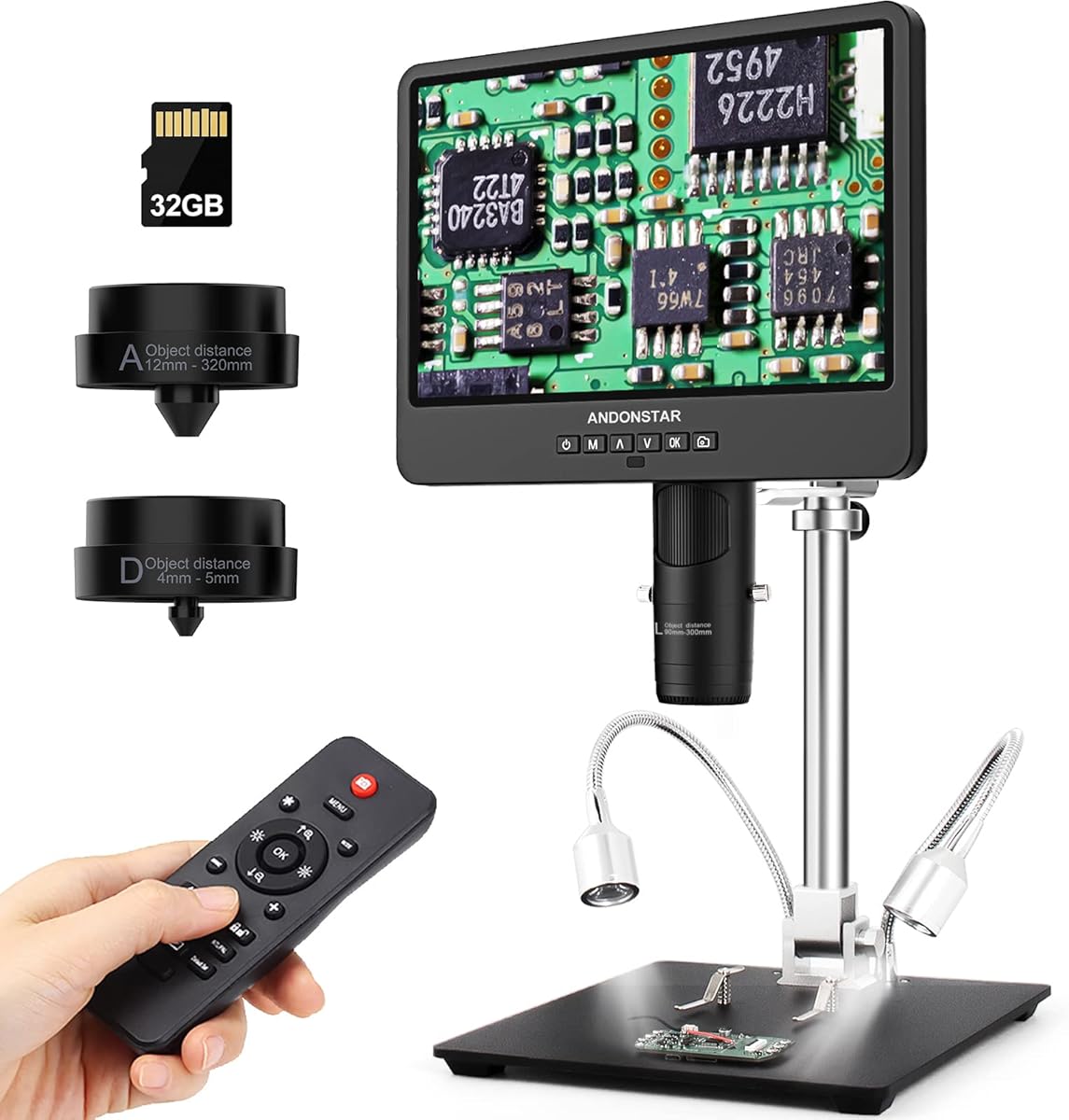
The Andonstar AD246S-M 3 Lens 2160P HDMI Digital Microscope 2000x for Adults has a 4.5 rating and stands out as a flexible inspection system rather than a single-purpose USB camera. Its three lenses address soldering and circuit-board work, broad object observation, and biological slides. The included metal boom arm, remote control, HDMI output, and supplied storage card make it especially relevant to technicians who perform detailed mobile electronics work.
We may earn a commission when you buy through this link, at no additional cost to you.
Lens L is intended for soldering and repair, including work on circuit boards and mobile phones. It provides a 15X-60X working range on the microscope screen and 60X-240X when the output is enlarged on a 28-inch HDMI display. The larger Lens A handles coins, plants, and stones, while Lens D supports 450X-510X on-screen and up to 2040X on an external monitor. This separation makes it possible to select optics based on the task instead of relying entirely on digital zoom.
Image capture is listed at 2160P, and the microscope can save photographs and videos to the included 32GB microSD card. It also connects to a Windows PC for professional measurement software capable of measuring length and area. A wireless remote allows operation without touching the microscope, while eight LED intensity levels help control brightness. The strong metal arm is adjustable in several directions and is described as suitable for high-temperature soldering environments.
The main drawback is that this is a broad kit rather than a minimal repair tool. New users may need time to understand the three lenses, screen modes, external display options, and included software. The bundled biological slides and observation accessories also do not directly improve mobile repair capability. Even so, the combination of repair optics, 2160P recording, a stable adjustable stand, and a large-screen platform makes this a strong all-round choice for a serious repair bench.
This model is best for technicians who routinely inspect solder joints, tiny board components, phone internals, and other electronic assemblies. It is also useful for documenting findings or showing work on a larger monitor. Buyers who only need occasional, casual inspection may find a simpler handheld model easier to manage, but for frequent repair work, the AD246S-M offers one of the most balanced feature sets in this guide.
The dedicated repair lens provides a more practical working range than a single general-purpose lens. It is intended for close inspection of solder joints, connectors, and densely populated mobile circuit boards, while the other lenses remain available for broader observations.
HDMI output allows the microscope image to be shown on a larger monitor, which can make customer demonstrations and detailed inspections easier. The included 2160P video recording also provides a practical way to preserve close-up evidence of a repair.
We may earn a commission when you buy through this link, at no additional cost to you.
The Skybasic Wireless Digital Microscope carries a 4.2 rating and offers a different approach from screen-equipped soldering stations. It is a small handheld camera that streams through a Wi-Fi hotspot to an Android or iOS device, while a USB connection supports Windows and Mac computers. This makes it a portable microscope for mobile repair work where using a phone or tablet keeps the viewing area uncluttered.
We may earn a commission when you buy through this link, at no additional cost to you.
The camera uses a 2MP HD CMOS sensor and provides 1920×1080 resolution when connected to a smartphone. Images can be captured or video recorded with one button, either through the device or the app. Eight adjustable LED lights illuminate the work area, and the supplied bracket and base help position the camera above small components. The working distance should remain between 3 and 60 millimeters to maintain image sharpness.
The primary appeal is portability. Technicians can move the microscope between benches, carry it to another workstation, or use it without occupying a dedicated display. It supports Android and iOS over Wi-Fi, with a USB alternative for desktop computers. The software package supports photo and video functions, while the app provides the mobile viewing controls. This setup can be useful for inspecting a connector, solder point, or board section without installing a large monitor beside the repair mat.
There are practical compromises. It behaves more like a fixed-focus magnifying camera than a traditional microscope, and the manufacturer specifically says it is not intended for professional serious biology work. Phone and computer connections can also require updates, camera permissions, and changes to default-camera settings. The app-based workflow may feel less immediate than a built-in screen, particularly during repeated diagnostic sessions.
For a technician who already prefers working on a phone and wants a lightweight inspection camera, this is a compelling option. It works particularly well for quick visual checks, customer demonstrations, and bench tasks where a compact camera is easier to reposition than a fixed microscope host. Those seeking laboratory-style optics or a dedicated large screen should choose one of the screen-equipped alternatives instead.
Connecting to a phone or tablet through the microscope's Wi-Fi hotspot removes the need for a separate monitor at the repair bench. This can save space and make it easier to carry the same inspection setup to different work areas.
Eight adjustable LEDs help reveal small board features, while one-button photo and video capture can document an issue quickly. The 1080P smartphone output is suitable for visual diagnosis and sharing, although the manufacturer notes that computer output is lower.
We may earn a commission when you buy through this link, at no additional cost to you.
The TOMLOV DM9 7 Inch Digital Microscope has a 4.4 rating and combines a large built-in display with a stable bench-style platform. Although marketed broadly for coins and close-up exploration, its metal base, stand, lighting arms, 1200X magnification, and PC viewing support make it a practical option for inspecting solder joints, scratches, and small electronic components.
We may earn a commission when you buy through this link, at no additional cost to you.
The seven-inch LCD offers a comfortable way to examine detail without continually leaning over a handheld camera. Its stated magnification reaches 1200X, although the image changes as the stand height and focus are adjusted. A 12MP camera captures still photographs, and 1080P video recording can document components, joints, and project stages. A 16GB microSD card is included, allowing saved material to be transferred or reviewed without relying only on live viewing.
The support structure is a major advantage for repair work. A solid metal base and 8.5-inch metal stand help reduce movement, while height adjustment makes it easier to inspect components at different distances. Eight integrated LEDs and two flexible gooseneck lights can be adjusted to reduce shadows and glare. This combination is especially useful when a solder joint, connector, or board surface needs illumination from more than one direction.
The product is not presented as a dedicated soldering station in the same way as the Andonstar systems. It does not include the same extensive collection of soldering aids, and it uses a single camera rather than interchangeable lenses. The claimed magnification also depends on screen size and camera-to-object distance, so users should focus on usable detail and working clearance rather than treating the maximum number as a guarantee of meaningful resolution.
This DM9 is best for a technician who wants a stable, screen-based microscope without moving into a large multi-lens system. It suits repair diagnostics, visual documentation, and close inspection of small parts. Those who work continuously under a soldering iron may prefer a model with a more specialized repair lens and helping-hands accessories, but the TOMLOV remains a well-rounded and approachable microscope for a home or small professional bench.
The metal base and adjustable stand reduce the need to hold a camera by hand while both hands remain on the device. That stability is valuable when diagnosing a joint or guiding fine tools around a populated circuit board.
Eight built-in LEDs work alongside two flexible gooseneck lights. Repositioning those arms can reduce deep shadows around tall components and reveal surface texture, wire insulation, solder fillets, and board markings from different angles.
We may earn a commission when you buy through this link, at no additional cost to you.
The 5 Inch LCD Digital Soldering Microscope for PCB Repair with C-Clamp has a 4.5 rating and focuses on a specific need: close electronics inspection in a compact footprint. Its five-inch IPS display, flexible arm, and clamp mounting arrangement place the camera near the work without requiring a full-size microscope base. It is designed specifically for small details such as solder joints and coin errors.
We may earn a commission when you buy through this link, at no additional cost to you.
The stated magnification reaches 1000X, but it is digital and obtained by changing the physical distance between the lens and the object. Users adjust the arm to establish the desired range, then turn the silver focus wheel until the image is sharp. This is not an autofocus camera. For experienced repair work, that manual control can feel predictable because the technician can deliberately set the working distance.
Computer viewing is straightforward through the microscope's PC Camera mode. Windows users can open the built-in Camera application, while Mac users can use Photo Booth. The lack of complicated driver installation is a practical advantage over systems that require separate measurement or capture software. The flexible goose-neck arm can also be arranged around a board or into a constrained working area.
A microSD card is required for recording 1080P repair videos and saving batches of high-resolution photographs, and one is not included. The product has only minimal built-in memory for temporary testing. It is also designed to inspect micro-details rather than capture a large full-screen subject. These constraints should be considered before buying, particularly if uninterrupted documentation is a major part of the intended workflow.
This microscope is best for a repair technician with limited bench space who needs a dedicated screen and flexible positioning. It is particularly suitable for solder-joint inspection, board-level diagnosis, and documenting small components. A user who expects effortless focusing or extensive included storage may find alternatives easier, but its clamp design, IPS screen, and simple computer connection make it a focused and practical repair tool.
The C-clamp and flexible arm can secure the microscope to a bench edge, leaving the work mat clear and allowing the lens to approach a PCB from different angles. This is useful in crowded workspaces where a full metal base would take up too much room.
The PC Camera mode provides a familiar route to a larger display without specialized third-party installation. It is a useful way to show a customer an enlarged component or to inspect a joint with more screen area while remaining at the bench.
We may earn a commission when you buy through this link, at no additional cost to you.
The Elikliv Microscope, Digital Coin Microscope 1000x with Lights, EDM4, 4.3 Inch, has a 4.5 rating and is built around portability. Its 4.3-inch LCD provides real-time 720P imagery, while eight LED fill lights illuminate the subject. Although the product is marketed heavily toward coin collecting, its height-adjustable stand and electronics applications make it relevant to mobile repair inspections.
We may earn a commission when you buy through this link, at no additional cost to you.
The microscope is described as suitable for circuit-board inspection, watch and clock repair, jewelry, stamps, textiles, and quality control. A maximum magnification of 1000X is stated, with actual magnification varying according to screen size and the camera-to-object distance. The stand can be adjusted to find a comfortable angle and suitable working distance, which helps when inspecting connectors, miniature components, or solder points.
A built-in rechargeable battery provides up to three hours of continuous use, making it easy to move between work surfaces without remaining tethered to a power outlet. The unit can also connect to Windows or MacBook systems for a larger live view and sharing. Photographs and videos can be saved for later analysis, but a memory card must be prepared separately and is not included in the package.
The trade-off is that the 4.3-inch display is smaller than the screens offered by several dedicated soldering microscopes. Image quality is listed at 720P rather than 1080P or 2160P, which may matter when the goal is highly detailed inspection or polished repair documentation. Actual magnification also changes with distance, so it is important to distinguish the maximum figure from the level of detail produced under real working conditions.
The EDM4 is a good match for mobile repairers who want a self-contained, cordless microscope and already work comfortably with a small display. Its portability and built-in lighting make it useful for quick inspections, collecting, and sharing observations with a customer. A technician who requires 1080P or 2160P capture, a larger screen, or a more specialized soldering stand should favor one of the higher-resolution screen-equipped models.
The rechargeable battery provides up to three hours of continuous operation, so the microscope can move between a repair mat, parts tray, or inspection area. Cordless placement also reduces cable clutter around delicate electronics.
Connecting to a Windows or MacBook creates a larger viewing area and allows the live image to be shared with others. This is helpful for collaborative troubleshooting or when a customer wants to see the component being discussed.
We may earn a commission when you buy through this link, at no additional cost to you.
The Bysameyee USB Digital Microscope 40X to 1000X has a 4.0 rating and offers broad compatibility for technicians who work across Android phones, tablets, and several computer systems. It supports Mac OS X 10.5, Windows 7 through 11, Linux, and Android devices with USB On-The-Go functionality. iPhone and iPad users are specifically excluded from the compatibility list.
We may earn a commission when you buy through this link, at no additional cost to you.
Magnification is stated at 40X to 1000X, and the camera can capture screenshots and record video through installed software. The measurement function is Windows-only, which is an important distinction for users who expect cross-platform dimensional tools. Eight built-in LEDs can be dimmed with a control knob, and the supplied diffuser is intended to produce softer light that is less harsh on the subject.
The package includes a metal stand, OTG adapter, ruler, driver, and carrying case. These accessories support several common repair tasks: the stand holds the camera over a PCB, the ruler can provide a physical size reference, and the OTG adapter enables compatible Android devices. The camera itself draws power and data from the connected host, eliminating the need for a separate battery or power supply.
The lowest rating in the list reflects the importance of setup and platform limitations. Android compatibility depends on OTG support, and the computer software must be installed before use. The product does not work with iPhone or iPad, an issue for repairers whose main inspection device is an iPhone. Its physical stand may also offer less precise positioning than a boom arm or clamp-mounted microscope.
This model is best for a technician who values broad operating-system support, inexpensive inspection, and a complete accessory set. It is useful for checking solder joints, PCB traces, and small components from an Android device or desktop computer. It is less suitable for iPhone-based workflows or technicians who require a built-in screen and effortless mobile connection.
OTG support allows many Android devices to display and capture microscope images without a dedicated monitor. USB connectivity also extends the scope to Windows, Mac, and Linux systems, making the camera easier to move between different workstations.
The eight LEDs can be dimmed to suit reflective or delicate surfaces, and the included diffuser softens the illumination. This is helpful for reducing glare on solder joints, metal contacts, and glossy circuit-board coatings.
We may earn a commission when you buy through this link, at no additional cost to you.
The USB Microscope for iPhone Android Phone Tablet and Windows Mac PC has a 4.4 rating and is the most approachable budget-oriented option in this guide. Its defining advantage is the four-in-one connection kit, which includes USB, Micro USB, Type-C, and Lightning interfaces. That selection allows the same camera to work with Android devices, iPhones and iPads, and Windows, Mac, or Linux computers.
We may earn a commission when you buy through this link, at no additional cost to you.
After installing the corresponding software, the microscope operates through a driver-free plug-and-play connection. It supports still photography and 1080P video recording. Eight adjustable LEDs provide illumination, while the capture buttons are placed on the cable so pressing them does not shake the lens. A simple stand is included to hold the camera above a phone board, component, or other small object.
The camera draws power directly from the connected phone, tablet, or computer, so it needs no internal charging arrangement. That makes it easy to keep in a tool bag and deploy wherever a host device is available. It is positioned for circuit-board repair, coin collection, jewelry, stamps, nature observation, and industrial inspection, making it broader than a purpose-built soldering microscope.
The straightforward stand is less adjustable than a metal boom arm, flexible goose neck, or C-clamp, so a user may need to reposition the entire camera when changing subjects. Compatibility still depends on installing the correct software, and Android devices must support OTG. The product is also not intended for professional biology work, although that limitation has little effect on its relevance to electronics repair.
This is the best budget pick for repairers who want broad device support without committing to a large dedicated microscope station. It is especially attractive to users who alternate between an iPhone, an Android phone, and a computer. For occasional inspection, quick fault documentation, and basic soldering views, it offers a useful combination of connector choices, lighting, and recording features.
Including USB, Micro USB, Type-C, and Lightning connectors removes much of the guesswork involved in matching the microscope to a host. It is a particularly useful feature for repair professionals who use different phones, tablets, and computers from one day to the next.
Moving the capture controls to the USB cable avoids the movement that occurs when pressing a button directly on a lightweight camera. The result is a more consistent image when taking a photograph or starting a recording over a circuit board.
We may earn a commission when you buy through this link, at no additional cost to you.
The Andonstar AD249S-M 3 Lens 2160P 10.1 Inch HDMI Digital Microscope 2000x has a 4.6 rating and is defined by its large 10.1-inch display. It retains the three-lens approach of the smaller AD246S-M, including a dedicated soldering and repair lens, but offers a more expansive screen for examining tiny parts and documenting board work.
We may earn a commission when you buy through this link, at no additional cost to you.
The microscope captures 2160P video and supports HDMI output to a larger display. Lens L is intended for circuit boards and mobile phone repair, with a listed working range of 15X-60X on the built-in screen and 60X-240X on a 28-inch HDMI monitor. Lens A provides broader object views, while Lens D is suited to biological slides. Users exchange lenses by removing and reinstalling screws.
Its metal boom arm is adjustable front to back, left to right, and by angle. The arm is described as suitable for high-temperature soldering environments, which makes it a more permanent bench option than a handheld camera. Windows PC connectivity enables professional measurement software for length and area calculations, while the remote control supports image color adjustment, digital zoom, and operation from a distance.
The 10.1-inch screen occupies more bench space than a handheld or 4.3-inch model, and the three-lens arrangement creates a learning curve. The included biological slides and observation tools also make the package broader than a strictly professional repair kit. Users who only need occasional magnification may find this setup unnecessarily elaborate, while high-volume repair work can benefit from the dedicated lens and large viewing area.
The AD249S-M is best for technicians who want a large built-in screen without setting up a separate monitor and still require the flexibility of multiple lenses. It supports detailed PCB inspection, soldering observation, image capture, and customer demonstrations. Compared with smaller Andonstar models, it is a strong choice when screen size and an expansive work envelope matter more than compactness.
The 10.1-inch screen gives solder joints, component markings, and board surfaces more visual area than compact microscope displays. That can reduce the need to lean toward the work and makes the system more comfortable for extended inspection and customer explanations.
Lens L focuses the system on close electronics work, while PC measurement software adds dimensional options when needed. Together, these features support both qualitative fault finding and more objective inspection of visible components.
We may earn a commission when you buy through this link, at no additional cost to you.
The Andonstar AD249S-M Plus 3 Lens 2160P 10.1 Inch HDMI Digital Microscope 2000x has a 4.7 rating and is the most complete dedicated repair system in this list. It combines a large display, 2160P recording, three interchangeable lenses, HDMI output, measurement software, and a substantial soldering accessory package. The result is designed for technicians who want a microscope and a coordinated electronics workstation rather than a single inspection camera.
We may earn a commission when you buy through this link, at no additional cost to you.
Lens L is listed at 60X-240X for soldering and repair, Lens A at 18X-720X for objects such as coins, plants, and stones, and Lens D at 1560X-2040X for biological slides. On the built-in monitor, the listed ranges are 4.5X-180X, 450X-510X, and 15X-60X respectively. The microscope can also output to a 28-inch HDMI monitor with an additional three-times digital zoom, giving users flexibility in scale.
A major distinction is the expanded Pro Boom Arm station. The plastic extension base increases the soldering work area by 230% and includes component storage boxes. A tool holder keeps instruments within reach, while rotatable soldering helping hands support pieces during repair. The package also includes clips, a soldering mat, a bottom light stage, slides, an observation box, tweezers, a remote, cables, adapters, and a 32GB microSD card.
This breadth comes with obvious trade-offs. The system needs more bench space and more initial organization than a compact handheld microscope. Its many accessories can feel excessive to a user who only performs occasional inspections. The additional digital zoom ranges should also be understood as part of the supplied specifications rather than a guarantee of additional optical detail.
The AD249S-M Plus earns the Editor's Choice position because it most completely addresses the working environment around mobile repair. It supports diagnosis, documentation, soldering assistance, component organization, customer viewing, and measurement without requiring a collection of unrelated bench tools. For a high-volume professional or an ambitious repair workspace, it offers the strongest integrated balance in the guide.
The extension base, component boxes, tool holder, and rotatable helping hands are designed to work around the microscope rather than sit separately on the bench. This makes the system more coherent for solder joints, component positioning, and repeated repair workflows.
Three lenses cover soldering, broad inspection, and high-magnification viewing, while HDMI output can move the image to a larger monitor. This combination allows the microscope to adapt to different parts and presentation needs without changing the core system.
We may earn a commission when you buy through this link, at no additional cost to you.
The Andonstar AD246S-M Plus 2160P 7 Inch HDMI Soldering Digital Microscope has a 4.7 rating and delivers the premium feature set of the Plus series in a more compact display format. It retains three lenses, 2160P video, HDMI output, measurement software, a 32GB microSD card, remote control, and the expanded soldering station, making it a strong choice for a professional repair bench with limited room.
We may earn a commission when you buy through this link, at no additional cost to you.
The supplied magnification ranges assign Lens L to 60X-240X for soldering and repair, Lens A to 18X-720X for larger objects, and Lens D to 1560X-2040X for biological slides. On the built-in monitor, the corresponding ranges are listed as 15X-60X, 4.5X-180X, and 450X-510X. A 28-inch HDMI display with 3x digital zoom can provide the larger output ranges, useful for showing detail to a customer or examining tiny features.
The upgraded Pro Boom Arm stand adds a plastic extension base that increases the soldering area by 230%. Storage boxes organize components, a dedicated tool holder keeps implements close, and rotatable helping hands hold work in position. The package also contains a metal base, clips, beam, soldering mat, bottom light stage, slides kit, observation box, tweezers, remote, SD card, adapter, and required cables.
The seven-inch display is smaller than the 10.1-inch AD249S-M Plus, so users who want the largest available screen should consider the larger variant. The system also carries a substantial accessory collection, and its digital zoom should not be confused with additional optical resolution. Some of the supplied components, particularly slides and observation tools, serve non-repair applications.
This model is best for a serious mobile repair technician who wants premium optics, a dedicated soldering lens, and an organized workstation without the footprint of the largest model. It also includes a 24-month warranty, adding useful reassurance for a device intended for repeated professional use. Its balance of screen size, repair accessories, and flexible output makes it a particularly complete premium microscope for mobile electronics work.
The three lenses provide clearly defined roles, including a dedicated soldering range, while the seven-inch display preserves a more manageable footprint. It is a practical configuration for technicians who need multiple inspection levels but do not want the largest monitor in the range.
The extension base, component storage, tool holder, and rotatable helping hands support a more deliberate soldering process. These additions can reduce the need for separate improvised stands and keep frequently used parts and tools close to the microscope.
We may earn a commission when you buy through this link, at no additional cost to you.
The most useful microscope is one that provides a stable, well-lit view of the repair area and integrates smoothly with the devices and screens already used at your bench.
Prioritize usable focus at a comfortable distance rather than maximum magnification alone. Test the concept against the size of the phone, board, or component you expect to inspect.
Choose adjustable, repositionable lighting that can eliminate shadows and glare around the repair target.
Match the screen to your workspace, choosing compact displays for tight benches and larger screens for detailed work or customer viewing.
Verify connector types, operating-system support, app requirements, and camera permissions before choosing a connection method.
Choose a rigid support that remains steady without taking over the repair mat or preventing comfortable tool access.
Frequent solderers should prioritize helping hands, tool access, and organized component storage alongside imaging features.
Check included storage, supported formats, capture resolution, and whether recording works through your chosen display connection.
Evaluate meaningful detail and working clearance at normal repair distances, not only the largest advertised magnification.
Begin by assembling the stand in a stable position and orienting the microscope toward the area of the board that needs inspection. Connect the appropriate power and display cable, install any required app or computer software, and remove any protective film from the lens or screen. Before placing a phone under the microscope, adjust the focus on a familiar object and verify that the LEDs illuminate the work area without excessive glare.
Power down the phone before working on it whenever required by the repair procedure, disconnect its battery, and use appropriate anti-static and soldering practices. Place the board on a clean, stable surface, bring the camera to a comfortable working distance, and rotate the focus control gradually. Adjust the lights to reveal solder joints, component markings, and connectors from more than one angle if necessary. Use the record function when a visual finding needs to be saved or shared.
After the session, disconnect the camera carefully and remove the phone or board from the work area. Clean the lens with a soft, dry microfiber cloth or a lens-safe solution, and avoid pushing debris into the camera. Wipe the display, cables, and metal stand without immersing any component in liquid. Store the microscope in its case or in a protected area, keep lenses secured when not in use, and follow the manufacturer's instructions for batteries, removable cards, software updates, and replacement parts.
The best magnification is the lowest level that clearly shows the joint, component, or trace you need to inspect. Working distance and focus quality matter more than the largest advertised number. A dedicated soldering lens with a usable low-to-moderate range is often more practical than extreme digital magnification, which may enlarge pixels without revealing new detail.
A digital microscope can make documentation, sharing, and computer viewing easier, while an analog stereo microscope can provide direct optical viewing with strong depth perception. The models in this guide are digital and particularly useful when video, HDMI output, phone connectivity, or a built-in screen is important. The better choice depends on your work style and display setup.
It depends on the included connector and current iOS compatibility. The 4-in-1 USB Mobile Microscope includes a Lightning interface, while the Skybasic and Bysameyee models list different connection methods and the Bysameyee does not support iPhone or iPad. Verify the product's current instructions and app requirements because mobile operating systems and connection standards can change.
No. Some models save images and video directly through a connected phone, tablet, or computer, while others require removable storage for capture. The 5 Inch LCD Soldering Microscope requires a microSD card for 1080P videos and larger photo batches, and the Elikliv EDM4 also asks users to prepare a card for saving functions. Always check the storage requirements before setting up the microscope.
Bright, adjustable lighting from more than one angle is the most useful approach. Fixed LEDs can create shadows around tall components, while flexible gooseneck lights or repositioned illumination can reveal cracks, cold joints, bridges, and surface texture. Dimmable light also helps prevent glare from reflective solder and glossy board coatings.
A high headline magnification is not automatically better. Useful image quality depends on the actual lens, camera sensor, focus, lighting, display size, and digital processing. A lower magnification with a clear working view is often more useful for soldering because the board must remain accessible and easy to navigate. Treat maximum magnification as one feature among many.
A built-in screen is convenient, consistent, and avoids app or connection setup, which is valuable at a dedicated repair bench. Phone-connected cameras are lighter and may use a larger display than some compact microscope screens, but they add dependence on compatibility, permissions, and software. Choose based on the device you already trust for detailed work and how often the microscope will be moved.
A flexible arm or C-clamp can conserve bench space and reach around a phone or circuit board, while a metal base and boom arm generally provide steadier positioning. The ideal support remains stable during soldering, does not block hand access, and can be moved away when the microscope is not needed. Consider the size of the board, tools, and parts tray before choosing.
The Andonstar AD249S-M Plus 3 Lens stands out as the most complete professional system, pairing a large display with three lenses, 2160P recording, HDMI output, and a coordinated soldering station. The AD246S-M Plus provides a similar premium feature set on a more compact seven-inch display, while the 4-in-1 USB Mobile Microscope is the most budget-friendly choice for broad device compatibility.
When choosing between them, prioritize a stable working position, clear focus at a practical distance, adjustable lighting, and seamless connection to the screen or computer you already use. Additional magnification matters less when it produces an inconvenient view or blocks access to the board. Storage requirements, software setup, included repair tools, and future documentation needs are also worth confirming before checkout.
Product listings, availability, and prices can change, so compare the current specifications and accessories on the linked pages before making a final purchase. The most effective microscope is the one that supports the actual repair workflow, remains comfortable to use, and provides enough stable detail to diagnose and document mobile electronics reliably.