
MFLABEL Colorful Border Name Tags
4.7Editor score
Two hundred labels per roll
Four color-coded border options
Strong permanent adhesive
Laptop labels for classrooms help teachers quickly identify students’ devices, assign shared computers, organize carts, and reduce interruptions caused by mixed-up equipment. The most useful options combine vivid colors, ample writing space, dependable adhesive, and easy removal without damaging the underlying surface.
This guide compares ten classroom labeling products by format, label count, color range, shape, surface compatibility, writability, and removal characteristics. It covers purpose-made computer labels as well as versatile name tags and color-coding stickers that can support laptop identification, cable organization, storage bins, and other classroom tasks.
Each pick reveals what its design does best, where it may be less convenient, and which teachers could benefit from it. Product details and customer ratings are based on the supplied listings, while prices and availability can change, so shoppers should confirm current listing information before purchasing.
4.7Editor score

4.7Editor score

4.6Editor score
As an Amazon Associate we earn from qualifying purchases.
The comparison highlights the quantities, formats, colors, adhesive qualities, and intended uses of all ten options, helping teachers identify labels that fit either individual laptop assignment or broader classroom organization.



This is the strongest all-around option for teachers who want a complete labeling system rather than a small supply of basic stickers. It carries a 4.7 rating and includes 385 labels in seven high-contrast colors, with 11 shapes allocated for each student. That combination is particularly useful for classrooms using individual Chromebooks, shared laptops, tablets, iPads, cases, or a mixture of devices.
We may earn a commission when you buy through this link, at no additional cost to you.
The most notable feature is the variety built into the pack. Different colors can represent students, classes, device types, or classroom zones, while multiple shapes provide room for different kinds of information. Some labels can carry a name, another can show a device number, and a third can identify a charger or accessory. The set’s high-contrast design should also make labels easier to distinguish during quick transitions and device checks.
The material is described as waterproof, durable, and removable without shredding the sticker paper. That matters because classroom computers are handled constantly and may encounter moisture, snacks, abrasion, or repeated label changes. A label that stays put during ordinary use and can later be removed cleanly is more practical than one that wrinkles, leaves residue, or takes the surface with it. Compatibility with Chromebooks, laptops, tablets, iPads, cases, and furniture also makes this a flexible choice for mixed-device environments.
The main trade-off is quantity. Teachers with a small number of devices may find that the extensive assortment exceeds what they need, and schools that use a very specific color code outside the seven included colors may need to supplement this set. Even so, its broad device support, removable construction, and unusually rich shape selection make it the most complete solution in this guide for a school managing 35 or more student devices.
Seven high-contrast colors make it possible to create a coding system that is visible at a glance. Teachers can assign colors by student, table, device type, or class period, reducing the time required to locate a particular computer or match it with a charger.
The listed waterproof and durable construction suits devices that move between students throughout the day. Removability also supports roster changes, device substitutions, and end-of-year cleanup without relying on permanent stickers.
We may earn a commission when you buy through this link, at no additional cost to you.
This set is a practical choice for teachers who want dedicated computer and cable labels in a manageable assortment. It has a 3.5 rating, covering 18 sheets with six color options. Each color appears as one round sticker and two rectangular stickers, providing 36 labels overall in a simple layout that supports handwritten names, numbers, or custom marks.
We may earn a commission when you buy through this link, at no additional cost to you.
The product listing emphasizes everyday classroom management, and the format fits that purpose well. The labels can be applied directly to laptops, Chromebooks, file folders, and other electronic devices. Round labels may work well for compact device numbers, while rectangular labels offer more room for names or short instructions. The six-color selection is bright enough to support quick visual differentiation without creating an overly complicated coding system.
Waterproof, self-adhesive material is a useful characteristic for a shared computer environment. The listing also says the labels can be removed without leaving sticky residue, which is valuable when a teacher needs to reassign a device, update a roster, or clean up old markings. Their broader applications include office supplies, room decorations, file folders, and small electronics, so the set can handle several organizational jobs.
The lower rating is the principal caution. It suggests that some buyers may have encountered practical drawbacks not detailed in the listing, and the product has fewer colors and labels than several competing options. Nevertheless, the combination of removable waterproof material, multiple shapes, and useful quantities makes it a sensible option for smaller classes or teachers who only need a straightforward six-color coding system.
The mixed shapes let teachers use compact round stickers for simple identifiers and rectangular stickers for longer handwritten details. This flexibility is helpful when managing laptops, Chromebooks, cables, and storage folders in the same room.
A listing that specifies removal without sticky residue is particularly relevant when students change, devices are reassigned, or an older classroom system needs to be replaced. Surface compatibility should still be confirmed before applying the labels broadly.
We may earn a commission when you buy through this link, at no additional cost to you.
This set offers impressive numerical variety, with 408 labels distributed across eight light colors and six shapes. Its 2.2 rating is the lowest among the products reviewed, so teachers should weigh its broad feature set against that limited customer feedback. Even with that reservation, the pack’s flexibility could make it useful for large classes or teachers who label many categories of classroom equipment.
We may earn a commission when you buy through this link, at no additional cost to you.
The six-shape format is unusual and gives teachers more layout choices than simple round-and-rectangle sets. Labels can be used to mark laptops, tablets, folders, storage bins, books, and supplies. The listing describes a strong adhesive backing that is intended to hold on varied surfaces while avoiding residue, plus an easy-apply, easy-remove, easy-reposition design. That makes the labels more suitable for temporary systems and frequently changing assignments.
Most pens and markers can be used on the smooth writing surface, which is important because classroom identifiers frequently combine a color code with a student name or asset number. The eight-color palette gives a teacher room to establish a detailed system, while the light colors keep the labels from overwhelming the devices they mark. The broad application list also extends the product beyond computers to bins, books, and general office organization.
The largest concern is its 2.2 rating, which may indicate concerns with adhesion, color appearance, writing performance, or overall consistency. The relatively light palette may also be less visible at a distance than high-contrast colors. Teachers who need an exceptionally strong established rating may prefer a more highly rated option, but those who need hundreds of repositionable, multi-shape labels may still find this set worthwhile.
With 408 labels in eight colors and six shapes, the set can support a detailed coding system rather than just one color per student. It is especially useful for schools that mark computers, accessories, bins, books, and other assets at the same time.
The stated ability to apply, remove, and reposition labels gives teachers more freedom while matching devices to seats or changing a system after a room rearrangement. Teachers should test a small label on each device material first.
We may earn a commission when you buy through this link, at no additional cost to you.
The Rainbow Name Tag Labels pack stands out for teachers who need a generous supply of labels with enough room for a full name, student number, group, or several lines of information. It has a 4.6 rating and includes 405 labels spread across 27 distribution sheets. Each label measures 3 by 2 inches, making it larger and more writable than many compact color-coding stickers.
We may earn a commission when you buy through this link, at no additional cost to you.
The plain white writing area surrounded by a colorful frame and rainbow dot accents gives students room to add identifying information without the design interfering with legibility. The listing says the paper is premium quality, does not allow pens to bleed through, and provides a smooth writing surface. That construction should be valuable for teachers using permanent markers, fine-tip pens, or other writing tools on a busy distribution day.
Permanent adhesive helps the labels remain attached to flat surfaces and clothing, while the easy-peel backing supports rapid setup. The stated use cases extend well beyond classrooms, including group education, meetings, office events, camps, parties, warehouses, and pantry organization. A teacher can therefore use the same pack for laptop identifiers, student name cards, storage-bin labels, conference badges, and temporary event tags.
This is not a purpose-built set of miniature computer stickers, and the permanent adhesive makes it less attractive when a label must be removed and reused. Some device surfaces may also require testing before application. Still, for schools that want one large, colorful, writable label system to support both technology management and broader classroom activities, the quantity and writing area justify serious consideration.
The three-by-two-inch format can hold a full student name alongside a device number, group designation, or short status note. Larger labels are easier to read and less likely to look crowded when several identifiers are required.
Because the labels adhere to clothing and flat surfaces, a single supply can support laptop identification, classroom name tags, meetings, camps, and storage organization. That versatility helps reduce the need to keep several unrelated label formats on hand.
We may earn a commission when you buy through this link, at no additional cost to you.
This MFLABEL roll combines a 4.7 rating with a straightforward format that works well for classroom identification. It includes 200 ready-to-use labels, each measuring 3.5 by 2.25 inches. The substantial size gives teachers plenty of room for names, groups, asset numbers, or brief instructions, while colored borders make categories easy to distinguish.
We may earn a commission when you buy through this link, at no additional cost to you.
Red, yellow, blue, and green borders provide a familiar four-color coding system without requiring complicated setup. A teacher could use one border for each table group, device category, homeroom, or checkout status. Because the labels can be handwritten and require no trimming, they can be deployed quickly during a first-period setup or used in office and event environments where immediate personalization is useful.
The permanent adhesive is described as strong enough for fabric, plastic, cards, metal, and other surfaces. The listing also notes resistance to peeling, washing, and daily wear. That durability makes the labels suitable for clothing, lunchboxes, water bottles, folders, and plastic storage bins, not just laptop lids. The material is non-toxic and tear-resistant, which is also relevant in a setting where children handle the labels.
The trade-off is the nature of permanent adhesive. It is well suited to durable identification, but teachers who need to remove and reuse a label may prefer a removable product. The labels are also larger than compact technology stickers, which can affect placement on narrow laptop surfaces. Even with those limitations, the 200-count roll, four-color borders, and broad surface compatibility make this a compelling budget-conscious choice for everyday classroom organization.
The four border colors support an immediately understandable system. Teachers can match computers, books, lunch containers, and personal belongings to groups or seats without creating a complex label legend.
The stated resistance to peeling, washing, and wear gives the labels an advantage on frequently handled items. Their ability to adhere to fabric as well as plastic, metal, cards, and folders makes them useful beyond device management.
We may earn a commission when you buy through this link, at no additional cost to you.
This pack delivers the essential features of a dependable classroom name label in a simple format. It carries a 4.7 rating and contains 200 labels measuring 3.5 by 2.25 inches. The red, yellow, green, and blue borders create recognizable color categories, while the white centers provide a clear writing area for student names, numbers, or group assignments.
We may earn a commission when you buy through this link, at no additional cost to you.
The labels can be handwritten or printed, giving teachers flexibility during the school year. Printed names can simplify daily distribution, while handwritten identifiers make it easy to adapt labels for groups, temporary seating, or special projects. Their relatively large dimensions also make them suitable for laptop lids, folders, cubbies, and other surfaces where a student’s full name should remain visible.
The strong adhesive is easy to peel and apply, and the listing identifies schools, offices, camps, warehouses, parties, parent visits, and cubby labeling among suitable uses. This broad function makes the pack a dependable general-purpose label supply. A school that wants consistent name identification across technology and physical materials may appreciate having a single format for both.
Unlike the rainbow-dot name tag product, this option does not emphasize a decorative design, and it is not marketed specifically for electronics. Teachers seeking tiny color-coding dots or waterproof computer material may need a different solution. Still, its 4.7 rating, large writable area, familiar color coding, and printable-or-handwritten flexibility make it a strong, uncomplicated choice for schools that prioritize readability and simple distribution.
Large white centers and distinct border colors make names easy to spot across a room. This readability is useful when students retrieve devices quickly, return them to a cart, or need to find a labeled cubby.
The ability to use either method provides useful flexibility. Teachers can prepare printed labels in advance or write names directly when assignments change, while the four border colors continue to organize the resulting system.
We may earn a commission when you buy through this link, at no additional cost to you.
Avery’s removable white labels provide a clean, practical solution for teachers who regularly update device assignments. The product has a 4.7 rating and includes 72 blank labels, each measuring 1 by 3 inches. Its elongated format offers enough space for a student name, device number, group code, or a short status note without taking up a large portion of a laptop lid.
We may earn a commission when you buy through this link, at no additional cost to you.
The removable adhesive is designed to hold firmly during use but peel away cleanly when a label needs to change. That quality is especially useful for shared-device programs, rotating groups, substitute teachers, and classrooms where students move between assigned machines. Labels can be swapped without relying on a permanent identifier, and the listing says they adhere well to paper, cardboard, plastic, wood, glass, and metal.
These labels are not printer compatible, but they can be handwritten directly. That makes them easy to deploy on short notice, although a teacher labeling dozens of computers with handwritten details will need an efficient workflow. Their neutral white appearance also gives them a low-profile look that may be preferable for a classroom with a restrained visual design or devices that already carry manufacturer branding.
The limitation is quantity. Seventy-two labels may be insufficient for a large school with multiple device fleets, and the white-only format offers no immediate color distinction. Nevertheless, the 4.7 rating, clean removability, and broad smooth-surface compatibility make this a strong choice for temporary or frequently revised labeling systems, especially when color coding is handled elsewhere.
Removable adhesive lets teachers replace a name or asset number without leaving a permanent layer behind. This makes the labels well suited to shared computers, temporary checkout systems, and classrooms that reorganize seating or device groups.
Although the listing lists paper, cardboard, plastic, wood, glass, and metal, every device enclosure is different. Testing one label on each surface helps confirm adhesion, writeability, and clean removal before labeling an entire fleet.
We may earn a commission when you buy through this link, at no additional cost to you.
This 12-color set is designed for teachers who need more coding choices than a basic four- or six-color system. It has a 3.3 rating and includes 36 sheets with 12 vibrant colors. Each color is represented by one round label and two rectangular labels, creating 36 individual stickers that can be used for names, marks, device numbers, or accessories.
We may earn a commission when you buy through this link, at no additional cost to you.
The expanded palette can be valuable in a busy school where several groups, classes, or device categories need distinct identifiers. Rectangular labels provide a usable writing area, while round labels work well for compact codes placed on corners or smaller components. The listing specifically references Chromebooks, laptops, cables, file folders, and small electronic devices, making it relevant for the full path from computer to charger.
Waterproof, self-adhesive material is designed for daily use, and the labels are described as removable without leaving sticky residue. Those features are useful when the coding system needs to be revised. The broader set can also support office supplies, whiteboard statistics, room decoration, and other organizational tasks, which extends its usefulness beyond a single classroom.
The 3.3 rating is lower than those of the leading products, so buyers should consider the available customer feedback carefully. More colors can also create unnecessary complexity if a classroom only needs two or three categories. Even so, teachers who want a dedicated computer-label set with waterproof material, clean removal, and twice the color range of the six-color version may find this option more aligned with their system.
Twelve colors give teachers room to distinguish device types, tables, classes, or checkout states. The additional codes can be useful in large schools, but the system should remain simple enough for students to understand quickly.
Because the same color can be applied to a computer and its cable, a teacher can create a complete matching system. Mixed shapes make it easier to place compact identifiers on accessories and roomier name labels on larger device surfaces.
We may earn a commission when you buy through this link, at no additional cost to you.
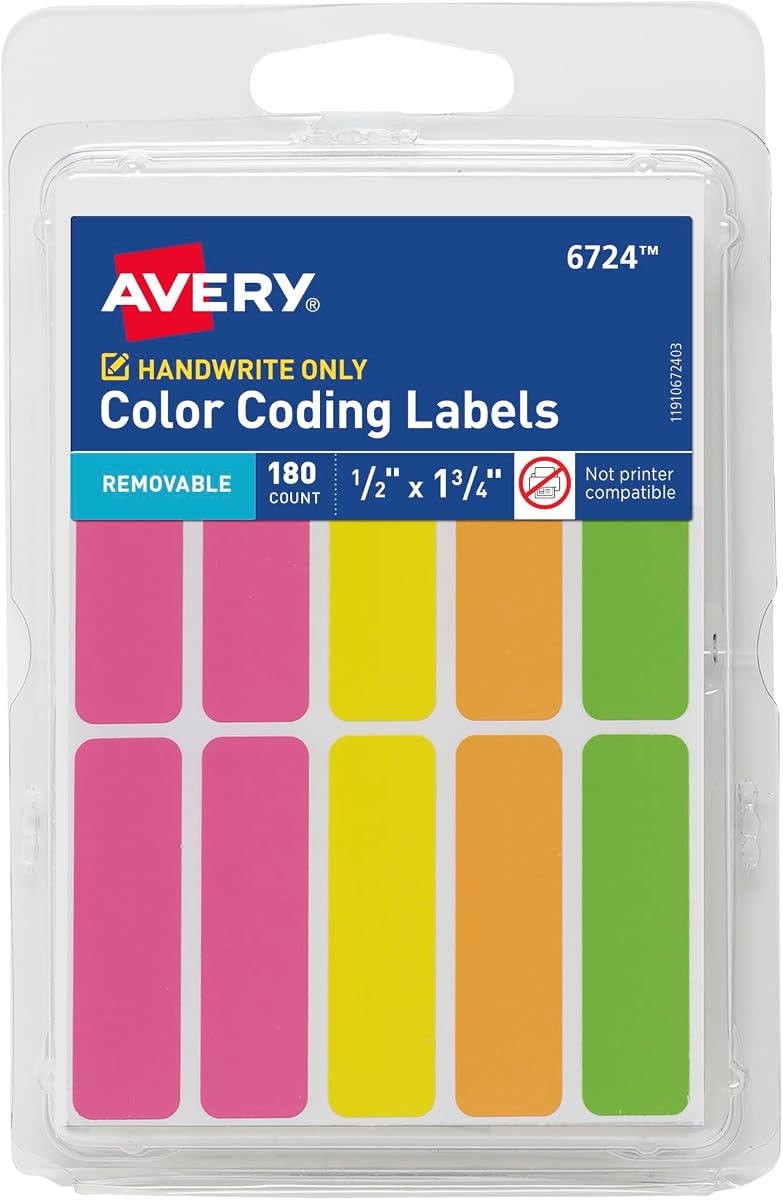
These Avery color-coding labels are well suited to compact device identification, where a large name tag would cover too much of a laptop or accessory. The product has a 4.6 rating and includes 180 blank labels in neon green, orange, pink, and yellow. Each rectangular label measures one-half inch by one and three-quarter inches, creating a useful middle ground between tiny dots and full-size name tags.
We may earn a commission when you buy through this link, at no additional cost to you.
The bright colors make quick visual sorting possible across laptops, documents, bins, kids’ belongings, and moving items. Neon green, orange, pink, and yellow offer stronger visual differentiation than subtle pastel options. Teachers can assign one color to each group, class, device category, or status and then add a short number or abbreviated code by hand.
The removable adhesive is designed to remain secure while a label is in use and peel away cleanly when it must be changed. This is useful for temporary checkout labels, daily rotations, and inventory control. The labels can also support routing, highlighting, scheduling, and price-marking tasks, although classroom device organization is where their combination of visibility, compact size, and removal becomes especially useful.
The principal limitation is the narrow writing area. A full student name may not fit comfortably, particularly on a small label, and the sheets are not printer compatible. Teachers who need only a color or short code will find the format more useful than those who want to print detailed asset records. Even so, the 4.6 rating and strong removable design make this a dependable option for secondary identifiers and cable or accessory coding.
The compact rectangular format fits on narrow laptop edges, cables, charging blocks, and small storage areas that cannot accommodate a large name tag. Neon colors remain noticeable without taking over the device surface.
Removable adhesive is useful when devices, cords, or supplies move between locations. Teachers can update a code or color category without applying a new permanent layer, although the short writing area calls for concise identifiers.
We may earn a commission when you buy through this link, at no additional cost to you.
The Colored Mini Coding Labels provide an enormous supply for schools that need to label many small items. The product has a 4.5 rating and includes 4,992 labels across 48 sheets, with 416 labels in each of 12 colors. Each rectangular label measures 1 inch by three-eighths of an inch, making it large enough for a short code but compact enough for books, cables, files, and crowded device surfaces.
We may earn a commission when you buy through this link, at no additional cost to you.
Twelve distinct colors support detailed categorization. Teachers can identify table groups, device types, curriculum units, storage locations, or checkout stages, and the compact format supports the extensive quantity without creating an unwieldy label supply. The bright colors are described as easy to distinguish and suitable for coding, project emphasis, files, documents, notebooks, and other organizational tasks.
The labels are made from paper and can be marked with pens, markers, or stamps. Their adhesive is described as strong enough to remain in place when exposed to moisture, heat, or cold. They peel and apply easily, which supports rapid deployment across large quantities. The listing also gives a wide range of applications, including classroom, office, warehouse, retail, home, inventory, and file organization.
The tiny dimensions are the defining trade-off. The labels are unsuitable for a full name unless that name is abbreviated, and teachers may need to pair them with a larger name label on the laptop lid. Even so, no other product in this guide approaches its quantity or color depth. For schools that require thousands of compact identifiers across many assets, this is an efficient way to build a large, visually consistent coding system.
The huge quantity makes the set useful for labeling every device accessory, book, folder, storage bin, and classroom object that needs a color or short code. It is far more practical for comprehensive coding than conventional name-tag rolls.
Because the available writing area is limited, teachers should assign short numbers, initials, or color meanings rather than expecting full names to fit. Pairing a compact code with a larger name tag can create a more complete device-identification system.
We may earn a commission when you buy through this link, at no additional cost to you.
The most useful classroom labels balance quick visibility, enough space for the intended information, secure adhesion, clean removal, and compatibility with the surfaces being marked. The right choice also depends on whether a teacher needs full names, short codes, color groups, or a complete laptop-and-accessory system.
Choose a large label when students must identify ownership at a glance, and choose a small label when your coding method relies on a legend or matching color system.
Favor a limited palette of highly distinguishable colors and use shape or text to add detail, rather than relying on many similar shades.
Test one label on each device material, and prioritize clean removal when devices are shared or frequently reassigned.
Confirm the surface and placement first, then apply a sample label before labeling the entire classroom fleet.
Count devices, chargers, and replacement needs separately, then choose a quantity with a modest operational buffer.
Select mixed shapes when one label format must serve devices, accessories, files, and storage areas.
Choose printable stock for advance setup, and choose writable labels when assignments or seating frequently change.
Use durable waterproof options for high-contact devices, and place standard paper labels away from edges, moisture, and frequently handled areas.
Start by defining a simple system. Decide whether color represents the student, table, device type, class period, or checkout status, and limit the number of colors to something children can interpret quickly. Label the computer, power adapter, and charging cable with matching identifiers, then create a simple legend that students can reference. Write consistently and leave enough room for a full name or code.
Prepare the device before applying labels. Wipe the surface with a clean, dry cloth, allow it to dry fully, and test one label on each material. Avoid ports, vents, cameras, speakers, and important branding. Press the label evenly and keep the device stationary while the adhesive sets. For removable labels, lift slowly from one edge to reduce the chance of pulling up the device finish.
Review the system at the end of each day or week. Replace labels that have curled, faded, or become difficult to read, and keep a small supply of spares for newly added devices. Remove old labels before applying a new coding system, and inspect the surface for residue or discoloration. A consistent inspection routine helps preserve the device while keeping ownership and inventory information accurate.
The best labels for classroom laptops combine a clearly visible color, enough writing space, and adhesive that suits the device surface. Large name tags work well for full student names, while compact labels are better for short codes or cable matching. Removable options are especially useful for shared devices and changing rosters, while permanent options suit long-term asset identification.
Labels advertised for clean removal are designed to peel away without leaving sticky residue, but results can vary by device material and how long the label has been attached. Test a single label in a discreet area and allow it to sit for several days before checking removal. Gentle, slow peeling is also important for protecting the surface.
Matching labels are strongly recommended because they reduce confusion when students return devices to a shared cart. Use the same color, number, and shape on the computer and its power adapter, and consider adding a small label to the charging cable as well. Keep the identifiers readable and avoid placing them over connectors or manufacturer symbols.
Larger labels are generally easier for students to recognize, but they also need more space on the device lid. They work well when a full name or several pieces of information must be visible. Smaller labels are more practical for crowded surfaces, cables, and systems based on color or abbreviated codes.
Many name tag stickers can be applied to smooth laptop surfaces because they are designed for clothing, plastic, metal, cards, and similar materials. Teachers should first test the adhesive and writing surface, especially on textured finishes. Large labels should be positioned away from vents, cameras, speakers, ports, and logos.
A large fleet benefits from a consistent system applied to devices, chargers, cables, storage bins, and checkout records. Use a limited color palette, assign short codes where space is limited, and keep a legend that staff can update. Large quantities should still be divided into manageable deployment batches so teachers can test each surface and correct placement errors early.
Writable labels are more flexible when students, seating, or device assignments change, while printed labels provide a polished and consistent appearance for a prepared fleet. Printed labels require printer-compatible stock, while many compact classroom labels are only intended for handwriting. Choose according to how frequently the system will be updated and how many devices need to be prepared at once.
Count every computer, matching charger, and cable that needs identification, then include replacement labels for damage, loss, or future devices. A modest spare allowance is useful even when the current fleet is fully covered. Very large packs are best for comprehensive school-wide coding, while smaller rolls are more practical for one classroom or a temporary pilot system.
The Classroom Color Coded Chromebook Laptop Labels are the most complete option, offering 385 labels, seven colors, multiple shapes, and removable waterproof material. For a simpler established option, MFLABEL provides 200 large, colorful-border labels with durable permanent adhesive, while the Rainbow Name Tag Labels offer 405 generous writing areas for teachers who want one versatile pack for computers, clothing, and classroom events.
Prioritize the system that matches your classroom rather than simply the largest assortment. Full names call for larger writable labels, shared devices benefit from clean removal, and extensive fleets may need a high label count. Color should be easy to distinguish, writing should remain legible, and every adhesive should be tested on the actual device surface before full deployment.
Product details, ratings, availability, and prices can change, so confirm the current listing before buying. Checking the current size, material, color, and quantity against your device inventory will help ensure that the selected labels support a smooth setup and an effective classroom identification system.