
galphi 4K Dash Cam
4.4Editor score
Screen-free compact design
4K front-camera recording
5GHz Wi-Fi app control
Included 32GB memory card
Discover the best Easy to Use Dash CAM options, comparing installation, recording quality, parking features, storage, app controls, and everyday reliability.
An easy-to-use dash cam should work reliably without demanding constant attention. The most approachable systems combine straightforward mounting, clear menus, automatic recording, and phone-based control, while still providing useful front, rear, or cabin coverage. The right model depends on your vehicle, driving habits, and desired parking protection.
We compared all ten featured dash cams by examining resolution, sensors, field of view, installation requirements, included storage, Wi-Fi and app support, parking modes, emergency locking, displays, and voice controls. The list includes screen-free compact designs, front-and-rear systems, three-camera coverage, and models built around the Garmin or VIOFO ecosystems.
Each review explains which drivers are most likely to appreciate that particular design and identifies any required accessories or limitations. Ratings reflect the supplied customer feedback, while technical details come from the product information. Product prices and promotions can change, so compare the current listing before choosing.
4.4Editor score

4.5Editor score

4.3Editor score
The table below compares the ten dash cams by camera coverage, recording resolution, connectivity, and storage support, making it easier to identify a model that balances setup simplicity with useful protection.




The ROVE R2-4K Dual is a well-rounded front-and-rear dash cam with a 4.5 rating. It combines a screen-equipped front unit, rear camera, GPS, dual-band Wi-Fi, and an included 128GB card, giving new users several useful capabilities without requiring separate purchases for basic recording.
We may earn a commission when you buy through this link, at no additional cost to you.
Its front camera records at 2.5K and upscales to 4K, while the rear records at 1080p. A Sony STARVIS 2 IMX675 sensor, wide apertures, HDR, and low-light processing support clearer images at night. The IPS screen displays speed and compass information, while the app can transfer recordings at up to 20MB/s over 5.8GHz or 2.4GHz Wi-Fi.
The main trade-off is that its 4K front output is upscaled rather than native. Parking surveillance also requires a separately purchased hardwire kit. These are important limitations, but they are offset by the included memory card, included mounting accessories, built-in supercapacitor, emergency locking, and extensive guidance for setup and operation.
This is a strong recommendation for drivers who want one coordinated system for road, rear-view, and parking evidence. It suits commuters, rideshare drivers, and families who prefer having a visible display and physical controls. Choose it over a screen-free model if navigation-style information, rapid wireless transfers, and broad parking features matter most.
The included front and rear cameras provide a useful combination of road detail and incident context. The supplied mounting accessories, rear cable, trim tool, charger, and card make the initial setup more complete than systems that require additional storage or wiring components.
Dual-band Wi-Fi and stated transfer speeds of up to 20MB/s make the ROVE app practical for reviewing clips without repeatedly removing the memory card. GPS route, speed, and location information add useful context when reviewing an incident.
We may earn a commission when you buy through this link, at no additional cost to you.
The galphi 4K Dash Cam is an approachable front-camera model with a 4.4 rating. Its compact body and screen-free design keep the windshield uncluttered, while 4K UHD recording, a 160-degree lens, and 5GHz Wi-Fi provide the essentials for everyday evidence collection.
We may earn a commission when you buy through this link, at no additional cost to you.
The included 32GB card means the camera can be used after basic installation without a separate storage purchase. Through the app, drivers can preview, download, and share footage at stated speeds of up to 8MB/s. Loop recording manages storage automatically, and the G-sensor locks clips when it detects sudden movement or a collision.
Its biggest limitation is the absence of a rear camera. Continuous parking mode also requires a Type-C hardwire kit that is not included. While that accessory requirement may frustrate buyers expecting an entirely self-contained parking solution, the core driving recorder is simple, compact, and well equipped for front-facing coverage.
This is a good option for a first dash cam, a driver who wants minimal windshield clutter, or anyone who mainly needs front-road evidence. It is less suitable for drivers requiring rear visibility or complete cabin monitoring. Its straightforward app, included card, automatic protection, and discreet installation make it an easy entry point.
The screen-free format eliminates a display that could compete for attention or block part of the view. Its slim enclosure and straightforward mounting instructions suit drivers who prefer a camera that records quietly in the background.
Loop recording, collision locking, WDR, and an F1.6 aperture form a practical basic feature set. Supported cards up to 256GB provide room to expand storage as recording needs change.
We may earn a commission when you buy through this link, at no additional cost to you.
The REDTIGER F7NP is a dual-camera dash cam built around 4K front and 1080p rear recording. Its 4.1 rating is the lowest among the ten featured products, but the specification set remains competitive for drivers who want both a STARVIS 2 sensor and a wide field of view.
We may earn a commission when you buy through this link, at no additional cost to you.
A 170-degree front lens and 140-degree rear lens capture broad road coverage, while the F1.5 aperture, WDR, HDR, and six-layer optical lens support balanced images in difficult lighting. The Redtiger Cam app provides live preview, playback, downloads, and route, speed, and location information through 5.8GHz Wi-Fi at speeds stated up to 20MB/s.
The included memory card supports immediate use, while seamless looping and G-sensor locking preserve important events. Parking time-lapse and collision-detection modes are available, although a hardwire kit must be purchased separately. A supercapacitor instead of a conventional lithium battery improves heat resistance and supports long-term parking use.
This model is best for drivers who prioritize front and rear resolution, quick wireless transfers, and dependable parking-oriented hardware. The included card and single-brand app reduce setup complexity. It is a sensible choice for commutes, road trips, and rideshare work, provided the buyer accounts for the necessary hardwire kit.
The 170-degree front angle and 140-degree rear angle reduce the chance that vehicles or cross traffic will sit entirely outside the frame. This makes the dual setup particularly useful for documenting interactions around the car.
The supercapacitor is a meaningful advantage for hot climates and extended parking periods. Time-lapse and collision modes provide two distinct ways to monitor a stationary vehicle, subject to obtaining a compatible hardwire kit.
We may earn a commission when you buy through this link, at no additional cost to you.
The REDTIGER F7N TOUCH is a front-and-rear system with a 4.3 rating and a feature set aimed at convenient operation. It records in 4K at the front and 1080p at the rear, while a touchscreen and voice commands provide more ways to review, save, and control the camera.
We may earn a commission when you buy through this link, at no additional cost to you.
The front STARVIS 2 sensor, WDR, HDR, and 170-degree lens support broad, balanced daytime and nighttime footage. The rear camera uses a 140-degree lens. Voice commands can reduce interaction while driving, while the touchscreen can lock emergency video, activate Wi-Fi, and capture still scenery with fewer button presses.
A built-in GPS records route, location, and speed data, and the app can transfer files at stated speeds up to 20MB/s. Loop recording and G-sensor locking protect relevant clips, and the included 128GB card offers substantial capacity. Parking monitoring is another benefit, but it requires a separate hardwire kit.
This model is especially attractive to drivers who want a dash cam that is easy to operate without an app. It is a solid choice for people who prefer physical screens, voice control, and front-and-rear coverage. Those who need a nearly invisible camera may prefer a smaller screen-free alternative.
The combination of touchscreen, retained buttons, and voice commands is unusually flexible. This lets users choose the quickest method for saving a clip or checking status, reducing the learning curve for new dash cam owners.
The app offers straightforward preview, downloading, and sharing, while embedded GPS adds location and speed information. This keeps important driving data attached to the footage without requiring a separate GPS tracker.
We may earn a commission when you buy through this link, at no additional cost to you.
The AProX 3-Channel Dash Cam offers the broadest camera configuration in this guide and carries a 4.8 rating. It records 4K from the front and rear plus 1080p inside the cabin, making it a strong candidate for rideshare drivers, families, and anyone who wants a complete record of the vehicle interior.
We may earn a commission when you buy through this link, at no additional cost to you.
The three viewing angles are 170 degrees at the front, 150 degrees at the rear, and 150 degrees inside. AProX HD night vision and WDR improve visibility, while four infrared lights help the cabin camera capture footage in darkness. A 3.18-inch laminated screen reduces reflections, and a screen saver can minimize interruption.
Dual-band Wi-Fi 6 supports stated transfer speeds up to 20MB/s through the TERUNSOUL app, with OTA firmware updates for management and maintenance. A 128GB card is included, loop recording handles storage turnover, and the G-sensor protects incident files. GPS records speed and location. Parking monitoring requires a separate hardwire kit.
The system is recommended for drivers who prioritize coverage count and cabin evidence. The tradeoff is added installation complexity because three cameras and their cables must be positioned carefully. Nevertheless, the included storage, broad field of view, night-oriented cabin features, and strong rating make it an easy system to recommend for comprehensive monitoring.
Front, rear, and cabin cameras create a more complete account of a journey or incident. This is especially valuable for rideshare and taxi drivers who need evidence of what happened inside as well as around the vehicle.
Four infrared lights give the interior camera a distinct advantage after dark. Combined with night-vision processing, they make the system more useful for drivers who regularly work or travel at night.
We may earn a commission when you buy through this link, at no additional cost to you.
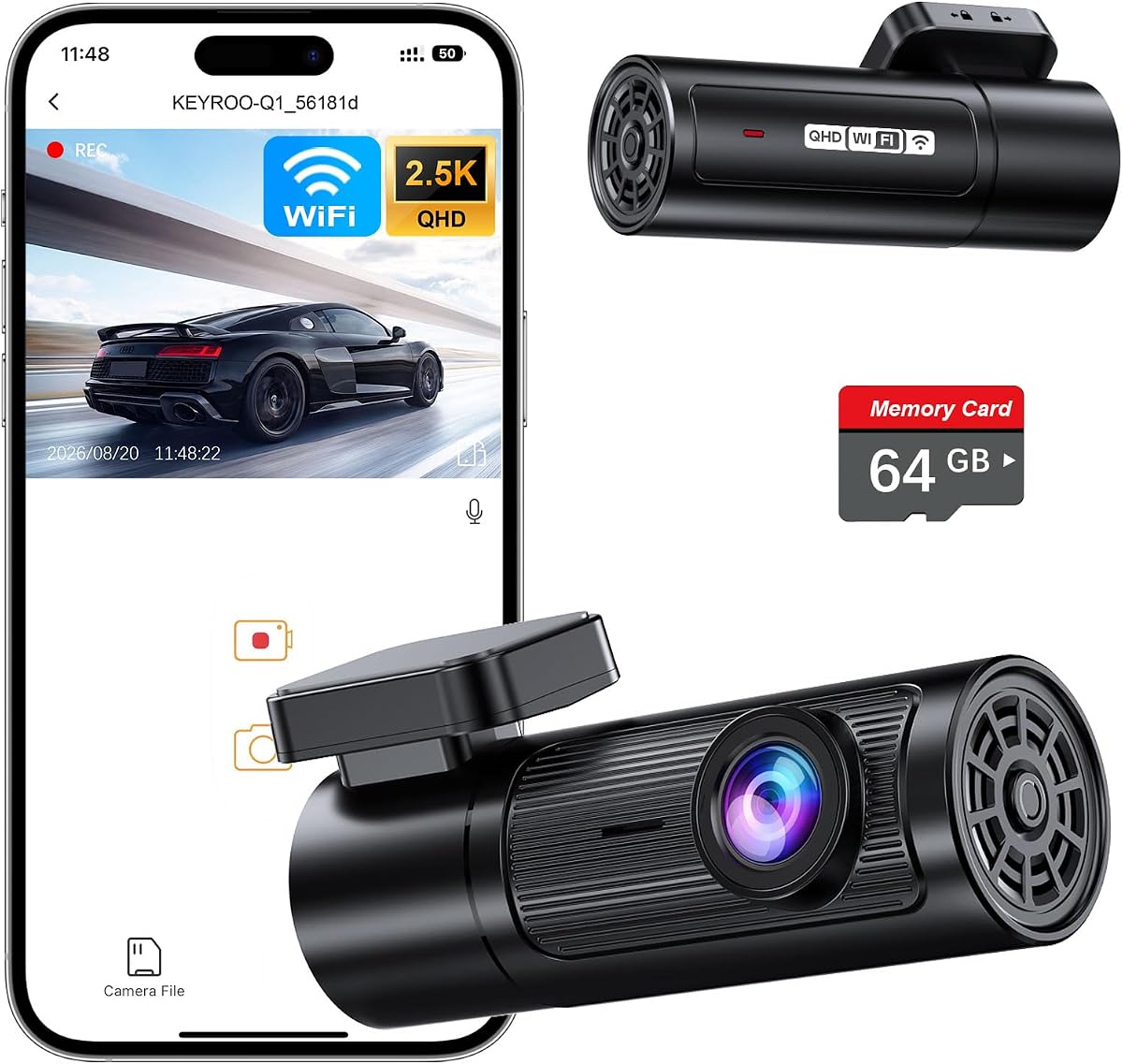
The KEYROO Q1 is a mini front-camera model with a supplied 5.0 rating. It records at 2.5K QHD through a six-layer 160-degree lens, and its compact body, screen-free layout, and adjustable mounting bracket make it particularly easy to place discreetly.
We may earn a commission when you buy through this link, at no additional cost to you.
A 360-degree rotatable lens allows the camera to be aimed toward the windshield, passenger area, or another suitable angle. The preinstalled 64GB high-endurance card eliminates the usual first purchase, while support for cards up to 256GB provides an upgrade path. Loop recording overwrites old files, and the G-sensor locks important events.
Built-in Wi-Fi connects to a free app for iOS and Android devices, enabling preview, download, replay, and sharing. Voice prompts provide operating feedback, and parking time-lapse plus collision locking add extra utility. However, a professional hardwired kit is sold separately for continuous parking operation.
This is a compelling recommendation for first-time owners, commuters, and rideshare drivers who want an inexpensive, flexible camera without a bulky display. Its single-camera format cannot cover the rear, and 2.5K is below 4K alternatives, but the easy bracket design and included storage make daily operation refreshingly uncomplicated.
The rotatable lens and detachable bracket make it easier to frame the camera for a sedan, SUV, or pickup. That flexibility is particularly useful for drivers who want to monitor part of the passenger area rather than using a fixed forward view.
Phone-based control removes the need to navigate a small on-device display. Voice prompts and app access keep routine tasks manageable while preserving a clean windshield view.
We may earn a commission when you buy through this link, at no additional cost to you.
The Terunsoul 4K Dual is one of the few models in the list that records true 4K UHD from both the front and rear cameras. With a 4.5 rating, a 128GB included card, built-in GPS, and Wi-Fi 6, it offers a balanced feature set for drivers who want high resolution throughout the vehicle.
We may earn a commission when you buy through this link, at no additional cost to you.
The front camera uses a 170-degree wide angle and F1.5 aperture, while the rear uses an F1.8 aperture. AProX HD night vision is designed to improve low-light detail. The phone app supports preview, downloads, management, and OTA firmware updates through dual-band 5.8GHz and 2.4GHz Wi-Fi 6 at stated speeds up to 20MB/s.
Loop recording automatically replaces old footage, and the G-sensor locks accident clips. Time-lapse and collision-detection parking modes are available once a compatible hardwire kit is obtained. The 3-year guarantee is another notable feature, although rear-camera viewing-angle details are less clearly stated than on some alternatives.
This model is recommended for drivers who want genuine 4K resolution from both directions and fast file access. It is a good match for road trips, commuting, and evidence-conscious users. Buyers should budget for parking-mode wiring if that feature is important, but otherwise receive a well-equipped and easy-to-manage dual-camera system.
Unlike systems that upscale one camera, this model states true 4K capture for front and rear views. That makes it attractive for drivers who want more detail when reviewing distant road features or surrounding vehicles.
Wi-Fi 6 and OTA updates streamline ongoing ownership. The combination of fast transfers, app-based control, and a generous memory card reduces the friction associated with storing and reviewing high-resolution clips.
We may earn a commission when you buy through this link, at no additional cost to you.
The Garmin Dash Cam Mini 3 prioritizes discretion and ecosystem simplicity. It has a 4.0 rating and a key-sized body designed to sit almost unnoticed on the windshield while recording crisp 1080p HD video through a 140-degree field of view.
We may earn a commission when you buy through this link, at no additional cost to you.
Its built-in Garmin Clarity polarizer helps reduce glare, which is particularly useful in bright daytime conditions. Voice commands can save video and start or stop audio recording in several supported languages. The camera automatically records and saves incident video with date and time information, reducing the need for manual intervention.
Garmin's online Vault is central to the remote experience. Live view, parking notifications, and remote access require a paid Vault subscription, an active Wi-Fi connection, constant power, and the Garmin Drive app. Non-subscribers can still view and download files when close to the dash cam. The compact unit also supports synchronized viewing of up to four cameras, each sold separately.
This is the right recommendation for drivers who value a tiny, polished camera and already use Garmin devices or appreciate a managed app ecosystem. It is less suitable for people who want 4K, rear coverage, or all remote features without a subscription. Direct sunlight and hot interiors are among the conditions the device is designed to withstand.
The ultracompact enclosure reduces visual obstruction and is unlikely to dominate the windshield. This makes the Mini 3 appealing to drivers who prefer technology that blends into the vehicle rather than a large visible screen.
Automatic incident saving with date and time provides a straightforward record of important events. The deciding factor is whether the benefits of Garmin's Vault system justify a subscription for parking alerts and remote viewing.
We may earn a commission when you buy through this link, at no additional cost to you.
The REDTIGER F17 combines three camera channels with a 4.4 rating and flexible recording modes. Its front camera uses a STARVIS 2 IMX675 sensor and can record at 4K, while separate rear and cabin cameras capture 1080p footage for broad situational awareness.
We may earn a commission when you buy through this link, at no additional cost to you.
The listed viewing angles are 150 degrees at the front, 160 degrees inside the cabin, and 155 degrees at the rear. WDR and HDR help manage bright and dark areas, while the sensor is designed to improve brightness and reduce image noise. The REDTIGER app can replay all three channels and display GPS data.
Users can choose 2.5K dual-channel recording with the front and rear cameras or switch to 4K front and 1080p rear capture. Time-lapse and collision-detection parking modes are supported after installing an extra hardwire kit. A supercapacitor contributes heat resistance, and a 64GB card is included for basic operation.
This model is a strong fit for rideshare drivers and families who want cabin coverage but retain control over recording resolution. The tradeoff is the extra effort of mounting and routing three cameras. In return, users gain flexible channel choices, wide interior visibility, and useful low-light performance.
Dual and triple-channel modes let the driver balance detail against storage demands. Turning off the cabin camera enables the higher 4K front and 1080p rear combination when maximum exterior resolution is the priority.
The 160-degree cabin view complements the exterior cameras and is useful for rideshare work. Three-channel replay in the app helps users understand a complete event without switching among unrelated files.
We may earn a commission when you buy through this link, at no additional cost to you.
The VIOFO A229 Plus is a premium front-and-rear system built around two Sony STARVIS 2 IMX675 sensors. Its 4.3 rating reflects a capable package that prioritizes image quality, precise positioning, flexible parking modes, and streamlined operation.
We may earn a commission when you buy through this link, at no additional cost to you.
Both cameras record at 1440p, with HDR available across both channels. The front camera can reach 60fps, although that high frame rate is unavailable while HDR is enabled. The sensors are stated to deliver 2.5 times the dynamic range and 2.5 times the light sensitivity of the earlier STARVIS generation, helping reduce night noise and motion blur.
A quad-mode GPS module supports GPS, BEIDOU, GALILEO, and GLONASS, adding location, speed, and time data. The VIOFO app handles previewing, downloading, photographs, and settings through 5GHz Wi-Fi. Twelve voice commands cover common actions, and the simplified menu displays connection and card-formatting status.
Three parking options—buffered event detection, time-lapse, and low-bitrate continuous recording—offer meaningful flexibility. The HK4 hardwire cable and a suitable high-endurance microSD card must be purchased separately, and the front camera's 1440p 60fps and HDR settings cannot be used together. Even with those constraints, it is a refined choice for drivers who prioritize dependable sensors and thoughtful controls.
Using STARVIS 2 sensors for the front and rear cameras creates consistent image behavior across views. This is valuable when comparing what happened ahead of and behind the vehicle, especially at night or during fast movement.
Buffered event detection records context before and after an incident, while time-lapse and low-bitrate modes offer alternatives for extended monitoring. The required hardwire cable makes these options less convenient for completely plug-and-play users.
We may earn a commission when you buy through this link, at no additional cost to you.
The easiest dash cam is not necessarily the one with the most features. It is the system whose installation, controls, app workflow, and recording behavior suit your vehicle and daily routine.
A single front camera is the simplest option and usually requires less wiring, fewer mounting decisions, and less attention to windshield placement. It is best for drivers who mainly want a record of the road ahead or need an inexpensive introduction to dash cam ownership. A front-and-rear system adds valuable context when another vehicle approaches from behind or a collision involves more than one direction. Three-channel models also record inside the cabin, which can be especially useful for rideshare drivers, families, and anyone monitoring passengers.
In short, match camera count to coverage needs. More cameras improve perspective but also increase installation and cable-routing work.
Resolution determines how much detail a recording can preserve, but sensor quality, lens construction, aperture, HDR, and WDR also affect what the footage looks like in practice. Native 4K provides more detail than upscaled 4K, while 2.5K or 2K can still be highly useful. STARVIS 2 sensors and large apertures are especially relevant for low-light scenes, where additional pixels alone may not overcome poor light gathering. A wide lens can capture adjacent lanes and surrounding vehicles, but excessive perspective can also make objects near the edges look distorted.
Prioritize balanced image features rather than chasing resolution alone. Low-light clarity and stable exposure are often more valuable for evidence than a headline resolution number.
Easy installation depends on more than the included instruction manual. Look for a compact body, accessible mounting location, clearly routed cables, and a power connection that fits your vehicle. Screen-free designs are often easier to position because they provide more flexibility around the rearview mirror. Systems with rear or cabin cameras require careful cable concealment so they do not obstruct the driver or interfere with airbags. Before installation, compare the supplied power source, cable length, and vehicle layout with the dash cam's mounting requirements.
In short, a simple front camera fits most vehicles quickly, while multi-camera systems demand more planning. Confirm the physical layout before buying.
An intuitive app can make a technically capable camera much easier to own. Look for clear preview, download, playback, and sharing functions, along with straightforward menus for resolution, parking mode, and recording length. Dual-band or 5GHz Wi-Fi can significantly reduce transfer times compared with a slower connection. Consider whether you prefer managing the camera through a phone, using physical controls, or using voice commands. Larger touchscreens are convenient when parked but may be less useful while moving, whereas voice control and automatic incident detection support hands-free operation.
In short, choose controls that match your habits. A good app, fast transfers, and clear voice feedback usually matter more than a large display.
Dash cam recording places sustained demands on memory cards, so card support and included storage deserve attention. Several featured models include a 32GB, 64GB, or 128GB card, while the VIOFO A229 Plus requires a separate high-endurance card. Check the maximum supported capacity and use a card appropriate for high-resolution continuous recording. Loop recording automatically replaces older files, but reliable emergency locking is equally important because an incident clip should not be deleted on the next overwrite cycle.
In short, check whether a suitable card is included before purchase. Confirm capacity, endurance, and automatic event locking to avoid storage surprises.
Parking surveillance usually requires a hardwire kit because a normal accessory socket loses power when the vehicle is switched off. A hardwire connection can support time-lapse, low-bitrate, or collision-triggered recording, but installation may be more involved than the dashboard mounting that makes a camera initially easy to use. Some products offer automatic event notifications or remote viewing, while others require the user to return to the vehicle and connect locally. Subscription-based services can add convenient live monitoring but create an ongoing cost.
In short, parking mode is not universally plug-and-play. Include the required wiring kit and decide whether remote access is worth a subscription.
Clear daytime footage is only part of the job because many consequential driving events occur after dark, during rain, or under tunnels and artificial lighting. Large apertures, sensitive sensors, HDR, WDR, and optical lens layers can improve the amount of usable detail. A polarizer can help reduce windshield glare, while infrared lighting is valuable for recording the cabin in complete darkness. Compare field of view with low-light capability rather than assuming one model excels in every condition.
In short, prioritize models with strong night-oriented features when you regularly drive after dark. Balance them against glare control and cabin visibility needs.
Dash cams should support safer driving rather than compete for the driver's attention. A compact screen-free model creates less visual clutter, while a touchscreen is more convenient for setup and reviewing footage while parked. Voice commands, automatic incident saving, and clear spoken notifications can reduce the need to handle the camera while moving. GPS and live speed displays are useful, but some drivers may prefer to keep that information within the phone app. The best design for you is the one you can configure once and then largely ignore.
In short, favor automatic behavior and hands-free operation. A device that stays out of the way is easier and safer to live with.
Begin by reading the product manual and checking the complete contents of the box. Clean the inside of the windshield, choose a mounting position that does not block the driver's view, and confirm whether the camera is powered through a socket, a hardwire kit, or another included connection. Insert the supplied memory card or a compatible high-endurance card, format it in the dash cam if instructed, and complete the basic settings before mounting the unit permanently.
After installation, connect the camera to its app while parked, confirm that preview and downloads work, and adjust the recording resolution, timestamp, and motion or collision sensitivity. Test both the normal driving loop and emergency locking by reviewing a short event. If parking mode is being used, install the correct hardwire kit, park in a safe location, and verify that the camera powers down and begins its selected parking routine as intended.
For ongoing care, inspect the mount, power cable, and card for looseness or damage and keep the lens clean. Use only the supplied or officially recommended power accessories. Review storage levels regularly, because continuous high-resolution recording fills cards quickly, and preserve important files before loop recording replaces them. Follow local laws concerning dash cam use, privacy, and audio recording.
They can be, especially for drivers who want a clean windshield and minimal visual distraction. Most screen-free models are controlled through buttons, voice prompts, or a phone app, so setup and file review usually happen while parked. However, a touchscreen can be more convenient for quick menu changes, so the best option depends on whether the driver prioritizes visibility or direct physical access.
No. Several models in this guide include a card, commonly in 32GB, 64GB, or 128GB capacities, while the VIOFO A229 Plus does not. Check the product listing carefully and use a compatible high-endurance card for continuous recording. Formatting the card in the camera can also help it begin recording cleanly and reduces the likelihood of recording errors.
Not necessarily. Resolution is only one part of image quality, and sensor sensitivity, lens quality, aperture, exposure, HDR, and low-light processing can be equally important. A native 4K recording generally preserves more detail than an upscaled image, but a capable 2K or 2.5K camera may still produce clearer nighttime footage than a less capable 4K model. Consider the full specification rather than resolution alone.
For the featured models that offer continuous parking monitoring, a compatible hardwire kit is generally required and is usually not included. Hardwiring provides continuous power, but it also requires more careful routing and setup than a simple cigarette-lighter connection. Check local installation practices, avoid obstructing safety systems, and consider professional installation if you are uncertain about the vehicle's wiring.
Yes, when the model includes a cabin camera with infrared lighting. The AProX three-channel system has four infrared lights intended to illuminate the interior in darkness, while the REDTIGER F17 uses a wide cabin camera with night-oriented processing. Cabin visibility still varies with reflections, window tint, mounting angle, and the amount of ambient light inside the vehicle.
Loop recording keeps the memory card usable by automatically overwriting the oldest files when storage becomes full. Emergency locking uses a G-sensor or collision trigger to protect relevant footage from routine deletion. Both features are important: continuous loop recording provides day-to-day coverage, while event locking helps preserve an incident for later review.
Not if the dash cam has built-in GPS. Several models in this guide can embed speed, route, location, and compass information in recordings for later playback in an app or desktop player. A standalone tracker is unnecessary for those systems, though route data can still be useful for documenting trips and providing context around an event.
Usage depends on resolution, frame rate, bitrate, and recording time. Higher-resolution files consume storage more quickly, so a larger card is useful for vehicles that spend significant time parked or driving. The included cards provide a convenient starting point, and compatible models support upgrades. Review the card regularly and transfer important clips before the loop-recording cycle removes them.
The ROVE R2-4K Dual is the most balanced all-around choice, offering front and rear cameras, a visible display, GPS, fast dual-band Wi-Fi, generous included storage, and extensive parking options. The galphi 4K Dash Cam stands out for drivers who want a more affordable, compact, screen-free front camera, while the VIOFO A229 Plus offers the most refined sensor and control package.
Prioritize the features you will actually use. A single-camera model is the least complicated, a dual system provides stronger incident context, and a three-camera setup is worth the extra setup for rideshare or family monitoring. Also account for memory-card requirements, hardwire kits, parking mode, low-light performance, and whether app-based or physical controls suit your habits.
Before purchasing, verify the current listing, included accessories, compatibility, warranty terms, and any subscription requirements. Product prices and promotions can change, but the most reliable dash cam remains the one that records clearly, fits your vehicle cleanly, and provides the coverage you need without creating unnecessary distraction.
