Alacrity NB65
5.0Editor score
Android 14 octa-core performance
Adjustable 58mm or 80mm printer
1D and 2D barcode scanning
A handheld POS system puts checkout, inventory tools, and customer interaction in a device your staff can carry from a counter to a table, truck, warehouse aisle, or busy service area. The right unit balances fast transactions, dependable connectivity, useful scanning, receipt printing, battery life, and comfortable handling rather than relying on one headline specification.
This guide compares ten handheld options using their stated capabilities, including supported operating systems, payment features, scanner types, thermal printers, connectivity, displays, batteries, and intended business environments. It covers compact standalone terminals, Android-based devices, mobile companion hardware, and countertop-oriented models that can still serve customers away from a fixed register.
Each review explains where a product stands out, where its compromises may matter, and which operators it may suit best. The first three selections highlight a particularly balanced all-purpose device, a feature-rich premium Android terminal, and a budget-friendly mobile option. Product details and availability can change, so readers should verify current specifications, software compatibility, and payment-account requirements before purchasing.
5.0Editor score

4.7Editor score

5.0Editor score
As an Amazon Associate we earn from qualifying purchases.
The comparison below highlights the most important differences among these handheld POS systems, including their payment approach, operating platform, scanning capabilities, receipt printing, connectivity, battery, portability, and overall suitability for mobile commerce.


The Square Handheld is a 4.7-rated, purpose-built portable payment system for restaurants, retailers, beauty businesses, and professional services. Its standout quality is a clean combination of card acceptance, tableside ordering, barcode scanning, portability, and offline payment support. Rather than trying to be an industrial data collector or an open Android computer, it focuses on helping a business complete sales smoothly wherever the customer happens to be.
We may earn a commission when you buy through this link, at no additional cost to you.
Its slim, lightweight body is designed to fit in a palm or pocket, while the comfortable grip should help servers, stylists, consultants, and sales staff use it for extended periods. The built-in barcode scanner adds inventory and checkout value, and the device is designed to withstand water splashes and dust. Most importantly for mobile operations, it can process payments even when the internet is unavailable, allowing staff to continue selling instead of abandoning a transaction.
The principal trade-off is that this is a more controlled ecosystem than a general-purpose Android terminal. Buyers receive a device designed around Square's payment workflow rather than a fully open Android platform with an interchangeable thermal printer, scanner, or cellular module. It also lacks the large screens, broad barcode-engine specifications, and multiple paper-width options found on some industrial-style alternatives. Those limitations matter most to technology-focused operators who need to customize the hardware extensively.
The Square Handheld is the strongest general recommendation for restaurants, beauty studios, mobile services, and small retailers that want a simple, durable way to take payments away from a register. Its compact shape, built-in scanner, offline resilience, and straightforward card acceptance cover the essential needs of a portable checkout without asking the buyer to assemble separate components.
The pocketable shape and comfortable grip make this terminal practical for tableside orders, line-busting, appointments, and roaming checkout. Its water-splash and dust resistance also supports use in active service environments where a countertop-only device would be inconvenient.
Offline payment capability gives the device a meaningful advantage in restaurants, markets, and service areas with unreliable connectivity. Users should still understand the activation and account requirements associated with offline payment modes before relying on them.
We may earn a commission when you buy through this link, at no additional cost to you.
The Multzo H10 earns a 4.2 rating and combines a modern Android 14 environment with a 58mm thermal printer, NFC reader, rear scanning camera, and extensive connectivity. It is a strong choice for a business that wants more control over installed applications than a tightly integrated payment appliance provides. The octa-core processor and 720-by-1440 touchscreen are intended to support compatible business apps while keeping everyday navigation clear.
We may earn a commission when you buy through this link, at no additional cost to you.
Its integrated direct-thermal printer uses standard 58mm paper and avoids ink cartridges, which simplifies mobile checkout and reduces consumable complexity. The built-in NFC reader supports contactless tap-to-pay, while the 5.0MP rear camera can scan 1D and 2D barcodes. That combination makes the H10 relevant to food trucks, mobile retail, field sales, inventory work, and service businesses that need more than basic payment acceptance.
Connectivity is another strength. Dual-band Wi-Fi, 4G LTE, Bluetooth, and USB give operators several ways to connect the terminal and its peripherals. The 6000mAh battery is stated to provide up to 14 hours of runtime, and the included charger supports a claimed full charge in two hours through 10W fast charging. One caveat is that hardware capability does not guarantee the terminal will be ready for encrypted card transactions; compatible payment software and processor onboarding must be confirmed separately.
At 345 grams, the H10 remains suitable for handheld work, and the available SDK creates a path for developers integrating custom software. It is most attractive to operators who value Android flexibility, modern performance, and a broad accessory feature set. Buyers who need simple plug-and-play card processing may prefer a more integrated system.
The printer, NFC reader, scanner camera, cellular radio, and Android platform reduce the number of separate accessories needed for mobile checkout. This makes the H10 useful for teams that move between sales, delivery, and inventory workflows throughout the day.
Android 14 provides a modern base for compatible business applications and custom integration through the available SDK. Software support and payment application compatibility should be checked against the specific apps a business intends to install.
We may earn a commission when you buy through this link, at no additional cost to you.
The Bisofice PDA Printer has a 4.0 rating and combines a 5.45-inch touchscreen, Android 8.1, a 58mm receipt printer, and camera-based scanning in a compact unit. Its appeal lies in consolidating several mobile functions at an approachable hardware tier. It is presented as a practical option for warehouse management, cafeterias, boutiques, bookstores, and other small operations that want receipt output and mobile application support in one device.
We may earn a commission when you buy through this link, at no additional cost to you.
The built-in thermal printer handles 58-by-35mm paper and requires no ink cartridges or ribbons, helping keep routine operating costs and maintenance simple. Wireless support includes 3G, Wi-Fi, Bluetooth 4.0, and USB OTG, while 4GB of NAND flash provides local storage. Its rechargeable 5000mAh battery and compact construction also support use away from a fixed workstation.
The main limitation is the age of the software foundation. Android 8.1 may not support the newest applications, security expectations, or operating workflows that a current platform provides. The camera-based scanning system is also less specialized than dedicated scan engines found on higher-end units. Payment processing is another area requiring care because the description identifies this as a general mobile POS terminal rather than promising encrypted card-reader functionality.
This Bisofice model is most reasonable for a small operator who values a printer, screen, and wireless connectivity in a portable package and whose chosen applications support the installed operating system. It is less attractive for a business planning years of software expansion or relying on advanced barcode capture in harsh environments.
The 58mm direct-thermal mechanism produces monochrome receipts without consumable ink, reducing complexity for small shops and mobile sellers. Paper availability and roll compatibility should be confirmed before deployment.
A rechargeable battery, compact body, and multiple wireless options support mobile use in cafes, boutiques, and small warehouses. Older software and basic scanning keep it best suited to straightforward workflows.
We may earn a commission when you buy through this link, at no additional cost to you.
The Bisofice H10S is a 4.0-rated Android 13 handheld built around mobility and data capture. Its 5.5-inch HD touchscreen, 2GB of memory, 16GB of storage, 4G and 3G cellular support, Wi-Fi, Bluetooth, and GPS give it a broad foundation for field inventory, logistics, manufacturing, and mobile retail tasks. A four-core MediaTek processor and integrated thermal printer complete the package.
We may earn a commission when you buy through this link, at no additional cost to you.
The 5MP rear camera includes autofocus and a flash, allowing it to recognize both 1D and 2D barcodes. That makes it useful for collecting product data in places where a fixed scanner is inconvenient. The built-in printer accepts 58mm paper, and a roll is included, so operators can produce receipts or standard-width thermal output without carrying a separate printer.
Its 3000mAh battery is smaller than the 5000mAh, 6000mAh, and 6400mAh batteries found elsewhere in this guide. Consequently, it may require more frequent charging during long shifts or intensive scanning sessions. The 2GB-plus-16GB memory configuration is also modest compared with more expensive Android terminals, potentially limiting demanding applications or heavy local data storage.
The H10S is a sensible fit for warehouses, delivery operations, field technicians, and small retailers that value cellular connectivity, modern Android compatibility, and integrated printing. It should be considered a general-purpose mobile computer with POS features rather than a dedicated encrypted-card payment appliance unless the chosen software and processor configuration explicitly support that use.
Support for cellular networks, Wi-Fi, Bluetooth, and GPS allows the terminal to remain useful in warehouses, delivery routes, and other locations away from a fixed network. SIM and carrier requirements should be arranged before use.
The autofocus camera and integrated 58mm printer reduce the equipment a field worker must carry. This combination is particularly valuable when stock verification and transaction records happen in the same workflow.
We may earn a commission when you buy through this link, at no additional cost to you.
The Square Terminal has a 4.5 rating and is a straightforward, integrated option for small merchants that want to ring up sales, accept cards, and print receipts without assembling a complex handheld system. It can serve customers at a counter or anywhere in a store, while its cordless design and built-in battery allow staff to move around during busy periods.
We may earn a commission when you buy through this link, at no additional cost to you.
The terminal accepts all major credit and debit cards, and its payment structure is described as using one rate without hidden fees or a long-term contract. Chip card processing is stated to take just two seconds, which is important when a portable checkout line serves a steady stream of customers. Integrated receipt printing further reduces the number of devices that employees need to manage.
This model is less versatile than several Android-based choices in the guide. It has no listed barcode scanner, no general-purpose operating system, and no 2D camera or cellular radio for inventory and field use. It is therefore best understood as a focused mobile payment terminal rather than a configurable handheld computer. The lack of offline payment support in the supplied description also means users should not assume the device can continue processing sales during an internet outage.
The Square Terminal remains attractive for retailers, service professionals, and pop-up sellers that need an uncomplicated cordless checkout with card acceptance and receipt printing. Its strengths are simplicity, speed, and a compact form factor rather than industrial data collection or broad application flexibility.
Combining card acceptance, receipt printing, and a rechargeable battery removes several separate counter accessories. The result is particularly convenient for small shops and mobile service rounds.
Staff can carry the terminal to a customer instead of requiring every transaction to occur at a fixed register. Its stated all-day battery design supports that cordless use.
We may earn a commission when you buy through this link, at no additional cost to you.
The Q2i Mobile POS Terminal has a 3.2 rating but offers an unusually clear software proposition for buyers comparing flexible Android devices. It runs Android 11, provides Google Play Store access, and is stated to work with popular POS applications including Loyverse, Square, Helcim, KORONA POS, and Stripe Terminal. That breadth makes it easier to match the hardware with an existing or preferred sales ecosystem.
We may earn a commission when you buy through this link, at no additional cost to you.
Its 5.5-inch HD capacitive touchscreen is paired with a thermal printer that produces 58mm receipts at speeds up to 80 millimeters per second. A built-in camera scanner reads common 1D formats such as UPC, EAN, and Code 128. This supports rapid product entry at the retail floor or tableside, although the scanner explicitly does not read QR codes.
Connectivity includes dual-band Wi-Fi and Bluetooth, while a 5000mAh battery and USB-C charging support a full workday-style workflow. The package contains the terminal, power adapter, USB-C cable, paper roll, and quick-start guide, and the product includes a one-year seller warranty. These details make setup more convenient for a first-time buyer.
The lower rating and modest 2GB of memory distinguish the Q2i from higher-rated models. Operators should verify whether their selected application performs well on the specified hardware and whether all required payment functions are available through the intended processor. Within those constraints, it is a practical choice for a small retailer that values app choice and a complete package.
Google Play Store access and stated compatibility with several major POS applications give the Q2i more software flexibility than a closed payment terminal. Buyers should still confirm current app requirements and device support.
The integrated 58mm thermal printer can handle up to 80 millimeters per second and avoids ink cartridges. A 1D scanner further supports quick retail item entry, although QR-code workflows require another reader.
We may earn a commission when you buy through this link, at no additional cost to you.
The Dejavoo P1 carries a 5.0 rating and is designed primarily for fixed checkout environments such as retail stores, salons, and small restaurants. It combines a 5-inch HD Android touchscreen with a physical keypad, a built-in high-speed thermal receipt printer, and both Ethernet and Wi-Fi. Although it appears in a handheld guide, its countertop design makes it better suited to a portable register than to all-day roaming work.
We may earn a commission when you buy through this link, at no additional cost to you.
The terminal supports tap, EMV chip, magnetic swipe, and mobile wallets, with Google Pay and Mobile Pay specifically named. Supporting several payment styles gives staff flexibility during checkout and reduces the need for customers to present the same card orientation every time. The physical keypad can also provide a familiar option for entering numeric data.
Its connectivity specification is notable. Rather than relying only on Wi-Fi, the P1 offers dual Ethernet and Wi-Fi capabilities, making it less dependent on a single wireless route in a busy store. The Android operating system supports familiar touchscreen navigation, although the supplied information does not describe barcode scanning, cellular operation, or a broad downloadable-app ecosystem.
The P1 is an excellent fit for owners who want a traditional counter terminal with modern payment types and less counter clutter. It is less appropriate for restaurant servers, field teams, and other operators who need a lightweight, roaming form factor. Its strong rating reflects the appeal of a focused all-in-one checkout appliance.
Support for contactless, chip, swipe, and mobile wallets covers the payment methods most customers expect. The combination of touchscreen and physical keypad also gives employees more than one way to complete and verify a transaction.
The integrated thermal printer consolidates receipt output into the terminal, reducing the need for separate equipment. Ethernet support is particularly useful for a stationary checkout that wants a dependable wired connection.
We may earn a commission when you buy through this link, at no additional cost to you.
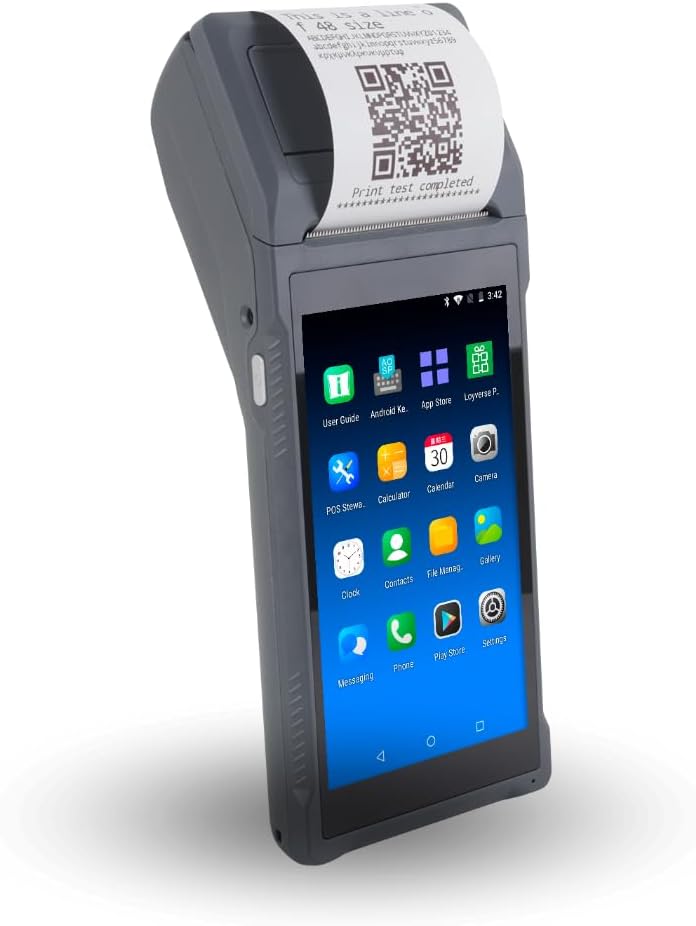
The Alacrity NB65 is a 5.0-rated, feature-rich Android handheld that stands apart through its 6.5-inch HD+ display, Android 14 operating system, 3GB-plus-32GB memory, 6400mAh battery, and adjustable thermal printer. It targets mobile retail, inventory work, logistics, and field operations that require more capability than a basic payment terminal can provide.
We may earn a commission when you buy through this link, at no additional cost to you.
Its 30W scanning module supports a wide range of 1D symbologies, including UPC, EAN, Code 128, Code 39, Code 11, and Codabar. It also reads 2D formats such as PDF417, Aztec Code, Data Matrix, QR Code, Micro PDF, and Interleaved 2 of 5, though it does not support MaxiCode. A 2.0GHz octa-core processor is intended to provide responsive application performance and transaction handling.
The printer module can switch between 58mm and 80mm paper, allowing the same device to produce narrower receipts or wider output. Connectivity includes dual-band Wi-Fi, 4G, Bluetooth, and SIM support. The 6400mAh battery is the largest stated capacity in the group, which is valuable for operators who spend much of the day away from a charger.
The NB65 is the premium choice for businesses willing to invest in flexible hardware. It is particularly attractive when scanning breadth, paper width, screen size, and battery endurance matter more than a compact dedicated card reader. As with other Android handhelds, encrypted card acceptance should not be assumed; operators need a compatible payment application and certified reader.
The adjustable 58mm and 80mm printing module gives operators more receipt-format flexibility than fixed-width alternatives. This is useful for businesses that may need compact customer receipts as well as larger tickets.
The dedicated 30W scan module supports an extensive list of common one- and two-dimensional formats. The excluded MaxiCode format is a minor limitation but should be considered if a business handles that particular symbology.
We may earn a commission when you buy through this link, at no additional cost to you.
The Alacrity Q50 has a 4.2 rating and is built as a handheld order-management and scanning device rather than a dedicated payment terminal. Its 5.9-inch display, Android 12 platform, 10-core processor, 3GB of memory, and 16GB of storage provide a capable foundation for online, mobile, takeaway, and queue-related workflows.
We may earn a commission when you buy through this link, at no additional cost to you.
The product has an important limitation stated directly in its information: its NFC reader is optimized for non-encrypted cards such as loyalty cards, membership IDs, and access badges. It does not accept encrypted credit or debit card transactions. A business that needs secure payments should pair it with a PCI-certified third-party reader such as SumUp, Zettle, or a comparable device. This requirement should be considered before purchase, not after deployment.
Its 58mm thermal print head is stated to produce receipts at 80 millimeters per second, and a zigzag-edge paper cutter streamlines removal. The printer supports continuous thermal receipt and ticket paper only; it does not handle label media or die-cut labels. For scanning, a 5MP autofocus camera with flashlight can read 1D and 2D codes, including codes affected by scratches, folds, or stains.
The Q50 is best for restaurants, delivery operations, queue management, membership programs, and inventory teams that need screen space, printing, and scanning more than embedded card acceptance. Its performance and connectivity make it a capable workflow tool, while the separate-reader requirement adds complexity for payment-focused merchants.
The large 5.9-inch screen and fast Android platform suit staff who need to review items, manage queues, and handle mobile or takeaway orders. Cellular and wireless connectivity help it function beyond a fixed counter.
This unit reads non-encrypted NFC identifiers but cannot securely process encrypted credit or debit cards. Mobile merchants should budget for a certified external reader and confirm that their preferred software supports the combined setup.
We may earn a commission when you buy through this link, at no additional cost to you.
The Clover GO is a 5.0-rated mobile companion that connects wirelessly to a smartphone through Bluetooth. It offers a different approach from the all-in-one Android terminals in this guide: the phone acts as the central interface while the compact Clover device handles card presentation and related functions. This can be economical and convenient for a very small operation that already manages everything on a phone.
We may earn a commission when you buy through this link, at no additional cost to you.
The device supports configurable percentage tips, multiple tax rates, and email or text receipts, giving a mobile seller useful customer-facing controls without requiring a paper printer. Employee permissions can also be created and managed, allowing access to sensitive functions to be limited to selected staff. Its data protection is described as extending from card acceptance through the transaction process.
Its major buying consideration is activation. The listing states that processing through SwyftPAY is required before shipment, and availability is limited to United States businesses. A dock is also sold separately, so buyers should not assume that every accessory or charging solution is included. Because the GO relies on a compatible smartphone, the business must account for phone battery life, screen size, Bluetooth range, and application compatibility.
The Clover GO is a sensible budget choice for a small US merchant seeking paperless receipts, simple tips and taxes, and lightweight mobile payment hardware. It is less suitable for operators who require a built-in printer, a large standalone screen, barcode scanning, cellular connectivity, or broad Android application control.
Bluetooth pairing with a smartphone keeps the payment hardware compact and avoids carrying a full Android terminal. This makes the GO convenient for pop-ups, mobile services, and small teams that already rely on phone-based workflows.
Email and text receipts remove the need for paper output, while configurable tips and taxes support common service transactions. Employee permissions help maintain control over sensitive operations when several staff members use the system.
We may earn a commission when you buy through this link, at no additional cost to you.
The most suitable handheld POS system depends on how it will be used, not merely on its screen size or processor. Payment environment, scanning requirements, connectivity, print media, battery demands, and software compatibility should be evaluated together before choosing a device.
A device can look like a payment terminal without being designed to process encrypted credit and debit card transactions. The Square Handheld, Square Terminal, Clover GO, and Dejavoo P1 have payment processing prominently described, but the general Android PDA models require compatible software and, in some cases, a separate PCI-certified reader. The Alacrity Q50 is especially important to distinguish because its NFC function is stated to handle only non-encrypted cards. Buyers should confirm processor approval, supported payment types, transaction fees, account onboarding, and whether the hardware itself can perform secure payment entry.
Android models provide a familiar environment for installing business applications, while dedicated systems offer a more controlled workflow. Android 14 appears on the Multzo H10 and Alacrity NB65, Android 13 on the Bisofice H10S, Android 12 on the Alacrity Q50, Android 11 on the Q2i, and Android 8.1 on the earlier Bisofice PDA Printer. Newer platforms generally provide a stronger foundation for current applications, but hardware memory and vendor support also matter. The Q2i explicitly states Google Play Store access and compatibility with several POS applications, while the Multzo offers an SDK for custom integration.
Basic checkout scanners may handle conventional UPC, EAN, and Code 128 labels, but mobile inventory and field operations often require 1D and 2D support. The Alacrity NB65 provides the broadest stated scan compatibility, while the Q2i is restricted to 1D codes and cannot read QR codes. Camera-based scanners can be versatile, although dedicated engines with autofocus, flash, and optical recognition are generally better suited to rapid or difficult scanning. The Square Handheld includes a scanner for product-focused workflows, whereas the Square Terminal, Dejavoo P1, and Clover GO have no listed scanning capability.
Integrated printing is useful when transactions occur away from a counter, but buyers should distinguish fixed 58mm printers from adjustable or multi-width systems. The Multzo H10, Bisofice H10S, and Q2i print on 58mm thermal paper, while the Alacrity NB65 can switch between 58mm and 80mm widths. The Alacrity Q50 prints continuous receipts and tickets but does not support die-cut labels. Dedicated terminals and the Clover GO avoid some of these physical-paper requirements, with the GO using email or text receipts instead.
Connectivity determines how smoothly a terminal syncs orders, inventory, and payment activity. Dual-band Wi-Fi is common among several models, while 4G LTE and SIM support extend coverage to delivery vehicles, warehouses, and field locations. Bluetooth is useful for peripherals, and Ethernet makes sense for a fixed counter with reliable wired service. The Square Handheld uniquely lists offline payment capability, making it a notable choice for businesses that cannot tolerate connectivity interruptions. Other devices may still work offline for local tasks, but the supplied data does not confirm offline transaction processing.
A handheld terminal that cannot last through a service is a liability even when its software is excellent. The Alacrity NB65 has the largest stated battery at 6400mAh, followed by the Multzo H10 at 6000mAh and the Bisofice and Q2i at 5000mAh. The Bisofice H10S has a smaller 3000mAh battery, and the Alacrity Q50 does not list a battery capacity in the supplied information. Runtime also depends on screen use, printing volume, scanning, cellular signal, and battery condition, so the capacity figure should be considered alongside expected workload.
A device carried in a pocket should be lighter and less awkward than one used as a counter terminal. The Multzo H10 weighs 345 grams, and the Q2i weighs 364 grams, while the Square Handheld is explicitly designed to fit in a palm or pocket. Larger screens can improve readability but may become tiring during a long shift. The Dejavoo P1 is more counter-oriented despite its handheld format, while the Clover GO depends on a separate smartphone. Weight, grip, screen visibility, and access to charging should be assessed together.
A larger screen can make menus, inventories, and order lists easier to navigate, but it should not substitute for processing compatibility. Screen sizes in the group range from 5 inches on the Dejavoo P1 to 6.5 inches on the Alacrity NB65, with several models in between. High-resolution touchscreens and physical keypads serve different preferences. Cameras with autofocus and flash are valuable in dim warehouses, while NFC supports contactless workflows when paired with compatible applications. Consider specialized features only after securing the fundamental payment and inventory functions.
Before using a new handheld POS system, charge it fully, install the required payment processor and business applications, sign into the correct merchant account, and confirm that catalog, tax, tip, and receipt settings match the operation. Test a small transaction and refund, scan several of the barcode formats used in the business, and print a receipt with the intended paper stock. For cellular devices, configure the SIM and confirm data coverage before leaving the premises.
During the workday, carry the device in a way that protects the screen while keeping it accessible, and use the provided case or an appropriate protective cover when drops are likely. Clean the touchscreen, scanner window, and printer slot with a soft, lightly dampened cloth, avoiding harsh liquids that could damage coatings or openings. Keep thermal paper away from heat, direct sunlight, and friction, and replace rolls before a partial roll jams during a transaction.
To preserve performance, update the operating system and applications only after confirming business compatibility and taking a backup of important sales or inventory data. Keep the charging contacts clean, use the specified power supply, and avoid leaving the device exposed to extreme heat, moisture, or dust beyond its stated tolerances. For devices with an offline mode, test that feature and understand its activation rules in advance rather than discovering the limitations during an outage.
A handheld POS is designed to be carried and used away from a fixed workstation, while a traditional register is usually anchored to a counter. Handheld systems can include card acceptance, scanning, receipt printing, inventory tools, and order management in a portable form. They are especially useful for tableside service, deliveries, field sales, queues, and pop-up locations.
No. A device may include a printer, scanner, and Android interface without being able to process encrypted payment-card transactions. Some models require compatible payment software, while others require a separately certified card reader. Always confirm processor approval and the exact payment methods supported before purchasing.
Yes, if the chosen workflow supports digital receipts or receipts sent from another device. The Clover GO, for example, can email or text paperless receipts. Many all-in-one terminals include a thermal printer, which is useful for customers who want a physical record or for businesses with regulatory or operational receipt requirements.
The best choice depends on where the device is used. Wi-Fi works well indoors, 4G LTE is valuable for vehicles, deliveries, and field service, and Bluetooth connects accessories or a companion device. Businesses that cannot tolerate lost sales should also consider a model with stated offline payment capability, such as the Square Handheld.
That depends on the products and documents you scan. Standard retail symbologies are 1D codes, while QR codes and many shipping, ticketing, and inventory formats use 2D. If the team handles only simple product barcodes, a 1D scanner may be sufficient. Mobile inventory and field teams generally benefit from both formats.
A 58mm printer produces compact receipts and is common for mobile checkout, while 80mm output provides more room for detailed receipts, kitchen tickets, or transaction lists. An adjustable model such as the Alacrity NB65 provides greater flexibility. Choose based on your existing paper rolls and the information customers or staff need on each receipt.
They can be, especially when they include 1D and 2D scanning, cellular connectivity, sufficient memory, and a long battery life. Models such as the Alacrity NB65 and Bisofice H10S are oriented toward mobile retail, logistics, and warehouse tasks. Compatibility with inventory software and the required barcode formats should still be verified.
Not every model, but payment capability must be confirmed. Some Android terminals integrate a certified payment interface, while general-purpose PDA devices may only support contactless identification cards. Others, including the Alacrity Q50, are explicitly not designed for encrypted credit and debit card transactions and require a separate PCI-certified reader.
The Square Handheld is the most balanced all-around recommendation, combining card acceptance, a built-in scanner, portability, and offline payment support. The Alacrity NB65 is the feature-rich premium choice for operators who value a large display, extensive scanning, flexible paper widths, and a high-capacity battery. The Clover GO provides a lighter budget-oriented approach for eligible US businesses that prefer phone-based operation and paperless receipts.
The right decision should follow the actual workflow. Choose a dedicated payment terminal when simplicity matters, an Android handheld when software and data capture are central, and a separate-reader configuration when a rugged PDA better fits inventory or order management. Battery endurance, scanner formats, paper type, cellular coverage, and processor compatibility should be evaluated before screen size or secondary features.
Finally, check the current product listing and merchant-account terms before ordering. Hardware specifications, included accessories, software support, and processing requirements can change, and some listings have activation or regional conditions. Confirming those details with the seller and payment provider helps ensure that the chosen handheld POS system is ready for the business's daily work.