
TP-Link AC1300 Dual Band
4.4Editor score
Dual 5 GHz and 2.4 GHz
Two external high-gain antennas
Broad Windows and macOS support
Explore the best high gain USB WiFi adapter options, comparing WiFi generations, antenna design, speed, range, security, and compatibility.
A high gain USB WiFi adapter can give a desktop or older laptop stronger reception, greater flexibility in antenna placement, and access to newer wireless standards. The right model depends on your router, operating system, USB port, and the distance between your computer and access point.
This guide compares ten adapters across WiFi generation, radio bands, stated throughput, antenna gain, beamforming, MU-MIMO, OFDMA, security features, installation requirements, and platform support. It also distinguishes between adapters intended to improve a computer's own connection and devices that include additional hotspot functionality.
Each review explains the most practical strengths and limitations, helping you match the hardware to your network. Ratings and technical details reflect the supplied product information, while prices and availability can change, so confirm the current listing before buying.
4.4Editor score

4.4Editor score

4.4Editor score
The comparison below organizes each adapter by its most important practical distinctions, including wireless generation, band support, antenna design, platform compatibility, and installation method. Advertised link speeds describe theoretical capability rather than guaranteed real-world throughput.



The TP-Link AC600 USB WiFi Adapter is a straightforward way to add dual-band wireless connectivity to a compatible Windows desktop or laptop. It carries a 4.4 rating and centers on a practical combination of a rotatable 5 dBi antenna, 2.4 GHz and 5 GHz support, and a compact USB form. That makes it most useful when signal positioning matters more than access to the newest wireless generation.
We may earn a commission when you buy through this link, at no additional cost to you.
Its advertised maximum link rates are 433 Mbps on the 5 GHz band and 200 Mbps on the 2.4 GHz band. The 5 GHz band is better suited to nearby high-speed tasks, while the lower band can offer more flexibility around walls and interference. The adjustable, multidirectional antenna can be rotated toward the router, giving users an easy way to improve reception without moving the computer.
The main limitation is age. AC600 is well behind WiFi 6 and WiFi 7 adapters in theoretical throughput, so it may not take full advantage of a modern high-performance router. It also supports Windows versions from XP through 11 but not macOS. These constraints matter for Mac owners and for users who routinely transfer very large files over a local network.
Despite those trade-offs, this adapter is compelling for an older Windows PC that needs a cost-conscious upgrade without a bulky external network card. Choose it when you need adjustable gain, dual-band operation, and broad legacy Windows support. Users with WiFi 6 routers and demanding workloads should instead consider a more modern AX-series model.
Because the antenna can rotate toward the access point, the adapter does not have to remain directly beside the computer's USB port. Small changes in orientation or extension-cable placement can produce a more useful connection in rooms with walls and competing signals.
This model is a practical fit for Windows machines with an older or missing WiFi card. Its support for older Windows releases also distinguishes it from several newer adapters that require Windows 10 or 11.
We may earn a commission when you buy through this link, at no additional cost to you.
The TP-Link USB WiFi 6 Adapter for Desktop PC, AX1800 Dual Band WiFi Antenna, provides a modern balance of speed, range, and placement flexibility. It has a 4.1 rating and uses dual high-gain antennas with an adjustable desktop design. The included one-meter USB 3.0 cable lets the adapter sit in a more favorable position without forcing the computer itself to remain there.
We may earn a commission when you buy through this link, at no additional cost to you.
Stated maximum speeds reach 1201 Mbps on 5 GHz and 574 Mbps on 2.4 GHz. MU-MIMO and OFDMA support can improve efficiency in busy networks, while WPA3 encryption adds current protection for compatible networks. These features make the adapter more relevant than the preceding AC600 model for streaming, gaming, downloads, and multi-device households.
Its primary constraint is operating-system support. It works only with Windows 11 and 10 and is explicitly not compatible with macOS or Linux. The product data also recommends current firmware and pairing it with a WiFi 6 router for the intended experience. Otherwise, a capable older router can still provide a connection, but not every advertised benefit will be available.
This is a sensible choice for a modern Windows desktop or laptop that needs a stronger, repositionable WiFi connection without replacing the entire computer. Buyers who want broad legacy support should consider the AC1300 or AC600 options, while those with WiFi 6E or WiFi 7 infrastructure may receive greater value from a tri-band model.
The one-meter USB 3.0 cable separates the radio and antennas from the computer's metal chassis and USB port. That separation can be helpful on desks where the computer sits between the adapter and router.
MU-MIMO and OFDMA are more valuable when several devices are online or when a nearby network uses overlapping channels. These technologies help the adapter manage simultaneous traffic more efficiently than a basic single-band adapter.
We may earn a commission when you buy through this link, at no additional cost to you.
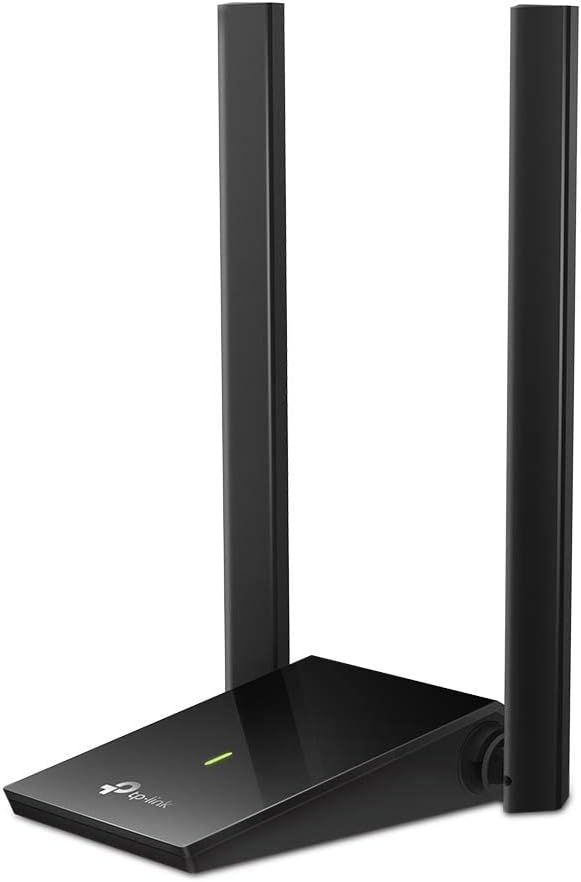
The TP-Link USB WiFi Adapter for Desktop PC, AC1300 Dual Band WiFi Antenna, offers a balanced combination of performance, range, and platform flexibility. Its 4.4 rating, dual external antennas, and support for both Windows and macOS make it one of the more broadly compatible options in this roundup. It is a logical fit for users who do not need WiFi 6 but want more speed than an entry-level AC adapter.
We may earn a commission when you buy through this link, at no additional cost to you.
The adapter supports maximum link speeds of 867 Mbps on 5 GHz and 400 Mbps on 2.4 GHz. MU-MIMO can improve overall network efficiency, while the rotatable multidirectional antennas provide useful placement control. Compatibility extends across Windows 11, 10, 8.1, 8, 7, and XP, as well as macOS 10.9 through 10.15.
The trade-off is that AC1300 remains a WiFi 5 design. It cannot use a 6 GHz band, and its headline speeds are lower than those of AX1800, AX900, and BE-series adapters. The macOS support also ends at version 10.15, so buyers using a current Mac may need a newer product even if the general adapter concept fits their setup.
For an older or mid-range Windows PC, or a compatible Mac within the listed version range, this is a sensible high-gain upgrade. It suits users who prioritize antenna adjustment and cross-platform support over the newest standard. If your router already supports WiFi 6 and your computer runs Windows 10 or 11, an AX adapter offers a more future-oriented alternative.
Few options in this list support both Windows and macOS. That makes this adapter especially useful for shared computers, mixed households, or buyers who may change platforms before the next major upgrade.
Two external high-gain antennas make it easier to orient the receiver toward a router. If reception is inconsistent, moving the antennas or adjusting their angle can be a simple first troubleshooting step.
We may earn a commission when you buy through this link, at no additional cost to you.
The TP-Link USB WiFi 6 Adapter for PC-1800 Mbps is a strong all-around option for a current Windows computer that needs better reception and faster wireless performance. It has a 4.2 rating and combines two high-gain dual-band antennas with beamforming. The product also emphasizes modern security, efficient multi-device operation, and a simple preloaded-driver installation.
We may earn a commission when you buy through this link, at no additional cost to you.
Maximum stated throughput is 1201 Mbps on 5 GHz and 574 Mbps on 2.4 GHz. Beamforming is intended to direct the signal toward the router, while MU-MIMO and OFDMA help handle multiple devices and reduce congestion. USB 3.0 supports faster data transfer than USB 2.0, while WPA3 encryption provides stronger password protection on compatible networks.
As with most modern adapters, compatibility is the main compromise. It supports only Windows 11 and 10, so it is unsuitable for Mac, Linux, or older Windows systems without a different solution. Real-world performance also cannot exceed the speed of the connected router, and walls, distance, interference, and placement will influence results.
Choose this model for a Windows 10 or 11 desktop or laptop that needs a modern WiFi 6 upgrade and a strong signal in a home or office. It is particularly attractive when USB 3.0 is available and the user values straightforward setup. If a 6 GHz router is already part of the setup, a tri-band WiFi 7 adapter would offer a more advanced path.
The two high-gain antennas and beamforming are designed to improve reception through walls and across floors. While no antenna can eliminate every obstruction, this combination gives the adapter more directional options than a tiny internal antenna.
WPA3, MU-MIMO, and OFDMA give this adapter several benefits associated with current wireless networks. Their usefulness depends on router support, but they make the hardware a more forward-looking choice than an AC-series model.
We may earn a commission when you buy through this link, at no additional cost to you.
The TP-Link BE6200 Tri-Band USB 3.0 Wi-Fi 7 Adapter is the premium-oriented choice in this group. It carries a 4.4 rating and supports the 2.4 GHz, 5 GHz, and 6 GHz bands. Its 6 GHz support, beamforming, and detachable cradle are especially relevant for a high-end home network designed around WiFi 7 infrastructure.
We may earn a commission when you buy through this link, at no additional cost to you.
Advertised maximum rates are 688 Mbps on 2.4 GHz, 2,594 Mbps on 5 GHz, and 2,882 Mbps on 6 GHz. The adapter can use 160 MHz channels, Multi-RUs, and 4K-QAM when paired with a suitable WiFi 7 router. A 3.9-foot cable and detachable cradle provide generous freedom to position the dual high-gain antennas away from the computer.
The obvious limitation is dependence on compatible infrastructure. A WiFi 6 or older router will restrict the adapter's capabilities, and actual throughput can never exceed the router's maximum. It also works only with Windows 11 and 10. For most home users, the extra radio and advanced features may be unnecessary unless the network is designed to take advantage of them.
This is the most technically advanced model here and the right choice for a Windows PC in a WiFi 7 environment, particularly when the computer sits far from the router. It also suits users who want a detachable, carefully positioned antenna system rather than a permanently attached dongle. For ordinary dual-band networks, a less advanced AX model will be more proportionate.
The 6 GHz radio can provide additional spectrum and wider channels when the router and environment support them. This is most useful for high-bandwidth local traffic and modern wireless clients, not as a guaranteed replacement for every home network.
The detachable cradle and long cable make it possible to position the antennas at eye level, near a window, or elsewhere with a clearer path to the router. That physical control is a major advantage over compact adapters with fixed short leads.
We may earn a commission when you buy through this link, at no additional cost to you.
The USB WiFi Adapter for Desktop PC — WiFi 6 Adapter AX1800 Dual 5G/2.4G USB3.0 is a straightforward WiFi 6 upgrade for a compatible Windows computer. It has a 5.0 rating, though that score should be interpreted as part of the supplied marketplace information rather than a guarantee of performance in every environment. Its defining feature is a rotatable 7 dBi high-gain antenna.
We may earn a commission when you buy through this link, at no additional cost to you.
The adapter offers stated maximum speeds of 1200 Mbps on 5 GHz and 576 Mbps on 2.4 GHz. USB 3.0 provides a faster data pathway than USB 2.0 while remaining backward compatible. WPA3 is supported alongside WPA2, WPA, and WEP, giving users a choice based on the security configuration of their router.
The product is designed for quick installation: the supplied information says Windows detects and installs the driver when the adapter is connected. It does not support Windows 7, macOS, or other systems. The same single-device scope means users should not expect the broader platform compatibility available from the TP-Link AC1300 and AC1300 USB 3.0 options.
This adapter is a practical choice for a Windows 10 or 11 PC with weak internal WiFi, especially when a single sizable antenna is useful in a challenging location. It may appeal to buyers who prioritize easy setup and a high stated antenna gain. Those who prioritize brand-specific documentation, broader platform support, or a detachable multi-antenna arrangement may prefer a TP-Link model.
The advertised 7 dBi antenna is among the higher-gain designs in the roundup and can be rotated through 90 degrees. Its physical size makes it easier to orient than a small internal-style antenna, although actual reception still depends on the router and environment.
Automatic driver detection makes this adapter convenient for a straightforward upgrade. The approach reduces setup steps, although users should still verify that their Windows version and USB port meet the stated requirements.
We may earn a commission when you buy through this link, at no additional cost to you.
The BrosTrend AX1800 USB WiFi 6 Adapter Long Range, High Gain Antennas, USB 3.0 is designed around the idea that a desktop's internal WiFi antenna may be poorly positioned. It has a 4.1 rating and uses two 5 dBi high-gain antennas, beamforming, and a 3.3-foot extension cable to give the hardware more freedom from the computer's chassis.
We may earn a commission when you buy through this link, at no additional cost to you.
Its stated dual-band rates are 1201 Mbps on 5 GHz and 574 Mbps on 2.4 GHz. OFDMA and UL/DL MU-MIMO are included to improve multi-device efficiency and reduce congestion. The product information also highlights use cases such as HD streaming, online gaming, and video calls, all of which benefit from a stable connection when the router is not nearby.
Compatibility is limited to Windows 11 and 10, and Linux is explicitly unsupported. The supplied information does not identify a separate downloadable driver because the adapter comes with a preloaded driver, but users should still check current compatibility before purchase. Like every adapter, its ultimate speed is limited by the router, distance, walls, and neighboring networks.
Choose this model when placement is the central problem and the computer runs a current Windows release. The extension cable makes it easy to test a stronger position without moving the PC. It is also a practical alternative to models with multiple detachable parts, although the tri-band choices offer more advanced radio options when the router can support them.
The 3.3-foot cable allows the antenna assembly to sit away from metal parts around the desktop. Trying a higher or more open location can be a simple way to improve consistency before changing routers or access points.
OFDMA and bidirectional MU-MIMO support can help when the network is handling several active clients. These standards are most beneficial with a compatible WiFi 6 router and a network that is not already limited by a slow internet connection.
We may earn a commission when you buy through this link, at no additional cost to you.
The WAVLINK BE6500 USB WiFi 7 Adapter for Desktop PC is a feature-rich option for a current Windows system and a modern tri-band router. It has a 4.4 rating, four adjustable 5 dBi antennas, and stated maximum rates of 688 Mbps on 2.4 GHz and 2882 Mbps on both the 5 GHz and 6 GHz bands. WiFi 7 features such as Multi-Link Operation and Multi-RU target lower latency and more stable performance in crowded networks.
We may earn a commission when you buy through this link, at no additional cost to you.
Installation relies on a built-in driver for Windows 10 and 11. The supplied instructions explain that a driver window should appear after connection and that a virtual CD drive may be visible during setup. A USB 3.0 interface supports a higher data-transfer ceiling than USB 2.0, and ventilation slots are included to help dissipate heat during extended use.
The adapter supports both Receive Mode and Hotspot Mode, allowing the PC to connect to a router or share its internet connection with nearby devices. It does not, however, act as a WiFi booster, extender, or repeater and cannot independently strengthen the router's existing signal. Its full potential also requires WiFi 7 infrastructure; use with WiFi 6 or 6E will limit performance.
This is an appealing option for a Windows enthusiast with a WiFi 7 router who values antenna control, attractive status lighting, and hotspot functionality. It may be unnecessary for a standard home network, but it offers extensive physical adjustability and flexible modes in a compact desktop-oriented package.
The foldable 5 dBi antennas can be adjusted individually, making it easier to aim them toward a router and away from obstructions. The larger physical footprint is a trade-off compared with a compact single-antenna dongle.
Hotspot Mode can make a wired desktop useful as a local access point for phones, tablets, and laptops. It remains dependent on the computer's active internet connection and should not be confused with extending the reach of an existing router.
We may earn a commission when you buy through this link, at no additional cost to you.
The TP-Link USB WiFi Adapter for Desktop PC, AC1300 Dual High Gain Antenna is a practical WiFi 5 upgrade with a 4.1 rating. It provides dual-band operation, adjustable high-gain antennas, and a SuperSpeed USB 3.0 connection. The design focuses on the fundamentals needed to improve a desktop's wireless link without introducing the complexity of newer multi-band systems.
We may earn a commission when you buy through this link, at no additional cost to you.
Stated maximum speeds are 400 Mbps on 2.4 GHz and 867 Mbps on 5 GHz. The 5 GHz band should suit nearby streaming and downloads, while 2.4 GHz offers flexibility in more obstructed locations. Adjustable antennas can be oriented toward the router, and the flexible desktop format makes it straightforward to place the unit on a desk.
The main limitation is its older AC1300 wireless class. It cannot exploit WiFi 6 features such as OFDMA and has no 6 GHz option. Compatibility is listed for Windows 11 and 10 and macOS 10.9 through 10.14, which narrows its usefulness for users on newer macOS releases. It also remains limited by the speed of the connected router.
This adapter makes sense for a compatible Windows or listed macOS system that needs better placement control and dual-band performance. It is especially attractive when a USB 3.0 port is available and a WiFi 5 router is already in place. For a newer Windows-only build, an AX1800 model offers greater headroom and current security features.
A SuperSpeed USB 3.0 connection gives the adapter more data-path headroom than USB 2.0. While the radio remains the main limit, the faster bus helps prevent the interface from becoming a secondary constraint.
The two adjustable antennas are useful on a desktop that can be moved to an open position. Users can test the adapter near the router and then return it to a location that still maintains usable reception.
We may earn a commission when you buy through this link, at no additional cost to you.
The Tenda WiFi Adapter for Desktop PC, AX900 WiFi 6 USB WiFi Adapter is a compact WiFi 6 option with an omnidirectional 6 dBi antenna. Its 4.3 rating and support for Windows 7, 10, and 11 make it a practical choice for systems that cannot use the newest adapters restricted to Windows 10 and 11. The built-in driver further reduces installation friction.
We may earn a commission when you buy through this link, at no additional cost to you.
The product information states that the adapter is faster than standard AC600 adapters on both 5 GHz and 2.4 GHz, although it does not provide exact link-rate figures. MU-MIMO supports communication with multiple devices, and AP mode can share the computer's connection with as many as eight devices on the 5 GHz band. Tenda's intelligent algorithm is also described as improving stability and coverage.
Its AX900 class places it below dual-band AX1800 adapters in advertised aggregate capability. The single antenna offers less physical positioning flexibility than models with two or four adjustable antennas, and the product does not support macOS or Linux. The exact real-world benefit also depends on router capability, interference, and placement.
Choose this adapter when you want a simple WiFi 6 upgrade, built-in-driver convenience, and broader Windows compatibility than most current models. It can also be useful for creating a 5 GHz access point from a desktop. Users needing maximum throughput, multiple antennas, or macOS support should examine the AC1300 or higher-capacity AX alternatives.
The internal driver means the adapter can be connected and configured without searching for a separate download in most cases. This is convenient for users who want a fast, uncomplicated upgrade.
AP mode can turn the desktop into a 5 GHz hotspot for nearby devices. It is useful for creating a local network, but it depends on the PC maintaining its upstream internet connection.
We may earn a commission when you buy through this link, at no additional cost to you.
The most useful adapter is not automatically the one with the largest headline speed. Match wireless generation, antenna design, radio bands, security, and operating-system support to your router and computer before considering additional features.
In short, buy for the router you have now and the standard you expect to use next.
Choose dual-band for most networks and tri-band when you already have, or plan to add, a 6 GHz router.
Prioritize an adjustable, extendable design over antenna size alone, and experiment with placement after installation.
Use USB 3.0 for modern high-speed networks, especially when the adapter includes a positioning cable or cradle.
Verify the exact operating-system version, architecture, and driver method before checkout.
Use WPA3 when available, WPA2 when required by the router, and update the adapter's driver and the router's firmware.
For crowded networks, prioritize current efficiency features; for simple homes, basic dual-band performance may be enough.
Choose hotspot or AP mode only if you want to share a computer's connection, not extend an existing router's range.
Begin by confirming that the computer's operating system, USB port, and router are supported. Connect the adapter using the supplied cable if the design includes one, or insert it directly into a USB port. For models with a built-in or preloaded driver, allow Windows to detect the hardware and complete the automatic installation. If a driver window does not appear, follow the adapter's specific instructions, including checking for a virtual CD drive on newer WAVLINK hardware.
After installation, open the available WiFi utility or the operating system's network panel and select the appropriate 2.4 GHz, 5 GHz, or 6 GHz network. Enter the correct security credentials, and allow the adapter to associate with the router. Use the 5 GHz or 6 GHz band for nearby high-speed tasks, while 2.4 GHz can be useful for longer distances or through more obstacles. Always use the strongest security mode supported by both the adapter and router.
For the best reception, move the adapter away from the computer's metal case and position the antenna toward the router. Test the connection in several locations, and use an extension cable or cradle if the included design provides one. Keep the unit away from enclosed compartments, excessive heat, moisture, and strong electrical interference. Update the driver and firmware when updates are available, and disconnect it before moving the computer if the physical connection is not designed to withstand movement.
No. A high-gain antenna may improve signal strength and stability when it is correctly positioned, but it cannot exceed the limits of the router or internet service. The 2.4 GHz band may provide better reach at lower speeds, while 5 GHz and 6 GHz generally offer more bandwidth over shorter distances. Actual results also depend on walls, interference, router quality, and the device's position.
It can improve the wireless connection if the computer has weak, outdated, missing, or poorly positioned internal WiFi hardware. It will not increase the speed of the internet service itself. A faster adapter can also reduce bottlenecks when the computer's old wireless card cannot keep up with a modern router, provided the router and connection are otherwise suitable.
Choose WiFi 6 for most current dual-band networks because it offers a practical balance of speed, efficiency, security, and router availability. WiFi 7 makes the most sense when you have a compatible WiFi 7 router, particularly one that supports the 6 GHz band. Using a premium tri-band adapter with an older router may provide good placement but will not unlock all advertised features.
Place it in an open position with the antenna facing the router and away from the computer's metal chassis. If reception is inconsistent, use the supplied extension cable or cradle to move the adapter higher or closer to the access point. Testing multiple locations is important because a high-gain antenna can still perform poorly when directed through dense obstacles or toward interference.
It depends on the exact model. The TP-Link AC1300 Dual Band and TP-Link AC1300 USB 3.0 are listed with macOS support, while most of the newer AX, BE, and WiFi 7 options are limited to Windows 10 and 11. Linux is explicitly unsupported by the BrosTrend AX1800, and the TP-Link AX1800 Plus is not compatible with Linux or macOS. Always check the current manufacturer listing for the exact model.
It is preferable for modern high-speed models because USB 3.0 provides more data-transfer headroom than USB 2.0. Several adapters are backward compatible with USB 2.0, although the full interface benefit will not be available. The WiFi generation also matters: a USB 2.0 connection can be limiting for the fastest WiFi 6 and WiFi 7 configurations.
Not in the way a dedicated range extender or repeater does. A USB adapter adds or upgrades the wireless connection of the computer to which it is connected. Some products support Hotspot or AP mode, allowing the computer to share its own connection, but that is different from receiving and rebroadcasting another router's signal.
First, select the appropriate band and move the antenna toward the router. Use an extension cable or cradle to separate the adapter from the computer's chassis, and test whether the signal improves in a more open location. Updating the driver, repositioning the router, reducing interference, and selecting 5 GHz or 6 GHz for nearby use can also help. If the router itself is outdated or the internet service is the limit, changing the adapter will not resolve that constraint.
The strongest overall recommendation is the TP-Link AC600 USB for its balanced antenna adjustment, compact form, and broad Windows compatibility. The TP-Link AC1300 Dual Band is the leading budget-oriented option for users who need both Windows and listed macOS support, while the TP-Link BE6200 Tri-Band is the premium choice when the network has WiFi 7 and 6 GHz infrastructure.
Prioritize the router's generation, operating-system support, and placement flexibility before focusing on the largest headline speed. A dual-band WiFi 6 model with adjustable antennas is often the most balanced choice, while a tri-band unit makes sense for a compatible advanced network. Ensure the USB connection is suitable and plan to position the antenna carefully after installation.
Finally, review the current listing, driver notes, system requirements, and price before ordering. Ratings, specifications, and availability can change, and the right high gain USB WiFi adapter for one setup may offer little advantage in another.